
INetPanel
Self-hosted hosting control panel using Cloudflare Zero Trust Tunnels to securely route multiple domains from a single machine, even on a residential ISP without opening firewall ports. Includes SSL, Multi-PHP, DB, DNS, Backups, WireGuard management and more.
Install / Use
/learn @tuxxin/INetPanelREADME
iNetPanel
Host websites from home — securely, with no open ports.
iNetPanel is a free, open-source hosting control panel designed for home servers. It uses Cloudflare Zero Trust Tunnels to bypass ISP limitations — no port forwarding, no exposed IP, no static IP required. Your server stays completely hidden while your sites are publicly accessible.
Website · Features · Screenshots · Documentation · Compare
Quick Install
bash <(curl -s https://inetpanel.info/latest)
Requires a clean Debian 12 server with root access. The guided installer handles everything.
Release Channels
| Channel | Installer | Updates | Use case |
|---|---|---|---|
| Stable | inetpanel.info/latest | Tagged GitHub releases | Production servers (default) |
| Beta | inetpanel.info/latest-beta | Latest code from main branch | Testing new features before release |
The stable installer downloads the latest tagged release. Updates are pulled from GitHub Releases only when a new version is published.
The beta installer clones the main branch directly. Updates pull the latest commit from main, which may include untested changes.
You can switch between channels at any time in Settings → Updates → Release Channel without reinstalling.
Why iNetPanel?
Most hosting panels assume you have a VPS with a public IP and open ports. iNetPanel is built for the opposite scenario — a machine behind a NAT, a dynamic IP, an ISP that blocks port 80/443. With Cloudflare Tunnels, your domains route through Cloudflare's network directly to your server. No firewall rules, no DDNS hacks, no exposed attack surface.
Add a domain, and iNetPanel creates the Linux user, Apache vhost, PHP-FPM pool, MariaDB user, SSL certificate, DNS record, and Cloudflare tunnel route — all in one click.
Key Features
Hosting Management
- One-click account creation with Apache, PHP-FPM, FTP, SSL, and tunnel routing
- Multi-domain users — each domain gets its own vhost, document root and SSL certificate
- Client portal for hosting users with database management, SSH keys, file manager, and backups
- Multi-PHP version switching (5.6–8.5) per domain
- Hook scripts for custom post-deploy automation
Security & Networking
- Cloudflare Zero Trust Tunnel — no ports exposed to the public internet
- Automatic Let's Encrypt SSL via DNS-01 challenge
- WireGuard VPN with auto-provisioned peers and full server lockdown option
- Firewall management (firewalld + fail2ban) from the panel
- Security details →
Cloudflare Integration
- Full DNS record management (A, AAAA, CNAME, MX, TXT, SRV)
- DDoS mode and Development mode toggles
- Email routing management
- Dynamic DNS for changing IPs
Server Tools
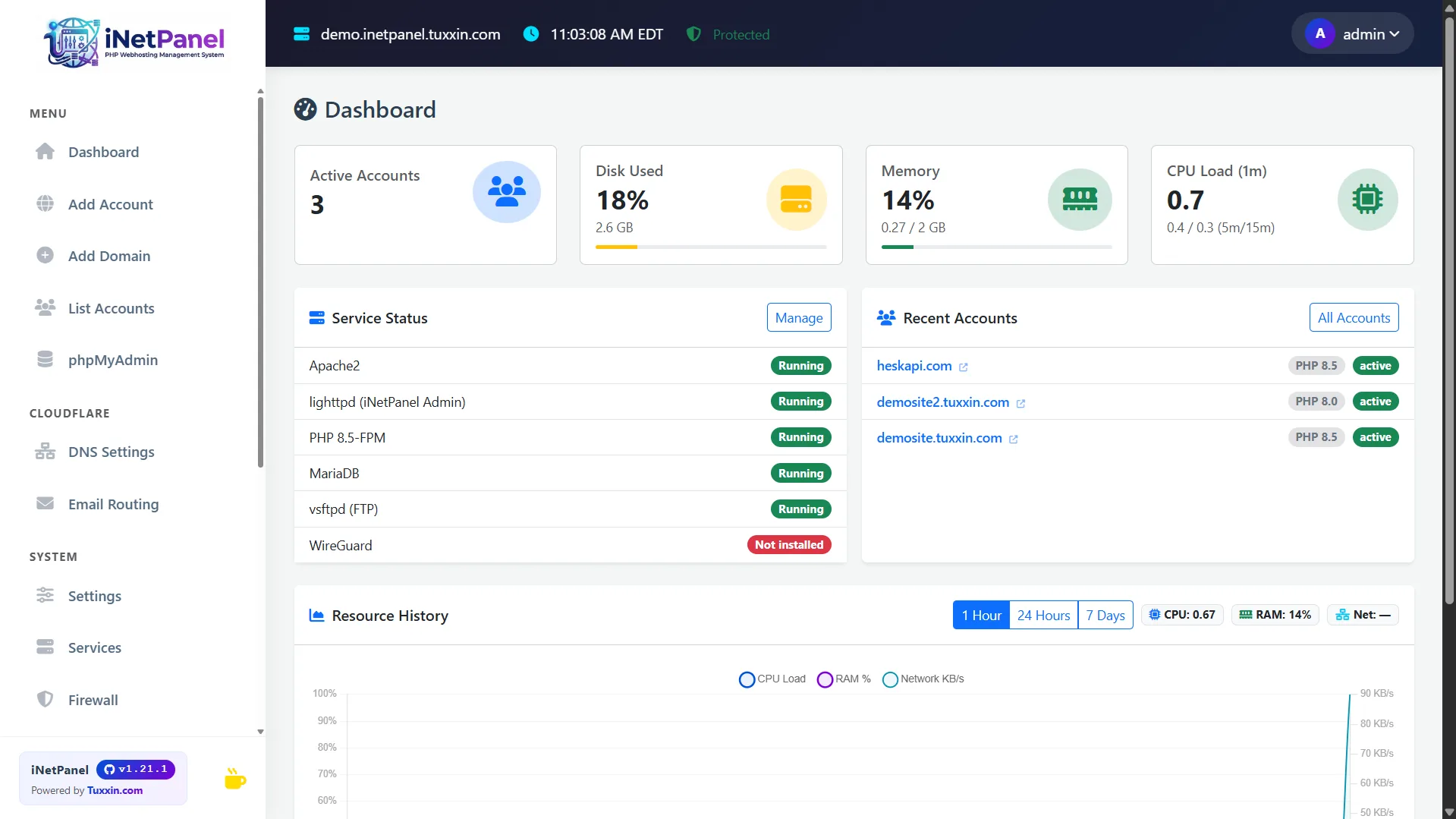
- Real-time dashboard with CPU, RAM, disk, and network monitoring
- Automated backups with system config archiving
- Image optimizer with AVIF generation
- phpMyAdmin auto-login from admin and client portals
- 35+ CLI commands for server management, security audits, and diagnostics
- Full feature list →
Requirements
- Debian 12 (Bookworm) — clean install
- Root access
- Cloudflare account (recommended) — or manual port-based mode without Cloudflare
Links
| | | |---|---| | Website | inetpanel.info | | Product Tour | Screenshots & walkthrough | | Features | Full feature list | | Compare | vs cPanel, Plesk, CloudPanel | | Documentation | Install guide & docs | | Install | Install guide | | Issues | Report a bug |
Technical Stack
| Layer | Technology | Port | |---|---|---| | Admin panel | lighttpd + PHP-FPM | 80 | | Client portal | lighttpd (same) | 80 | | phpMyAdmin | Apache2 vhost | 8888 / 8443 (SSL) | | Hosting sites | Apache2 SSL vhosts | 1080+ | | Panel database | SQLite | — | | Site databases | MariaDB (localhost) | 3306 | | VPN | WireGuard | 1443/UDP |
Directory Layout
/var/www/inetpanel/          Panel installation
  ├── public/                Web root (only dir served by lighttpd)
  ├── TiCore/                Core PHP classes
  ├── api/                   JSON API endpoints
  ├── src/                   Admin page views
  ├── themes/                Layout templates (admin + client portal)
  └── db/                    SQLite database

/home/<username>/            Hosting user home
  ├── <domain>/              Domain directory
  ├── <domain>/www/          Public document root
  └── <domain>/logs/         Apache and PHP error logs

/root/scripts/               System scripts (deployed from repo)
/backup/                     Automated backups
Security: Only
public/is web-accessible. All other directories are loaded internally by PHP and unreachable via HTTP.
License
MIT — see LICENSE
Created by Tuxxin · inetpanel.info
Related Skills
node-connect
349.9kDiagnose OpenClaw node connection and pairing failures for Android, iOS, and macOS companion apps
frontend-design
109.8kCreate distinctive, production-grade frontend interfaces with high design quality. Use this skill when the user asks to build web components, pages, or applications. Generates creative, polished code that avoids generic AI aesthetics.
openai-whisper-api
349.9kTranscribe audio via OpenAI Audio Transcriptions API (Whisper).
qqbot-media
349.9kQQBot 富媒体收发能力。使用 <qqmedia> 标签,系统根据文件扩展名自动识别类型(图片/语音/视频/文件)。
