
Envin
Type-safe env validation with live previews 🌳
Install / Use
/learn @turbostarter/EnvinREADME
Installation
[!NOTE]
This is an ESM only package that requires a tsconfig with a module resolution that can read package.json#exports (
NodeNextif transpiling withtsc,Bundlerif using a bundler).
# Core package, no framework specific features
bun add envin

# CLI, used e.g. for live previews
bun add @envin/cli
For full documentation, see https://envin.turbostarter.dev
Usage
[!NOTE]
You may use any Standard Schema compliant validator of your choice.
This package supports the full power of most popular schema libraries, meaning you can use transforms and default values.
Define your schema
// env.config.ts
import { defineEnv } from "envin";
import * as z from "zod";

export default defineEnv({
  /*
   * Shared environment variables, available on the client and server.
   */
  shared: {
    NODE_ENV: z.enum(["development", "production"]).default("development"),
  },
  /*
   * Prefix for client environment variables.
   */
  clientPrefix: "NEXT_PUBLIC_",
  /*
   * Environment variables available on the client (and server).
   *
   * 💡 You'll get type errors if these are not prefixed with NEXT_PUBLIC_.
   */
  client: {
    NEXT_PUBLIC_API_URL: z.url(),
  },
  /*
   * Serverside Environment variables, not available on the client.
   * Will throw if you access these variables on the client.
   */
  server: {
    DATABASE_URL: z.url(),
  },
  /*
   * In some cases, we need to manually destructure environment variables to make sure all are included in bundle.
   *
   * 💡 You'll get type errors if not all variables are included here.
   */
  envStrict: {
    DATABASE_URL: process.env.DATABASE_URL,
    NEXT_PUBLIC_API_URL: process.env.NEXT_PUBLIC_API_URL,
  },
});
Use the schema in your app with autocompletion and type inference
// route.ts
import env from "~/env.config";

export const GET = (req: Request) => {
  const DATABASE_URL = env.DATABASE_URL;
  // use it...
};
Live Preview
One of the most powerful features of this package is the ability to preview your environment variables in a livemode.
# Run the CLI with your env.config.ts file
npx @envin/cli@latest dev
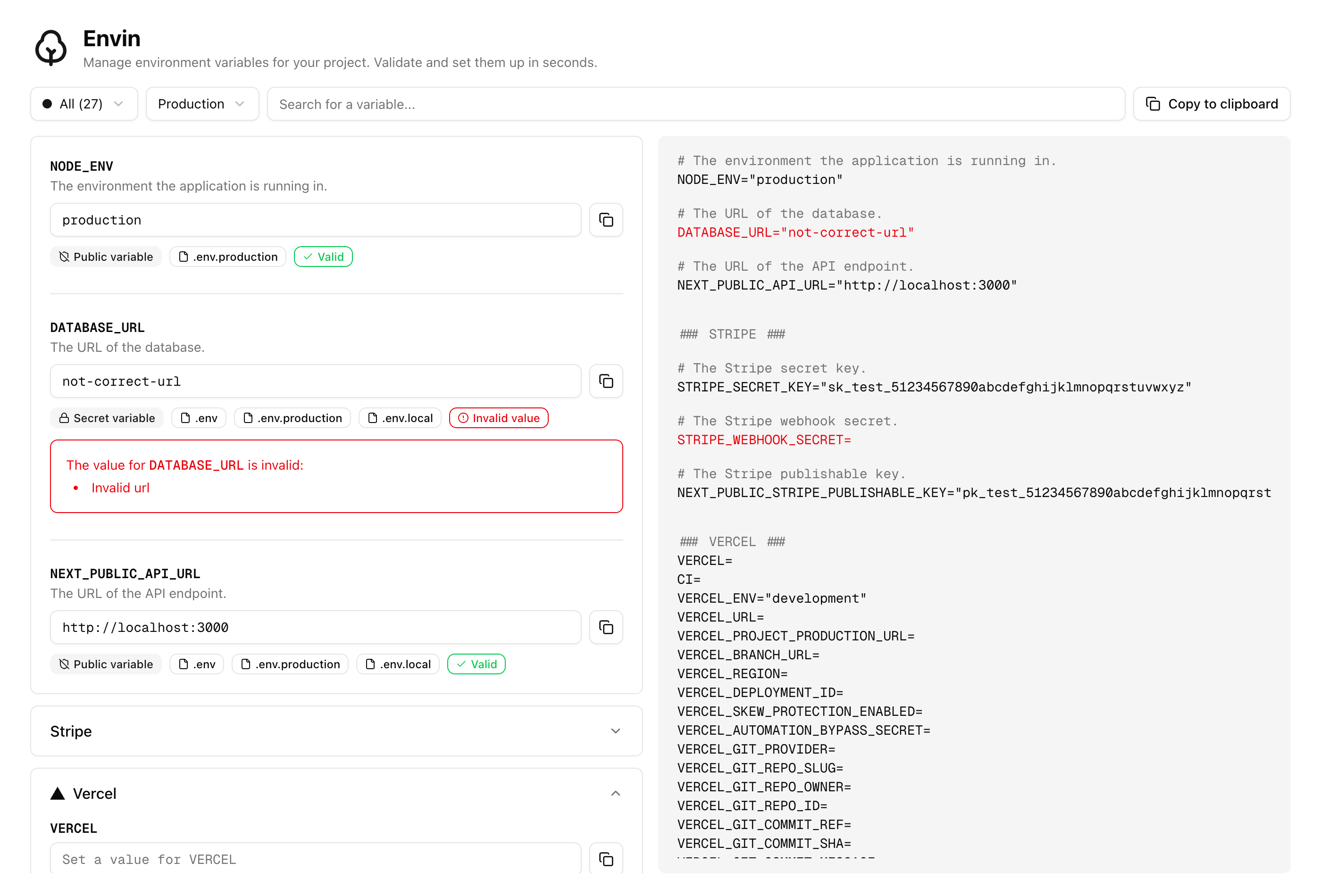
This will start a live preview server that will automatically update your environment variables when you change them allowing you to find and fix errors before deploying your app.
CLI options
npx @envin/cli@latest dev [options]
Options:
-c, --config <path>: explicit path toenv.config.ts-e, --env <path...>: path(s) to.envfile(s) or directories-p, --port <port>: port to run the preview server (default:3000)-v, --verbose: enable verbose logging
Env loading behavior
The CLI uses the following precedence within each directory:
.env→.env.local→.env.development→.env.development.local.env→.env.local→.env.production→.env.production.local
If -e points to a single file, only that file is used. If -e points to a directory, only that directory is used. If multiple paths are provided, they must all be files or all be directories. Without -e, the CLI uses the current working directory.
Contributing
See CONTRIBUTING.md.
