
Popclipextensions
Brett's PopClip Extensions
Install / Use
/learn @ttscoff/PopclipextensionsREADME
Brett's PopClip Extensions
My growing collection of [PopClip][popclip] extensions.
Installation
This repository only includes these as source bundles
(.popclipext), not packaged .popclipextz versions. To
install, just make sure the extension of a folder is
.popclipext and double click it in Finder. An up-to-date
package of the bundled versions is available on my
site.
Current release version: <!--VER-->1.45.4<!--END VER--> ([source code](https://github.com/ttscoff/popclipextensions/releases/tag/<!--VER-->1.44.8<!--END VER-->))
Many of these extensions have alternate behaviors when holding modifier keys. Recent versions of PopClip override these variations and provide specific actions when holding modifiers, such as Shift to copy result and Option to display the result in the bar. This means that the variations in the plugins no longer function. A better system may be available in the future, but for now, to restore the modifier key functionality, you need to disable the global interpretation of them. Open Terminal and run this command:
defaults write com.pilotmoon.popclip DisableAlternateActions -bool YES
{:alert}
Extensions
The extensions currently included in the bundle. Some are available elsewhere as well, but this collection will always be the most up-to-date versions.
<!--EXTENSIONS-->Blockquote
Turn indented text (or any text) into nested Markdown blockquotes.
- Clicking adds a ">" for each indentation level in the selected text
- Command-click to decrease quote level
- Command-Option-click key to remove all quoting
When adding quote levels, multiple line breaks between lines creates separate block quotes (by design). If there's a single blank line between to paragraphs, they'll be joined together as paragraphs within a blockquote. More than one starts a new quote.
BulletList
PopClip extension to turn lines of text into Markdown bullet items. Indentation is handled as nested lists and existing markers are overwritten (numbered list becomes bullet list).
Numbered lists
Holding Option (⌥) while clicking the button for the extension in the PopClip bar will create/update a numbered list instead. When the list is already a numbered list, it will be re-numbered to fix any gaps or out-of-order numbering within nest levels.
Clear list formatting
Holding Command (⌘) while clicking will remove all list prefixes.
Bullet format
When you install this extension, you'll get an options page where you can select the type of bullet you prefer for unordered lists. This can be accessed again later by clicking the pencil button at the bottom of the list, then clicking the gear button next to the BulletList extension.
CheckURLs
PopClip extension to show a popup preview for each URL in selected text. Used for confirming the output of scripts like SearchLink without switching to the browser.
Links are shown sequentially in the order they're found. If a URL is changed by following links in the preview and pressing "OK", the selected text will be updated with the final URL. Because of this, duplicate links in the text are all previewed so they can be modified individually.
Code
Turn selected text into Markdown inline code or a code block. This extension "toggles," so if the selection already contains code syntax (inline code or fenced code block) the syntax is removed.
Detects whether there are multiple lines:
- if not, it surrounds the input with single backticks
- if so, it wraps the block in triple backticks (fenced)
When creating an inline code block, it will also detect whitespace at the beginning and end of the selection and make sure that it's excluded from the surrounding backticks.
Comment
Turn selected text into an HTML or code comment.
By default, it surrounds selected text with <!-- block of text --> style comment tags. Hold various modifier keys to insert other types of comment markers:
- Option: CSS Comment (
/* block of text */) - Command: Hash Comment (
# before each line) - Command-Option: Slash comment (
// before each line)
CopyCleanLinks
PopClip extension to lengthen and clean URLs. Duplicate of LinkCleaner, but only copies results to the clipboard.
Option: clean all query strings (default: only clean Google UTM strings) Command: Output just the resulting URL(s) Command-Option: Output just URL(s) with query strings stripped
CopyPLUS
PopClip extension to append the selection to the current contents in the clipboard. This is a duplicate of an existing extension (Append) with just slightly better UTF-8 handling, and modifier key handling for copying with and without linebreaks and whitespace.
- Hold Command (⌘) when clicking to add an extra line break between entries.
- Hold Option (⌥) to append with no extra whitespace.
CopyURLS
PopClip extension to copy just the URLS in selection.
Duplicate of OpenURLS, but copies urls to the clipboard, one link per line, instead of opening in browser.
CriticMarkup
Allows the quick insertion of CriticMarkup syntax. Optionally fill in a signature to have a comment included after every insert, deletion or change with your initials or name.
- No modifier: Highlight
- Command: Deletion
- Control: Insertion
- Control-Option: Change
- Option: Comment
There is a PopClip extension for CriticMarkup in the main download package, which I didn't realize when I whipped this one up. I may defer to that one eventually, but I'll wait until I figure out if mine adds anything worthwhile or not.
DefineAbbr
PopClip extension to search textingabbreviations.ca for the selected string.
Editor
Extension for adding HTML editor marks to text.
- No modifier:
<mark>(highlight) - Control:
<ins datetime></ins>(insertion) - Command:
<del datetime></del>(deletion) - Option:
<!-- -->(comment)
FixPoorlyObscuredEmails
Fixes emails obscured in a "support AT mydomain DOT com" fashion.
Hold Option to also open an email window for each matched address. This feature does not require edit capability in the current field.
HardWrap
Add hard wrapping to paragraphs. Default wrap column is 80, hold down Option to wrap at an alternate column (modify both in the extension options). Hold down command to unwrap text, removing line breaks between lines but preserving multiple lines between paragraphs.
- Clicking wraps at ruler, default 80 characters
- Option-click to wrap to alternate width
- Command-click to unwrap text
Increment Templated
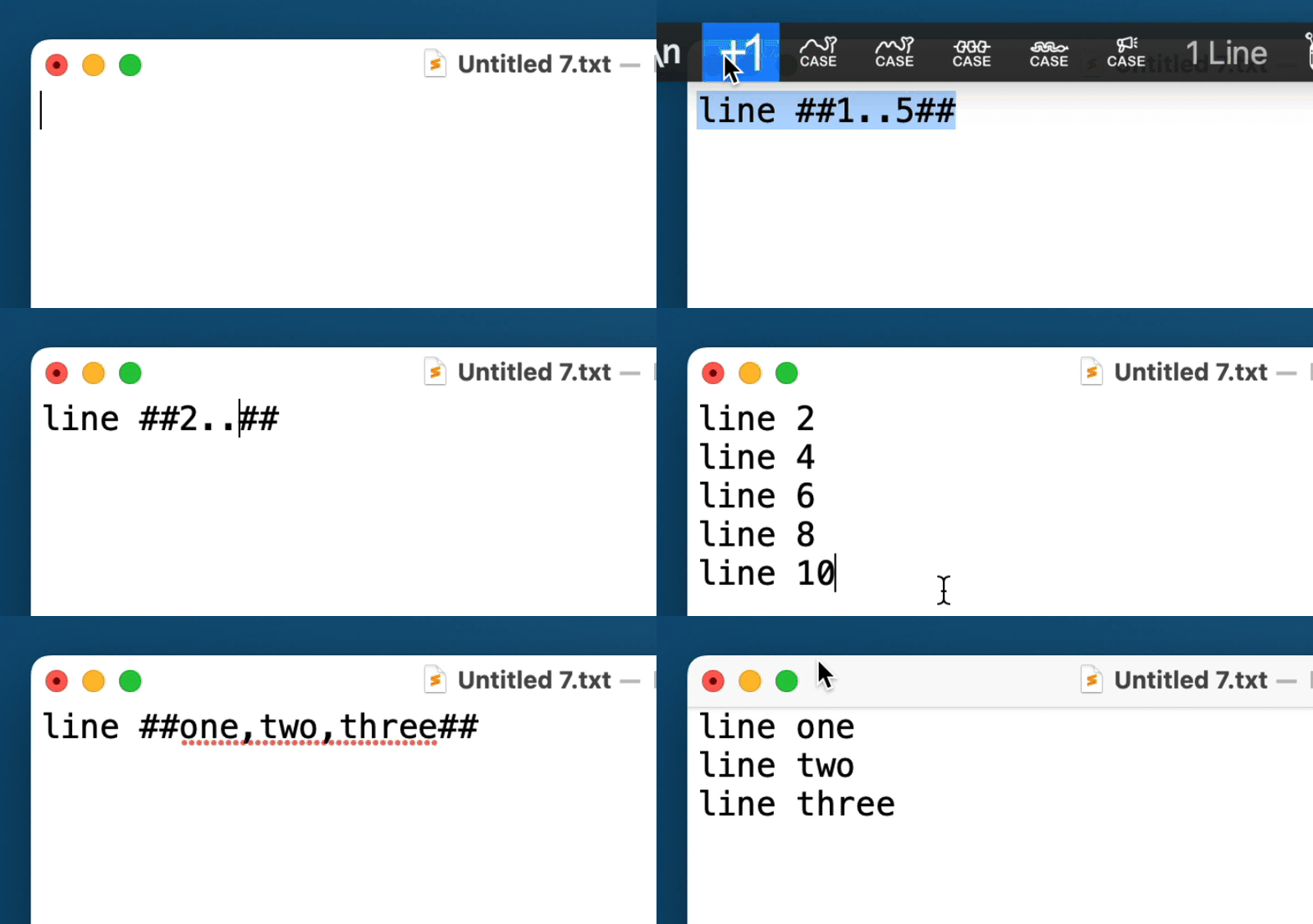
PopClip extension to increment and repeat templated text.
Select and run on the following text:
This is a numeric increment ##0..2##.
Which will generate:
This is a numeric increment 0.
This is a numeric increment 1.
Specify a value to increment by with ##START..INCREMENT..END##, e.g. ##0..2..10## would insert 0, 2, 4, 6, 8, and 10.
Placeholders
You can use placeholders with basic math modification. ##x## inserts the current element again. ##i## inserts the 0-based index in the iteration. So if the template is ##5..7##, on the second iteration x would hold 6 and i would hold 1.
Apply math functions to the placeholders using basic operator symbols (including % for mod). To insert the current value times 10, use ##x*10##. More complex equations are allowed, e.g. ##(i+2)*10##. Use % for modulus.
You can include leading zeroes on math operations to pad the result. If you want to just pad the number without modifying, you would use ##x*0001##, which would turn 5 into 0005 and 50 into 0050. Including a 0 padding on any element of the equation will result in padded output.
String Arrays
You can also use arrays of strings or numbers:
Hello ##mother,father,sister,brother##. And repeat with ##x##.
Yields:
Hello mother. And repeat with mother.
Hello father. And repeat with father.
Hello sister. And repeat with sister.
Hello brother. And repeat with brother.
The ##i## placeholder (zero-based index) with math operators is also available in string array replacements. If you want the index to also refer to strings, add #list,of,strings after the index or equation, e.g. ##i%2#odd,even## to insert odd and even alternately with each iteration.
Example:
.element-##one,two,three## {
    text-indent: ##i*10##px;
}
.element-one {
    text-indent: 0px;
}
.element-two {
    text-indent: 10px;
}
.element-three {
    text-indent: 20px;
}
LinkCleaner
PopClip extension to lengthen and clean URLs.
Use extension settings to determine whether it strips Google Analytics strings only, or all query strings.
- Option: force clean all query strings, ignore settings
- Command: Output just the resulting URL(s)
- Command-Option: Output just URL(s) with all query strings stripped
Markdown to Mindmap
Takes a selection of plain text containing markdown headlines, list items and paragraphs and converts it into a format ready for pasting into a mind mapping application (such as MindNode, MindManager or MindMeister) as separate nodes/topics.
Markdownify
Turn HTML text into Markdown using html2text.
NumberedList
PopClip extension to turn lines of text into Markdown numbered items. Will sort and update an existing numbered list as well, and convert bullets on list items to numbers.
This is only here if you want a separate button for numbered lists. Otherwise you can just use BulletList and hold down option to create an ordered list instead.
nvUltra
nvUltra extension for PopClip. Add text as new note to frontmost notebook, or define a notebook in setting
Related Skills
node-connect
349.2kDiagnose OpenClaw node connection and pairing failures for Android, iOS, and macOS companion apps
frontend-design
109.5kCreate distinctive, production-grade frontend interfaces with high design quality. Use this skill when the user asks to build web components, pages, or applications. Generates creative, polished code that avoids generic AI aesthetics.
openai-whisper-api
349.2kTranscribe audio via OpenAI Audio Transcriptions API (Whisper).
qqbot-media
349.2kQQBot 富媒体收发能力。使用 <qqmedia> 标签,系统根据文件扩展名自动识别类型(图片/语音/视频/文件)。
