
Irony
Application that gives it's users the ability to examine situations and inner workings of the T8 and T7 game in forensic detail.
Install / Use
/learn @tomislav-ivankovic/IronyREADME
Irony
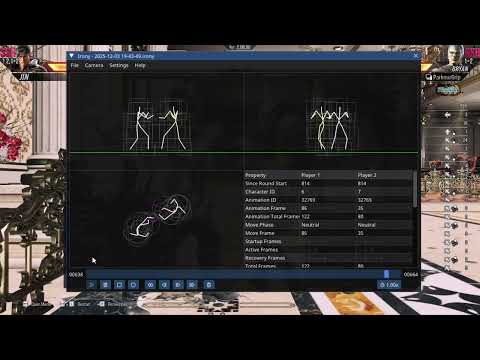
Application that gives it's users the ability to examine situations and inner workings of the T8 and T7 game in forensic detail. The application only works with the PC version of both games.
Features
- View situations from front, top and side.
- Record situations from practice mode, live games and replays.
- Examine the recorded situations frame by frame.
- Save and open recordings into/from files.
- Examine hit lines, hurt cylinders and collision spheres.
- Measure startup, active and recovery frames as well as the frame advantage.
- Precisely measure attack range, attack height and attack's recovery range.
- Precisely measure distance and angle to opponent and wall.
- Precisely measure hit lines and hurt cylinders height.
- Examine posture, blocking and crushing frame by frame.
- Record suspicious replays and examine player inputs frame by frame.
- Measure any distance you are interested in using the measure tool.
Quick Video Demonstration
Installation
Windows
- Download the latest release from here.
- Extract the
.ziparchive anywhere you want. - Run
irony_injector.exefrom the extracted archive. - Launch the game using Steam.
- Once in the game, press
Tabto open the UI.
(You can also run irony_injector.exe after the game already started.)
Linux
-
Download the latest release from here.
-
Extract the
.ziparchive anywhere you want. -
Launch the game using Steam.
-
Use proton to run
irony_injector.exewithonly_injectcommand line argument inside the same Wine prefix that the game is running in:- For native Steam installation the command looks something like this:
STEAM_COMPAT_CLIENT_INSTALL_PATH=$HOME/.local/share/Steam \ STEAM_COMPAT_DATA_PATH=$HOME/.local/share/Steam/steamapps/compatdata/1778820 \ WINEPREFIX=$HOME/.local/share/Steam/steamapps/compatdata/1778820/pfx \ $HOME/.local/share/Steam/compatibilitytools.d/GE-Proton10-20/proton run \ Z:/home/user_name/path_to_irony_folder/irony_injector.exe only_inject- For flatpak Steam installation the command looks something like this:
flatpak run --command=bash com.valvesoftware.Steam -c ' STEAM_COMPAT_CLIENT_INSTALL_PATH=$HOME/.var/app/com.valvesoftware.Steam/.steam/root \ STEAM_COMPAT_DATA_PATH=$HOME/.var/app/com.valvesoftware.Steam/.local/share/Steam/steamapp/compatdata/1778820 \ WINEPREFIX=$HOME/.var/app/com.valvesoftware.Steam/.loca/share/Steam/steamapps/compatdata/1778820/pfx \ $HOME/.var/app/com.valvesoftware.Steam/.steam/roo/compatibilitytools.d/GE-Proton10-20/proton run \ Z:/home/user_name/path_to_irony_folder/irony_injector.exe only_inject '- Modify the command to reflect location of
steamappsdirectory you installed the game in, version of proton you are running the game with and location of your Irony directory. - Alternatively you can use Steam Tinker Launch to launch the injector along with the game.
-
Once injected, press
Tabto open the UI.
(If you use the above commands to run irony_injector.exe before starting the game, the launch will stall, making the game never start up.)
Building From Source
Take a look inside the build.zig.zon file.
Under the property .zig_version there is a version of the Zig programming language that the project is to be compiled with.
Install that version of the ZIG compiler onto your machine using the official Zig tutorial.
Make sure that your version of the Zig compiler matches the .zig_version, execute:
zig version
To build the project in debug mode set your current directory to the repository root and execute:
zig build
To build the project in release mode execute:
zig build --release=fast
Ether way, after the compilation is over the binaries will be placed inside zig-out/bin.
To run the application while developing execute:
zig build run
If you have only one of the games running you can disable the compilation of the other game's DLL by game using -Dt7=false or -Dt8=false command line arguments:
zig build run -Dt7=false
zig build run -Dt8=false
To run the project's tests execute:
zig build test
If you are on Linux, the tests will run inside Wine.
Make sure you have Wine installed and make sure that your default Wine prefix has dxvk and vkd3d installed.
You can use the following command to install these:
winetricks dxvk vkd3d
Not Open Source
While this application is free to download and it's source code is publicly available for inspection, the license that the code is under limits the legal rights of the public in a way that makes this software NOT open source. A more accurate way to describe this software is "source-available". For more details look at the license.
Support
To support me and this project you can donate using one of the following links:
Additionally. If you are recruiting software developers, and you like what you see here, you can offer me a job by contacting me via email: jobs@tomislav-ivankovic.from.hr
Related Skills
node-connect
348.2kDiagnose OpenClaw node connection and pairing failures for Android, iOS, and macOS companion apps
frontend-design
108.9kCreate distinctive, production-grade frontend interfaces with high design quality. Use this skill when the user asks to build web components, pages, or applications. Generates creative, polished code that avoids generic AI aesthetics.
openai-whisper-api
348.2kTranscribe audio via OpenAI Audio Transcriptions API (Whisper).
qqbot-media
348.2kQQBot 富媒体收发能力。使用 <qqmedia> 标签,系统根据文件扩展名自动识别类型(图片/语音/视频/文件)。
