
LinkM
BlinkM controller / programmer and general USB-to-I2C adapter
Install / Use
/learn @todbot/LinkMREADME
LinkM -- USB to I2C adapter for BlinkM Smart LEDs
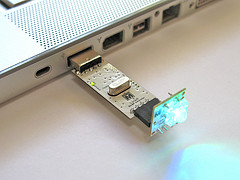
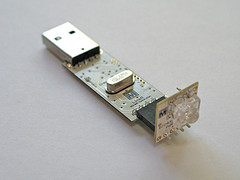
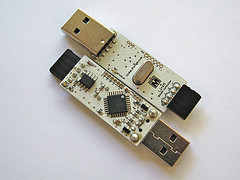
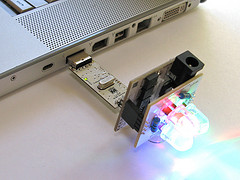
LinkM datasheet: https://github.com/todbot/LinkM/raw/master/docs/LinkM_datasheet.pdf
README for LinkM
2010-2015 Tod E. Kurt, ThingM
Hosted on Github at https://github.com/todbot/LinkM/
OVERVIEW
This project contains the following directories:
-
c_host -- C library for talking to LinkM
- linkm-tool -- Command-line tool for exercising C library
-
java_host -- Java library for talking to LinkM
- linkm.sh -- Command-line tool for exercising Java library
-
processing_apps -- Several applications using Java library and Processing
- BlinkMSequencer2 -- Multi-channel light sequencer
- BlinkMScriptTool -- Helps write text light scripts
- TwitterBlinkM -- Turns BlinkMs colors from twitter stream mentions
- OSCLinkM -- OSC gateway for LinkM
- LinkMLibTest -- Simple tests of LinkM Processing/Java library
-
tools -- Misc tools
- linkm_load -- mass bootloading tool
- linux_usb_setup -- fixes USB permissions on Ubuntu & other udev Linux
-
schematic -- LinkM device schematics in Eagle format
-
firmware -- LinkM device firmware code
-
bootloadHID -- LinkM device bootloader firmware and commandline tool
- firmware -- firmware for bootloader
- commandline -- commandline host-side tool to upload new firmware
BUILDING THE PC-SIDE (HOST) CODE
The build process for all LinkM software except the Processing apps is expected to be done entirely from the command-line using standard free Unix-like tools such as "make" and "gcc".
There is a build_all_host.sh script that will build the host-side code
on all OS platforms.
Host code dependencies:
- The Java library in "java_host" depends on the C library in "c_host"
- The C library in "c_host" depends on library in "bootloadHID/commandline"
On Mac OS X you will need the following free tools:
- XCode - http://developer.apple.com/technologies/xcode.html
- libusb -
brew install libusb
On Windows you will need the following free tools:
- MinGW - http://www.mingw.org/
- MSYS - http://www.mingw.org/wiki/MSYS
- zip - http://stahlworks.com/dev/index.php?tool=zipunzip
- Java JDK - http://java.sun.com/javase/downloads/widget/jdk6.jsp
On Ubuntu Linux you will need the following free tools:
- build-essential -
sudo apt-get install build-essential - libusb -
sudo apt-get install libusb libusb-dev - Sun JDK -
sudo add-apt-repository "deb http://archive.canonical.com/ lucid partner" && sudo apt-get update && sudo apt-get install sun-java6-jdk
BUILDING THE FIRMWARE
In general you should have everything you have for the host code above, and:
On Mac OS X:
- AVR CrossPack - http://www.obdev.at/products/crosspack/
On Windows:
- WinAVR - http://winavr.sourceforge.net/
On Ubuntu Linux:
- "sudo apt-get install avrdude avr-libc avr-gcc avr-binutils"
Bundling BlinkMSequencer2 for Multiple Architectures
A. Bundle for Mac OS X
- Open BlinkMSequencer2 in Processing
- Choose File -> Export Application, choose "Mac OS X"
- In Finder, open linkm/processing_apps/BlinkMSequencer2/application.macosx
- Add Icon: 4a. Right-click "BlinkMSequencer2.app", choose "Get Info" 4b. Open "linkm/tools/bundle_bits/thingm_log-10.png" in Preview. 4c. Select All, copy, then select icon in Info inspector, and paste
- Right-click "BlinkMSequencer2.app", choose "Compress ..."
- Rename resulting zip as "BlinkMSequencer2_macosx.zip"
- Publish release
B. Bundle for Windows:
- Open BlinkMSequencer2 in Processing
- Choose File -> Export Application, choose your "Windows"
- Bundle with Java with these 5 command-line commands:
   cd linkm/processing_apps/BlinkMSequencer2/application.windows
   unzip ../../../tools/bundle_bits/java_from_arduino_0018_win.zip
   cd ..
   mv application.windows BlinkMSequencer2_windows
   zip -r BlinkMSequencer2_windows.zip BlinkMSequencer2_windows
- Publish release
C. Bundle for Linux:
- Open BlinkMSequencer2 in Processing
- Choose File -> Export Application, choose "Linux"
- Bundle with the following 3 command-line commands:
   cd linkm/processing_apps/BlinkMSequencer2
   mv application.linux BlinkMSequencer2_linux
   tar cvzf BlinkMSequencer2_linux.tar.gz BlinkMSequencer2_linux
- Publish release
