
Xxl
a minimal vector programming language
Install / Use
/learn @tlack/XxlREADME

What is XXL?
XXL is a new programming language whose goals are simplicity, power, and speed. We throw out most of conventional programming language thinking in order to attain these goals.
Status
Passes tests. Useful for writing small utilities, for me.
Ideas valid, but development stalled pending rethink of virtual machine. The current VM leaks memory during complex operations and is generally too slow. A more modular type system would be nice as well.
Tested so far on Linux (64bit x86 & GCC or Clang), OS X (Clang), Windows (Cygwin64), Android under termux, Intel Edison and Raspberry Pi. Should work on iOS as well but untested.
Examples
Manipulate variables
In XXL, we call functions verbs, and they can have only one or two arguments (named x and y).
You call a verb like x func or x func y.
Code reads left to right. There is no order of operations. Semicolons are important.
Comments are // to end of line.
Aside from the poorly documented built-in verbs, there isn't much to learn in terms of syntax.
When you name variables, you specify their names as a special name starting
with ', and use the as or is verb. Afterward you refer to them without the
'.
(Note: the 0. and 1. below are part of the XXL interactive prompt.)
0. 41,6,2 as 'ages     // create a variable named ages with "as"
(41,6,2)
1. 'ages is (41,6,2)   // equivalent to the above, reverse order with "is"
(41,6,2)
2. ages
(41,6,2)
3. 'ages is 41,6,2     // WRONG! there is no order of operations - group with ()
(41,6,2)
4. ages
41                     // oops..
5. ages; 666           // semicolons separate expressions
666                    // repl shows you result of last expr
XXL is functional, so you don't use any loops to manipulate values:
3. ages each {x * 2}
(82,12,4)
4. ages each {x str," years old"} join "\n"      // join into separate lines
"41 years old\n6 years old\n2 years old\n"
(Note: \n is nerd speak for newline or linebreak in the terminal)
To save time, XXL has the questionable feature of allowing you to omit the x part of the
very beginning of a function. You'll often see this pattern employed for brevity in the examples
below. Examples:
3. ages each {x * 2}
(82,12,4)
4. ages each {* 2}
(82,12,4)
5. ages each {x str," years old"} join "\n"
"41 years old\n6 years old\n2 years old"
6. ages each {str," years old"} join "\n"
"41 years old\n6 years old\n2 years old"
each is a regular function (verb), believe it or not. It happens to understand what to do
given a list (vector) on the left side and a function on the right. In contrast to most languages,
XXL doesn't really have any syntax that defines looping abilities. It's all just regular XXL functions.
Quasi-JSON encoder
Not really to spec, but what is? About 6 lines of code, without the tests:
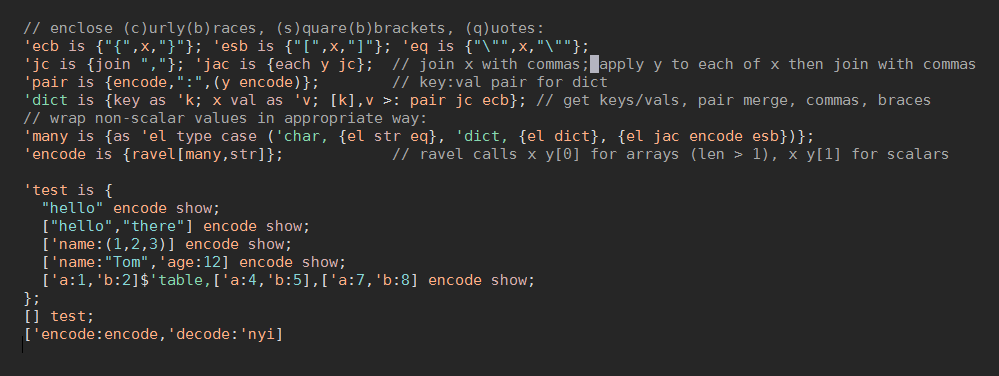
Here's what's going on in this monster. I'll explain the parts, and then the sequence of how it comes together.
// (e)nclose (c)urly(b)races, (s)quare(b)brackets, (q)uotes:
'ecb is {"{",x,"}"}; 'esb is {"[",x,"]"}; 'eq is {"\"",x,"\""};
Line 1: Define three functions to enclose values in the typical JSON delimeters. ecb/esb/eq enclose their
argument in curly braces, square braces, or quotes, respectively. They use the name x to refer to their argument.
'jc is {join ","}; 'jac is {each y jc}; // join x with commas; apply y to each of x then join with commas
Line 2: jc (join comma) joins the contents of its argument together with a comma in between each item. jac does the same
thing, but after first calling its right argument (y) on each item - jac here is a mnemonic for "join and call".
The astute might notice that jc and jac don't refer tox, because the first verb inside a function will be invoked
automatically with x as the left argument. In small functions, x is almost always the first term in the function's
code, so being able to omit it results in some expressivity. More on this later.
'pair is {encode,":",(y encode)}; // key:val pair for dict
Line 3: pair calls another function, encode (which we define later), without referring to x. It then appends a : to the
string that is returned from encode, and then appends that to the result of calling encode with the y argument.
This is a form of recursion.
'dict is {key as 'k; x val as 'v; [k],v >: pair jc ecb}; // get keys/vals, pair merge, commas, braces
Line 4: dict takes a dictionary as an argument, gets its keys as a list using the built-in key verb, and saves them in a
new variable called k. The values of the dictionary (also a list) are extracted using the built-in val verb and
become v.
These two lists then become the left and right arguments for successive calls to jc using the "each pair" or >: verb.
Each of the key/value pairs will get commas between them. Then, we enclose the whole of the dictionary in curly braces,
like {"name":"Tyler","age":"2"}.
All the looping verbs have short names that end in :.
'many is {as 'el type case ('char, {el str eq}, 'dict, {el dict}, {el jac encode esb})};
Line 5: many isn't as grody as it looks. Its purpose is to handle multiple-item collections (called vectors in XXL).
In our case, we have to worry about two main ones: character vectors (strings) and dictionaries.
First, we store the value of x as el (element). Then we extract the value's type
using the type verb, and then use the case verb to decide how to treat all the different types.
x case (y0, f0, y0, f0, ..., else0) will check x against each of the y values; if it matches, the corresponding
function f will be invoked with x as its argument. If none match, x else0 will be invoked.
If it's a character vector (a string), we pass el through the str verb to remove its tag (a feature we'll explain later).
If it's a dictionary, we call our dict function.
If it's anything else, we recurse by calling encode again, and then enclose the result in square braces (think arrays of numbers).
'encode is {ravel[many,str]}; // ravel calls x y[0] for arrays (len > 1), x y[1] for scalars
Line 6: And finally the star of the show, encode. ravel is a verb that allows you to take one branch of logic for single-item
values (like the number 3), or a different branch for values that have many items, like an array or string (vector of char).
Depending on the type of x, encode will dispatch either many (for multiple values) or str (for simple, single values).
MySQL Slow Query Watcher
Here we use command-line MySQL to get process list, turn into table, find interesting slow queries.
Note that the 0., 1. etc is XXL's prompt in interactive mode. The number you see next to the
prompt allows you to refer later to that line of input or the result XXL produced for it. Don't type
this part, or the comments, at the interactive REPL.
0. 'slowtime is 2;
// get output, split it by line, then by column, save
1. "mysql -e \"show full processlist\" --batch" Shell.get split "\n" each {split "\t"} as 'lines;
// the first line is column headings, massage data for each row, create table with keys:data
2. lines first each {make '} : (lines behead curtail each {make "issstiss"}) as 'procs;
// Use  except  with an anonymous function to filter rows we don't care about
3. procs except {@'Time<slowtime | (x@'State="")}
['Id:194128i, 'User:"destructoid", 'Host:"localhost", 'db:"destructoid", 'Command:'Execute,
  'Time:3i, 'State:"Sending data", 'Info:"SELECT * from ... "]
Originally used as a one-liner to fix a performance issue on a site.
Simple Web Server (Counter)
Here's an example web server application that acts as a counter.
You can run this as./c examples/web-ctr.xxl.
XXL doesn't include HTTP support explicitly (yet), so this server speaks a little HTTP. Source code in full:
0 as 'ctr;

'make_http_response is {
	[
		"HTTP/1.0 200 OK",
		"Content-Type: text/plain",
		"Connection: close",
		"Server: xxl v0.0"
	] show as 'template;
	template join "\r\n",
	"\r\n", "\r\n",
	x,
	"\r\n", "\r\n"
	flat
};

(8080,"localhost") Net.bind {
	ctr + 1 as '.ctr repr make_http_response
}
(We didn't show the XXL prompt here, just the code itself.)
This simple server uses (socket_options) Net.bind (handler) to start a
listening network connection and setup a callback.
When invoked, the callback fetches the value of ctr (a global), adds 1 to it,
resets the global (as allows you to assign in other contexts - like globally here with '.ctr),
convert that number to a string (repr), and then create a somewhat-valid HTTP
response with that string.
make_http_response basically construct a simple string from your output, flattens the list,
and returns it to Net.bind to send.
Docs
Here's some useful info, but no real docs yet.
-
Groceries tutorial - a short tutorial written for non-programmers.
-
Mailboxes soliloquy. Mailboxes are like a message queue and allow your program to use multiple threads.
-
Posts are a general concept for sharing data between XXL and the outside world. Work in progress!
-
List of verbs in XXL, represented as an XXL table
See the vario
