
SakuraKit
🤡SakuraKit, a lightweight and powerful library for application to switching themes or skins.
Install / Use
/learn @tingxins/SakuraKitREADME
SakuraKit, is a lightweight and powerful library for application to switching themes or skins, inspired by SwiftTheme and DKNightVersion. Its provides chain and functional programming, that is more readable for your codes.
For Demo take a look at the SakuraDemo_OC, an iOS example project in the workspace. You will need to run pod install after downloading.
sakura mean theme as following. Now, sakura for your Apps.
Installation
There are three ways to use SakuraKit in your project:
-
Using CocoaPods
-
Manual
-
Using Carthage
CocoaPods
CocoaPods is a dependency manager for Objective-C, which automates and simplifies the process of using 3rd-party libraries in your projects.
Podfile
platform :ios, '8.0'
pod 'SakuraKit'
Manual
Download repo's zip, and just drag ALL files in the SakuraKit folder to your projects.
Carthage
Carthage is a decentralized dependency manager that builds your dependencies and provides you with binary frameworks.
You can install Carthage with Homebrew using the following command:
$ brew update
$ brew install carthage
To integrate SakuraKit into your Xcode project using Carthage, specify it in your Cartfile:
github "tingxins/SakuraKit"
Run carthage to build the frameworks and drag the SakuraKit.framework framework into your Xcode project.
Usage
Test Demo
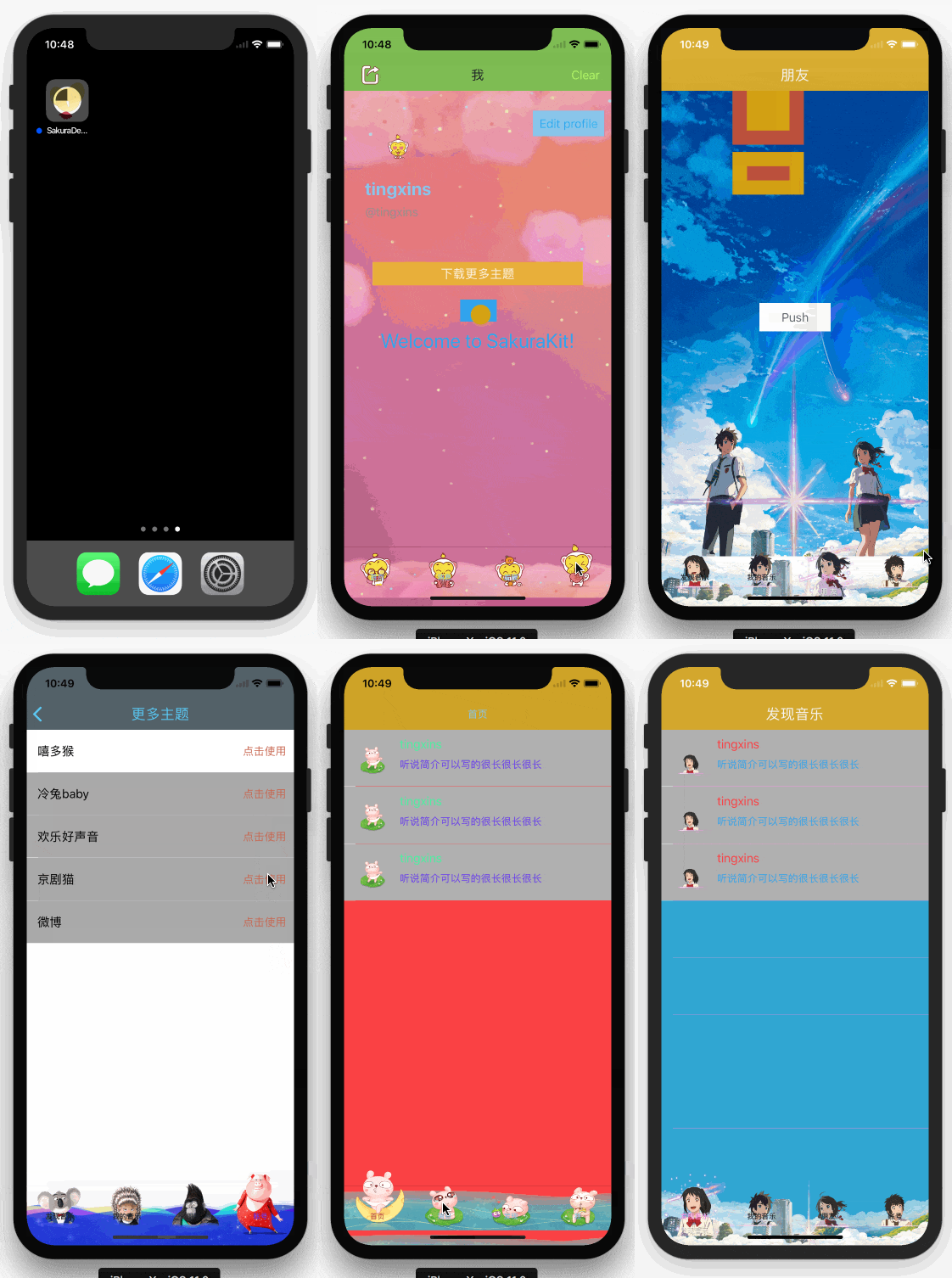
Use Case
Here's an example, configure skins for UIButton as an example following.
UIButton *button = [[UIButton alloc] initWithFrame:CGRectMake(100, 100, 100, 100)];

button.sakura
.backgroundColor(@"Home.buttonBackgroundColor")
.titleColor(@"Home.buttonTitleColor", UIControlStateNormal);
Obviously, as the code show. it's just configure backgroundColor & titleColor of skin for a button. If you want to switch theme or skin for your apps. Just call this API use TXSakuraManager:
// name: name of a theme or skin.
// type: TXSakuraTypeMainBundle or TXSakuraTypeSandBox
+ (BOOL)shiftSakuraWithName:(TXSakuraName *)name type:(TXSakuraType)type;
For lines of code above. You may be puzzled by some literals, such as Home.buttonBackgroundColor or Home.buttonTitleColor. Do not worry about, we will focus on how to set up a profile for sakura step by step later.
Sakura Profile
Now, let's focus on profile. In brief, profile is a simple way to manage theme or skin for your application setting in a project. (Actually, sakura profile is just likes localizing your app.)
SakuraKit supports both .json & .plist format of file. For .json file example. you may should do configure like this:
{
	"Home":{
            "buttonBackgroundColor":"#BB503D",
            "buttonTitleColor":"#4AF2A1"
        }
}
as show above, we can know that literals of Home.buttonBackgroundColor and Home.buttonTitleColor is just a KeyPath for dictionary. SakuraKit always fetch value from Profile switching theme or skin for your app, such as color/iconName/text/fontSize.e.g.
Precautions:
- Each theme has its own Profile, including MainBundle and Sandbox themes. (MainBundle default theme named default, and its profile named default.json).
- The theme name is the same as the name of profile. For example. If a theme called fish, then the corresponding profile should be named fish.json. (Recommended to comply with this agreement)
- Different mainBundle theme(Local theme) need be distinguish for icon name. For different sandbox theme(Remote theme), icon name should be the same.
Bundle Theme
Bundle themes are exists in your app bundle. we also called Local Theme. we should always configure a default theme for app. of course, SakuraKit can add multi bundle themes for your app following these steps:
Step 1
First, create [SakuraName].json profile. be sure that the SakuraName is your theme name. For example, if you want to add a new bundle theme which named typewriter, then the corresponding profile should be named typewriter.json.
Step 2
Next, configure icons for typewriter theme. And name of icons need be distinguish with other local theme. For example. If an icon named cm2_btm_icn_account in default theme, then the corresponding icon in typewriter theme should be named like this cm2_btm_icn_account_xxx.
Step 3
After Step 1 & 2. you may should register all local sakura theme in AppDelegate. (default theme can be ignored.)
- (BOOL)application:(UIApplication *)application didFinishLaunchingWithOptions:(NSDictionary *)launchOptions {

    // Coding ...

    [TXSakuraManager registerLocalSakuraWithNames:@[@"typewriter"]];

    // Coding ...

    return YES;
}
Step 4
At this point, we have configured all Bundle themes. we can switching to these themes any time now. For example. If you want switching to a specified bundle theme which named typewriter. Just call API like this:
[TXSakuraManager shiftSakuraWithName:@"typewriter" type:TXSakuraTypeMainBundle];
Sandbox Theme
Sandbox themes, using compressed package(.zip) with a folder, which contains Profile & Icons. And we also called Remote Theme. The user can downloads via the network from server. Server can uploading multi themes dynamic, and then user can downloads from app.
About remote theme data format suggestion, give an example:(FYI)
{
    "name": "I'm a monkey",
    "sakuraName": "monkey",
    "url": "http:\\image.tingxins.cn\sakura\monkey.zip"
}
sakuraName is your theme name. And url is a remote url address of sakura theme. (Note: If the sakuraName field passed nil, the name of the corresponding theme will default to the name of downloaded package.)
When the remote theme has been downloaded, we can switching the theme like this:
[TXSakuraManager shiftSakuraWithName:sakuraName type:TXSakuraTypeSandBox];
About some exciting for you. SakuraKit also provides some API that you can used to download the remote theme. And supports both Block & Delegate callback. Very awesome, right? And of course, you can also customize your own download operation for remote theme.
Let's talk about it now.
Block Handler
If you want to download a sakura theme. You can call the download task block API like this. Show the code of Use-Case:
[[TXSakuraManager manager] tx_sakuraDownloadWithInfos:sakuraModel downloadProgressHandler:^(int64_t bytesWritten, int64_t totalBytesWritten, int64_t totalBytesExpectedToWrite) {
    // Sakura theme download progress callback
} downloadErrorHandler:^(NSError * error) {
    // Sakura theme download error callback
} unzipProgressHandler:^(unsigned long long loaded, unsigned long long total) {
    // Unzip sakura theme compressed package progress callback
} completedHandler:^(id<TXSakuraDownloadProtocol> infos, NSURL * location) {
    // completed callback
} ];
In this example, the object of sakuraModel conform to TXSakuraDownloadProtocol. You can check out SakuraDemo_OC for more details in DownloadSakuraController.
Delegate Handler
Step 1
If you want to download a sakura theme. You can call the download task delegate API like this :
[[TXSakuraManager manager] tx_sakuraDownloadWithInfos:sakuraModel delegate:self];
Step 2
Implement delegate methods that you need to.
// If download task of sakura theme is already exist or already exist in sandbox, this API will callback.
- (void)sakuraManagerDownload:(TXSakuraManager *)manager
                 downloadTask:(NSURLSessionDownloadTask *)downloadTask
                       status:(TXSakuraDownloadTaskStatus)status;

// completed callback
- (void)sakuraManagerDownload:(TXSakuraManager *)manager
                 downloadTask:(NSURLSessionDownloadTask *)downloadTask
                  sakuraInfos:(id<TXSakuraDownloadProtocol>)infos
    didFinishDownloadingToURL:(NSURL *)location;

// Sakura download progress callback
- (void)sakuraManagerDownload:(TXSakuraManager *)manager
                downloadTask:(NSURLSessionDownloadTask *)downloadTask
                didWriteData:(int64_t)bytesWritten
           totalBytesWritten:(int64_t)totalBytesWritten
   totalBytesExpectedToWrite:(int64_t)totalBytesExpectedToWrite;

/** Reserved for future use */
- (void)sakuraManagerDownload:(TXSakuraManager *)manager
                downloadTask:(NSURLSessionDownloadTask *)downloadTask
           didResumeAtOffset:(int64_t)fileOffset
          expectedTotalBytes:(int64_t)expectedTotalBytes;

//  Sakura theme download error callback
- (void)sakuraManagerDownload:(TXSakuraManager *)manager
                 sessionTask:(NSURLSessionTask *)downloadTask
        didCompleteWithError:(nullable NSError *)error;

// Unzip sakura theme compressed package progres
