
Ue2wav
GUI utility for converting .ubulk Unreal Engine audio files
Install / Use
/learn @timhok/Ue2wavREADME
ue2wav
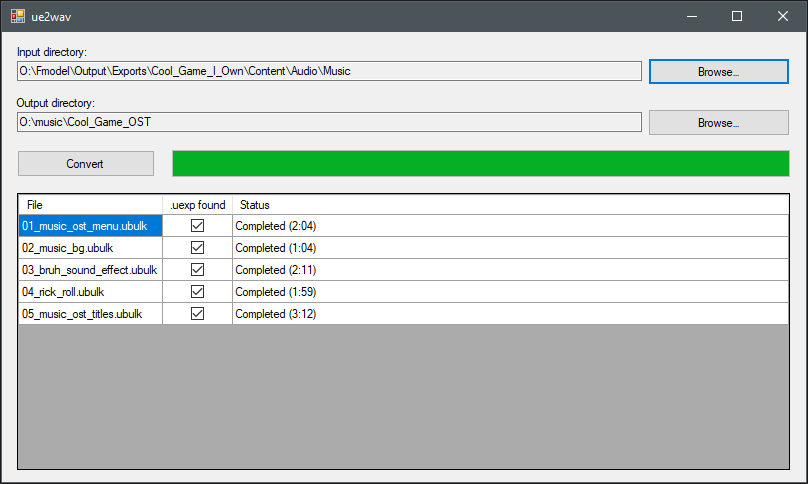
A Windows GUI utility for converting Unreal Engine game audio files (.ubulk + .uexp) exported via FModel into standard WAV files using binkadec, without building "Local Mapping File" (usmap).
Tested with UE 5.6 games using FModel, useful for gathering background music.
Please respect game developers and use it on games that you own. Support creators by buying OST packs if they are available.
Requirements
- Windows 10 or later
- Net Framework 4.8
.ubulkand matching.uexpfiles exported from FModel using "Export Folder's Packages Raw Data (.uasset)"
Usage
- Download the latest version from Releases and unpack it.
- Make sure binkadec.exe binary (that handles actual conversion from Bink Audio to WAV) is placed in the same directory as
ue2wav.exe - You can download it from BinkadecWithWavHeader releases or use the bundled release.
- Make sure binkadec.exe binary (that handles actual conversion from Bink Audio to WAV) is placed in the same directory as
- Select the Input directory that contains your
.ubulkfiles. The app automatically checks for.uexpfiles and lists every detected pair.- TIP: Find out where is your FModel installed, those files should be in
<FModel folder>\Output\Exports\<game>\Content\Audio\Music
- TIP: Find out where is your FModel installed, those files should be in
- Choose the Output directory where the resulting WAV files should be saved.
- Press Convert. ue2wav combines header data from
.uexpfiles and audio data from.ubulkfiles before runningbinkadec.exe. The table updates the status for each file and shows the duration when it is reported bybinkadec.exe. - When the progress bar fills, conversion is done. WAV files should appear in the output directory using their original base filenames.
Troubleshooting
- The Convert button stays disabled if no valid
.ubulk/.uexppairs are found. - If a file fails to convert, review the status for error details. Missing headers or a missing
binkadec.exeare common causes, you may also try tinkering with FModel and UE versions before exporting files.
Disclaimer
Unreal Engine and associated trademarks are owned by Epic Games. This project is an independent tool provided without affiliation, endorsement, or warranty, and you assume all responsibility for its use; I carry no liability for any misuse or damages.
