
HeartBeat
HeartBeat is a tool for tracking project delivery metrics that can help you get a better understanding of delivery performance. This product allows you easily get all aspects of source data faster and more accurate to analyze team delivery performance which enables delivery teams and team leaders focusing on driving continuous improvement and enhancing team productivity and efficiency.
Install / Use
/learn @thoughtworks/HeartBeatREADME
Heartbeat Project




- Heartbeat Project
- News
- 1 About Heartbeat
- 2 Support tools
- 3 Product Features
- 4 Known issues
- 5 Instructions
- 6 Run Heartbeat
- 7 How to trigger BuildKite Pipeline
- 8 How to use
- 9 Contribution
- 10 Pipeline Strategy
News
- Feb 28 2023 - Released Heartbeat - 0.9.0
- July 27 2023 - Release Heartbeat - 1.0.0
- Oct 9 2023 - Release Heartbeat - 1.1.0
- Nov 6 2023 - Release Heartbeat - 1.1.2
- Nov 21 2023 - Release Heartbeat - 1.1.3
- Dev 4 2023 - Release Heartbeat - 1.1.4
- Feb 29 2024 - Release Heartbeat - 1.1.5
- Apr 2 2024 - Release heartbeat - 1.1.6
1 About Heartbeat
Heartbeat is a tool for tracking project delivery metrics that can help you get a better understanding of delivery performance. This product allows you easily get all aspects of source data faster and more accurate to analyze team delivery performance which enables delivery teams and team leaders focusing on driving continuous improvement and enhancing team productivity and efficiency.
State of DevOps Report is launching in 2019. In this webinar, The 4 key metrics research team and Google Cloud share key metrics to measure DevOps performance, measure the effectiveness of development and delivery practices. They searching about six years, developed four metrics that provide a high-level systems view of software delivery and performance. Based on that, Heartbeat introduce below metrics as below.
8 metrics supported by heartbeat:
- Velocity
- Cycle time
- Classification
- Rework
- Deployment Frequency
- Lead Time for changes
- Dev Change Failure Rate
- Dev Mean Time To Recovery
2 Support tools
Here is the user manaul for Version 1 on 2020/06. For now, we just can support Jira/Buildkite/Github to generate the corresponding metrics data. | Type | Board | Pipeline | Repo | | ------------- | --------------------- | ---------------------------------------- | -------------------------- | | Support tools | Jira √ </br> Trello × | Buildkite √ </br>Teamcity × </br> GoCD × | Github √ </br> Bitbucket × |
Note: “√” means can support, “×” means can not support
3 Product Features
3.1 Config project info
3.1.1 Config Board/Pipeline/Source data
Before generator the metrics data, user need to config the project info, in Home page (Image3-1), you can create a new project for your project, or you can import a project config json file (If you already saved one config file, for import file feature will introduce in “Import and Export feature ”).
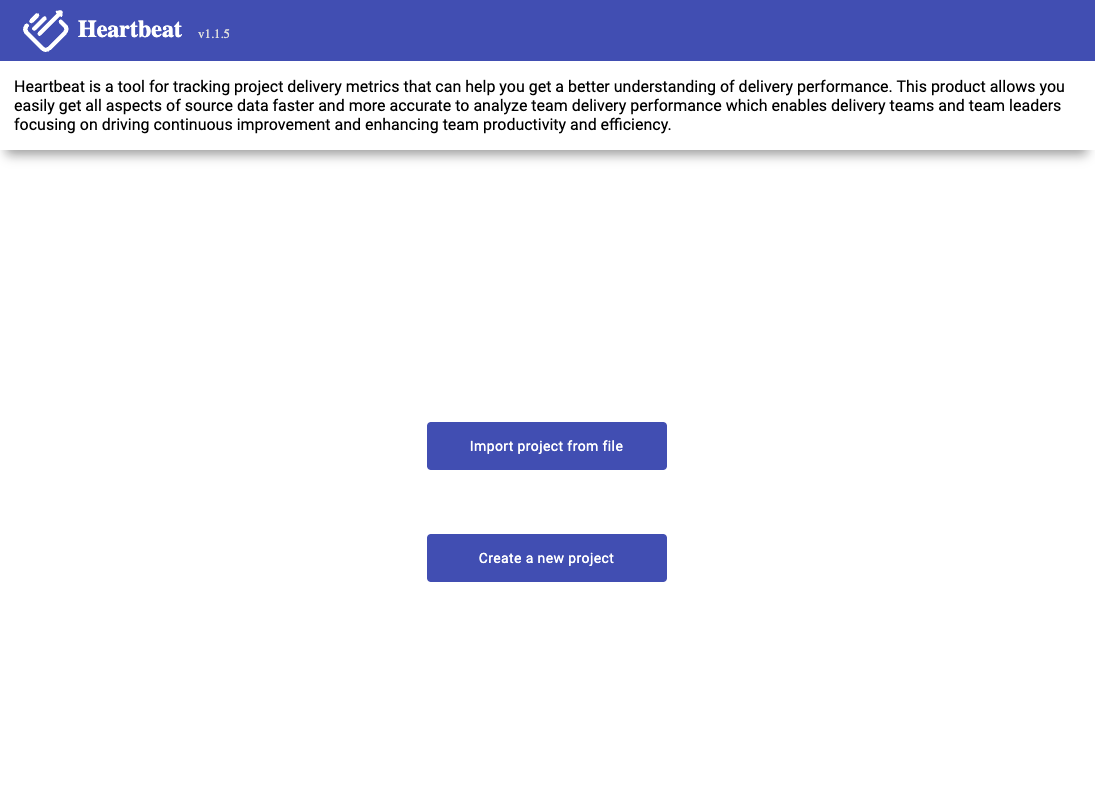
Image 3-1,home page
3.1.2 Config search data
If you are first use the product, you need to select “Create A New Project”,it will go to config page (Image 3-2)

Image 3-2,Project config page
Users need to select a period of time, then all of the data that follows is based on that time period.
Have two items of time period:
- Regular Calendar(Weekend Considered): If you select this item, it means all data will exclude the weekend.
- Calendar with Chinese Holiday: If you select this item, it means all data will exclude the weekend and Chinese holiday. So if the time period you selected contains Chinese holiday, you need to select this item.
All need to select which data you want to get, for now, we support seven metrics data (Image 3-3). Those seven metrics are Deployment Frequency (DF), Lead Time for changes (LTC), Mean Time To Recover (MTTR), Change Failure Rate (CFR), and Velocity, Cycle time, Classification, where
Velocity: includes how many story points and cards we have completed within selected time period.Cycle time: the time it take for each card start to do until move to done.Classification: provide different dimensions to view how much efforts team spe
