
Caloriecounter
AWS Lex based chatbot that calculates calories based on different fast food restaurants. This was an entry for a coding challenge on DevPost, and is actively used on Facebook Messenger. The issues list is actively managed as what defects or improvements are found by real world usage.
Install / Use
/learn @terrenjpeterson/CaloriecounterREADME
Calorie Counter Chatbot
This is a Lex based chatbot that will calculate calories made by trips to different fast food restaurants. It is enabled from a FB Messenger Chatbot that can be accessed from the Facebook Page, or through the Messenger App on your phone.
Table of Contents
- How does this use the NLU models from Lex?
- What custom slots are used by the NLU?
- How can multiple slots be used in a single intent?
- What are the lambda functions called by the bot?
- Where does it get its data from?
- How do you create large custom slots?
- How does information get shared between intents?
- How do you create buttons for the user to click on?
- What does the deployment model look like?
- Does a bot have a personality?
- What is the website code for?
Using NLU Models
This bot uses AWS Lex - a service that contains the intelligence to be able to decipher user requests and trigger intents based on data provided in the models. The intents then invoke lambda functions that contain business logic specific to the intent.
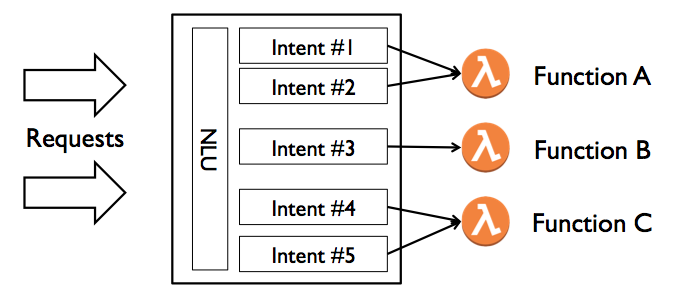
Currently there are many different intents that the NLU process sorts into. Here are the "core functions" of the bot.
- FoodTypeOptions (Sample utterance - What are my food options?)
- GetCalories (Sample utterance - How many calories in a Big Mac?)
- GetMexicanFoodCalories (Sample utterance - How many calories in a Chicken Burrito?)
- GetNuggetsCalories (Sample utterance - How many calories in 20 Chicken Nuggets?)
- GetPizzaCalories (Sample utterance - How many calories in 2 slices of Pepperoni Pizza at Papa Johns?)
- GetChineseCalories (Sample utterance - How many calories in a Kung Pao Chicken?)
- GetChickenCalories (Sample utterance - How many calories in a piece of Original Recipe Chicken?)
There are also intents that complement the core features.
- MoreDetails (Sample utterance - More details. Note: this can only be invoked after prior requests are made in the conversation as it's reading data from the session).
- DailyIntakeAnalysis (Sample utterance - analyze my meal. Similar to more details, this uses session data, so must follow one of the prior requests.
- WhatPizzaTypes (Sample utterance - What types of pizza are there?)
- WhichRestaurants (Sample utterance - List of restaurants.)
- CalculateBMR (Sample utterance - What is my daily recommended calorie intake?)
- GetCarbs (Sample utterance - How many carbs in this?)
Then there are intents that form the 'personality' of the bot. These were created based on real user usage, and prevent the generic error message from being used to respond.
- EndConversation (Built-in intent - uses AWS sample utterances like - Stop)
- Introduction (Sample utterances - Hello, Get Started, Send Message)
- Thanks (Sample utterances - Thanks, Goodbye, Bye)
- Complement (Sample utterances - I love you)
- Critic (Sample utterances - U suck)
- Shock (Sample utterances - wow, ouch)
- MyName (Sample utterances - what is your name)
- HelpRequest (Built-in intent - uses AWS sample utterances like - Help)
- NewRestaurant (Sample utterance - New restaurant. This clears out the session.)
Within each of the intents, sample utterances are provided that construct the potential sentances that a user may provide. The value of the slot (i.e. Large Fry) gets passed to the lambda function as a unique attribute.
You can get the summary information from the AWS CLI by executing the following command.
aws lex-models get-bot --name FastFoodChecker --version-or-alias PROD
Custom Slots
It is a combination of the sample utterances and slots that determine which intent the NLU models will invoke. These are maintained in Lex, and are used for training the models.
Currently, here are the custom slots that are used by the intents.
- FoodOptions (sample values: Big Mac, Smokehouse Brisket Sandwich, etc. This has hundreds of entries, and is generated from the foods.json data object).
- DrinkOptions (sample values: Water, Iced Tea, Large Diet Lemonade, etc. This has many entries, and is generated from the drinks.json data object).
- FastFoodRestaurants (sample values: Chick-fil-A, McDonald's, Wendy's)
- FoodType (sample values: Burger, Salad, Chicken)
- ExtraItems (sample values: Large Fry, Sugar Cookie, Side Salad)
- MexicanFoodTypes (sample values: Burrito, Gordita, Soft Taco)
- Preparation (sample values: Grilled, Fried, Baked)
- Protein (sample values: Steak, Chicken, Black Bean)
- PizzaRestaurants (sample values: Dominos, Papa John's, Little Caesars)
- PizzaSize (sample values: Small, Medium, Large)
- PizzaType (sample values: Sausage, Pepperoni, Honolulu Hawaiian)
- ChineseEntree (sample values: Orange Chicken, Kung Pao Chicken)
- ChineseSide (sample values: Fried Rice, Mixed Vegetables)
- ChineseAppetizer (sample values: Egg Roll, Spring Roll)
- FoodAdjustment (sample values: Add Guacomole, No Cheese)
- DressingOptions (sample values: Italian, Balsamic Vinaigrette)
- DippingSauce (sample values: Honey Mustard, Sweet and Sour)
- ChickenPart (sample values: Drumstick, Breast, Wing)
- ChickenStyle (sample values: Original Recipe, Extra Crispy)
- ChickenSides (sample values: Mashed Potatoes, Baked Beans)
An item does not need to be specified in the slot for the NLU to place a value into it. However, if the data is sparse, it may degrade how the NLU interprets the user requests.
Multiple Slots in a Single Intent
Usability of a chatbot requires natural interaction to occur with a user. One key concept is around how to incorporate multiple slots into a single intent. For example, a user could ask "How many calories in a Big Mac, Fries, and a Coke?" That is three different items that each need to be parsed out. Within this chatbot, the main processing has many different slots that map into intents. For example, here are the slots that map into the GetCalories intent.
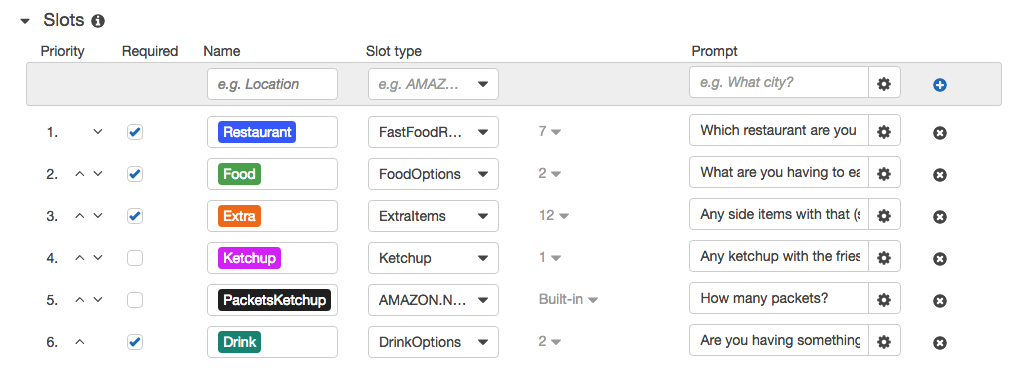
There are a couple of items to note in this.
-
In the example request above, the NLU models would parse the data from the utterance into three different slots (Food, Extra, and Drink).
-
The slot order doesn't matter to the parsing, but it does drive what would be the next response (slot 1 - Which Restaurant are you at?)
-
There are two slots that aren't required in this intent - Ketchup and PacketsKetchup. This optional information is asked for if fries is asked for as a side item. This is driven by the code in the Lambda function that is invoked in the Validation code hook.
Rules logic in lambda
All of the logic in formulating responses to different intents is processed in a series of lambda functions. Which lambda function to invoke is managed within Lex, and set at the intent level. This enables modularity to be built within the application, keeping the functions lightweight.
There are two different spots within Lex that can invoke a lambda function. The first is through basic validation, and the attribute name that identifies it is called invocationSource. There are two potential values for this - DialogCodeHook and FulfillmentCodeHook. Here is where these Lambda functions are specified in the Lex Bot.
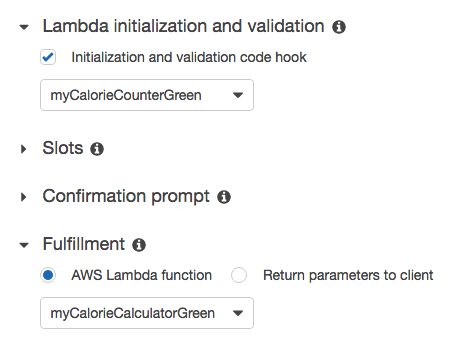
The first dropdown is the Validation, and calls the lambda function every time the bot is called. The attribute that it passes is called DialogCodeHook. The second dropdown is the Fulfillment, and only called once the mandatory slots have been completed, and the validation from the initial call is complete. This allows for the functions to be different, enabling better scalability in building the bot.
Here is an overview of each function currently written.
-
lambda.js - the main function that handles the basic validation for queries, sourced only in DialogCodeHook mode.
-
calculate.js - calculating the response for the actual calories in a meal is handled by this funciton, and is sourced by a FulfillmentCodeHook.
-
pizza.js - handles intents around calculating calories in a pizza, including the intent - WhatPizzaTypes.
-
misc.js - handles simple intents like help, the introduction, and more details around a meal.
-
chinese.js - handles intents around chinese food, and coupling the different slots together to form a meal.
Data lookup tables
The core functionality of this bot is to be able to answer queries of how many calories are in different meals. While the slots that Lex uses are helpful in training the NLU models, they don't have the ability to serve as lookup files. That's where the json objects come in that are stored in the /src/data/ folder.
Here is a sample of the format.
[
    {
        "restaurant":"Chipotle",
        "foodItems":[
            {"foodName":"Chicken Burrito", "foodType":"Burrito", "protein":"chicken", "calories":975},
            {"foodName":"Steak Burrito", "foodType":"Burrito", "protein":"steak", "calories":945},
            {"foodName":"Carnitas Burrito", "foodType":"Burrito", "protein":"carnitas", "calories":1005},
The lambda functions refer to these objects to respond to different queries, and to calculate calorie consumption for the user.
Each food item may be duplicated for different spellings and phrases used to retrieve. For example.
	    {"foodName":"Fries", "calories":340},
            {"foodName":"Fry", "calories":340},
            {"foodName":"Frys", "calories":340},
	    {"foodName":"French Fries", "calories":340},
            {"foodName":"French Fry", "calories":340}
