
local-transcriber
Transcribe meetings, calls and dictation locally on your Mac – with speaker recognition, no cloud. Whisper + pyannote, menu bar app. German and English.
Install / Use
claude mcp add teconomix -- npx -y github:teconomix/local-transcriberIf the server publishes to npm under a different name, use that package instead — check the repo README.
MCP Server
Model Context Protocol server
Quality Score
Category
OtherSupported Platforms
Our assessment of local-transcriber
local-transcriber scores 74/100 on our quality scale, 235th of 259 Other skills we index.
Its MCP Server is 3.1 KB long, split into 5 sections with 1 code example: a solid amount of guidance for an agent.
It has 10 GitHub stars, so there is little community track record yet; judge it on its content.
Maintenance, license and trust
- The repository was last updated 3 days ago, so local-transcriber is actively maintained.
- It is released under the MIT license, a permissive license that allows use, modification and commercial use with attribution.
- Its trust signals score 97/100, with no cautions. These come from repository metadata, not a code audit — read the skill file before letting an agent act on it.
local-transcriber compared with similar skills
All 4 of these similar skills score higher than local-transcriber; compare them before choosing.
| Skill | Score | Stars | Updated | Format |
|---|---|---|---|---|
| local-transcriber (this skill)by teconomix | 74 | 10 | 3d ago | MCP Server |
| Agent-Reachby Panniantong | 100 | 99.4k | 4d ago | CLAUDE.md |
| headroomby headroomlabs-ai | 100 | 76.0k | 1d ago | CLAUDE.md |
| CowAgentby zhayujie | 100 | 47.5k | today | CLAUDE.md |
| Scraplingby D4Vinci | 100 | 88.6k | today | MCP Server |
Frequently asked questions
- How do I install local-transcriber?
- Run
claude mcp add teconomix -- npx -y github:teconomix/local-transcriber. The install tabs above show the steps for each supported agent. - Which AI agents does local-transcriber work with?
- It is written for Claude Code and Claude Desktop, as a MCP Server file. Other agents that read the same format can often use it too.
- Is local-transcriber safe to use?
- It is MIT-licensed and scores 97/100 on trust signals. Skills are instructions an agent will follow, so read the file before installing it and do not approve commands you do not understand.
- Is local-transcriber still maintained?
- The repository was last updated 3 days ago, so local-transcriber is actively maintained.
Skill content
View source on GitHubLocal Transcriber
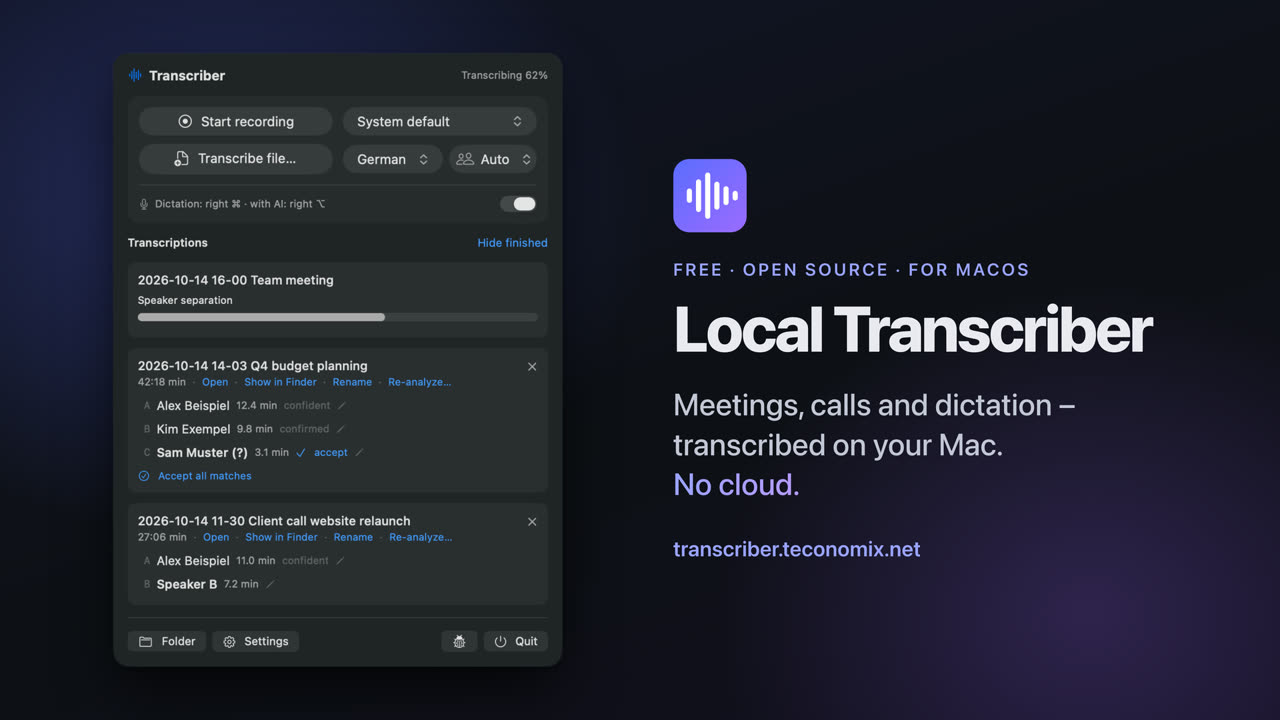
Meetings, calls and dictation – transcribed on your Mac. No cloud.
Deutsch: docs/de/README.md
Local Transcriber (“Transcriber” for short in the menu bar) is a small menu bar tool for macOS: it records conversations, transcribes them, recognizes who spoke, and lets you dictate anywhere at the press of a key. Everything runs locally on the Mac – no account, no subscription, no license server, no audio leaving the computer.
curl -fsSL https://transcriber.teconomix.net/k/github/install.sh | bash
Or with Homebrew: brew install --cask teconomix/tap/local-transcriber. Questions: Discussions.
What it does
- Record meetings – one click; microphone and system audio (the others in the call) as separate tracks.
- Transcribe – Whisper large-v3-turbo on the Apple Silicon GPU (MLX): one hour of audio including speaker recognition in about three to four minutes.
- Recognize speakers – pyannote with a learning voice database; name someone once, and they are recognized next time.
- Video calls – detects Teams, Zoom, Meet & co., offers to record and stops the recording when the call ends.
- Calendar – event title as file name, attendees as suggestions when naming speakers.
- Dictation everywhere – hold a key, speak, release: the text appears at the cursor in any app.
- Local AI (macOS 26) – dictation cleanup, meaningful file names – with Apple Intelligence on the device.
- For power users – folder watcher, Markdown/JSON/SRT, glossary, command line, MCP server for AI agents.
In detail: docs/FEATURES.md · Usage: docs/USER_GUIDE.md · Installation: docs/INSTALLATION.md · Privacy: docs/PRIVACY.md
Requirements
Mac with Apple Silicon (M1 or newer), macOS 14 Sonoma or newer (AI features: macOS 26 with Apple Intelligence), about 8 GB of free disk space, 16 GB of memory recommended. Internet only for installation.
Structure
| Part | Location | Technology |
|---|---|---|
| Menu bar app | app/ | Swift/SwiftUI, AVFoundation, Core Audio process tap, EventKit, Foundation Models, Vision |
| Core | transcriber/ | Python: mlx-whisper, pyannote.audio, ffmpeg, SQLite (voice database) |
| Command line / MCP | transcriber/cli.py, transcriber/mcp_server.py | transcriber transcribe …, MCP tools |
| Installer | installer/ | install.sh, uninstall.sh |
| Release | scripts/make-release.sh | builds dist/<version>/ |
| Website | website/ | static |
Building it yourself: see docs/DEVELOPMENT.md.
Legal
Free software under the MIT License – without any warranty. The models and libraries used keep their own licenses: THIRD_PARTY_NOTICES.md.
Recordings: You are responsible for obtaining the consent of everyone involved. Secretly recording conversations is illegal in many countries.
Related Skills
Agent-Reach
99.4kGive your AI agent eyes to see the entire internet. Read & search Twitter, Reddit, YouTube, GitHub, Bilibili, XiaoHongShu — one CLI, zero API fees.
headroom
76.0kCompress tool outputs, logs, files, and RAG chunks before they reach the LLM. 20% fewer tokens for coding agents, 60-95% fewer tokens for JSON, same answers. Library, proxy, MCP server.
CowAgent
47.5kOpen-source personal AI assistant & Agent Harness. Plans tasks, runs tools and skills, self-evolves with memory and knowledge. Multi-agent, multi-model, multi-channel. Lightweight, extensible, one-line install.
Scrapling
88.6k🕷️ A Web Scraping framework that handles everything from a single request to a full-scale crawl! Don't be shy, join here: https://discord.gg/EMgGbDceNQ and follow here for daily tips and tricks: https://x.com/Scrapling_dev

Languages
Trust signals
From repository metadata: license, adoption, age and documentation. Not a code audit — see the Safety scan above for what the skill file itself contains.