
Nero
Code and resources for the paper: "Neural Reverse Engineering of Stripped Binaries using Augmented Control Flow Graphs"
Install / Use
/learn @tech-srl/NeroREADME
Neural Reverse Engineering of Stripped Binaries using Augmented Control Flow Graphs
This is the official implementation of Nero-GNN, the prototype described in: Yaniv David, Uri Alon, and Eran Yahav, "Neural Reverse Engineering of Stripped Binaries using Augmented Control Flow Graphs״, will appear in OOPSLA '2020, PDF.
Our evaluation dataset and other resources are available here (Zenodo). These will be used and further explained next.
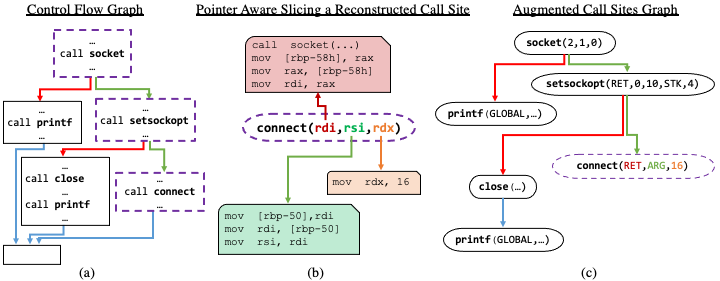
Table of Contents
Requirements
Data Generation Specific Requirements
- python3.8
- LLVM version 10 and the llvmlite & llvmcpy python packages (other versions might work. 3.x will not).
- IDA-PRO (tested with version 6.95).
- angr, and the simuvex package.
- A few more python packages: scandir, tqdm, jsonpickle, parmap, python-magic, pyelftools, setproctitle.
Using a licensed IDA-PRO installation for Linux, all of these requirements were verified as compatible for running on an Ubuntu 20 machine (and with some more effort even on Ubuntu 16).
For Ubuntu 20, you can use the requirements.txt file in this repository to install all python packages against the native python3.8 version:
pip3 install -r requirements.txt
LLVM version 10 can be installed with:
sudo apt get install llvm-10
The IDA-python scripts (in datagen/ida/py2) were tested against the python 2.7 version bundled with IDA-PRO 6.95, and should work with newer versions at least up-to 7.4 (more info here). Please file a bug if it doesn't.
The jsonpickle python package also needs to be installed for use by this bundled python version:
- Download the package:
wget https://files.pythonhosted.org/packages/32/d5/2f47f03d3f64c31b0d7070b488274631d7567c36e81a9f744e6638bb0f0d/jsonpickle-0.9.6.tar.gz
- Extract only the package sources:
tar -xvf jsonpickle-0.9.6.tar.gz jsonpickle-0.9.6/jsonpickle/
- Move it to the IDA-PRO python directory:
mv jsonpickle-0.9.6/jsonpickle /opt/ida-6.95/idal64/python/
Note that, when installed as root, IDA-PRO defaults to installing in /opt/ida-6.95/idal64. Other paths will require adjusting here and in other scripts.
Neural Model Specific Requirements
- python3.6. (For using the same Ubuntu 20 machine for training and data generation we recommend using virtualenv)
- These two python packages: jsonpickle, scipy
- TensorFlow 1.13.1 (install) or using:
pip install tensorflow-gpu==1.13.1 # for the GPU version
Note that CUDA >= 10.1 is required for tensorflow-gpu version 1.13 and above. (See this link for more information)
or:
pip install tensorflow==1.13.1 # for the CPU version
To check existing TensorFlow version, run:
python3 -c 'import tensorflow as tf; print(tf.__version__)'
Generating Representations for Binary Procedures
Our binaries dataset was created by compiling several GNU source-code packages into binary executables and performing a thorough cleanup and deduplication process (detailed in our paper).
The packages are split into three sets: training, validation and test (each in its own directory in the extracted archive: TRAIN, VALIDATE & TEST resp.).
To obtain preprocessed representations for these binaries you can either download our preprocessed dataset, or create a new dataset from our or any other binaries dataset.
Creating Representations
Indexing
Indexing, i.e., analyzing the binaries and creating augmented control flow graphs based representations for them is performed using:
python3 -u index_binaries.py --input-dir TRAIN --output-dir TRAIN_INDEXED
where TRAIN is the directory holding the binaries to index, and results are placed in TRAIN_INDEXED.
To index successfully, binaries must contain debug information and adhere to this file name structure:
<compiler>-<compiler version>__O<Optimization level(u for default)>__<Package name>[-<optional package version>]__<Executable name>
For example: "gcc-5__Ou__cssc__sccs".
Some notes on the indexing process and its results:
- The indexing process might take several hours. We recommend running it on a machine with multiple CPU-cores and adequate RAM.
- The number of procedures created might depend on the timeout value selected for procedure indexing (controlled by
--index-timeoutwith the default of 30 minutes). - Procedures containing features not supported by the indexing engine (e.g., vector operations) or CFGs with more than 1000 unique CFG paths will not be indexed.
- The created representations might have some minor discrepancies when compared with those published in zenodo. These include JSON field ordering and formating. These discrepancies are the result of porting this prototype to Python3 towards its publication.
- To change the path to the IDA-PRO installation use
--idal64-path.
Filter and collect
Next, to filter and collect all the indexed procedures into one JSON file:
python3 -u collect_and_filter.py --input-dir TRAIN_INDEXED --output-file=train.json
This will filter and collect indexed procedures from TRAIN_INDEXED (which should hold the indexed binaries for training from the last step) and store them in train.json.
Preprocess for use by the model
Finally, to preprocess raw representations, preparing them for use by the neural model, use:
python3 preprocess.py -trd train.json -ted test.json -vd validation.json -o data
This will preprocess the training(train.json), validation(validation.json) and test(test.json) files. Note that this step require TensorFlow and other components mentioned here.
Using Prepared Representations
The procedure representations for the binaries in our dataset can be found in this archive.
Extracting the procedure representations archive will create the folder procedure_representations and inside it two more folders:
raw: The raw representations for all the binary procedures in the above dataset. Each procedure is represented by one line in the relevant file for each set (training.json, validation.json and test.json)preprocessed: The raw procedure representations preprocessed for training.
The preprocessed directory contains:
- Files for training the model:
data.dictanddata.train(the dictionary and preprocessed training set samples accordingly) data.val- The (preprocessed) validation set samples.data.test- The (preprocessed) test set samples.
Predicting Procedure Names Using Neural Models
As we show in our paper, Nero-GNN is the best variation of our approach, and so we focus on and showcase it here.
Training From Scratch
Training a Nero-GNN model is performed by running the following command line:
python3 -u gnn.py --data procedure_representations/processed/data \
--test procedure_representations/processed/data.val --save new_model/model \
--gnn_layers NUM_GNN_LAYERS
Where NUM_GNN_LAYERS is the number of GNN layers. In the paper, we found NUM_GNN_LAYERS=4 to perform best.
The paths to the (training) --data and (validation) --test arguments can be changed to point to a new dataset.
Here, we provide the dataset that we used in the paper.
We trained our models using a Tesla V100 GPU. Other GPUs might require changing the number of GNN layers or other dims to fit into the available RAM.
Using Pre-Trained Models
Trained models are available in this archive.
Extracting it will create the gnn directory composed of:
- Trained model (the
dictionaries.bin&model_iter495.*files, storing the 495th training iteration) - Training log.
- Prediction results log.
Evaluation
Evaluation of a trained model is performed using the following command line:
python3 -u gnn.py --test procedure_representations/data.test \
--load gnn/model_iter495 \
--gnn_layers NUM_GNN_LAYERS
if model_iter495 is the checkpoint that performed best on the validation set during training (this is the case in the provided trained model).
The value of NUM_GNN_LAYERS should be the same as in training.
