
mcp-alphabanana
A local MCP server for generating image assets using Google Gemini AI (Nano Banana 2 / Pro). Enable transparency and resize.
Install / Use
claude mcp add tasopen -- npx -y github:tasopen/mcp-alphabananaIf the server publishes to npm under a different name, use that package instead — check the repo README.
MCP Server
Model Context Protocol server
Quality Score
Category
Development & EngineeringSupported Platforms
Our assessment of mcp-alphabanana
mcp-alphabanana scores 84/100 on our quality scale, 2841st of 4,542 Development & Engineering skills we index.
Its MCP Server is 13 KB long, well organised into 25 sections with 11 code examples: a thorough specification that gives an agent plenty to work with.
It has 10 GitHub stars, so there is little community track record yet; judge it on its content.
Maintenance, license and trust
- The repository was last updated 5 days ago, so mcp-alphabanana is actively maintained.
- It is released under the MIT license, a permissive license that allows use, modification and commercial use with attribution.
- Its trust signals score 97/100, with no cautions. These come from repository metadata, not a code audit — read the skill file before letting an agent act on it.
Safety scan
No issues foundOur scan of the whole file found no instruction hijacking, hidden characters, credential access, data exfiltration or destructive commands. An AI review of the same text found nothing harmful.
AI review by kimi-k2.7-code on 2026-10-13. Automated pattern scan on 2026-10-13. It catches known dangerous patterns, not every risk — read a skill before letting an agent act on it.
mcp-alphabanana compared with similar skills
All 4 of these similar skills score higher than mcp-alphabanana; compare them before choosing.
| Skill | Score | Stars | Updated | Format |
|---|---|---|---|---|
| mcp-alphabanana (this skill)by tasopen | 84 | 10 | 5d ago | MCP Server |
| Agent-Reachby Panniantong | 100 | 97.4k | 6d ago | CLAUDE.md |
| taste-skillby Leonxlnx | 100 | 96.6k | today | CLAUDE.md |
| headroomby headroomlabs-ai | 100 | 75.4k | today | CLAUDE.md |
| CowAgentby zhayujie | 100 | 47.4k | today | CLAUDE.md |
Frequently asked questions
- How do I install mcp-alphabanana?
- Run
claude mcp add tasopen -- npx -y github:tasopen/mcp-alphabanana. The install tabs above show the steps for each supported agent. - Which AI agents does mcp-alphabanana work with?
- It is written for Claude Code, Claude Desktop and Gemini CLI, as a MCP Server file. Other agents that read the same format can often use it too.
- Is mcp-alphabanana safe to use?
- Our scan of the whole file found no instruction hijacking, hidden characters, credential access, data exfiltration or destructive commands. An AI review of the same text found nothing harmful. It is MIT-licensed and scores 97/100 on trust signals. Skills are instructions an agent will follow, so read the file before installing it and do not approve commands you do not understand.
- Is mcp-alphabanana still maintained?
- The repository was last updated 5 days ago, so mcp-alphabanana is actively maintained.
Skill content
View source on GitHubmcp-alphabanana
<img src="https://raw.githubusercontent.com/tasopen/mcp-alphabanana/main/images/mcp-alphabanana.png" width="48" alt="mcp-alphabanana logo" /> 

English | 日本語
mcp-alphabanana is a Model Context Protocol (MCP) server for generating image assets with Google Gemini. It is built for MCP-compatible clients and agent workflows that need fast image generation, transparent outputs, reference-image guidance, and flexible delivery formats.
Keywords: MCP server, Model Context Protocol, Gemini AI, image generation, FastMCP
Key capabilities:
- Nano Banana 2.1 image generation by default, plus Lite, Flash, and Pro tiers
- Transparent PNG/WebP asset output for web and game pipelines
- Multi-image style guidance with local reference image files
- Flexible file, base64, or combined outputs for agent workflows
Quick Start
Run the MCP server with npx:
npx -y @tasopen/mcp-alphabanana
Or add it to your MCP configuration:
{
  "mcp": {
    "servers": {
      "mcp-alphabanana": {
        "command": "npx",
        "args": ["-y", "@tasopen/mcp-alphabanana"],
        "env": {
          "GEMINI_API_KEY": "${env:GEMINI_API_KEY}"
        }
      }
    }
  }
}
Set GEMINI_API_KEY before starting the server.
For Claude Desktop,
Download mcp-alphabanana-latest.mcpb, then add it as Extension from Claude Desktop Settings. For Windows, Recommend add 'FileSystem' extension for better local file handling.

Claude Registry
The Claude registry / MCPB package metadata is defined in manifest.json and ships with the static 512x512 icon at images/mcp-alphabanana.png.
Native sharp runtime packages are declared as optional dependencies so .mcpb installs can resolve the correct prebuilt binary on each supported platform without relying on postinstall hooks.
- Stable MCPB URL:
https://github.com/tasopen/mcp-alphabanana/releases/latest/download/mcp-alphabanana-latest.mcpb - Versioned MCPB URL pattern:
https://github.com/tasopen/mcp-alphabanana/releases/download/vVERSION/mcp-alphabanana-VERSION.mcpb - Support: GitHub Issues
MCP Server
This repository provides an MCP server that enables AI agents to generate images using Google Gemini.
It can be used with MCP-compatible clients such as:
- Claude Desktop
- VS Code MCP
- Cursor
Built with FastMCP 3 for a simplified codebase and flexible output options.
Glama MCP Server badge:
<a href="https://glama.ai/mcp/servers/tasopen/mcp-alphabanana">
<img width="380" height="200" src="https://glama.ai/mcp/servers/tasopen/mcp-alphabanana/badge" />
</a>
Available Tools
generate_image
Generates images using Google Gemini with optional transparency, local reference images, grounding, and reasoning metadata.
For Claude Desktop, prefer outputType=file for medium or large images. base64 and combine responses consume Claude context and can hit the client's size limit. On Windows, use the FileSystem extension to choose a writable absolute outputPath and any local referenceImages paths.
Key parameters:
prompt(string): description of the image to generatemodel:NanoBanana2.1(default),Flash3.1(deprecated),Lite3.1,Flash2.5,Pro3, plus aliasesflash,prooutputWidthandoutputHeight: requested final image size in pixels in normal modenoresize+aspectRatio+output_resolution: return Gemini native size without resizingoutput_resolution:1K,2K,4Koutput_format:png,jpg,webpoutputType:file,base64,combineoutputPath: required whenoutputTypeisfileorcombinetransparent: enable transparent PNG/WebP post-processingreferenceImages: optional array of local reference image filesgrounding_typeandthinking_mode: advanced Gemini controls (thinking_mode:minimal/medium/high, defaultmedium)
Model Selection
| Input Model ID | Internal Model ID | Description |
| --- | --- | --- |
| NanoBanana2.1 | gemini-nano-banana-2.1 | Default. Google Nano Banana 2.1. Best overall quality, prompt adherence, text rendering, and reference-image handling. 1K/2K/4K, up to 14 reference images. |
| Flash3.1 | gemini-3.1-flash-image | Deprecated. Ultra-fast, supports Thinking/Grounding. Google shuts it down on October 29, 2026; requests are rejected from that date. Migrate to NanoBanana2.1. |
| Lite3.1 | gemini-3.1-flash-lite-image | Ultra-fast, cost-effective 1K-only model. No Search Grounding. |
| Flash2.5 | gemini-2.5-flash-image | Legacy Flash. High stability. Low cost. 1K only. |
| Pro3 | gemini-3-pro-image | High-fidelity Pro model. |
| flash | gemini-nano-banana-2.1 | Alias for the default model (NanoBanana2.1). |
| pro | gemini-3-pro-image | Alias for Pro3. |
Parameters
Full parameter reference for the generate_image tool.
| Parameter | Type | Default | Description |
|-----------|------|---------|-------------|
| prompt | string | required | Description of the image to generate |
| outputFileName | string | required | Output filename (extension auto-added if missing) |
| outputType | enum | combine | file, base64, or combine |
| model | enum | NanoBanana2.1 | Model: NanoBanana2.1, Flash3.1, Lite3.1, Flash2.5, Pro3, flash, pro |
| output_resolution | string | auto | 1K, 2K, 4K (0.5K removed in v1.6.0); required when noresize=true |
| noresize | boolean | false | Skip post-generation resize and return Gemini native dimensions |
| aspectRatio | enum | optional | Required when noresize=true; e.g. 1:1, 16:9, 4:5 |
| outputWidth | integer | required unless noresize=true | Final output width in pixels |
| outputHeight | integer | required unless noresize=true | Final output height in pixels |
| output_format | enum | png | png, jpg, webp |
| outputPath | string | required for file / combine | Absolute output directory path |
| transparent | boolean | false | Transparent background (PNG/WebP only) |
| transparentColor | string or null | null | Color key override for transparency extraction |
| colorTolerance | integer | 30 | Transparency color matching tolerance |
| fringeMode | enum | auto | auto, crisp, hd |
| resizeMode | enum | crop | crop, stretch, letterbox, contain |
| grounding_type | enum | none | none, text, image, both (grounding-capable models: NanoBanana2.1, Flash3.1, Pro3) |
| thinking_mode | enum | medium | minimal, medium, high (thinking-capable models: NanoBanana2.1 accepts all three; Flash3.1/Pro3 accept minimal/high and fall back to their own default otherwise) |
| include_thoughts | boolean | false | Return model reasoning fields when metadata is enabled |
| include_metadata | boolean | false | Include grounding and reasoning metadata in JSON output |
| referenceImages | array | [] | Up to 14 local reference files (NanoBanana2.1/Flash3.1/Pro3/Lite3.1), 3 for Flash2.5 |
| debug | boolean | false | Save intermediate debug artifacts |
Why alphabanana?
- Zero Watermarks: API-native clean images.
- Thinking/Grounding Support: Higher prompt adherence and search-backed accuracy.
- Production Ready: Supports transparent WebP and exact aspect ratios for web and game assets.
Features
- Nano Banana 2.1 default (
gemini-nano-banana-2.1, 1K/2K/4K output) - Nano Banana 2 Lite (
Lite3.1): ultra-fast, cost-effective 1K-only model for quick drafting and low-latency iteration - Advanced multi-image reasoning (up to 14 reference images)
- Thinking/Grounding support (
NanoBanana2.1,Flash3.1,Pro3) - Transparent PNG/WebP output (color-key post-processing, despill)
- Multiple output formats: file, base64, or both
- Flexible resize modes: crop, stretch, letterbox, contain
- Multiple model tiers: NanoBanana2.1 (default), Flash3.1 (deprecated), Lite3.1, Flash2.5, Pro3, legacy aliases
Example Outputs
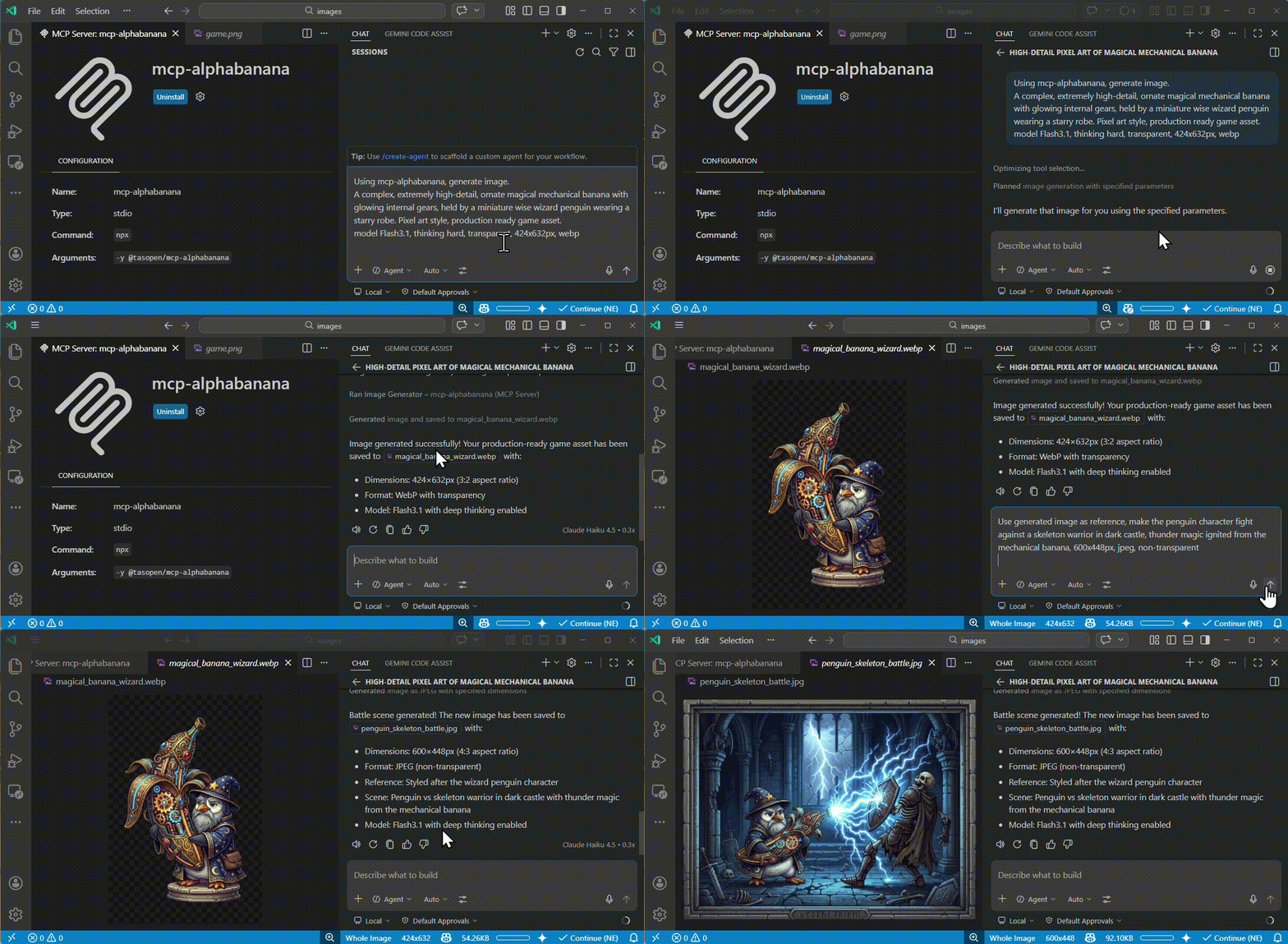
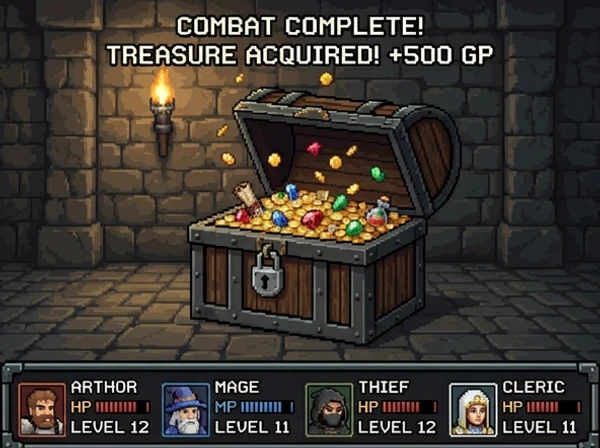
These sample outputs were generated with mcp-alphabanana and stored in images/examples.
| Pixel art asset | Reference-image game scene | Photorealistic generation |
| --- | --- | --- |
|  |
|  |
|  |
|
Configuration
Configure the GEMINI_API_KEY in your MCP configuration (for example, mcp.json).
Examples:
- Reference an OS environment variable from
mcp.json:
{
  "env": {
    "GEMINI_API_KEY": "${env:GEMINI_API_KEY}"
  }
}
- Provide the key directly in
mcp.json:
{
  "env": {
    "GEMINI_API_KEY": "your_api_key_here"
  }
}
VS Code Integration
Add to your VS Code settings (.vscode/settings.json or user settings), configuring the server env in mcp.json or via the VS Code MCP settings.
{
  "mcp": {
    "servers": {
      "mcp-alphabanana": {
        "command": "npx",
        "args": ["-y", "@tasopen/mcp-alphabanana"],
        "env": {
          "GEMINI_API_KEY": "${env:GEMINI_API_KEY}"
        }
      }
    }
  }
}
Optional: Set a custom fallback directory for write failures by adding MCP_FALLBACK_OUTPUT to the env object.
Usage Examples
Basic Generation
{
  "prompt": "A pixel art treasure chest, golden trim, wooden texture",
  "model": "NanoBanana2.1",
  "outputFileName": "chest",
  "outputType": "base64",
  "outputWidth": 64,
  "outputHeight": 64,
  "transparent": true
}
Native Size Without Resize
{
  "prompt": "A clean app icon with a banana mascot, flat graphic design",
  "model": "NanoBanana2.1",
  "outputFileName": "banana-icon-native",
  "outputType": "base64",
  "noresize": true,
  "aspectRatio": "1:1",
  "output_resolution": "1K",
  "output_format": "png"
}
This mode returns the Gemini native pixel size for the requested ratio and resolution. For example, 1:1 + 1K returns 1024x1024 without any resize pass. (0.5K was removed in v1.6.0.)
Advanced (Vertical poster and thinking)
{
  "prompt": "A vertical, photorealistic travel poster advertising Magical Wings Day Tours. A joyful young couple flies high above a breathtaking European countryside at golden hour, holding hands as they soar through a partly cloudy sky. Below them are vineyards, villages, forests, a winding river, and a hilltop medieval castle. The poster uses large, elegant typography with the headline FLY THE COUNTRYSIDE at the top and Magical Wings Day Tours branding near the bottom.",
  "model": "NanoBanana2.1",
  "output_resolution": "1K",
  "outputFileName": "photoreal-travel-poster",
  "outputType": "file",
  "outputPath": "/path/to/output",
  "outputWidth": 848,
  "outputHeight": 1264,
  "output_format": "jpg",
  "thinking_mode": "high",
  "include_metadata": true
}
Grounding Sample (Search-backed)
{
  "prompt": "A modern travel poster featuring today's weather and skyline highlights in Kuala Lumpur",
  "model": "NanoBanana2.1",
  "outpu
Truncated for display — read the full file on GitHub.
Related Skills
Agent-Reach
97.4kGive your AI agent eyes to see the entire internet. Read & search Twitter, Reddit, YouTube, GitHub, Bilibili, XiaoHongShu — one CLI, zero API fees.
taste-skill
96.6kAgent skills that give coding agents taste: art direction, reference images and a browser check instead of generic AI pages
headroom
75.4kCompress tool outputs, logs, files, and RAG chunks before they reach the LLM. 20% fewer tokens for coding agents, 60-95% fewer tokens for JSON, same answers. Library, proxy, MCP server.
CowAgent
47.4kOpen-source personal AI assistant & Agent Harness. Plans tasks, runs tools and skills, self-evolves with memory and knowledge. Multi-agent, multi-model, multi-channel. Lightweight, extensible, one-line install.

Languages
Trust signals
From repository metadata: license, adoption, age and documentation. Not a code audit — see the Safety scan above for what the skill file itself contains.