
Formantanalyzer.js
Extract formant features such as frequency, power, energy, and bandwidth of formants at syllable or word level from audio sources in a web browser using WebAudio API.
Install / Use
/learn @tabahi/Formantanalyzer.jsREADME
formantanalyzer.js



A JS Web API based spectrum analyzer for speech and music analysis. It can be used for labeling or feature extraction.
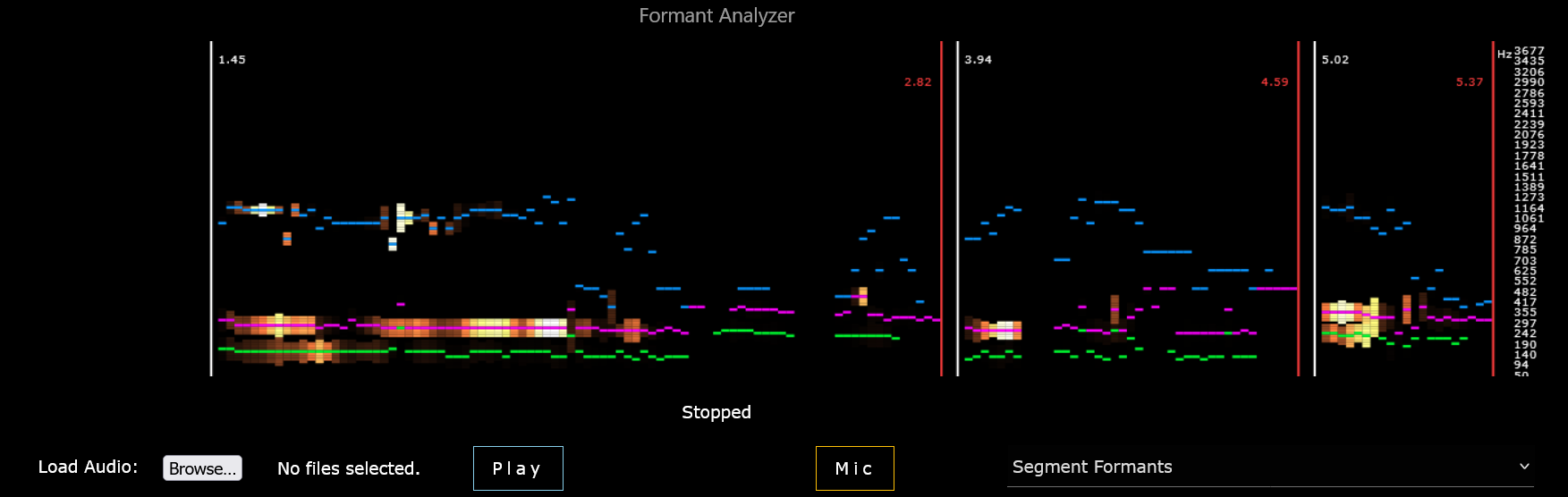
Demo
Bare minimum starter file: tabahi.github.io/formantanalyzer.js
Related projects:
Installation
Using JS Script
Load the javascript module as
<script src="https://unpkg.com/formantanalyzer@1.1.8/index.js"></script>
Then use the entry point FormantAnalyzer to use the imported javascript library.
Using Webpack Library
Prerequisites: Node.js, check versions >12 for node -v and >6 for npm -v.
- For importing the JS package in webpack project: Install formantanalyzer using
npm
npm i formantanalyzer
:: or
npm install formantanalyzer --save-dev
const FormantAnalyzer = require('formantanalyzer'); //after npm installation
FormantAnalyzer.configure(launch_config);
FormantAnalyzer.LaunchAudioNodes(2, webAudioElement, call_backed_function, ['file_label'], false, false);
If you are creating a webpack project from scratch by just using JS files from ./src then first initialize a new webpack project by npx webpack and create a new webconfig.js in project root directory. See instructions here.
Usage
First, configure the fomant analyzer. Pass the #SpectrumCanvas element if plot is enabled. Pass null if no need for plot. See 'index.html' for a simple example.
HTML:
<div id="canvas_div">
    <canvas id="SpectrumCanvas" width="1200" height="300" ></canvas>
</div>
In javascript:
/*Using <script src="https://unpkg.com/formantanalyzer@1.1.8/index.js"></script>
Can also import in webpack as:
const FormantAnalyzer = require('formantanalyzer');
*/

function Configure_FormantAnalyzer()
{
    const BOX_HEIGHT = 300;
    const BOX_WIDTH = window.screen.availWidth - 50;
    document.getElementById('SpectrumCanvas').width = BOX_WIDTH;    //reset the size of canvas element
    document.getElementById('SpectrumCanvas').height = BOX_HEIGHT;

    let launch_config = { plot_enable: true,
    spec_type: 1,       //see below
    output_level: 2, //see below
    plot_len: 200, f_min: 50, f_max: 4000,
    N_fft_bins: 256,
    N_mel_bins: 128,
    window_width: 25, window_step: 15,
    pause_length: 200, min_seg_length: 50,
    auto_noise_gate: true, voiced_min_dB: 10, voiced_max_dB: 100,
    plot_lag: 1, pre_norm_gain: 1000, high_f_emph: 0.0,
    plot_canvas: document.querySelector('#SpectrumCanvas').getContext('2d'),
    canvas_width: BOX_WIDTH,
    canvas_height: BOX_HEIGHT };

    FormantAnalyzer.configure(launch_config);
}
Initialize an Audio Element, or local audio file binary element, or null if using the mic stream. Then pass it to LaunchAudioNodes with suitable parameters. See 'index.html' for examples for local audio file and mic streaming.
var webAudioElement = new Audio("./audio_file.mp3");
/*Parameters:*/
const context_source = 2;   //1: Local file binary, 2: play from a web Audio, 3: mic
const test_mode = true; //plots only, it does not return callback
const offline = false;  //play on speakers, set true to play silently
const file_labels =[];     //array of labels that will be passed to callback after feature extraction

/* Wait for audio file to load */
webAudioElement.addEventListener("canplaythrough", event => {
    /* Launch Audio Nodes */
    FormantAnalyzer.LaunchAudioNodes(context_source, webAudioElement,
                    callback, file_labels, offline, test_mode).then(function()
        {
            console.log("Done");
        }).catch((err)=>{
            console.log(err);
        });
});

callback(seg_index, file_labels, seg_time, features)
{
//callback function to which extracted features are passed
}
LaunchAudioNodes()
Returns: This function returns a promise as resolve(true) after playback is finished or reject(err) if there is an error.
If you want an abrupt stop, then call the FormantAnalyzer.stop_playing("no reason") function. Then this function will return resolve("no reason"). Different audio contexts are buffered/streamed differently, therefore each has a separate function in AudioNodes.js.
Parameters:
context_source (int):
- 1 --- Play from a locally loaded file (pass an audio binary as source_obj).
- 2 --- Play from an Audio element (pass an
Audioobject as source_obj) - 3 --- Stream from mic
source_obj (object):
Source audio object.
- If
context_source==1(playing from a local file) then pass a binary of file. Get binary fromFileReaderas:FileReader.onload (e)=>(binary = e.target.result). Seeindex.html. - If
context_source==2(playing from a web address) then pass anAudioobject. - If
context_source==3(playing from mic Passnull). Seeindex.html.
callback:
It is the callback function to be called after each segment ends. It should accept 4 variables; segment_index, segment_time_array, segment_labels_array, segment_features_array. Callback is called asynchronously, so there might be a latency between audio play and it's respective callback, that's why it's important to send the labels to async segmentor function.
file_labels (Array):
It is an array of labels for currently playing file. It is returned as it is to the callback function.
It is used to avoid the label mismatch during slow async processing in case if a new file is playing, but the callback sends the output of the previous one.
Sometimes callback is called with a delay of 2 seconds, so it helps to keep track which file was playing 2 seconds ago. e.g., file_labels=['filename.wav', 'Angry']
offline_mode (boolean):
If true then the locally loaded files will be played silently in an offline buffer.
test_play (boolean)
set it true to avoid calling the callback. Plots and AudioNodes will still work as it is, but there will be no call backs. It can be enabled to test plotting or re listening.
play_offset and play_duration are in seconds to play a certain part of the file, otherwise pass null.
As an example, callback function in WebSpeechAnalyzer app looks like this:
async function callback(seg_index, seg_label, seg_time, features)
{
    if(launch_config.output_level == 13) //Syllable 53x statistical features for each segment
    {
        if(settings.collect)
        for(let segment = 0; segment < features.length; segment++ )
        {
            storage_mod.StoreFeatures(launch_config.output_level, settings.DB_ID, (seg_index + (segment/100)), seg_label, seg_time[segment], features[segment]);
        }

        if(settings.plot_enable && settings.predict_en)
        {
            pred_mod.predict_by_multiple_syllables(settings.predict_type, settings.predict_label, seg_index, features, seg_time);
        }
    }
}
Different types of features are returned to the callback(seg_index, seg_label, seg_time, features) at different output levels. Variables for callback:
seg_indexthe index of segment since the play start. Segments are separated by significant pauses, the first segment of each file starts hasseg_index = 0.seg_labelis the same asfile_labelspassed toLaunchAudioNodes().seg_timeis an array of two elements[start_time, total_duration]at segment level. At syllable level, it is a 2D array of shape (syllables, 2), giving[start_time, total_duration]for each syllable separately.featuresis the array of extracted features that is of different shape at differentoutput_level. Detailed descriptions for each level are given below.
configure()
Before playing any audio source using LaunchAudioNodes(), the audio nodes must be configured otherwise, default launch_config settings will be assumed.
let launch_config = { plot_enable: true,
    spec_type: 1,
    output_level: 4,
    plot_len: 200,
    f_min: 50,
    f_max: 4000,
    N_fft_bins: 256,
    N_mel_bins: 128,
    window_width: 25,
    window_step: 15,
    pause_length: 200,
    min_seg_length: 50,
    auto_noise_gate: true,
    voiced_min_dB: 10,
    voiced_max_dB: 100,
    plot_lag: 1,
    pre_norm_gain: 1000,
    high_f_emph: 0.0,
    plot_canvas: document.querySelector('#SpectrumCanvas').getContext('2d'),
    canvas_width: 900,
    canvas_height: 300 };

    FormantAnalyzer.configure(launch_config);
Available spec_type options:
- 1 = Mel-spectrum
- 2 = Power Spectrum
- 3 = Discrete FFT
Available output_level options:
- 1 = Bars (no spectrum, only the last filter bank)
- 2 = Spectrum
- 3 = Segments
- 4 = Segment Formants / segment
- 5 = Segment Features 53x / segment [ML]
- 10 = Syllable Formants / syllable
- 11 = Distributions 264x / file [ML]
- 12 = Syllable Curves 23x / syllable [ML]
- 13 = Syllable Features 53x / syllable [ML]
Output Level Descriptions:
Different features are returned to the callback(seg_index, seg_label, seg_time, features) at different output levels. The shape of seg_time also differs from (2) to (syllable, 2) for segment vs syllable. The shape of `feature
