
Psudohash
Generates millions of keyword-based password mutations in seconds.
Install / Use
/learn @t3l3machus/PsudohashREADME
psudohash

 <img src="https://img.shields.io/badge/Maintained%3F-Yes-23a82c">
<img src="https://img.shields.io/badge/Developed%20on-kali%20linux-blueviolet">
<img src="https://img.shields.io/badge/Maintained%3F-Yes-23a82c">
<img src="https://img.shields.io/badge/Developed%20on-kali%20linux-blueviolet">
Cool New Features of v1.1.0
Special thanks to DavidAngelos:
▶️ Added a progress bar in every step to track execution.
▶️ Added options:
- In-order joins (
-i/--inorder): join keywords only in the original order (e.g.foo,bar,baz→foo, bar, baz, foobar, foobaz, barbaz, foobarbaz). - All-order combinations (
-c/--combinations): generate every ordering of each subset (e.g.foo,bar,baz→foo, bar, baz, foobar, foobaz, barfoo, …, bazbarfoo). - Custom separator (
--sep <string>): when joining words, insert this string between tokens (defaults to no separator). - Max combine size (
--max-combine <N>): limit how many raw keywords get joined together (default: 2). - Min/Max length filtering of final words (
--minlen/--maxlen <N>): filter the final wordlist only with word with the desired length.
Purpose
Psudohash is a password list generator for orchestrating brute force attacks and cracking hashes. It imitates certain password creation patterns commonly used by humans, like substituting a word's letters with symbols or numbers (leet), using char-case variations, adding a common padding before or after the main passphrase and more. It is keyword-based and highly customizable. 🎥 -> Video Presentation
Pentesting Corporate Environments
System administrators and other employees often use a mutated version of the Company's name to set passwords (e.g. Am@z0n_2022). This is commonly the case for network devices (Wi-Fi access points, switches, routers, etc), application or even domain accounts. With the most basic options, psudohash can generate a wordlist with all possible mutations of one or multiple keywords, based on common character substitution patterns (customizable), case variations, strings commonly used as padding and more. Take a look at the following example:
Customization
Leet Character Substitution
The script implements the following character substitution schema. You can add/modify character substitution mappings by editing the transformations list in psudohash.py and following the data structure presented below (default):
transformations = [
	{'a' : ['@', '4']},
	{'b' : '8'},
	{'e' : '3'},
	{'g' : ['9', '6']},
	{'i' : ['1', '!']},
	{'o' : '0'},
	{'s' : ['$', '5']},
	{'t' : '7'}
]
Common Padding Values
When setting passwords, I believe it's pretty standard to add a sequence of characters before and/or after the main passphrase to make it "stronger". For example, one may set a password "dragon" and add a value like "!!!" or "!@#" at the end, resulting in "dragon!!!", "dragon!@#", etc. Psudohash reads such values from common_padding_values.txt and uses them to mutate the provided keywords by appending them before (-cpb) or after (-cpa) each generated keyword variation. You can modify it as you see fit.
Year Values
When appending a year value to a mutated keyword, psudohash will do so by utilizing various seperators. by default, it will use the following seperators which you can modify by editing the year_seperators list:
year_seperators = ['', '_', '-', '@']
For example, if the given keyword is "amazon" and option -y 2023 was used, the output will include "amazon2023", "amazon_2023", "amazon-2023", "amazon@2023", "amazon23", "amazon_23", "amazon-23", "amazon@23".
Installation
Install Python 3.x and tqdm first:
pip3 install tqdm
Then clone the repo and make the script executable:
git clone https://github.com/t3l3machus/psudohash.git
cd ./psudohash
chmod +x psudohash.py
Usage
./psudohash.py [-h] -w WORDS [-i] [-c] [--sep SEP] [--max-combine N] [-an LEVEL] [-nl LIMIT] [-y YEARS] [-ap VALUES] [-cpb] [-cpa] [-cpo] [-o FILENAME] [-q]
The help dialog [ -h, --help ] includes usage details and examples.
Options
-
-w, --words <kw1,kw2,…>
Comma‐separated raw keywords (required). -
-i, --inorder
Join up to--max-combinekeywords in the given order (e.g.foo,bar,baz→foo, bar, baz, foobar, foobaz, barbaz, foobarbaz). -
-c, --combinations
Generate every permutation of each subset (up to--max-combine) (e.g.foo,bar,baz→foo, bar, baz, foobar, foobaz, barfoo, …). -
--max-combine <N>(default: 2)
Maximum number of raw keywords to join into one base string. -
--sep <string>
When joining words (-ior-c), place this string between tokens. Defaults to an empty string. -
--minlen <N>
Discard any final password shorter than N characters. -
--maxlen <N>
Discard any final password longer than N characters. -
-an, --append-numbering <LEVEL>
Append numbered suffixes (zero‐padded to<LEVEL>digits) to each word mutation. -
-nl, --numbering-limit <LIMIT>
Maximum number to count up to when appending numbers (default: 50). -
-y, --years <years>
Append one or more years to each mutation (e.g.1990-2000, or2022,2023). -
-ap, --append-padding <vals>
Append custom padding values (comma‐separated). Must be used with-cpbor-cpa. -
-cpb, --common-paddings-before
Prepend values fromcommon_padding_values.txtbefore each mutation. -
-cpa, --common-paddings-after
Append values fromcommon_padding_values.txtafter each mutation. -
-cpo, --custom-paddings-only
Use only user‐provided paddings (no defaults). Must be used with-ap. -
-o, --output <file>
Write the results to<file>(default:output.txt). -
-q, --quiet
Suppress the ASCII art banner on startup.
Usage Examples
-
No multi‐word (singletons only)
./psudohash.py -w foo,bar,baz -cpa # → foo, bar, baz -
In‐order joins (-i, up to 2 words by default)
./psudohash.py -w foo,bar,baz -i # → foo, bar, baz, foobar, foobaz, barbaz -
All‐order combinations (-c, up to 2 words by default)
./psudohash.py -w foo,bar,baz -c # → foo, bar, baz, foobar, foobaz, barfoo, barbaz, bazfoo, bazbar -
Change separator between joined words
./psudohash.py -w foo,bar,baz -i --sep "_" # → foo, bar, baz, foo_bar, foo_baz, bar_baz -
Length Filtering (
--minlen/--maxlen)./psudohash.py -w apple,banana -i --minlen 10 # Warning: exact size cannot be determined because of length filters. # Example final outputs might include “applebanana” (11 chars), “bananaapple” (11 chars). -
Combine up to 3 words (instead of default 2)
Usage Tips
- Combining options
--yearsand--append-numberingwith a--numbering-limit≥ last two digits of any year input, will most likely produce duplicate words because of the mutation patterns implemented by the tool. - If you add custom padding values and/or modify the predefined common padding values in the source code, in combination with multiple optional parameters, there is a small chance of duplicate words occurring. psudohash includes word filtering controls but for speed's sake, those are limited.
- When using
--minlenor--maxlen, the script cannot pre-calculate the exact word count; you’ll see a “exact size cannot be determined” warning and the size without this filter will be calculated, the final size will be smaller.
Individuals
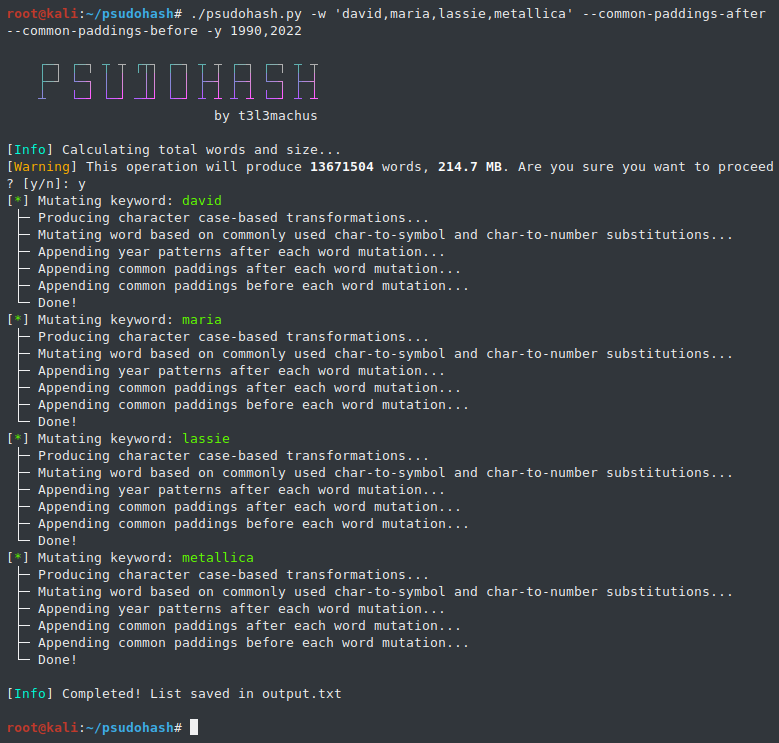
When it comes to people, i think we all have (more or less) set passwords using a mutation of one or more words that mean something to us e.g., our name or wife/kid/pet/band names, sticking the year we were born at the end or maybe a super secure padding like "!@#". Well, guess what?
Future
I'm gathering information regarding commonly used password creation patterns to enhance the tool's capabilities.
Related Skills
node-connect
345.4kDiagnose OpenClaw node connection and pairing failures for Android, iOS, and macOS companion apps
frontend-design
104.6kCreate distinctive, production-grade frontend interfaces with high design quality. Use this skill when the user asks to build web components, pages, or applications. Generates creative, polished code that avoids generic AI aesthetics.
openai-whisper-api
345.4kTranscribe audio via OpenAI Audio Transcriptions API (Whisper).
qqbot-media
345.4kQQBot 富媒体收发能力。使用 <qqmedia> 标签,系统根据文件扩展名自动识别类型(图片/语音/视频/文件)。
