
Exifcleaner
Cross-platform desktop GUI app to clean image metadata
Install / Use
/learn @szTheory/ExifcleanerREADME
<img src="static/icon.svg" height=26> ExifCleaner


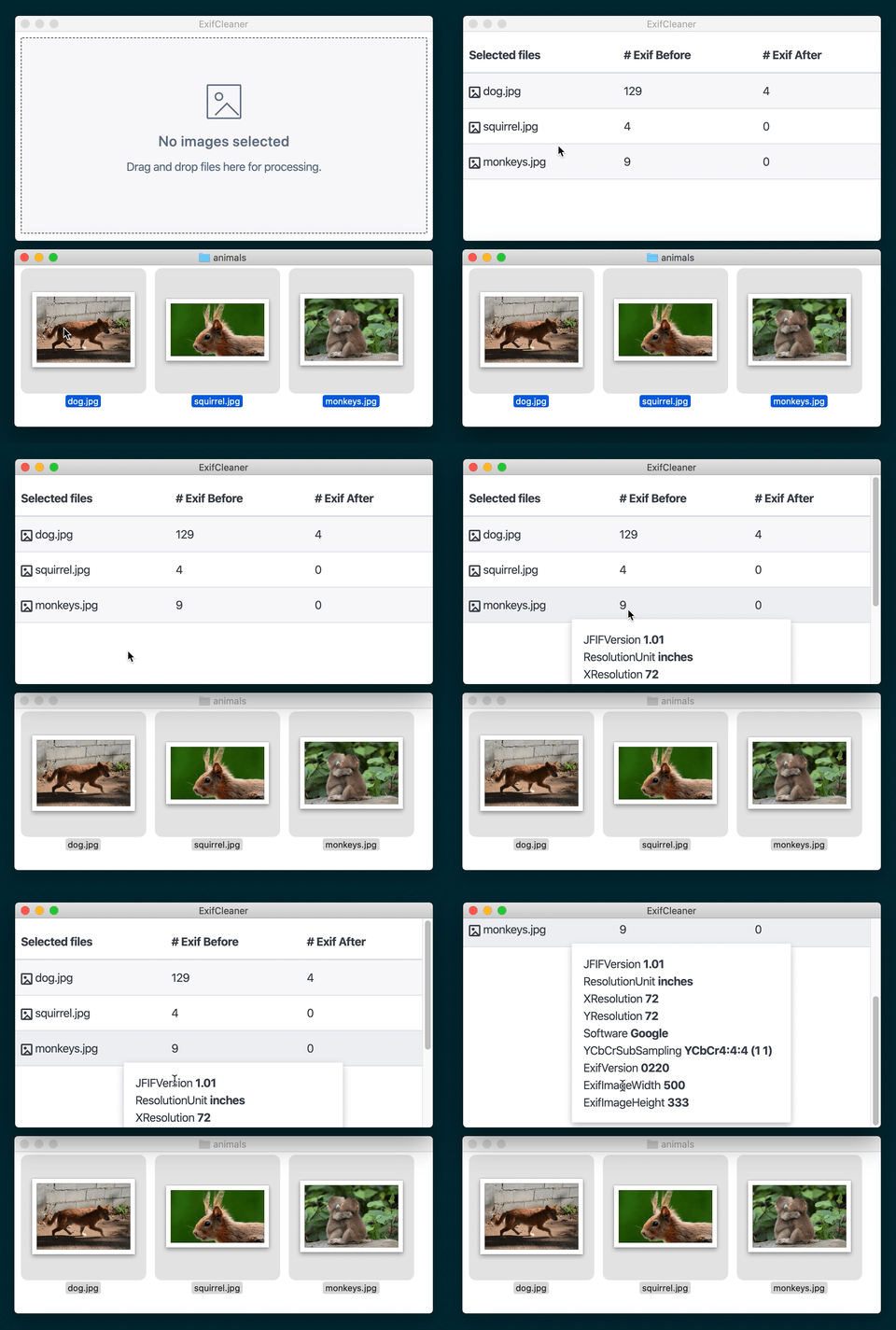
Desktop app to clean metadata from images, videos, PDFs, and other files.
!!!!! NOTE - UPGRADE TO 3.6.0+ ASAP !!!!!
If you are running a version of ExifCleaner before 3.6.0, upgrade immediately! A security vulnerability was found in exiftool, the command-line application that powers ExifCleaner under the hood, and this was updated in ExifCleaner 3.5.0. There was also an XSS and Electron remote shell vulnerability due to unsanitized HTML output that was fixed in ExifCleaner 3.6.0.
Benefits
- Fast
- Drag & Drop
- Free and open source (MIT)
- Windows, Mac, and Linux
- Supports popular image formats such as PNG, JPG, GIF, and TIFF
- Supports popular video formats such as M4A, MOV, and MP4
- Supports PDF documents* (partial, see discussion)
- Batch-processing
- Multi-core support
- Dark mode (automatic)
- No automatic updates or network traffic
- Multi-language support
- Relatively few NPM dependencies (no JS frameworks)
Drawbacks
- Executable size
~200MB(Electron app) - Memory usage
~120MB(Electron app) - PDF metadata removal is only partial (see discussion)
- Does not remove extended filesystem attributes (see discussion)
Download and Install
Linux, macOS 10.10+, and Windows 7+ are supported (64-bit only).
- Linux: Download the .AppImage, .deb, or .rpm file
- macOS: Download the .dmg file
- Windows: Download the .exe file
For Linux, The AppImage needs to be made executable after download.
Arch Linux users can install the app from the AUR using an AUR helper (such as yay or paru):
paru -S exifcleaner-bin
Links
Supported File Types
Below is a full list of supported file types that ExifCleaner will remove metadata for. It's based on which file types ExifTool supports write operations for.
- 3G2, 3GP2 – 3rd Gen. Partnership Project 2 a/v (QuickTime-based)
- 3GP, 3GPP – 3rd Gen. Partnership Project a/v (QuickTime-based)
- AAX – Audible Enhanced Audiobook (QuickTime-based)
- AI, AIT – Adobe Illustrator [Template] (PS or PDF)
- ARQ – Sony Alpha Pixel-Shift RAW (TIFF-based)
- ARW – Sony Alpha RAW (TIFF-based)
- AVIF – AV1 Image File Format (QuickTime-based)
- CR2 – Canon RAW 2 (TIFF-based) (CR2 spec)
- CR3 – Canon RAW 3 (QuickTime-based) (CR3 spec)
- CRM – Canon RAW Movie (QuickTime-based)
- CRW, CIFF – Canon RAW Camera Image File Format (CRW spec)
- CS1 – Sinar CaptureShop 1-shot RAW (PSD-based)
- DCP DNG – Camera Profile (DNG-like)
- DNG – Digital Negative (TIFF-based)
- DR4 – Canon DPP version 4 Recipe
- DVB – Digital Video Broadcasting (QuickTime-based)
- EPS, EPSF, PS – [Encapsulated] PostScript Format
- ERF – Epson RAW Format (TIFF-based)
- EXIF – Exchangeable Image File Format metadata (TIFF-based)
- EXV – Exiv2 metadata file (JPEG-based)
- F4A, F4B, F4P, F4V – Adobe Flash Player 9+ Audio/Video (QuickTime-based)
- FFF – Hasselblad Flexible File Format (TIFF-based)
- FLIF – Free Lossless Image Format
- GIF – Compuserve Graphics Interchange Format
- GPR – GoPro RAW (DNG-based)
- HDP, WDP, JXR – Windows HD Photo / Media Photo / JPEG XR (TIFF-based)
- HEIC, HEIF – High Efficiency Image Format (QuickTime-based)
- ICC, ICM – International Color Consortium color profile
- IIQ – Phase One Intelligent Image Quality RAW (TIFF-based)
- IND, INDD, INDT – Adobe InDesign Document/Template
- INSP – Insta360 Picture (JPEG-based)
- JP2, JPF, JPM, JPX – JPEG 2000 image [Compound/Extended]
- JPEG, JPG, JPE – Joint Photographic Experts Group image
- LRV – Low-Resolution Video (QuickTime-based)
- M4A, M4B, M4P, M4V – MPEG-4 Audio/Video (QuickTime-based)
- MEF – Mamiya (RAW) Electronic Format (TIFF-based)
- MIE – Meta Information Encapsulation (MIE specification)
- MOS – Creo Leaf Mosaic (TIFF-based)
- MOV, QT – Apple QuickTime Movie
- MP4 – Motion Picture Experts Group version 4 (QuickTime-based)
- MPO – Extended Multi-Picture format (JPEG with MPF extensions)
- MQV – Sony Mobile QuickTime Video
- NEF – Nikon (RAW) Electronic Format (TIFF-based)
- NRW – Nikon RAW (2) (TIFF-based)
- ORF – Olympus RAW Format (TIFF-based)
- PDF – Adobe Portable Document Format
- PEF – Pentax (RAW) Electronic Format (TIFF-based)
- PNG, JNG, MNG – Portable/JPEG/Multiple-image Network Graphics
- PPM, PBM, PGM – Portable Pixel/Bit/Gray Map
- PSD, PSB, PSDT – PhotoShop Document / Large Document / Template
- QTIF, QTI, QIF – QuickTime Image File
- RAF – FujiFilm RAW Format
- RAW – Panasonic RAW (TIFF-based)
- RW2 – Panasonic RAW 2 (TIFF-based)
- RWL – Leica RAW (TIFF-based)
- SR2 – Sony RAW 2 (TIFF-based)
- SRW – Samsung RAW format (TIFF-based)
- THM – Thumbnail image (JPEG)
- TIFF, TIF – Tagged Image File Format
- VRD – Canon DPP Recipe Data
- X3F – Sigma/Foveon RAW
- XMP – Extensible Metadata Platform sidecar file
File writer limitations
ExifCleaner has the same writer limitations as the underlying exiftool it depends on. Taken from the official website:
- ExifTool will not rewrite a file if it detects a significant problem with the file format.
- ExifTool has been tested with a wide range of different images, but since it is not possible to test it with every known image type, there is the possibility that it will corrupt some files. Be sure to keep backups of your files.
- Even though ExifTool does some validation of the information written, it is still possible to write illegal values which may cause problems when reading the images with other software. So take care to validate the information you are writing.
- ExifTool is not guaranteed to remove metadata completely from a file when attempting to delete all metadata. For JPEG images, all APP segments (except Adobe APP14, which is not removed by default) and trailers are removed which effectively removes all metadata, but for other formats the results are less complete:
- JPEG - APP segments (except Adobe APP14) and trailers are removed.
- TIFF - XMP, IPTC, ICC_Profile and the ExifIFD are removed, but some EXIF may remain in IFD0. (The CommonIFD0 Shortcut tag is provided to simplify removal of common metadata tags from IFD0.)
- PNG - Only XMP, EXIF, ICC_Profile and native PNG textual data chunks are removed.
- PDF - The original metadata is never actually removed.
- PS - Only XMP and some native PostScript tags may be deleted.
- MOV/MP4 - Most top-level metadata is removed.
- RAW formats - It is not recommended to remove all metadata from RAW images because this will likely remove some proprietary information that is necessary for proper rendering of the image.
Translations
New translations and corrections to existing translations are welcome! See the Adding a Translation section if there is a language you would like to add. Here is the current translations status:
- Arabic ✅ by @ZER0-X
- Chinese (Mandarin) ✅ by MarcusPierce
- Croatian ✅ by @milotype
- Czech ✅ by @t0mzSK
- Danish ✅ by @zlatco
- Dutch ✅ by @rvl-code
- French (France) ✅ by @NathanBnm (Nathan Bonnemains)
- French (Quebec) ❌ needs translation if France version is not sufficient
- German ✅ by @tayfuuun, with updates by @philippsandhaus
- Hungarian ✅ by @icetee (Tamás András Horváth)
- Italian ✅ by @PolpOnline
- Japanese ✅ by @AKKED
- Malayalam by ✅ by @theunknownKiran
- Polish ✅ by @m1chu
- Portuguese (Brazil) ✅ by @iraamaro, with updates by @dadodollabela
- Portuguese (Portugal) ❌ needs translation if Brazil version is not sufficient
- Russian ✅ by @likhner (Arthur Likhner)
- Spanish (Spain) ✅ by @ff-ss (Francisco)
- Spanish (Latin America) ❌ needs translation if Spain version is not sufficient
- Swedish ✅ by @sastofficial
- Slovak ✅ by @LiJu09
- Turkish ✅ by @bsonmez (Burak Sonmez)
- Ukranian ✅ by @hugonote (Alexander Berger)
- Vietnamese ✅ by @tensingnightco
Verifying checksum of downloads from the Github releases page
Download the latest.yml (Windows), latest-mac.yml (Mac), or latest-linux.yml (Linux) file from the release page that corresponds to your o
