
Hermod
voice services stack from audio hardware through hotword, ASR, NLU, AI routing and TTS bound by messaging protocol over MQTT
Install / Use
/learn @syntithenai/HermodREADME
This repository provides a framework for building voice based applications.
It was created to simplify integrating custom speech services into a website.
It can also be used to build standalone alexa like devices that do not need a network.
Inspired by Snips, the software is provided as a suite of microservices that collaborate using a shared MQTT server. Services include
- audio capture and playback services for local hardware
- audio to text - automated speech recognition(ASR) using streaming for fastest transcriptions. Includes implementations for Deepspeech, IBM Watson and Google
- hotword optimised audio to text using picovoice.
- text to speech (TTS)
- RASA based Natural Language Understanding (NLU) to determine intents and slots from text
- RASA routing using machine learning of stories to translate a history of intents and slots into a choice about the next action.
A sequence of messages passes between the services as the dialog progresses from hotword triggering through speech to text, natural language understanding, routing and finally text to speech in reply to the user.
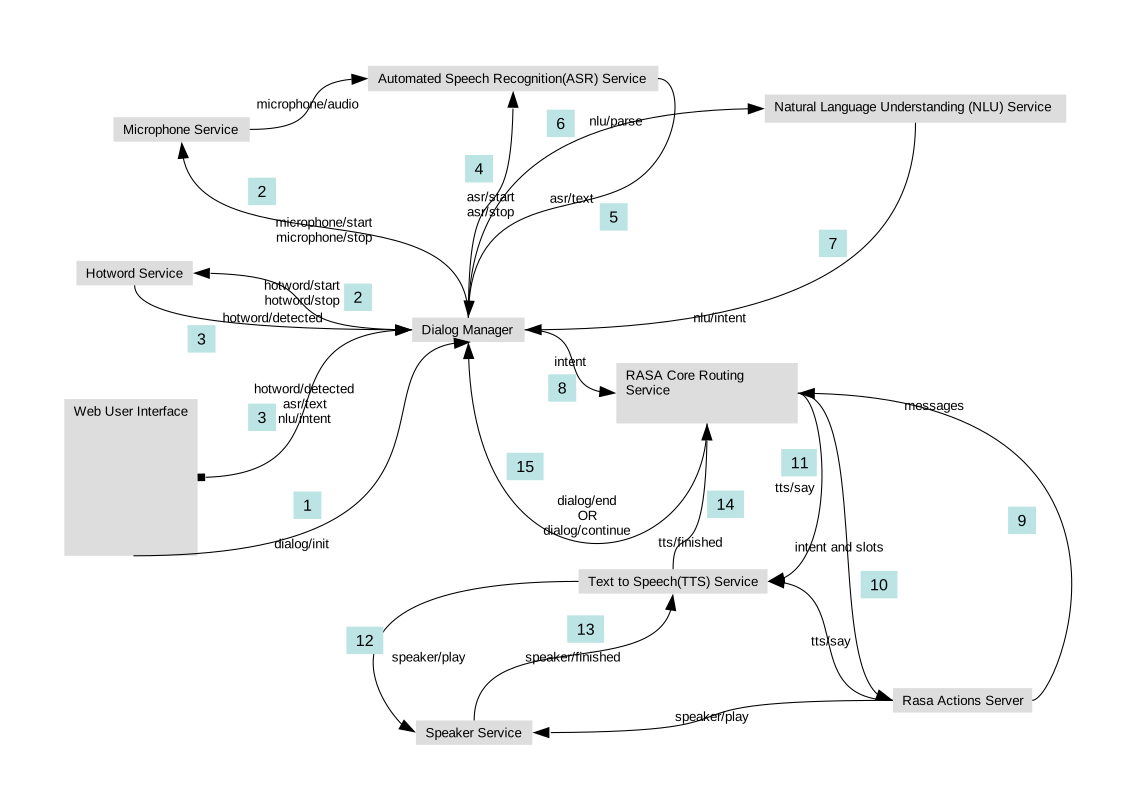
The software also provides a vanilla javascript library and example for integrating a hotword and visual microphone into a web page as a client of the suite. The client uses mqtt over websockets for live communication and streaming audio back to the hermod server.
The hermod services run in a single threaded asyncio loop for optimimum performance on limited hardware.
Services can be distributed across hardware for high concurrency applications or distributed LAN deployments (satellite mode with pi0)
This project has recently been ported from nodejs to python. In particular on ARM, in my experience, stable packages for speech recognition were more difficult to achieve with nodejs than python. Additionally RASA written in python is a core part of the suite so the portage unifies the development environment for the server side. Access the historic nodejs version remains available via the nodejs branch
Quickstart
The suite provides a Dockerfile to build an image with all os and python dependancies.
The resulting image is available on docker hub as syntithenai/hermod-python.
By default, the image runs all the software required for the suite in a single container.
This repository also provides a docker-compose.yml file to start the suite with services split into many containers.
The image also provides a default set of RASA model files defining configuration, domain, intents, stories and actions for an agent that searches wikipedia.
# install docker
sudo curl -fsSL https://get.docker.com -o get-docker.sh | sh

# install docker-compose
sudo curl -L https://github.com/docker/compose/releases/download/1.22.0/docker-compose-$(uname -s)-$(uname -m) -o /usr/local/bin/docker-compose

# clone this repository
git clone https://github.com/syntithenai/hermod.git

# change directory into it so relative paths in docker-compose.yml to host mounts work correctly
cd hermod

# copy environment from sample (edit as required)
cp .env-sample .env

# start services
sudo docker-compose up
# OR (with pulseaudio on host)  to enable local audio
# PULSE_HOST=`ip -4 route get 8.8.8.8 | awk {'print $7'} | tr -d '\n'` ; docker-compose up
Open (https://localhost)[https://localhost] in a web browser.
Say "Hey Edison" or click the microphone button to enable speech and then ask a question.
If local audio is enabled, you can use the hotword "Picovoice" to activate a local dialog session.
Installation
The software package has python dependencies that can be installed with
pip install -r requirements.txt
There are also operating system requirements including
- python 3.7+
- nodejs
- installation of a recent version of mosquitto
- pico2wav binary install for the TTS service
- portaudio
- pulseaudio
- download and install deep speech model
- pip install -r requirements.txt in hermod-python/src
- npm install (in hermod-python/tests and hermod-python/rasa/chatito)
See the hermod-python/Dockerfile for install instructions.*
Installation on AWS
At a bare minimum t3a.micro instance (1 cores, 1G memory) with a 16G root file system
There is not enough memory to train a model on this type of instance so building locally and uploading model files is necessary.
This hardware configuration is usable but significantly compromises the responsiveness.
Mosquitto
Newer versions (1.6+) of mosquitto include an option to restrict the header size ```` websockets_headers_size 4096```
When websockets is sharing a domain with a Flask served web application, large cookies cause mosquitto to crash disconnect.
The docker image includes a build of mosquitto 1.6.7
Compatibility
The suite was developed on using Ubuntu Desktop. It should work on most Linux systems. It is largely written in python and requires at least python 3.7
As per the notes below, cross platform shouldn't be too much of a stretch.
-
The TTS service uses a Linux binary pico2wav to generate audio from text. The Google TTS service is cross platform but requires the Internet.
-
For strictly web based services, audio is handled by the client browser so no problems with audio devices. The local Audio Service relies on pyaudio and (optionally) pulseaudio for local microphone capture and playback. Cross platform audio on python is challenging. In particular streaming with asyncio. Implementation on Windows or OSX would require the use of an alternate python sound library that works for those platforms.
-
Raspberry pi4 with ARM runs deepspeech, picovoice and the rest of the hermod suite. However, at this time i haven't been able to install RASA on ARM (although I have in the past) due to missing libraries.
Configuration
The entrypoint for the source code is the file hermod.py which has a number of command line arguments to enable and disable various features of the software suite.
Environment variables are also used to configure the hermod services.
Using docker-compose to access containers incorporates environment variables from .env
Start a shell in the running web container
docker-compose exec hermod bash
Arguments
Arguments to hermod.py are mainly used to specify which services should be activated.
Arguments include
- m (--mqttserver) run local mqtt server
- r (--rasaserver) run local rasa server
- w (--webserver) run local web server
- a (--actionserver) run local rasa action server
- d (--hermod) run the hermod services
- sm (--satellite) only run audio and hotword hermod services (for low power devices eg pi0 acting as a satellite that rely on central hermod server)
- nl (--nolocalaudio) skip local audio and hotword services (instead use browser client)
- t (train) train RASA model when starting local server
The entrypoint script hermod.py must be executed from the rasa folder.
For example to start the mosquitto, web and action servers as well as the main hermod services with local audio disabled
cd /app/rasa
python hermod.py -m -w - a -d -nl
Environment
Environment variables are used for almost all configurable values needed by services.
When using docker-compose, add environment variables to each services by editing the docker-compose.yml file OR using a .env file in the same folder.
The .env file is excluded from git and is a good place to store secrets. To enable the sample file
cp .env-sample .env
Without docker compose, environment variables should be present in the shell that runs python hermod.py
Authentication
The admin user credentials are used by the hermod services which listen and respond to messages from many sites (all topics under hermod/) The admin credentials must be provided as environment variables.
MQTT_HOSTNAME: mqtt
MQTT_USER: hermod_server
MQTT_PASSWORD: hermod
MQTT_PORT: 1883
A standalone server with local audio does not require authentication and uses the admin credentials from the environment.
Authentication details are generated for web users when they load the site.
Access to the mqtt server is partitioned by sites. A site corresponds to a mosquitto login user. The mqtt service has access rules so that an authenticated user can read and write to any topic underneath hermod/theirsiteid/
In the example, the web service generates a password when the user logs in and then uses mosquitto_password to update the mosquitto password file via a shared volume with the mosquitto server. The mosquitto server runs an additional thread to watch for changes to its password file and send a HUP signal to mosquitto to trigger a reload when the passwords change. The web server delivers the generated password to the browser client via a templated HTML content.
Deepspeech Model
The deepspeech model files required for speech recognition are not part of this repository.
They are included in the docker image syntithenai/hermod-python available on docker hub.
If you need to download them,
wget -qO- -c https://github.com/mozilla/DeepSpeech/releases/download/v0.7.0/deepspeech-0.7.0-models.tar.gz
By default, the model files are expected to be found in in ../deepspeech-models relative to the source directory.
The environment variable DEEPSPEECH_MODELS can be used to set an alternate path.
Google ASR
To enable high quality google speech recognition use console.developers.google.com to create and download credentials for a service account with google speech recognition API enabled. This will require that you enable billing in your google project.
https://console.developers.google.com/
Set environment variables to enable
GOOGLE_APPLICATION_CREDENTIALS=path to downloa
