
Swarmvault
Inspired by Karpathy's LLM Wiki. Local-first LLM knowledge base compiler (Claude Code, Codex, OpenCode, OpenClaw). Turn raw research into a persistent markdown wiki, knowledge graph, and search index that compound over time.
Install / Use
/learn @swarmclawai/SwarmvaultQuality Score
Category
Development & EngineeringSupported Platforms
README
SwarmVault
<!-- readme-language-nav:start -->Languages: English | 简体中文 | 日本語
<!-- readme-language-nav:end -->


A local-first knowledge compiler for AI agents, built on the LLM Wiki pattern. Most "chat with your docs" tools answer a question and throw away the work. SwarmVault keeps a durable wiki between you and raw sources — the LLM does the bookkeeping, you do the thinking.
Documentation on the website is currently English-first. If wording drifts between translations, README.md is the canonical source.
Three-Layer Architecture
SwarmVault uses three layers, following the pattern described by Andrej Karpathy:
- Raw sources (
raw/) — your curated collection of source documents. Books, articles, papers, transcripts, code, images, datasets. These are immutable: SwarmVault reads from them but never modifies them. - The wiki (
wiki/) — LLM-generated and human-authored markdown. Source summaries, entity pages, concept pages, cross-references, dashboards, and outputs. The wiki is the persistent, compounding artifact. - The schema (
swarmvault.schema.md) — defines how the wiki is structured, what conventions to follow, and what matters in your domain. You and the LLM co-evolve this over time.
In the tradition of Vannevar Bush's Memex (1945) — a personal, curated knowledge store with associative trails between documents — SwarmVault treats the connections between sources as valuable as the sources themselves. The part Bush couldn't solve was who does the maintenance. The LLM handles that.
Turn books, articles, notes, transcripts, mail exports, calendars, datasets, slide decks, screenshots, URLs, and code into a persistent knowledge vault with a knowledge graph, local search, dashboards, and reviewable artifacts that stay on disk. Use it for personal knowledge management, research deep-dives, book companions, code documentation, business intelligence, or any domain where you accumulate knowledge over time and want it organized rather than scattered.
SwarmVault turns the LLM Wiki pattern into a local toolchain with graph navigation, search, review, automation, and optional model-backed synthesis. You can also start with just the standalone schema template — zero install, any LLM agent — and graduate to the full CLI when you outgrow it.
<!-- readme-section:install -->Install
SwarmVault requires Node >=24.
npm install -g @swarmvaultai/cli
Verify the install:
swarmvault --version
Update to the latest published release:
npm install -g @swarmvaultai/cli@latest
The global CLI already includes the graph viewer workflow and MCP server flow. End users do not need to install @swarmvaultai/viewer separately.
Quickstart
my-vault/
├── swarmvault.schema.md       user-editable vault instructions
├── raw/                       immutable source files and localized assets
├── wiki/                      compiled wiki: sources, concepts, entities, code, outputs, graph
├── state/                     graph.json, search.sqlite, embeddings, sessions, approvals
├── .obsidian/                 optional Obsidian workspace config
└── agent/                     generated agent-facing helpers
swarmvault init --obsidian --profile personal-research
swarmvault source add https://github.com/karpathy/micrograd
swarmvault source add https://example.com/docs/getting-started
swarmvault ingest ./meeting.srt --guide
swarmvault source session transcript-or-session-id
swarmvault ingest ./src --repo-root .
swarmvault add https://arxiv.org/abs/2401.12345
swarmvault compile
swarmvault graph blast ./src/index.ts
swarmvault query "What is the auth flow?"
swarmvault graph serve
swarmvault graph export --report ./exports/report.html
swarmvault graph push neo4j --dry-run
Need the fastest first pass over a local repo or docs tree? swarmvault scan ./path --no-serve initializes the current directory as a vault, ingests that directory, compiles it, and skips opening the graph viewer when you only want the artifacts.
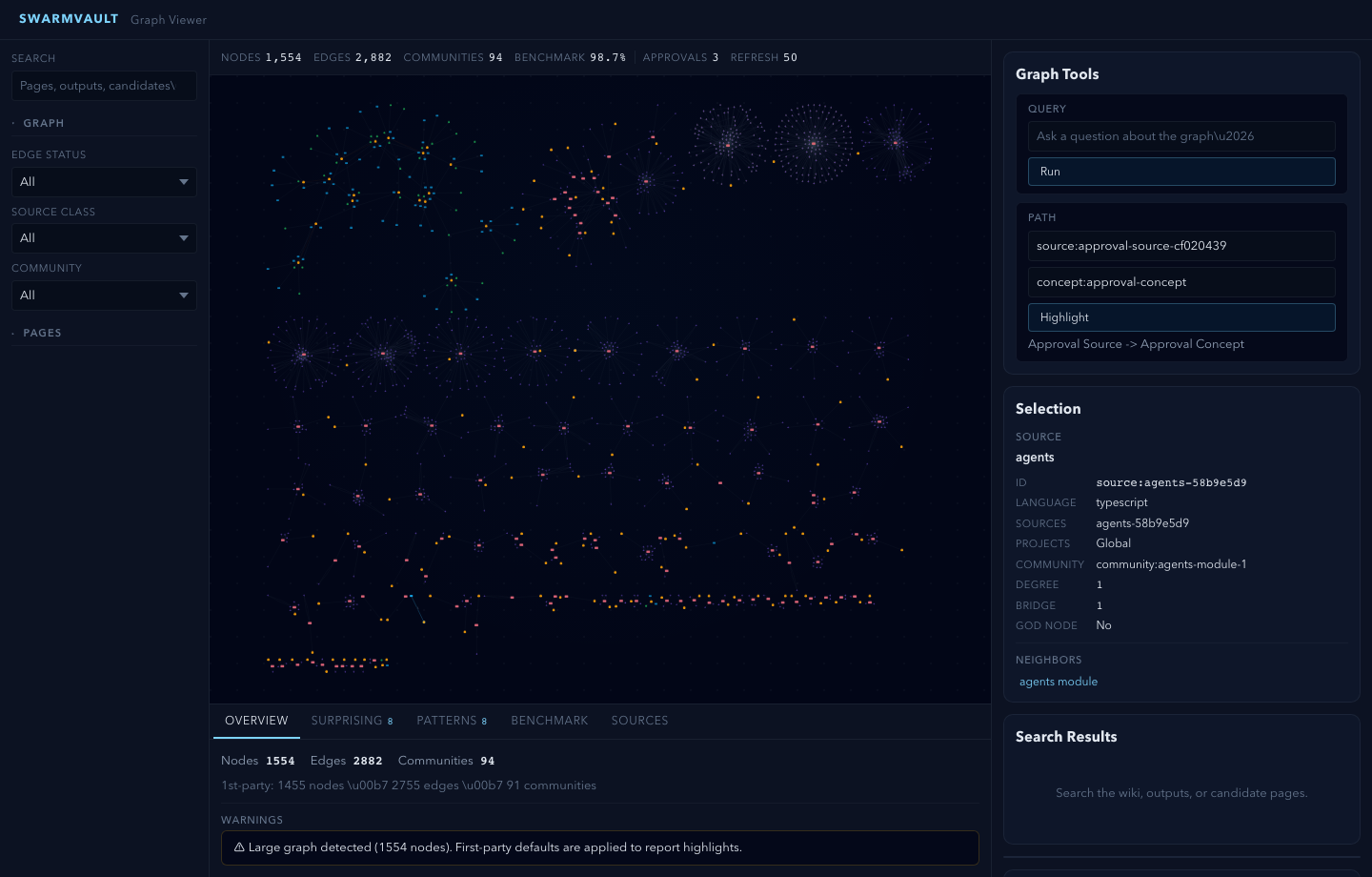
For very large graphs, swarmvault graph serve and swarmvault graph export --html automatically start in overview mode. Add --full when you want the entire canvas rendered anyway.
When the vault lives inside a git repo, ingest, compile, and query also support --commit so the resulting wiki/ and state/ changes can be committed immediately. compile --max-tokens <n> trims lower-priority pages when you need the generated wiki to fit a bounded context window.
swarmvault init --profile accepts default, personal-research, or a comma-separated preset list such as reader,timeline. The personal-research preset turns on both profile.guidedIngestDefault and profile.deepLintDefault, so ingest/source and lint flows start in the stronger path unless you pass --no-guide or --no-deep. For custom vault behavior, edit the profile block in swarmvault.config.json and keep swarmvault.schema.md as the human-written intent layer.
Optional: Add a Model Provider
You do not need API keys or an external model provider to start using SwarmVault. The built-in heuristic provider supports local/offline vault setup, ingest, compile, graph/report/search workflows, and lightweight query or lint defaults.
Recommended: local LLM via Ollama + Gemma
If you want a fully local setup with sharp concept, entity, and claim extraction, pair the free Ollama runtime with Google's Gemma model. No API keys required.
ollama pull gemma4
{
  "providers": {
    "llm": {
      "type": "ollama",
      "model": "gemma4",
      "baseUrl": "http://localhost:11434/v1"
    }
  },
  "tasks": {
    "compileProvider": "llm",
    "queryProvider": "llm",
    "lintProvider": "llm"
  }
}
When you run compile/query with only the heuristic provider, SwarmVault surfaces a one-time notice pointing you here. Set SWARMVAULT_NO_NOTICES=1 to silence it. Any other supported provider (OpenAI, Anthropic, Gemini, OpenRouter, Groq, Together, xAI, Cerebras, openai-compatible, custom) works too.
Local Semantic Embeddings
For local semantic graph query without API keys, use an embedding-capable local backend such as Ollama instead of heuristic:
{
  "providers": {
    "local": {
      "type": "heuristic",
      "model": "heuristic-v1"
    },
    "ollama-embeddings": {
      "type": "ollama",
      "model": "nomic-embed-text",
      "baseUrl": "http://localhost:11434/v1"
    }
  },
  "tasks": {
    "compileProvider": "local",
    "queryProvider": "local",
    "embeddingProvider": "ollama-embeddings"
  }
}
With an embedding-capable provider available, SwarmVault can also merge semantic page matches into local search by default. tasks.embeddingProvider is the explicit way to choose that backend, but SwarmVault can also fall back to a queryProvider with embeddings support. Set search.rerank: true when you want the configured queryProvider to rerank the merged top hits before answering.
Cloud API Providers
For cloud-hosted models, add a provider block with your API key:
{
  "providers": {
    "primary": {
      "type": "openai",
      "model": "gpt-4o",
      "apiKeyEnv": "OPENAI_API_KEY"
    }
  },
  "tasks": {
    "compileProvider": "primary",
    "queryProvider": "primary",
    "embeddingProvider": "primary"
  }
}
See the provider docs for optional backends, task routing, and capability-specific configuration examples.
Point It At Recurring Sources
The fastest way to make SwarmVault useful is the managed-source flow:
swarmvault source add ./exports/customer-call.srt --guide
swarmvault source add https://github.com/karpathy/micrograd
swarmvault source add https://example.com/docs/getting-started
swarmvault source list
swarmvault source session file-customer-call-srt-12345678
swarmvault source reload --all
source add registers the source, syncs it into the vault, compiles once, and writes a source-scoped brief under wiki/outputs/source-briefs/. Add --guide when you want a resumable guided session under wiki/outputs/source-sessions/, a staged source review and source guide, plus approval-bundled canonical page edits when profile.guidedSessionMode is canonical_review. Profiles using insights_only keep the guided synthesis in wiki/insights/ instead. Set profile.guidedIngestDefault: true in swarmvault.config.json to make guided mode the default for ingest, source add, and source reload; use --no-guide when you need the lighter path for a specific run. It now works for recurring local files as well as directories, public repos, and docs hubs. Use ingest for deliberate one-off files or URLs, and use add for research/article normalization.
Agent and MCP Setup
Set up your coding agent so it knows about the vault:
swarmvault install --agent claude --hook    # Claude Code + graph-first hook
swarmvault install --agent codex            # Codex
swarmvault install --agent cursor           # Cursor
swarmvault install --agent copilot --hook   # GitHub Copilot CLI + hook
swarmvault install --agent gemini --hook    # Gemini CLI + hook
swarmvault install --agent trae             # Trae
swarmvault install --agent claw             # Claw / OpenClaw skil
