
sunglasses
Open source input firewall for AI agents, beta. A local scanner checks text, code, PDFs, images, QR codes, audio and video with 1,569 patterns across 117 categories and reports findings and incomplete scans.
Install / Use
claude mcp add sunglasses-dev -- npx -y github:sunglasses-dev/sunglassesIf the server publishes to npm under a different name, use that package instead — check the repo README.
MCP Server
Model Context Protocol server
Quality Score
Category
SecuritySupported Platforms
Our assessment of sunglasses
sunglasses scores 75/100 on our quality scale, 1034th of 1,113 Security skills we index.
Its MCP Server is 60 KB long, well organised into 66 sections with 24 code examples: long enough that it reads more like full documentation than a focused instruction file, which agents can find harder to follow.
It has 10 GitHub stars, so there is little community track record yet; judge it on its content.
Maintenance, license and trust
- The repository was last updated today, so sunglasses is actively maintained.
- It is released under the MIT license, a permissive license that allows use, modification and commercial use with attribution.
- Its trust signals score 97/100, with no cautions. These come from repository metadata, not a code audit — read the skill file before letting an agent act on it.
sunglasses compared with similar skills
All 4 of these similar skills score higher than sunglasses; compare them before choosing.
| Skill | Score | Stars | Updated | Format |
|---|---|---|---|---|
| sunglasses (this skill)by sunglasses-dev | 75 | 10 | today | MCP Server |
| Agent-Reachby Panniantong | 100 | 95.5k | 2d ago | CLAUDE.md |
| headroomby headroomlabs-ai | 100 | 74.9k | today | CLAUDE.md |
| CowAgentby zhayujie | 100 | 47.3k | today | CLAUDE.md |
| Scraplingby D4Vinci | 100 | 86.7k | today | MCP Server |
Frequently asked questions
- How do I install sunglasses?
- Run
claude mcp add sunglasses-dev -- npx -y github:sunglasses-dev/sunglasses. The install tabs above show the steps for each supported agent. - Which AI agents does sunglasses work with?
- It is written for Claude Code and Claude Desktop, as a MCP Server file. Other agents that read the same format can often use it too.
- Is sunglasses safe to use?
- It is MIT-licensed and scores 97/100 on trust signals. Skills are instructions an agent will follow, so read the file before installing it and do not approve commands you do not understand.
- Is sunglasses still maintained?
- The repository was last updated today, so sunglasses is actively maintained.
Skill content
View source on GitHubSUNGLASSES
<!-- mcp-name: io.github.sunglasses-dev/sunglasses -->




Open source input firewall for AI agents, beta. A local scanner checks text, code, PDFs, images, QR codes, audio and video with 1,569 patterns across 117 categories and reports findings and incomplete scans. A Claude Code hook blocks secret material in tool calls and the paths and hosts your policy lists, before a tool runs, best effort under its 10 second timeout.
What works today
- Scan text, files, PDFs, images and QR codes from the CLI or from Python
- An MCP server your agent calls, and a GitHub Action that scans every pull request
- A Claude Code hook that blocks the credential paths and policy violations your policy lists, before a tool runs
- A local MCP proxy that refuses every
tools/listandtools/calluntil a person approves the server at an interactive terminal. Once approved, it withholds a credential in a tool call or in a tool result, which is the credential lane and not general inspection of everything a tool returns. Installing it is not protection on its own. See What the proxy enforces. - Outside that lane this reads input, so a clean result is a confidence floor and not a guarantee
Sunglasses is a local, open-source scanner for text and supported files. It reports what it matched and what it could not read, so you can decide what to pass onward. It produces findings and an exit status; a CI job, a Claude Code hook or your own code acts on that result.
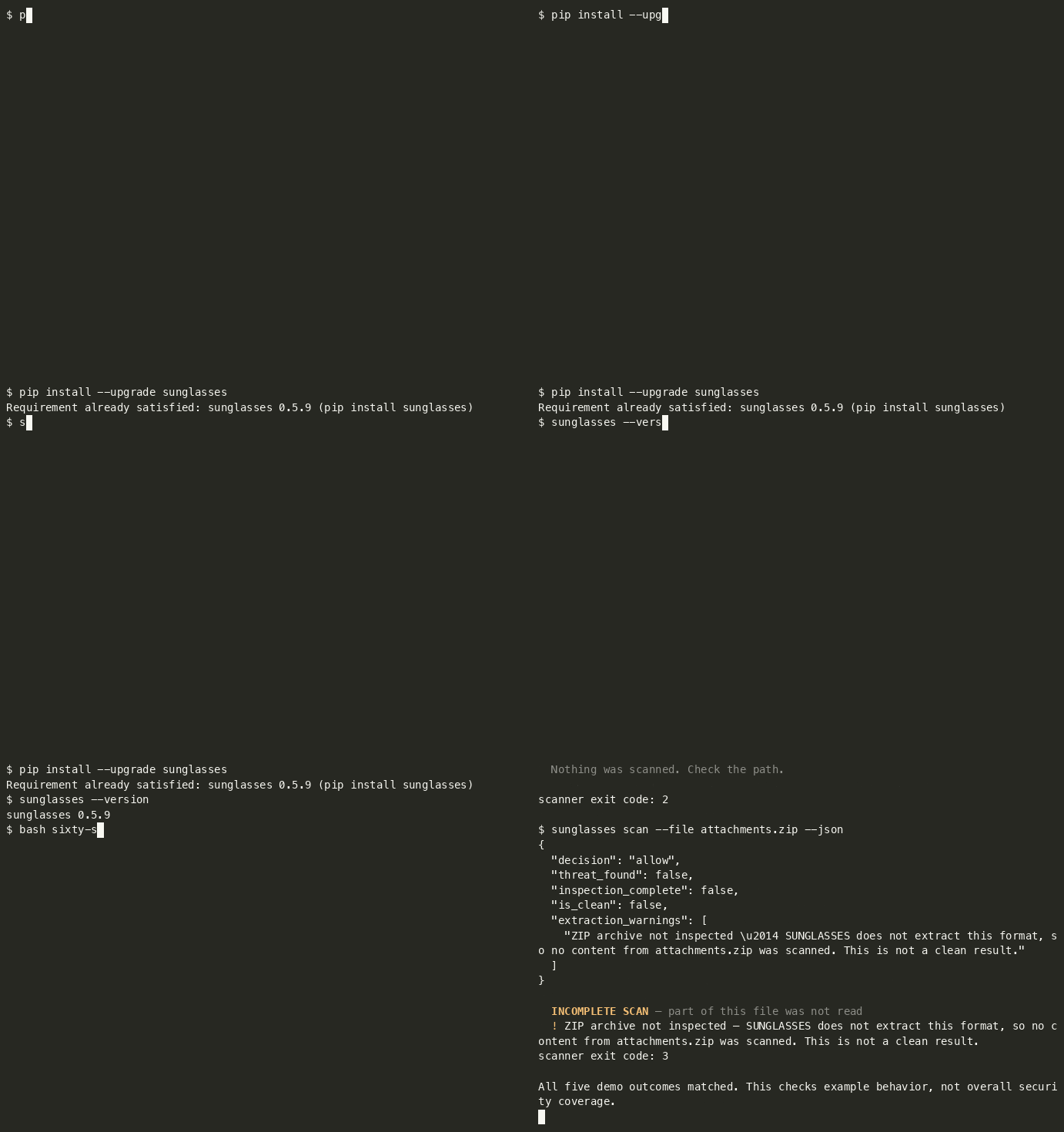
Sixty seconds
python3 -m venv .venv && source .venv/bin/activate
python -m pip install --upgrade sunglasses
curl -fsSL -o sixty-seconds.sh https://raw.githubusercontent.com/sunglasses-dev/sunglasses/main/demo/sixty-seconds.sh && bash sixty-seconds.sh
An activated virtualenv keeps the install and the sunglasses your shell resolves in the
same environment, and --upgrade matters if you already have an older version. curl -fsSL
fails on an HTTP error instead of saving the error page, so the script only runs if the
download actually succeeded.
The script writes three fixture files into a temp directory, and deliberately scans a fourth path that does not exist, five scanner invocations in total, because the archive is scanned twice (human output and JSON). The script's own commands execute; scanned content stays data (it is never executed, and the ZIP is not extracted).
Abbreviated output, recorded on 0.5.6. Finding rows 2-5 are omitted below; timings and presentation are not shown because they vary:
$ sunglasses scan --file notes.md            # ordinary sprint notes
  PASS — No threats detected.
scanner exit code: 0

$ sunglasses scan --file vendor-brief.md     # a vendor brief with an instruction buried in it
  BLOCK [HIGH] — 6 threat(s) found:
  1. [HIGH] Ignore previous instructions            GLS-PI-001
  … findings 2-5 omitted …
  6. [HIGH] Data exfiltration to sink (mechanism)   GLS-MECH-003
scanner exit code: 1

$ sunglasses scan --file attachments.zip     # an archive we do not extract
  INCOMPLETE
  No findings in the inspected scope. Part of this input was not read, so this is
  not a clean result.
scanner exit code: 3

$ sunglasses scan --file missing.md
  File not found: missing.md — Nothing was scanned. Check the path.
scanner exit code: 2
And the same archive as JSON. Selected fields from the scan document, not the whole of it:
{
  "decision": "allow",
  "threat_found": false,
  "inspection_complete": false,
  "is_clean": false,
  "extraction_warnings": [
    "ZIP archive not inspected — SUNGLASSES does not extract this format, so no content from attachments.zip was scanned. This is not a clean result."
  ]
}
decision: allow with is_clean: false. Nothing matched because nothing was read, and
the result says so. Do not treat decision: allow alone as permission to proceed, this
result is incomplete. The document exposes the distinction; acting on it is the caller's
job.
Timings and presentation vary. The demo checks the exit statuses and the ZIP coverage fields; report a mismatch against your installed version.
⭐ If this is useful, consider starring the repository.
🕶 Or try it in your browser, no install: sunglasses.dev/scan (scan text, GitHub repos, or images). Image OCR runs locally in your browser; the image never leaves your device.
What the proxy enforces
python -m sunglasses.proxy -- <your server command> runs a real MCP server as
a child process and mediates the stdio session between it and your client.
What it does depends entirely on whether that server has been approved, and
the two states are very different.
Before approval, your client's tool requests are refused
Out of the box, every tools/list and tools/call from your client is
refused. The client receives a typed JSON-RPC error like this one.
{"jsonrpc":"2.0","id":3,"error":{"code":-32070,"message":"SUNGLASSES_WITHHELD",
 "data":{"reason_code":"APPROVAL_REQUIRED","rule":"S4",
         "status":"not_run","inspection_complete":false,
         "inspected_utf8_bytes":0,
         "server_id":"40ed892fc0f0b8819c294778c492dbd0",
         "snapshot_sha256":"26aeeb2f7c5b61aa33523967171d46c0d248cd13d612cef913b089daccae4c64"}}}
server_id and snapshot_sha256 are the two values the approve command
needs, and the refusal is where you get them. You do not have to look inside
the state directory to find out what to approve.
status: not_run and inspected_utf8_bytes: 0 describe your client's
request. It is not forwarded to the server and its arguments are not scanned.
The proxy does read the server's own tool list first. It fetches every
tools/list page from the server and scans the descriptors to build the
snapshot you approve. A page with a finding is refused on that finding before
any approval is looked up. Installing the proxy does not protect anything by
itself.
Approval is a deliberate human step and it requires an interactive terminal.
$ python -m sunglasses.proxy approve <server_id> --snapshot <snapshot_sha256>
approving records that a human viewed this capture, and this is not an
interactive terminal, so nobody did          # exits 1, nothing is recorded
It prints the tool names and the first 16 characters of each descriptor digest, then asks. It records that someone at an interactive terminal answered yes to that list. From a pipe it refuses. Run it at a real terminal and answer the prompt.
An approval belongs to one server, not to a tool list. The snapshot hash
covers the descriptors, and two different servers exposing the same tools have
the same snapshot_sha256, but they get different server_ids, and the
approval is stored against the server_id. Measured: two servers whose
captures both read snapshot_sha256 26aeeb2f7c5b61aa… carry the ids
8740fa6360ce72946fa5a99e86974e01 and 0096972d2543ec556ad9eefe9c144b05, and
approving the first left the second refusing with APPROVAL_REQUIRED until it
was approved at its own terminal prompt.
So changing the command behind a familiar tool list does not inherit the approval you already gave. A server that presents the same descriptors as one you trust is still a server you have not approved.
After approval (both directions, in the credential lane)
With the snapshot approved, the mediator inspects messages in both directions and withholds one whose content the engine blocks, returning the reason code, the rule, the bytes inspected and the rule ids that fired:
{"jsonrpc":"2.0","id":3,"error":{"code":-32070,"message":"SUNGLASSES_WITHHELD",
 "data":{"reason_code":"PROHIBITED_CONTENT","rule":"S2","status":"complete",
         "inspection_complete":true,"inspected_utf8_bytes":87,
         "rule_ids":["GLS-SD-001-API","GLS-SD-003-API"]}}}
- A credential in a tool RESULT is withheld from your client. The
-APIrules are the tool-result channel. GLS-SD-010is line-anchored, and that is a limit in every channel. It matches an assignment at the start of a line, so aKEY=valuethat is indented by any whitespace, or sits inside a JSON string, or sits behind a quote, is not matched on any channel, not in a tool result, and not in a file or a message either, which are channels it does declare. Indentation alone is enough, which makes this wider than it sounds: a config block, a YAML mapping or an indented snippet all miss. Note the assignment's POSITION is what matters and not the quoting of its value.PASSWORD="hunter2"at a line start is matched,"PASSWORD=hunter2"is not. When the value is in a known credential format theGLS-SD-001family still catches it everywhere (GLS-SD-001on file, message and web content,GLS-SD-001-APIin a tool result), so what is actually uncovered is an assignment whose value has no recognisable shape (a password, a DSN, an internal token) once it is embedded. Closing it needs a different anchor, which is a new rule with its own fixtures rather than a channel added to this one.- A credential in a tool CALL does not reach the server. Verified by reading the receiving server's own input, not by asking the proxy.
- Ordinary traffic passes.
tools/listreturns the real list and a benign call returns its real result.
What this is not
This is the credential lane on tool results and tool calls. It is not general inspection of everything a tool returns, and no comparison with any other tool is claimed. See Not claimed in this release in CHANGELOG.md.
Four exit statuses, deliberately different signals:
| exit | meaning |
|---|---|
| 0 | inspection completed in the supported scope, and nothing matched |
| 1 | threat found (the inspection may still have been incomplete, and that is reported alongside) |
| 3 | incomplete, nothing matched in the part that was inspected; some component was not |
| 2 | usage or operational error |
0 and 3 never collapse into each other. "Everything I support reading here was read,
and nothing matched" and "this format was not inspected" are different facts, and the second
one is where agents get hurt. Exit 0 is not a guarantee that a file is safe, only that the
supported scope was covered and no pattern fired. In JSON the same split is explicit:
is_clean is not threat_found and inspection_complete.
Try the proxy in two minutes
You do not need an MCP client for this. The package ships a tiny server,
sunglasses/proxy/echo_server.py, bundled for the proxy self test; it works as a sample server, it is not a supported surface.
It has one tool, echo. Run all
of it from o
Truncated for display — read the full file on GitHub.
Related Skills
Agent-Reach
95.5kGive your AI agent eyes to see the entire internet. Read & search Twitter, Reddit, YouTube, GitHub, Bilibili, XiaoHongShu — one CLI, zero API fees.
headroom
74.9kCompress tool outputs, logs, files, and RAG chunks before they reach the LLM. 20% fewer tokens for coding agents, 60-95% fewer tokens for JSON, same answers. Library, proxy, MCP server.
CowAgent
47.3kOpen-source personal AI assistant & Agent Harness. Plans tasks, runs tools and skills, self-evolves with memory and knowledge. Multi-agent, multi-model, multi-channel. Lightweight, extensible, one-line install.
Scrapling
86.7k🕷️ An adaptive Web Scraping framework that handles everything from a single request to a full-scale crawl! Don't be shy, join here: https://discord.gg/EMgGbDceNQ and follow here for daily tips and tricks: https://x.com/Scrapling_dev

Languages
Trust signals
From repository metadata: license, adoption, age and documentation. Not a code audit — see the Safety scan above for what the skill file itself contains.