
Screenkeys
Hardware & Software for drive 1..64 LCD Screenkeys LC button w Teensy3.x
Install / Use
/learn @sumotoy/ScreenkeysREADME
screenkeys
Hardware & Software for drive 1..64 LCD Screenkeys LC button with Teensy3.x<br>
 <br>
<br>
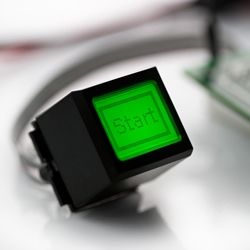
<b>What is a Screenkey?</b><br>
Screenkey it's a button with an LCD incorporated from a company called Screenkeys, not easy to find in the consumer market since they are very expensive but very popular in big video studios and avionics.<br> Using a tiny LCD inside a momentary button require at list a microcontroller and thanks to their miniaturization the access it's not so easy as supposed. I've managed to hack only LC16 and LC24 and they are both 6 pin devices, just 2 wires need to be individually managed.<br> First 2 problems: they uses syncronous programming and clock needs to be constantly feeded to all devices or they get quickly damaged...<br> Another headache it's the protocol, easy, but uses a weird parity bit that need to be constantly calculated and can be even or odd (depends of the command)<br> The last problem it's how to manage many of these little beasts without dedicate tons of hardware and microcontroller resources.<br><br> Taked a look around...Just one guy writed something barely usable but works only for a button, code was more an experiment and refresh frequency was so low that the key will be damaged in less than one year.<br><br> The company has some documentation based on old microcontrollers and uses shift registers that I'm try to avoid because they easily inject interferences in audio and they designed for old era microprocessors so they still use a lot of pins!<br> I got some hundreds of these keys from an auction so I decided to design something.<br>
<b>Hardware Design:</b><br>
Forget Arduino uno et similar, they simply have insufficent resources, so I choosed one of my preferred Micro around, Teensy3.x from <b>Paul Stoffregen</b> http://www.pjrc.com/store/teensy3.html that it's a 32bit tiny microcontroller with a lot of features and much better supported than gigantic and expensive Arduino Due.<br> To get around the clock problem by choosing to use 2 clocks that can be switched automatically by microcontroller and it worked well. Then I decided to use some SPI 16bit gpio's from Microchip, the MCP23s17 that it's faster than SR and I2C and uses a unique feature called HAEN that let me share all pins between chips so only 3 pins are needed for detecting 64 switches individually and I have the data line for each switch as well. For this purpose I coded recently a library here that let me drive many of those chips. I just added a couple of buffers for the clock and a level translator for Teensy3.<br> I choosed a refreshing clock between 500Khz to 2Mhz, a task that for Teesy3 it's pretty easy but I got the same results even if I tried to use a dedicated oscillator, just need to inform Micro at what speed I'm driving LCD's.<br> In conclusion, the pins needed are:<br> MISO,MOSI,SCK from SPI that can be shared with other periferals.<br> A dedicated CS pin for all GPIO's<br> A dedicated pin with INT capabilities for all GPIO connected to the keyscan.<br> A dedicated pin for Clock Enable.<br> A dedicated pin for Clock Programming.<br> Only 4 pin dedicated for 64 buttons with 64 lcd... not bad, I can live with it!<br>
<b>Software Design:</b><br>
Since many switches can be used I choosed to working with just one display buffer (64 bytes,512bits) that can be changed on the fly and sent to every LCD. For this reason the library has the main graphic methods that are common for every display and a child of the same library has the specific commands to inject code into display every display, this method give me also the ability to extend the display types easily. The LCD works in 'graphic' mode so text and graphic can be mixed.<br> Graphics methods works around a pixel engine that write directly into the buffer and have rotation and origin-change capabilities, this to have the maximum flexibility if you plan to put display in vertical or you turned it upside down.<br> Library has the ability to send Bitmap Graphics and use custom fonts of any type, Ill include a conversion utility in java for that.<br>
<b>Experiments:</b><br>
I have tested library and hardware with 48 switches and works like a charm, it can support max 64 switches. With 48 switches (this means 48 tiny LCD screens!!!) Teensy3 resources are used at 1 to 5%, not bad and I was right to choose the direct switch identification instead of a matrix, for the price of these switches I really need multiple key ident, not possible with matrix (oops, possibly but with several restrictions)<br>
<b>64Keys, 1 buffer??:</b><br>
Screenkeys are designed as Button with programmable custom graphics, not really a classic LCD! They are not designed for animations or fast updates on several buttons. Once you sent screen buffer to button it will remain steady until you change it's content (thanks to the refreshing clock) so it's simply a waste of resources and memory assign to every button a separate buffer. Each buffer it 64 bytes, 512bits, small for a classic processor but a lot for a tiny microcontroller! Every graphic function in library works on a single buffer and just to the end you will have to call the refresh command that will send to the choosed button the screen content so procedure to write over several buttons are slight different from a common graphic lcd screen.<br>
- Before create something, clear buffer.<br>
- Write what you want. You can even load the buffer with bitmap graphics.<br>
- Send the buffer to the desired button.<br>
And so on...<br> It's clear obvius that you cannot refresh all buttons in one time but you need to do this procedure for each button but this it's fast enough to result as a realtime to human eyes, even with 64 buttons!
-----------------------------------------------------------------------------------------<br>
<b>Features:</b><br>
- 64 x LC16.2 LCD-Buttons supported by 6/7 wires.
- Small microcontroller resources footprint.
- Main clock for LCD refresh can be generated by microcontroller or external (1 wire less).
- 500K to 3Mhz refresh clock speed.
- Access to all parameters of the LC16.
- Full system of 64 Switches needs 10 external IC's.
- Can be splitted in boards of 16 Switches.
- Can send/receive infos in I2C,RS485,Ethernet or as USB Hid/Keyboard trough Teensy3 programming.
- Interfacing with 3V3 or 5V systems.
- Identify multiple buttons pressed.
- If internal keyscan is not used it can be expanded to 128 switches.
<b>FAQ:</b><br>
<dl> <dt>Library works 'out of the box'? Just connect the switch?</dt> <dd><b>NO!</b> Needs specific hardware (still not published).</dd> <dt>How many switches support?</dt> <dd>Actually 64 but can be exanded even more.</dd> <dt>Can work with other Microcontrollers?</dt> <dd>can be... But Teensy 3.x it's perfect for this project and arduinos are not in my todo list.</dd> </dl><b>Development Status:</b><br>
<b>0.6b1:</b>
- [x] Screenkey low level routines.
- [x] Graphic routines.
- [x] Text routines.
- [x] 64 Screenkeys addressing.
- [d] Switch Scan routines. working 1 GPIO mode, not tested multiple GPIO mode
For commercial purposes and licence questions please contact me.(sumotoy < at > gmail.com)
 <br>
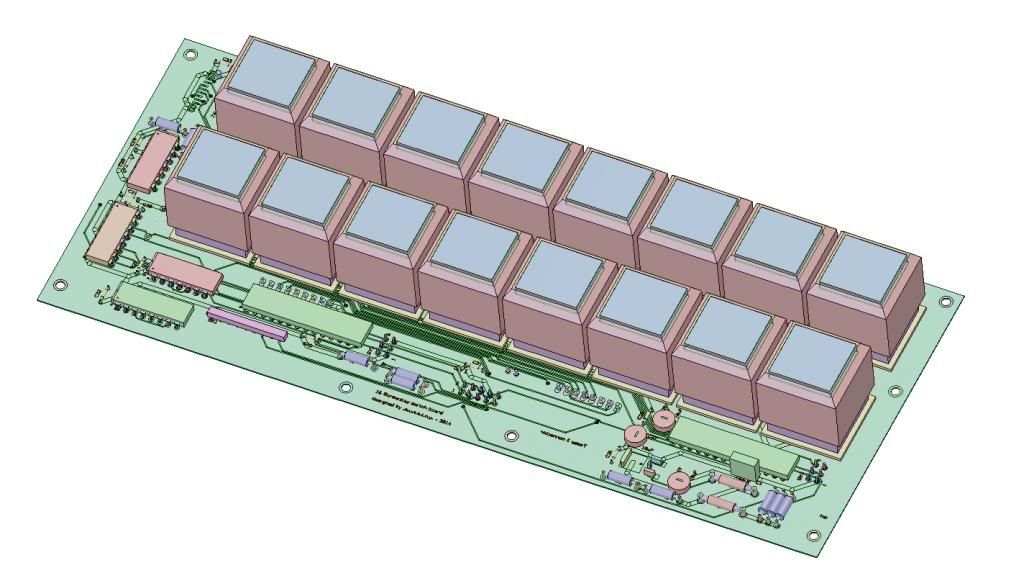
This is the 16 switch board.<br>
This board has all the needed electronics and works with Teensy3.0 as well Teensy3.1, it has been designed to use DIP ic's so it's easy to buildup. Has internal level converters and IDC 10 pin connector to expand in bloks of 16 switches by shared the same wires. The expansions has less chips since this one mounts level converters and oscillator logic that it's common to all boards so they need only 2 GPIO's extra for every 16 switches plus a buffer.<br>
Other boards design, coming next, allow 8 inline buttons and are more compact but drivers are all mounted in a doughter board and all components are SMD.
<br>
This is the 16 switch board.<br>
This board has all the needed electronics and works with Teensy3.0 as well Teensy3.1, it has been designed to use DIP ic's so it's easy to buildup. Has internal level converters and IDC 10 pin connector to expand in bloks of 16 switches by shared the same wires. The expansions has less chips since this one mounts level converters and oscillator logic that it's common to all boards so they need only 2 GPIO's extra for every 16 switches plus a buffer.<br>
Other boards design, coming next, allow 8 inline buttons and are more compact but drivers are all mounted in a doughter board and all components are SMD.
Related Skills
node-connect
349.7kDiagnose OpenClaw node connection and pairing failures for Android, iOS, and macOS companion apps
frontend-design
109.7kCreate distinctive, production-grade frontend interfaces with high design quality. Use this skill when the user asks to build web components, pages, or applications. Generates creative, polished code that avoids generic AI aesthetics.
openai-whisper-api
349.7kTranscribe audio via OpenAI Audio Transcriptions API (Whisper).
qqbot-media
349.7kQQBot 富媒体收发能力。使用 <qqmedia> 标签,系统根据文件扩展名自动识别类型(图片/语音/视频/文件)。
