
Enchat
End-to-end encrypted, ephemeral, self-hosted terminal chat — no accounts, no history, no cloud.
Install / Use
/learn @sudodevdante/EnchatREADME
🔐 Enchat - Encrypted Under The Radar Terminal Chat
<div align="center"> <b><a href="https://enchat.io">Website</a></b> • <b><a href="https://github.com/sudodevdante/enchat">GitHub</a></b> </div>
Enchat brings end-to-end encrypted communication directly to your terminal, enabling completely private conversations without corporate surveillance or data harvesting. Built on a zero-trust architecture, Enchat ensures that your messages are cryptographically protected and invisible to servers, governments, and eavesdroppers.
Why Enchat? Because your privacy deserves better. Take back control with a tool that's truly private by design—no accounts, no tracking, no compromises.
✨ Core Features
- Real-Time Encrypted Chat: Secure, real-time messaging with timestamps and user presence indicators.
- Secure Room & File Sharing: Invite users with temporary, zero-knowledge links and share files with end-to-end encryption.
- Perfect Forward Secrecy (PFS): Chat sessions use ephemeral keys, ensuring past conversations remain secure even if a room's passphrase is compromised.
- Tor Support: Enhance your anonymity by routing all traffic through the Tor network.
- Zero-Knowledge Architecture: Servers act as blind message relays and have zero knowledge of your message content, files, or room passphrases.
- Cross-Platform: A consistent and powerful terminal experience on macOS, Linux, and Windows.
🚀 Quick Start
Installation
The recommended installation method uses our install.sh script, which automatically handles dependencies and sets up a global enchat command.
# Clone the repository
git clone https://github.com/sudodevdante/enchat.git
cd enchat

# Run the installer (feel free to inspect it first)
./install.sh
For manual installation instructions, see the repository wiki.
Ways to Start Enchat
| Command | Description |
|---|---|
| enchat | Start the interactive setup to create or join a room. |
| enchat join-link <url> | Join a room directly using a secure invitation link. |
| enchat reset | Resets all saved room configurations. |
| enchat kill | Securely wipes all Enchat data from your device. |
Creating or Joining a Room
To start a new chat, simply run enchat and follow the on-screen prompts.
enchat
You will be guided through setting a room name, a nickname, and a strong encryption passphrase.
Joining with an Invitation Link
If you've received a secure link, use the join-link command:
enchat join-link "https://share.enchat.io/s/AbCdEfGh#key-material-here"
🤝 Sharing & Collaboration
Enchat provides powerful, secure tools for inviting users and sharing files without compromising on privacy.
Inviting Users to Private Rooms (Securely & Easily)
Forget manually sharing secret passphrases. Enchat's link-sharing system allows you to generate temporary, secure invitation links.
How it Works (Zero-Knowledge Architecture):
- You run
/share-room. - Your client locally encrypts the room's credentials (name + passphrase) with a new, single-use key.
- This encrypted data is sent to the link server (
share.enchat.io). - The secret key is appended to the URL after a
#(a URL fragment), which never leaves your client. - When a new user joins with the link, their client fetches the encrypted blob and uses the key from the URL fragment to decrypt it locally.
The server only ever stores an encrypted, meaningless blob of data, making the entire process zero-knowledge.
1. Generate the Link
Use the /share-room command. You can control the link's lifetime (--ttl) and number of uses (--uses). The generated link will be displayed in a panel.
> /share-room --uses 2 --ttl 1h
2. Copy the Link
A confirmation panel will appear. To prevent copy-paste errors with long URLs, simply use the /copy-link command.
> /copy-link
Sharing Files Securely
Share documents, images, and other files with the same end-to-end encryption used for messages.
- End-to-End Encrypted: Files are encrypted into small chunks on your machine before being sent.
- Zero Server Knowledge: The server only sees encrypted data, never the file's content or its name.
- Integrity Verification: A SHA256 hash check ensures files are delivered without corruption.
Enhance your development workflows
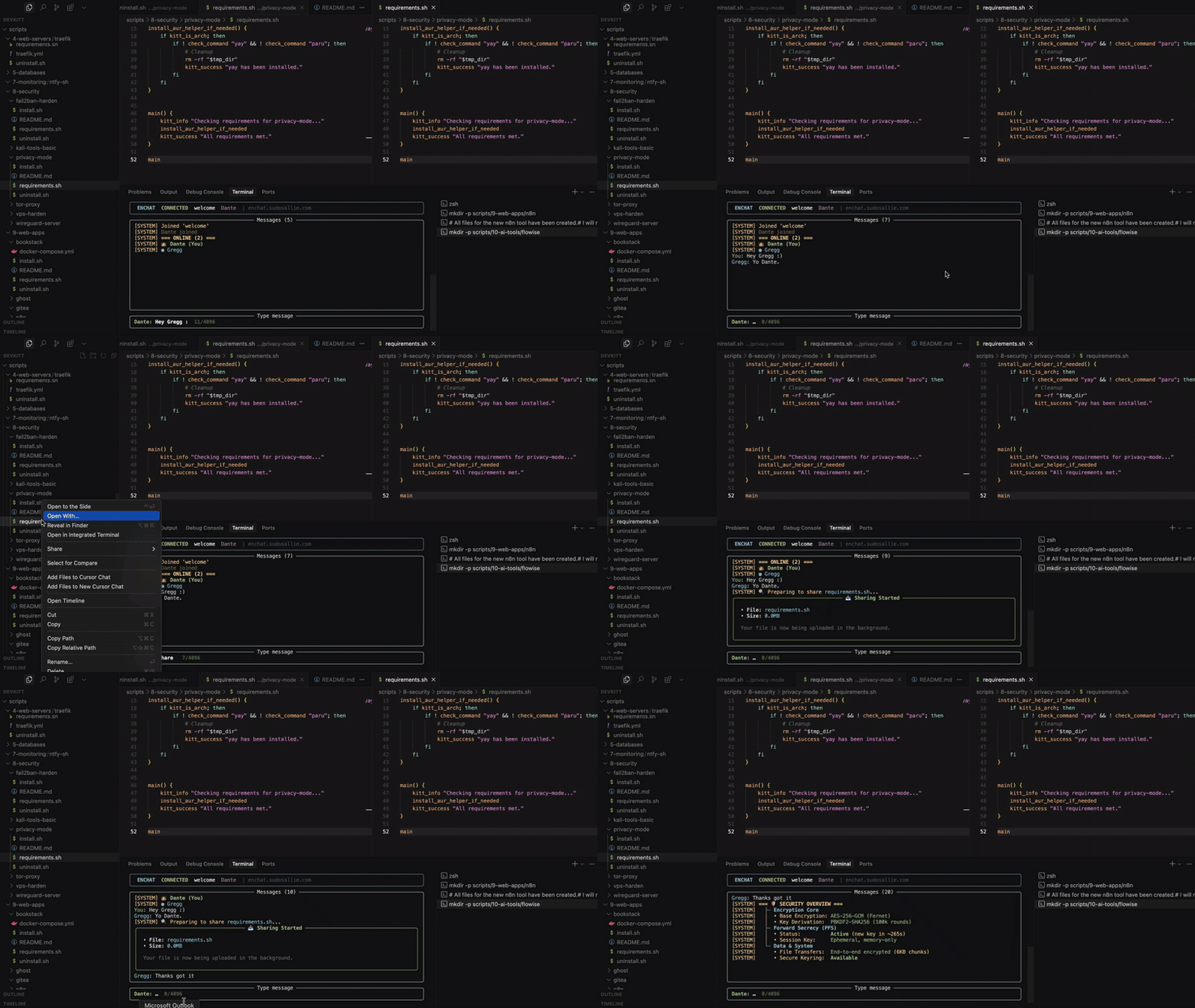
Enchat is designed to integrate seamlessly into your development process. Use it to collaborate with colleagues, share code snippets, and transfer files without ever leaving the terminal. The GIF below demonstrates how Enchat can be used in a development environment to communicate with team members and share files securely.
⌨️ All In-Chat Commands
| Command | Description | Example |
|---|---|---|
| Room & Sharing | | |
| /share-room | Generate a secure, temporary link to invite users. | /share-room --uses 1 --ttl 10m |
| /copy-link | Copy the last generated room link to the clipboard. | /copy-link |
| /who | List all users currently in the room. | /who |
| /server | Display the status of the connected message server. | /server |
| /exit | Gracefully leave the chat and exit Enchat. | /exit |
| File Transfers | | |
| /share | Securely share a file with the room. | /share ~/documents/report.pdf |
| /files | List all files available for download. | /files |
| /download | Download a file by its ID. | /download a1b2c3d4 |
| Utilities | | |
| /help | Show the help message with all available commands. | /help |
| /clear | Clear all messages from the terminal window. | /clear |
| /clean-chat | Clean chat history for all participants (private rooms only). | /clean-chat |
| /security | Display an overview of the current security settings. | /security |
| /notifications | Toggle desktop notifications on or off. | /notifications |
| Fun & Polls | | |
| /lottery <cmd> | Run a lottery (start, enter, draw, status, cancel). | /lottery start |
| /poll | Create a poll for the room. | /poll "Q?" \| "Opt1" \| "Opt2" |
| /vote | Cast your vote in an active poll. | /vote 1 |
🔒 Security Deep Dive
Enchat is built on a foundation of defense-in-depth and zero-trust principles.
- End-to-End Encryption:
AES-256-GCMfor authenticated encryption of all messages and files. - Key Derivation:
PBKDF2-HMAC-SHA256with 100,000 iterations protects your passphrase against brute-force attacks. - Perfect Forward Secrecy (PFS): Each session uses a unique, ephemeral encryption key. Once a session ends, the key is gone forever, rendering past messages inaccessible even if the main room passphrase is stolen.
- Double-Layer Encryption: Messages are first encrypted with the ephemeral session key, and the result is then encrypted again with the main room key.
- Server Blindness: The
ntfy.shserver (or your self-hosted instance) acts as a blind message relay. It only ever sees encrypted blobs of data and has no ability to decrypt message content, usernames, timestamps, or file data. - Metadata Protection: All metadata, including timestamps, usernames, and system events (like joins/leaves), is fully encrypted.
- Privacy Cleanup: The
/clean-chatcommand allows users to clear chat history for all participants, and rooms automatically clean up when empty to minimize data retention. - Secure Wipe: The
enchat killcommand securely wipes all local configuration files, logs, and downloaded content.
Message Flow Security
Your Message → [PFS Session Key Encrypt] → [Room Key Encrypt] → Encrypted Blob → ntfy Server → Encrypted Blob → [Room Key Decrypt] → [PFS Session Key Decrypt] → Recipient
An attacker would need to compromise both the main room passphrase and the active, in-memory-only session key to view messages in transit—a near-impossible task.
🔧 For Developers
Self-Hosting
For maximum security and control, you can self-host your own ntfy.sh message server. While you can configure a server manually, this repository includes an automated script to make it easy.
On a fresh Debian or Ubuntu server, simply run:
# Downloads and executes the setup script
wget -O - https://raw.githubusercontent.com/sudodevdante/enchat/master/setup-selfhosted-ntfy-server.sh | bash
This script will install Docker, configure ntfy, set up SSL with Let's Encrypt, and harden the server for production use. Once complete, just point Enchat to your own domain during the initial setup.
Codebase
The code is designed to be readable and auditable. We encourage security researchers to review the implementation and report any potential vulnerabilities.
enchat.py: Main application entry point and UI handler.enchat_lib/: Core logic for the application.crypto.py: Handles all encryption, decryption, and key derivation.network.py: Manages connections, message listeners, and the outbox queue.commands.py: Implements all/command logic.file_transfer.py: Manages secure file chunking, transfer, and reassembly.link_sharing.py: Powers the zero-knowledge room invitation system.
install.sh: The installer script for easy setup.requirements.txt: A list of all Python dependencies.
Your contributions are welcome! Please open a GitHub issue to discuss any proposed changes.
❤️ Donate & Support
Enchat is a free, open-source project developed in
