
Armcom2
Armoured Commander II
Install / Use
/learn @sudasana/Armcom2README
Armoured Commander II
Started February 23, 2016; Restarted July 25, 2016; Restarted again January 11, 2018; Restarted again January 2, 2019
This is Armoured Commander II, the World War II Tank Commander Roguelike.
Copyright (c) 2016-2020 Gregory Adam Scott (sudasana@gmail.com)
Armoured Commander II is free software: you can redistribute it and/or modify it under the terms of the GNU General Public License as published by the Free Software Foundation, either version 3 of the License, or (at your option) any later version.
Armoured Commander II is distributed in the hope that it will be useful, but WITHOUT ANY WARRANTY; without even the implied warranty of MERCHANTABILITY or FITNESS FOR A PARTICULAR PURPOSE. See the GNU General Public License for more details.
You should have received a copy of the GNU General Public License along with Armoured Commander II, in the form of a file named "license.txt". If not, see https://www.gnu.org/licenses/.
Running ArmCom2
To run the armcom2.exe PyInstaller build, you may need:
- Visual C++ Redistributable https://visualstudio.microsoft.com/downloads/
To run armcom2.py, you will need:
- Python 3.6.6 https://www.python.org/downloads/release/python-366/
- Libtcod 1.6.4 https://bitbucket.org/libtcod/libtcod
- XPLoader https://github.com/RCIX/XPLoader
- PySDL2 https://github.com/marcusva/py-sdl2
Running ArmCom2 on OSX
To run on OSX use a virtual environment (e.g. pipenv) with Python >= 3.6.6 and install the following libraries:
- tcod https://pypi.org/project/tcod/
- pysdl2 https://github.com/marcusva/py-sdl2
Then run python armcom2.py
If the starting font size is too large then change "display_font_size" in data/armcom2.cfg
Running ArmCom2 on Linux
To run the game on Linux, two steps are required:
- Install only Libtcod 1.6.5, newer versions will not work
- Once libtcod is installed, copy the contents of /usr/lib/libtcod*.so.* into libtcodpy_local/
Thanks to peterjohnhartman for this information!
Game Manual - Version 2.0.0
1. General Principles
In Armoured Commander II, you play the role of a tank commander in World War II, leading your crew through a campaign in one of the major conflicts of the war. It is (I would argue) a "roguelike" style of game, which in general means that it:
- emphasizes gameplay over graphics, using an extended Petscii character set rather than bitmap graphics;
- is turn-based and allows the player to stop and resume at virtually any point; and
- rewards mastery of the game mechanics and encourages multiple playthroughs.
The original Armoured Commander was very closely modelled upon and inspired by the 1987 board game Patton's Best, but ArmCom2 is an attempt to go beyond that model while maintaining the basic format of the player being in control of a single tank.
2. Main Menu
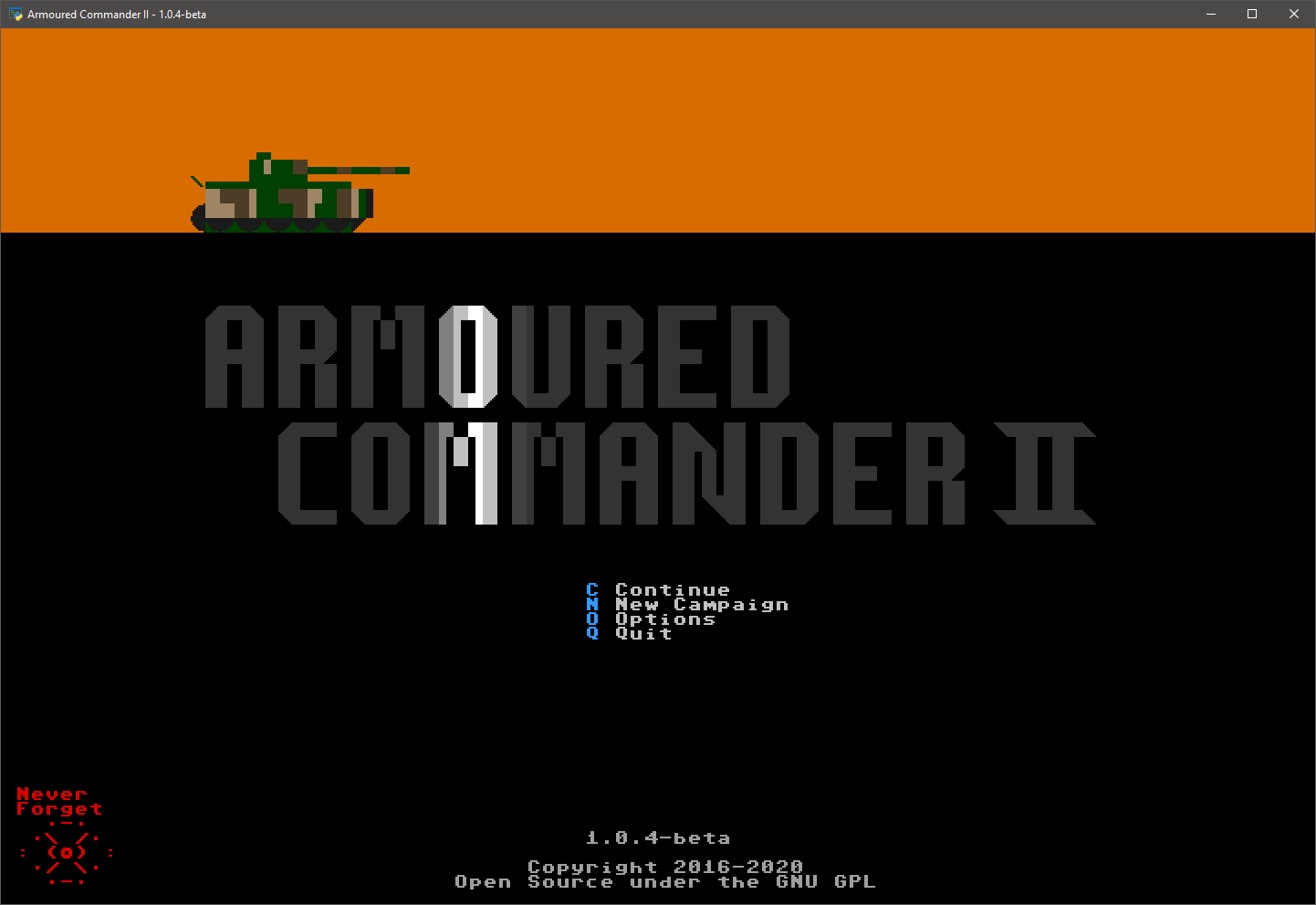 In the Main Menu, you can continue your most recently saved campaign, load and continue a saved campaign, start a new campaign, change game options, or quit the game.
To Continue or Load a campaign, it must have been saved with a compatible version of the game. If the first two version numbers (separated by single dots) match, it will be compatible. Otherwise, you won't be able to resume your campaign unless you load it with a compatible version of the game.
If you start a New Campaign, any current saved campaign will be erased. You can only have one saved campaign at any one time.
Game Options can be accessed here and from the in-game menu as well. Changing the Font Size will change the total window size. Sound Effects, including the main menu theme, can be toggled here. Changing the Master Volume will change the volume of the theme music and all sound effects. Message Pause changes the length of time that pop-up messages are displayed before disappearing. Several Keyboard layouts are supported, and you can set your own keyboard mapping by editing the "custom" dictionary in the keyboard_mapping.json file in the data folder, and selecting it here.
3. Campaign Selection
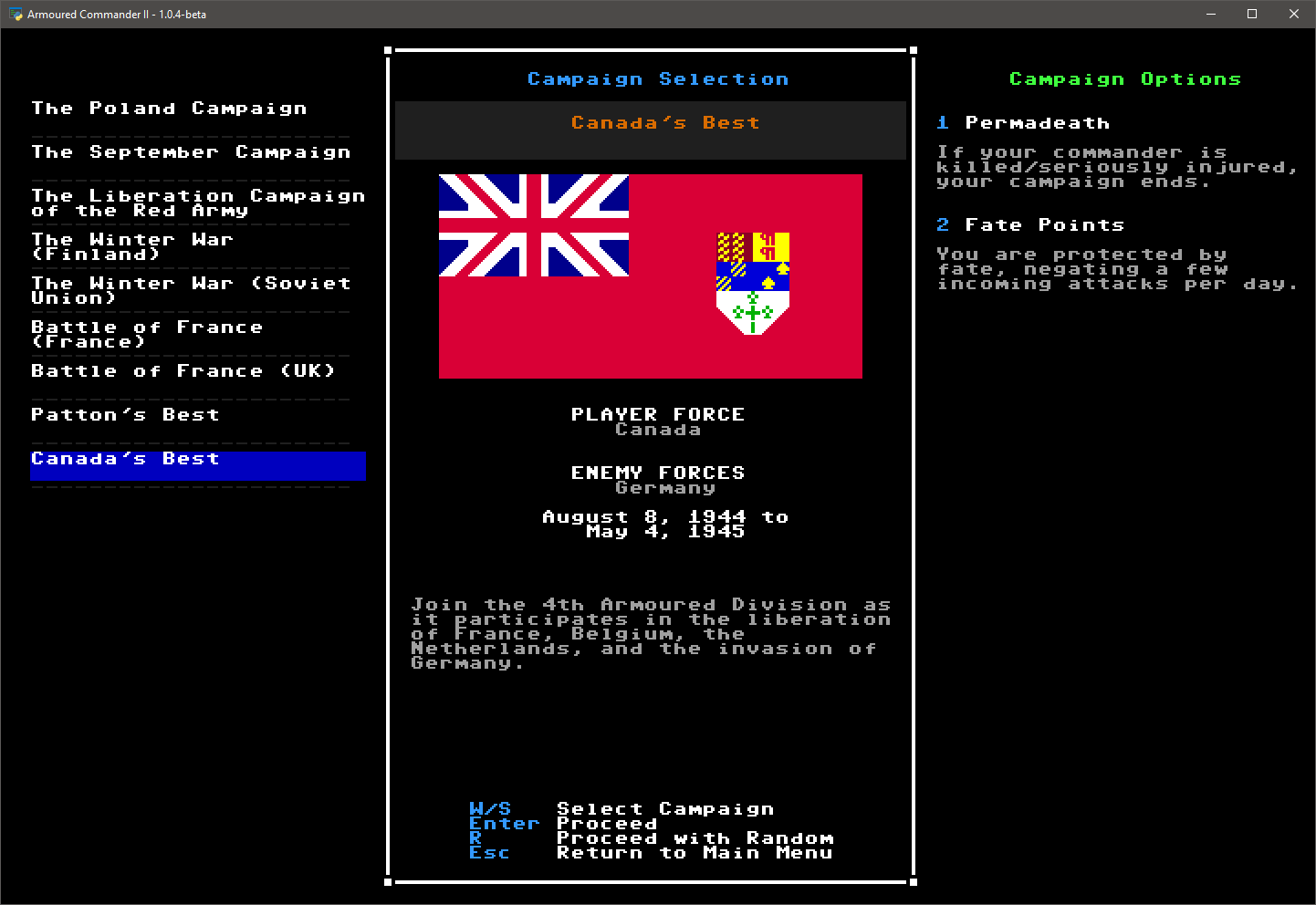
Several campaigns are included with the game. Each one takes place over a fixed period of time between 1939 and 1945, placing you in the role of a tank and battlegroup commander. Player Force means the national military force that you will be a part of. Enemy Forces lists the expected national forces that will be your opponents in this campaign. Some campaigns are longer than others; the actual days within the campaign calendar on which you will be called up for action will be determined randomly.
From this screen you can select a campaign to start, or have the game select one randomly.
You can also set your Campaign Options in this menu. "Permadeath" means that your Commander represents you, and if he is killed or seriously injured, your campaign ends immediately. Otherwise you can continue your campaign with a newly assigned Commander. "Fate Points" are replenished at the start of each Campaign Day, and each one silently saves you from an incoming attack that would have otherwise destroyed your tank.
4. Tank and Crew Selection
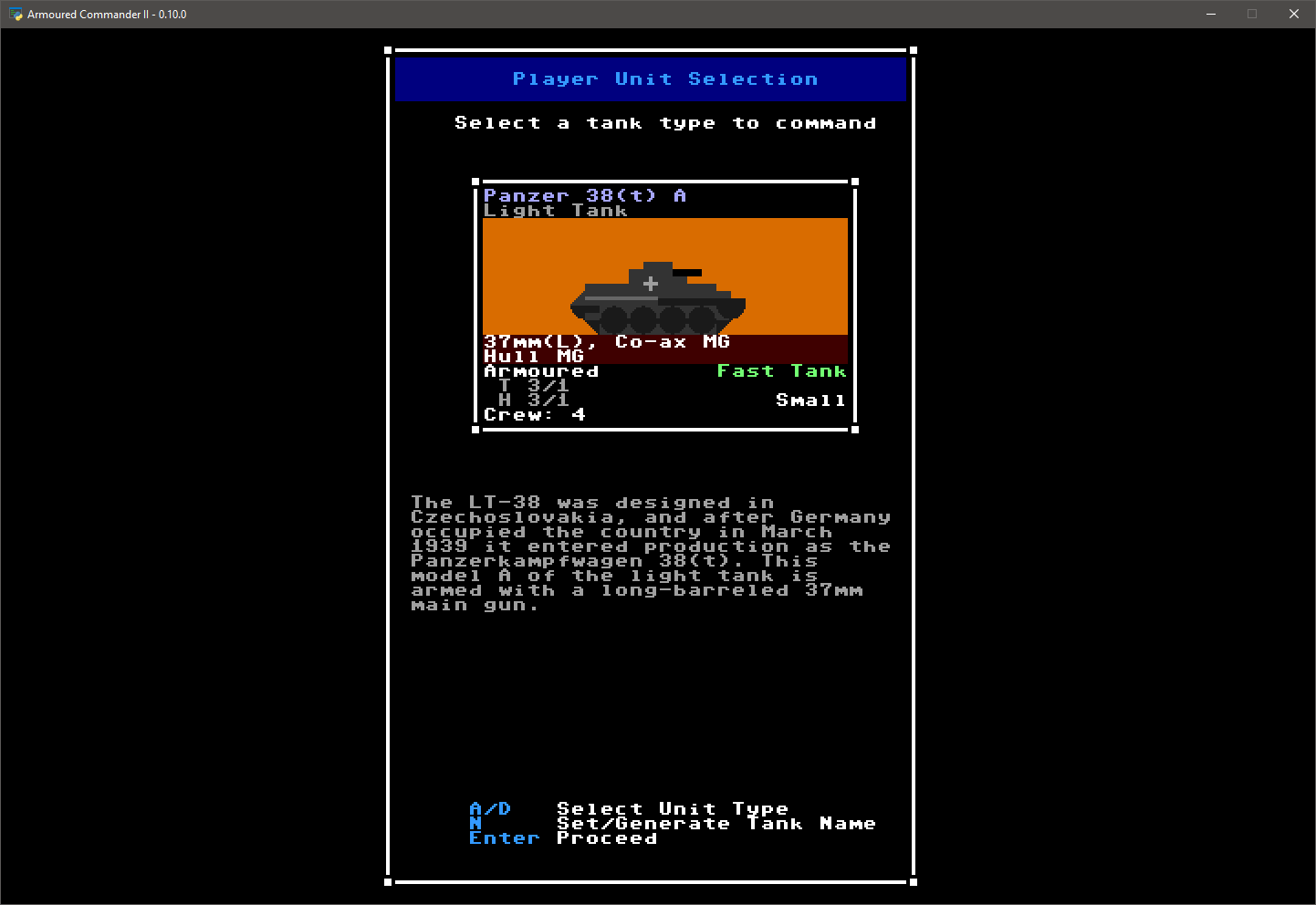
A selection of tank models are available to you at the start of the campaign. During Refit Weeks, and if you have to abandon your tank, you will have an opportunity to select a new model. Available models depend on the current calendar date; some models will only become available to you later on in a campaign. Pay close attention to the stats of your chosen tank, since you may be riding in it for some time.
4.1 Tank Stats
Virtually everything you need to know about a unit is included in its unit information display. Your tank's stats are especially important, so here is an example of how to read them:
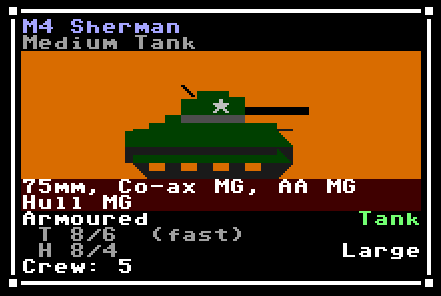
- M4 Sherman: This is the unit identifier, unique to each model of tank
- Medium Tank: This is the unit's class, indicating generally what type of unit it is
- Portrait: A rough approximation of this unit as viewed from the side
- 75mm, etc. (dark red background): A list of weapon systems on this unit, starting with its main armament
- Guns may be short (S), long (L), or very long (LL) barreled
- Co-ax weapons are mounted on the turret alongside (or as) the main gun
- Anti-Aircraft (AA) machine guns (MG) can fire in any direction, but must often be fired from outside of the tank
- Bow MGs are fixed to the front of the hull
- If a weapon is displayed in a light grey colour, it means that it is unrealiable and has a greater chance of breaking down
- Armoured or Unarmoured vehicles have their armour values listed here
- The T line refers to turret armour, but if there is no rotatable turret it will appear as U (Upper Structure) instead; if the turret has a fast traverse, this will be noted by (fast)
- H refers to hull armour
- The two armour values x/x refer to front and side armour respectively for that area
- Rear armour values for any location are one level lower than its side level
- The movement class of the unit is shown in green in the lower right
- If a vehicle has light ground pressure this will be displayed in a light shade of green, if heavy ground pressure, a darker shade. Ground pressure affects the chance of bogging down.
- If a vehicle has an especially powerful engine, a plus sign will appear next to the movement class
- Any special vehicle features will appear below the movement class:
- HVSS stands for Horizontal Volute Spring Suspension; vehicles with this upgrade are slightly faster and less likely to bog
- Recce is short for reconnaissance, and means that the vehicle is less likely to be ambushed at the start of a scenario
- ATV means that this is an All-terrain Vehicle (no effect yet)
- The size class of the unit appears below that. Larger targets are easiser to spot and hit
- Finally, the normal number of crew for this unit
A full crew, with yourself as the commander, will be automatically generated for your chosen tank.
4.2 Crew
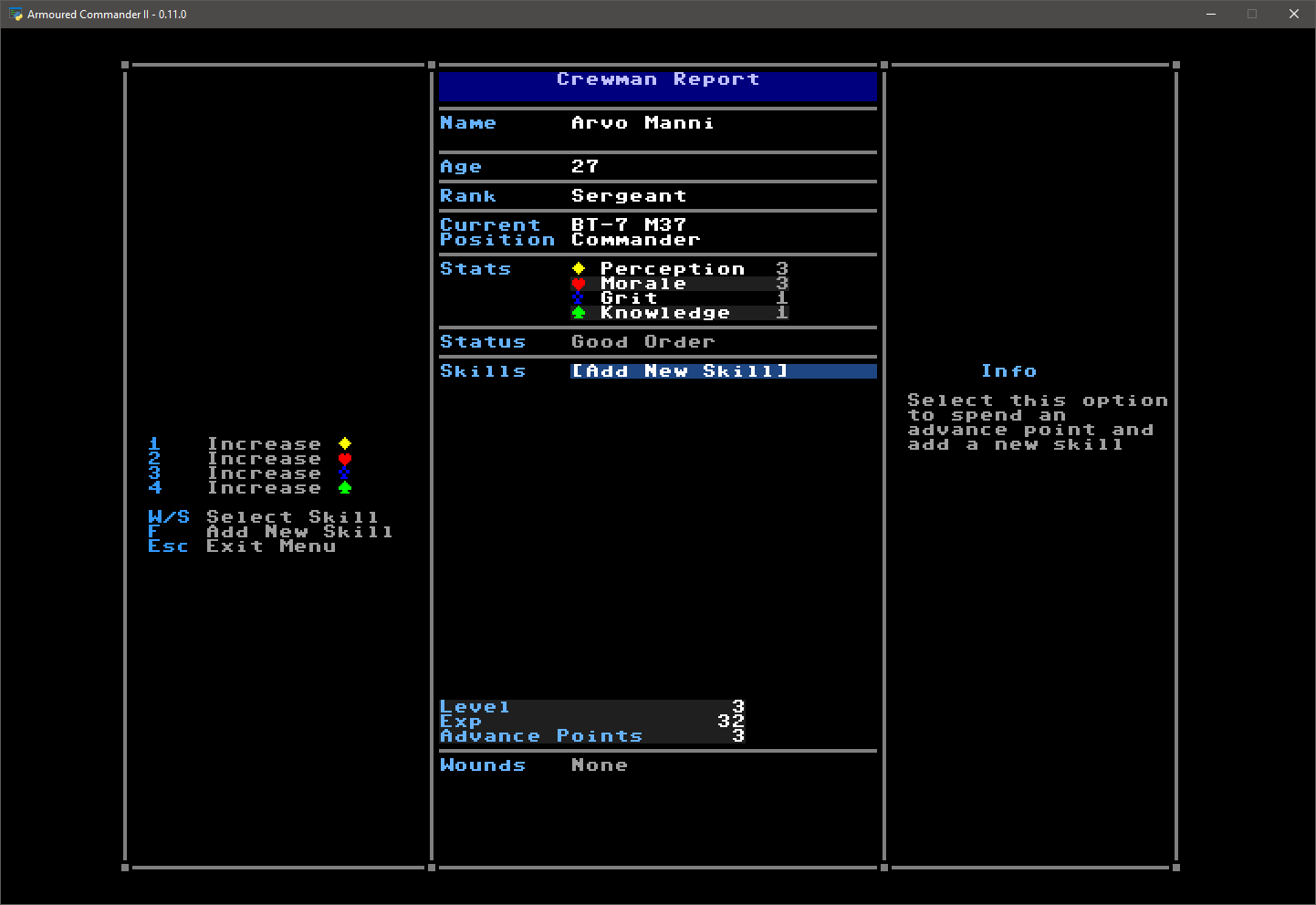
Each crewman in your tank has their own set of stats, skills, and experience points. Names are randomly generated, but you can assign a nickname to each crewman.
Crew Stats
Each crewman has four stat values, which are randomly generated at the start of the game but can be improved by spending Advance Points later on.
- Perception is used during attempts to spot enemy units on the scenario layer
- Morale represents the crewman's ability to resist psychological stress and harm (not yet used as of Alpha 10)
- Grit is used to resist wounds and negative status effects such as Stunned
- Knowledge applies a small modifier to all skill bonuses
Crew Experience
Every time you earn a Victory Point in the game, any crewman who is conscious at the time also receives an experience point. At the end of each combat day they may go up one or more levels depending on their exp. Each time they go up a level, they are awarded with an Advance Point which can be spent increasing the crewman's stats or adding a skill.
Crew Skills
19 skills are available (as of Alpha 10), but not all are availabl
Related Skills
node-connect
341.0kDiagnose OpenClaw node connection and pairing failures for Android, iOS, and macOS companion apps
claude-opus-4-5-migration
84.4kMigrate prompts and code from Claude Sonnet 4.0, Sonnet 4.5, or Opus 4.1 to Opus 4.5
frontend-design
84.4kCreate distinctive, production-grade frontend interfaces with high design quality. Use this skill when the user asks to build web components, pages, or applications. Generates creative, polished code that avoids generic AI aesthetics.
model-usage
341.0kUse CodexBar CLI local cost usage to summarize per-model usage for Codex or Claude, including the current (most recent) model or a full model breakdown. Trigger when asked for model-level usage/cost data from codexbar, or when you need a scriptable per-model summary from codexbar cost JSON.
