
Codereview.gpt
Reviews your Pull/Merge Requests using ChatGPT
Install / Use
/learn @sturdy-dev/Codereview.gptREADME
codereview.gpt
<p align="center"> <img src="https://raw.githubusercontent.com/sturdy-dev/codereview.gpt/main/public/icons/icon_128.png"> </p> <p align='center'> Review GitHub Pull Requests or GitLab Merge Requests using <a href="https://chat.openai.com" target="_blank">ChatGPT</a>. </p> <p align='center'> <a href="https://github.com/sturdy-dev/codereview.gpt/blob/main/LICENSE.txt"> <img alt="GitHub" src="https://img.shields.io/github/license/sturdy-dev/codereview.gpt"> </a> <a href="https://chrome.google.com/webstore/detail/codereviewgpt/amdfidcajdihmbhmmgohhkoaijpkocdn"> <img alt="Chrome Web Store" src="https://img.shields.io/chrome-web-store/v/amdfidcajdihmbhmmgohhkoaijpkocdn"> </a> </p> <p align="center"> <a href="#overview">🔍 Overview</a> • <a href="#usage">💻 Usage</a> • <a href="#faq">📖 FAQ</a> • <a href="#installation">🔧 Installation</a> </p>Overview
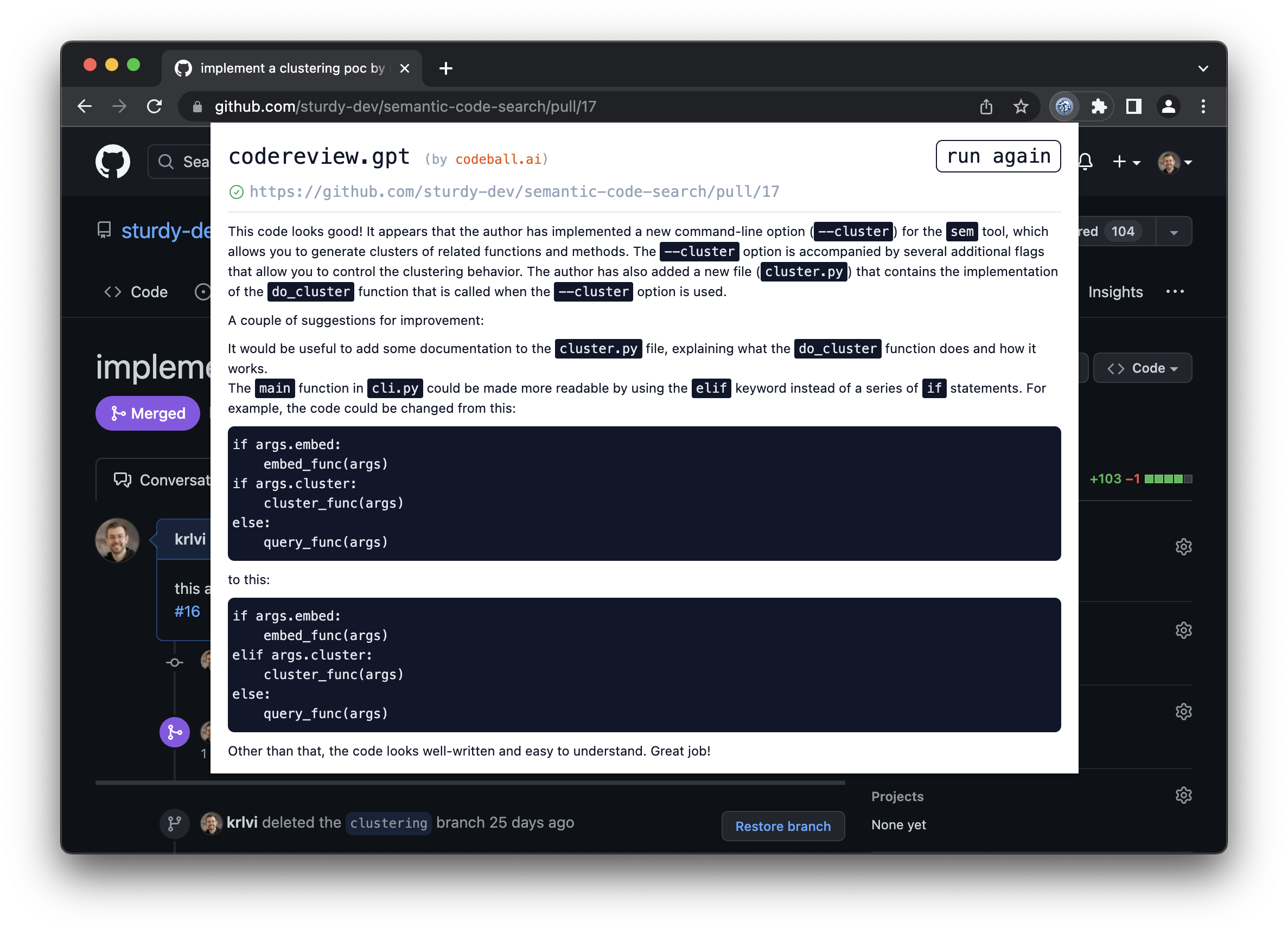
This is a Chrome extension which reviews Pull Requests for you using ChatGPT.
Here's an example output for this Pull Request:
https://user-images.githubusercontent.com/4030927/207372123-46d7ee8c-bd3e-4272-8ccb-4639f9f71458.mp4
Usage
- Navigate to a GitHub Pull Request or GitLab Merge Request that you want a review for.
- Fill in your OpenAI API token in the Settings of the Chrome Extension
- Click the extension icon
- You get code review comments from ChatGPT in the popup window
NB: Running the review multiple times often produces different feedback, so if you are dealing with a larger PR, it might be a good idea to do that to get the most out of it.
FAQ
Q: Are the reviews 100% trustworthy?
A: No. This tool can help you spot bugs, but as with anything, use your judgement. Sometimes it hallucinates things that sound plausible but are false — in this case, re-run the review.
Q: What aspects of the Pull Request or Merge Request are considered during the review?
A: The model gets the code changes and the commit messages in a patch format. Additionally it pulls in the description of the MR/PR.
Q: Does the extension post comments on the Pull Request page?
A: No. If you want any of the feedback as PR comments, you can copy paste the output.
Q: Is this a GPT wrapper?
A: Yes, but
Q: Why would you want this?
A: Plenty of reasons! You can:
- pretend to work while playing games instead
- appear smart to your colleagues
- enable a future skynet
- actually catch some bugs you missed
- learn a thing or 2 on best practices
Installation
You can install codereview.gpt from the Chrome Web Store or build it from source locally.
From the Chrome Web Store (recommended)
Go to the extension page at the Chrome Web Store and add codereview.gpt.
From source
- Clone this repository
git clone foo && cd foo - Install the dependencies
npm install - Run the build script
npm run build - Navigate to
chrome://extensions - Enable Developer Mode
- Click the 'Load unpacked' button and navigate to the
builddirectory in the project
Supported browsers
only Chrome is supported
Permissions
This is a list of permissions the extension uses with the respective reason.
activeTabis used to get the URL or the active tab. This is needed to fetch the get the Pull Request detailsstorageis used to cache the responses from OpenAIscriptingis used to fetch html content from the Merge Request / Pull Request
Credits
This project is inspired by clmnin/summarize.site
License
codereview.gpt is distributed under the MIT license.
