
Stride
Stride (formerly Xenko), a free and open-source cross-platform C# game engine.
Install / Use
/learn @stride3d/StrideREADME





Welcome to the Stride Game Engine
Stride is an open-source C# game engine designed for realistic rendering and VR. Highly modular, it aims to give game makers more flexibility in their development. Stride comes with an editor, Game Studio, which allows you to create and manage the content of your games or applications visually and intuitively. To learn more about Stride, visit stride3d.net.
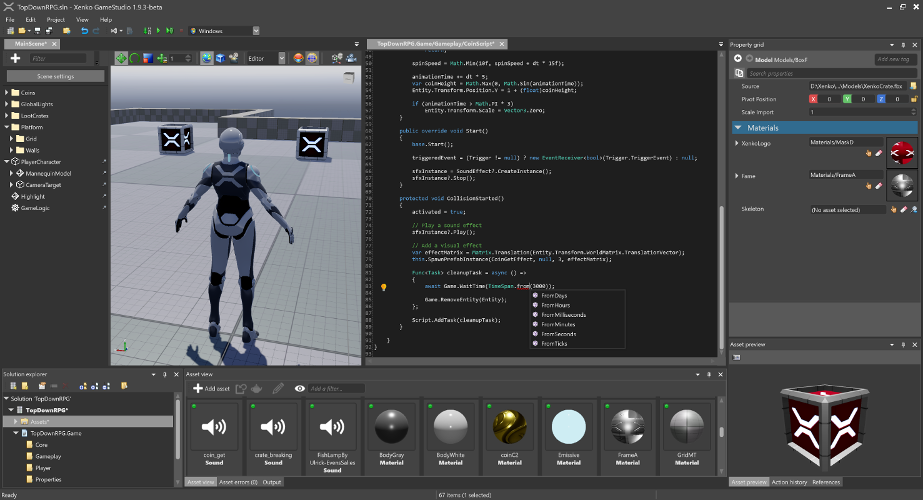
This README is intended for users who want to build the Stride engine from source or contribute to its development. If your goal is to create games using Stride, we recommend visiting the Get started with Stride guide. There, you'll find detailed instructions on downloading, installing, and getting started with game development in Stride.
🤝 Contributing
Want to get involved? See our Contributing section for how to ask questions, report bugs, submit pull requests (including good first issues), and how you can earn money by contributing via funded tasks/bug bounties.
🗺️ Roadmap
Our Roadmap communicates upcoming changes to the Stride engine.
🛠️ Building from Source
Prerequisites
- Latest Git with Large File Support selected during setup. For convenience, you might also use a Git UI client like GitExtensions.
- .NET 10.0 SDK
- Run
dotnet --infoin a console or PowerShell window to see which versions you have installed.
- Run
- Visual Studio 2026 (the Community edition is free), with the following workloads. Follow this link if you would rather use a different IDE or the command line.
- .NET desktop development with .NET Framework 4.7.2 targeting pack (should be enabled by default)
- Desktop development with C++ with:
- Windows 11 SDK (10.0.22621.0) or a later version (should be enabled by default)
- MSVC v143 - VS 2022 C++ x64/x86 build tools (Latest) (should be enabled by default)
- MSVC v143 - VS 2022 C++ ARM64/ARM64EC build tools (Latest) (not enabled by default, click Individual components tab to select or search)
- C++/CLI support for v143 build tools (Latest) (not enabled by default)
- Optional (to target iOS/Android): .NET Multi-platform App UI development and the Android SDK setup individual component (enabled by default). Then, in Visual Studio, go to
Tools > Android > Android SDK Managerand install NDK (version 20.1+) from theToolstab. - Optional (to build the VSIX package): Visual Studio extension development
[!NOTE] The installation of Visual Studio with the required components may require up to 19 GB of disk space, depending on your system and selected components.
[!WARNING] If this is your first time installing the .NET SDK, you might need to restart your system after the installation so that the system can recognize the new environment variables.
Build Stride
- Clone the repository using a Git UI client or from the command line:
git lfs clone https://github.com/stride3d/stride.git - Open the solution:
- Open
<StrideDir>\build\Stride.slnwith Visual Studio 2026. - Build the
Stride.GameStudioproject in the60-Editorsolution folder (it should be the default startup project) or run it directly from Visual Studio's toolbar. - Optionally, open and build
Stride.Android.sln,Stride.iOS.sln, etc.
- Open
[!WARNING] Do NOT use GitHub -> Code -> Download ZIP option, as this won't include the LFS files.
Build Stride without Visual Studio
- Install Visual Studio Build Tools (Go to Tools for Visual Studio and press download next to Build Tools for Visual Studio 2026) with the same prerequisites listed above.
- Add MSBuild to your system's PATH:
- Add MSBuild's directory to your
PATHenvironment variable (e.g.,c:\Program Files (x86)\Microsoft Visual Studio\18\BuildTools\MSBuild\Current\Bin).
- Add MSBuild's directory to your
- Clone the repository:
git lfs clone https://github.com/stride3d/stride.git - Build using the command line:
- Navigate to the
/builddirectory in the command prompt and run:
msbuild /t:Restore Stride.sln- Then run:
compile.bat - Navigate to the
If Building Fails
- Some errors for test projects are normal, GameStudio will start anyway.
- The Visual Studio extension might fail to build if you are missing the Visual Studio SDK, but Game Studio will start anyway.
- If you skipped any of the Prerequisites thinking you already have the latest version, please update to the latest to be sure.
- Visual Studio might have issues building properly if an older version is present alongside 2026. If you want to keep those versions, ensure they are up to date and that you are building Stride using Visual Studio 2026.
- Your system's
PATHshould not contain older versions of MSBuild (e.g.,...\Microsoft Visual Studio\2019\BuildTools\MSBuild\Current\Binshould be removed). - Some changes might require a system reboot. Try that if you haven't yet, for example, if you see these errors:
Could not find a compatible version of MSBuild.Path to dotnet executable is not set.
- Ensure that Git, Git LFS, and Visual Studio can access the internet.
- Close Visual Studio, clear the NuGet cache (
dotnet nuget locals all --clear), delete the hidden.vsfolder inside\buildand the files insidebin\packages, kill anymsbuildand other Visual Studio processes, then build the whole solution and run GameStudio.
[!WARNING] Test solutions might fail, but this should not prevent you from building
Stride.GameStudio.
Contribution Guidelines
Please check our Contributing Guidelines.
🔬 Build Status
|Branch| master | |:--:|:--:| |Windows D3D11|<a href="https://teamcity.stride3d.net/viewType.html?buildTypeId=Engine_BuildWindowsD3d11&branch=master&guest=1"><img src="https://teamcity.stride3d.net/app/rest/builds/buildType:(id:Engine_BuildWindowsD3d11),branch:master/statusIcon"/></a> |Windows D3D12|<a href="https://teamcity.stride3d.net/viewType.html?buildTypeId=Engine_BuildWindowsD3d12&branch=master&guest=1"><img src="https://teamcity.stride3d.net/app/rest/builds/buildType:(id:Engine_BuildWindowsD3d12),branch:master/statusIcon"/></a> |Windows Vulkan|<a href="https://teamcity.stride3d.net/viewType.html?buildTypeId=Engine_BuildWindowsVulkan&branch=master&guest=1"><img src="https://teamcity.stride3d.net/app/rest/builds/buildType:(id:Engine_BuildWindowsVulkan),branch:master/statusIcon"/></a> |Windows OpenGL|<a href="https://teamcity.stride3d.net/viewType.html?buildTypeId=Engine_BuildWindowsOpenGL&branch=master&guest=1"><img src="https://teamcity.stride3d.net/app/rest/builds/buildType:(id:Engine_BuildWindowsOpenGL),branch:master/statusIcon"/></a> |Windows OpenGL ES|<a href="https://teamcity.stride3d.net/viewType.html?buildTypeId=Engine_BuildWindowsOpenGLES&branch=master&guest=1"><img src="https://teamcity.stride3d.net/app/rest/builds/buildType:(id:Engine_BuildWindowsOpenGLES),branch:master/statusIcon"/></a> |iOS|<a href="https://teamcity.stride3d.net/viewType.html?buildTypeId=Engine_BuildiOS&branch=master&guest=1"><img src="https://teamcity.stride3d.net/app/rest/builds/buildType:(id:Engine_BuildiOS),branch:master/statusIcon"/></a> |Android|<a href="https://teamcity.stride3d.net/viewType.html?buildTypeId=Engine_BuildAndroid&branch=master&guest=1"><img src="https://teamcity.stride3d.net/app/rest/builds/buildType:(id:Engine_BuildAndroid),branch:master/statusIcon"/></a> |Linux Vulkan|<a href="https://teamcity.stride3d.net/viewType.html?buildTypeId=Engine_BuildLinuxVulkan&branch=master&guest=1"><img src="https://teamcity.stride3d.net/app/rest/builds/buildType:(id:Engine_BuildLinuxVulkan),branch:master/statusIcon"/></a> |Linux OpenGL|<a href="https://teamcity.stride3d.net/viewType.html?buildTypeId=Engine_Buil
Related Skills
node-connect
343.3kDiagnose OpenClaw node connection and pairing failures for Android, iOS, and macOS companion apps
frontend-design
92.1kCreate distinctive, production-grade frontend interfaces with high design quality. Use this skill when the user asks to build web components, pages, or applications. Generates creative, polished code that avoids generic AI aesthetics.
openai-whisper-api
343.3kTranscribe audio via OpenAI Audio Transcriptions API (Whisper).
qqbot-media
343.3kQQBot 富媒体收发能力。使用 <qqmedia> 标签,系统根据文件扩展名自动识别类型(图片/语音/视频/文件)。
