Scblogs
🎉校园博客,基于微服务架构且前后端分离的博客社区系统。项目后端技术栈:JDK17+SpringBoot + SpringCloud + Mybatis-Plus + Nacos + MySQL + Redis + MQ + ElasticSearch + Docker。前端主要是基于Vue2和ElementUI进行开发的。
Install / Use
/learn @stick-i/ScblogsREADME
校园博客 [scblogs]
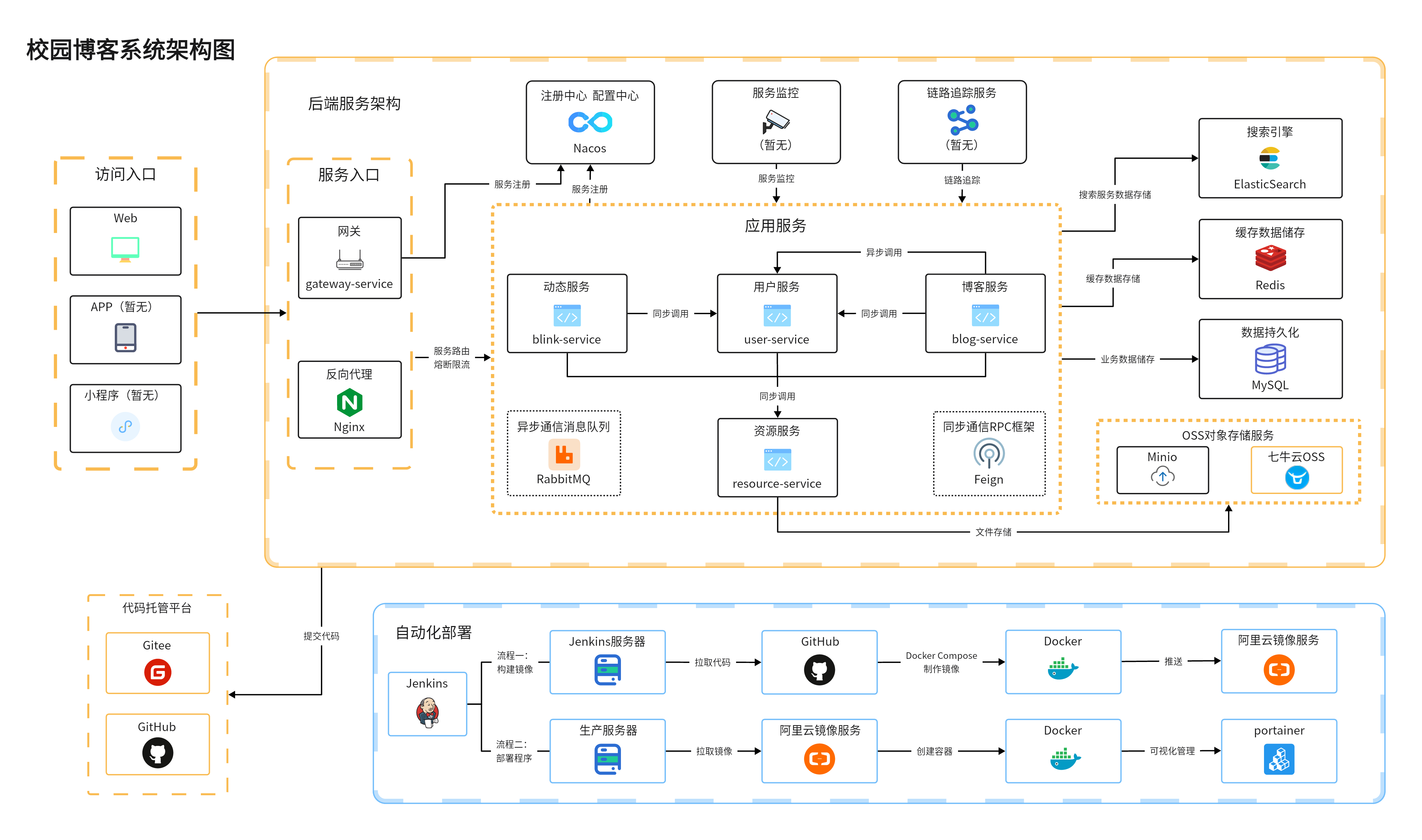
<p align=center> <a href="http://www.scblogs.cn"> <img src="./document/image/scblogs-logo.png" alt="校园博客"> </a> </p> <p align=center> 基于微服务架构的前后端分离的博客系统 </p> <p align="center"> <a target="_blank" href="https://github.com/stick-i/scblogs"> <img src="https://img.shields.io/badge/license-CC%20BY--NC--ND%204.0-lightgrey" alt="知识共享许可协议"/> <img src="https://img.shields.io/github/stars/stick-i/scblogs" alt=""/> <img src="https://img.shields.io/github/forks/stick-i/scblogs" alt=""/> <br> <img src="https://img.shields.io/badge/JDK17-blue" alt=""/> <img src="https://img.shields.io/badge/SpringBoot-3.2.1-green" alt=""/> <img src="https://img.shields.io/badge/SpringCloud-2023.0.0-green" alt=""/> <img src="https://img.shields.io/badge/SpringCloudAlibaba-2022.0.0.0-green" alt=""/><br> <img src="https://img.shields.io/badge/Vue-2.6.14-green" alt=""/> <img src="https://img.shields.io/badge/ElementUI-2.15.6-green" alt=""/> </a></p>系统架构图
GitHub点此 链接 查看大图,Gitee直接点图片就可以放大

暂停维护
此项目为作者大学时期学习微服务时所创建,现由于个人时间原因已暂停维护,在线网站也一并下线。
此项目适合微服务初学者进行参考学习,如有疑问,仍然欢迎提issue。
项目地址
项目部署在腾讯云服务器上,代码托管在 Gitee 和 GitHub 上,欢迎大家 Star
- Gitee地址:https://gitee.com/sticki/scblogs
- GitHub地址:https://github.com/stick-i/scblogs
- QQ交流群:729931395 <a target="_blank" href="https://qm.qq.com/cgi-bin/qm/qr?k=KwCs7qjv8N65wHys9A1nT8yZwfQF4oHh&jump_from=webapi&authKey=pk46Kps4/87pOQAWXQ+QcdHs31ZrGn+3/E/wBcxPEJrT/EkON/P6knYvUUDIexue"><img border="0" src="https://pub.idqqimg.com/wpa/images/group.png" alt="校园博客" title="校园博客"></a> (优先加微信群吧,QQ我不咋用)
- 微信交流群:加我微信 sticki6,备注或私聊 “校园博客”,我拉你进群
项目特点
- 微服务架构开发,友好的代码结构及注释,便于阅读及二次开发
- 前后端分离,通过 Json 进行数据交互,前端无需关注后端技术
- 采用 Nacos 作为服务注册中心,支持分布式集群架构,方便微服务配置管理
- 采用 Getaway 搭建网关服务,进行负载转发的同时对用户身份进行识别,并支持配置接口未认证拦截功能
- 采用 JWT 的方式进行用户鉴权,配合网关服务保证其他所有微服务都能准确识别用户身份
- 采用 Minio 搭建对象存储服务,同时引入七牛云对象存储
- 采用 AOP + 自定义注解 + Redis 实现限制IP接口访问次数
- 基于 Redis 实现的分布式全局唯一ID生成器,保障ID可用性、安全性。
- 页面交互使用 Vue2.x,极大的提高了开发效率
项目目录
├─config:全局配置文件目录
├─document:项目文档目录
├─common:公用模块
│  ├─common-amqp:公用AMQP模块
│  ├─common-core:核心模块
│  ├─common-redis:公用Redis模块
│  ├─common-regex:公用正则模块
│  ├─common-tool:公用工具模块(需要修改或调整)
│  └─common-web:公用web模块
├─gateway-service:网关服务
├─user-service:用户服务
├─blog-service:博客服务
├─blink-service:动态服务
├─comment-service:评论服务
├─resource-service:资源服务
└─vueblog:前端Vue服务
技术选型
| 技术 | 说明 | 官网 | | :------------: | :--------------: |:-------------------------------------------------:| | SpringBoot | MVC框架 | https://spring.io/projects/spring-boot | | SpringCloud | 微服务框架 | https://spring.io/projects/spring-cloud/ | | Gateway | 网关服务框架 | https://spring.io/projects/spring-cloud-gateway | | Fegin | RPC框架 | https://spring.io/projects/spring-cloud-openfeign | | Nacos | 注册、配置中心 | https://nacos.io/zh-cn/ | | MyBatis-Plus | 数据库框架 | https://mp.baomidou.com/ | | MySQL | 数据库 | https://www.mysql.com/ | | Redis | 分布式缓存 | https://redis.io/ | | RabbitMQ | 消息队列 | https://www.rabbitmq.com/ | | Elasticsearch | 搜索引擎 | https://github.com/elastic/elasticsearch | | Docker | 容器化部署 | https://www.docker.com/ | | Jenkins | 自动化部署服务 | https://www.jenkins.io/ | | Druid | 数据库连接池 | https://github.com/alibaba/druid | | 七牛云 | 七牛云 | https://developer.qiniu.com/sdk#official-sdk | | SLF4J | 日志框架 | http://www.slf4j.org/ | | Lombok | 简化对象封装工具 | https://github.com/rzwitserloot/lombok | | Nginx | web服务器 | http://nginx.org/ | | Hutool | Java工具包类库 | https://hutool.cn/docs/#/ | | Minio | 本地对象存储服务 | https://min.io/ | | Docker Compose | Docker容器编排 | https://docs.docker.com/compose/ |
启动服务
启动后端
需要准备的环境:
- MySQL(强制)
- Redis(强制)
- Nacos(强制)
- ES(blog-content-service依赖,需要安装ik分词器)
- RabbitMQ(blog-service依赖)
- MinIO(resource-service依赖)
SQL、Nacos配置等文件以及说明在 document 目录下,Nacos里的相关配置也需要修改为自己实际的。
由于本项目没有完善的教程文档,故仅适合有一定项目基础的同学,同时也欢迎大家来补充教程。
启动前端
1、安装node.js 参考菜鸟教程:https://www.runoob.com/nodejs/nodejs-install-setup.html
2、运行前端项目
# 进入到前端项目目录
cd vueblog

# 强烈建议不要用直接使用 cnpm 安装,会有各种诡异的 bug,可以通过重新指定 registry 来解决 npm 安装速度慢的问题。
npm install --registry=https://registry.npmmirror.com

# 本地开发 启动项目
npm run serve
打开浏览器输入 http://localhost:8080/
参与贡献
在参与项目贡献前,请先阅读 CONTRIBUTING 这个文件,这很重要。
如果你经常性的无法访问GitHub,这篇文章或许可以帮到你:GitHub连接不上解决方案。
贡献者名单
<a href="https://github.com/stick-i/scblogs/graphs/contributors"> <img src="https://contrib.rocks/image?repo=stick-i/scblogs" /> </a>赞助
如果本项目对你有帮助,可以请作者喝杯奶茶(超爱)!
| ☕️微信赞赏 | ☕️支付宝赞赏 |
|------------------------------------------------------|--------------------------------------------------|
|  |
|  |
|
Related Skills
node-connect
349.9kDiagnose OpenClaw node connection and pairing failures for Android, iOS, and macOS companion apps
prose
349.9kOpenProse VM skill pack. Activate on any `prose` command, .prose files, or OpenProse mentions; orchestrates multi-agent workflows.
frontend-design
109.8kCreate distinctive, production-grade frontend interfaces with high design quality. Use this skill when the user asks to build web components, pages, or applications. Generates creative, polished code that avoids generic AI aesthetics.
openai-whisper-api
349.9kTranscribe audio via OpenAI Audio Transcriptions API (Whisper).