
Mvggt
[CVPR 2026] This repository is the official implementation of MVGGT: Multimodal Visual Geometry Grounded Transformer for Multiview 3D Referring Expression Segmentation
Install / Use
/learn @sosppxo/MvggtREADME
[CVPR 2026] MVGGT: Multimodal Visual Geometry Grounded Transformer for Multiview 3D Referring Expression Segmentation
<div align="center">Changli Wu<sup>1,2,†</sup>, Haodong Wang<sup>1,†</sup>, Jiayi Ji<sup>1,*</sup>,Yutian Yao<sup>5</sup>,
Chunsai Du<sup>4</sup>, Jihua Kang<sup>4</sup>, Yanwei Fu<sup>3,2</sup>, Liujuan Cao<sup>1</sup>
<sup>1</sup>Xiamen University, <sup>2</sup>Shanghai Innovation Institute, <sup>3</sup>Fudan University,
<sup>4</sup>ByteDance, <sup>5</sup>Tianjin University of Science and Technology
<sup>†</sup>Equal Contribution, <sup>*</sup>Corresponding Author





📢 News & Roadmap
🎉 [News] Our paper has been accepted to CVPR 2026! 🎉
This repository is the official implementation of MVGGT. All resources have been fully released. We warmly welcome everyone to try out our code, models, and the interactive demo!
- [x] Release the MVRefer Benchmark
- [x] Release Training & Inference Code.
- [x] Release Pre-trained Models.
- [x] Release Interactive Demo Code (Local version).
📖 Abstract
Most existing 3D referring expression segmentation (3DRES) methods rely on dense, high-quality point clouds, while real-world agents such as robots and mobile phones operate with only a few sparse RGB views and strict latency constraints.
We introduce Multi-view 3D Referring Expression Segmentation (MV-3DRES), where the model must recover scene structure and segment the referred object directly from sparse multi-view images. Traditional two-stage pipelines, which first reconstruct a point cloud and then perform segmentation, often yield low-quality geometry, produce coarse or degraded target regions, and run slowly.
We propose the Multimodal Visual Geometry Grounded Transformer (MVGGT), an efficient end-to-end framework that integrates language information into sparse-view geometric reasoning. Experiments show that MVGGT establishes the first strong baseline and achieves both high accuracy and fast inference, outperforming existing alternatives.
<div align="center"> <img src="https://sosppxo.github.io/mvggt.github.io/resources/figure1.png" width="80%"> <br> <em>Figure 1: Comparison of the proposed MV-3DRES task (bottom) against the traditional two-stage pipeline (top).</em> </div>🚀 Method: MVGGT
We propose the Multimodal Visual Geometry Grounded Transformer (MVGGT), an end-to-end framework designed for efficiency and robustness.
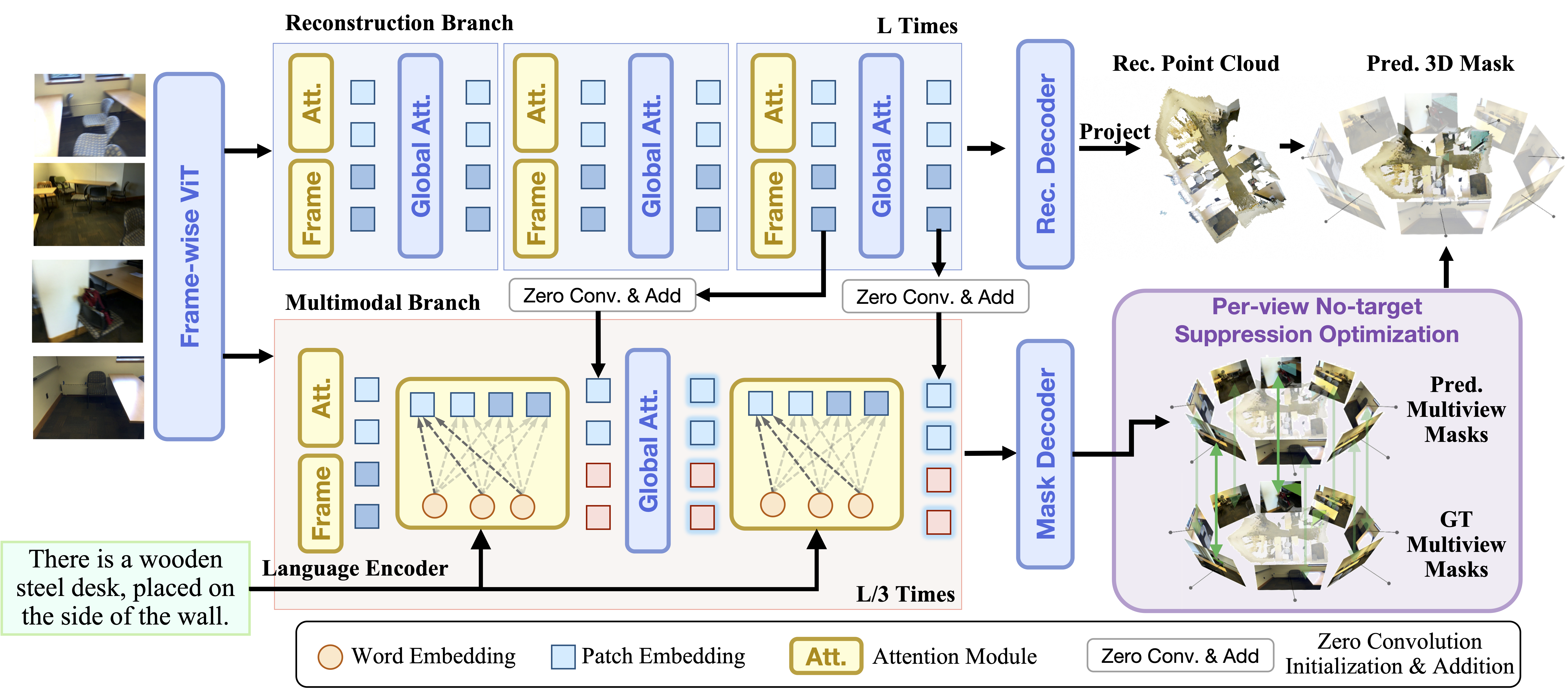 Figure 2: Architecture of MVGGT. It features a Frozen Reconstruction Branch (top) and a Trainable Multimodal Branch (bottom).
Note: For interactive 3D visualizations and video comparisons with other methods, please visit our Project Page.
🛠️ Installation
1. Clone the repository
git clone https://github.com/sosppxo/mvggt.git
cd mvggt
2. Create conda environment
Create and activate a new conda environment:
conda create -n mvggt python=3.12
conda activate mvggt
3. Install dependencies
Install the full requirements for training:
pip install -r requirements.txt
📂 Data Preparation
1. ScanNet dataset
Download the ScanNet dataset. The data should be organized as follows:
[data_root]/
|   └──scene0000_00/
│       ├── color/              # RGB images (.jpg)
│       ├── depth/              # Depth maps (.png)
│       ├── intrinsic/          # intrinsic_depth.txt
│       └── pose/               # Camera poses (.txt)
└── scans/                  # Required for 2D instance masks
    └── scene0000_00/
        └── scene0000_00_2d-instance-filt/
            └── instance-filt/  # 2D instance segmentation masks (.png)
⚠️ Note: Remember to update the data_root path for both train_dataset and test_dataset in configs/data/example.yaml to point to your actual [data_root].
2. ScanRefer dataset
Download ScanRefer annotations.
Put the ScanRefer folder in data/:
data/
└── ScanRefer/
    ├── ScanRefer_filtered_train.json
    ├── ScanRefer_filtered_val.json
    ├── ScanRefer_filtered_train.txt
    └── ScanRefer_filtered_val.txt
3. Invalid Frame List
If you need to regenerate the invalid frame list based on your data, run:
python scripts/generate_invalid_scannet_list.py
4. Scene Frame Indices
To enable target-centric sampling and ensure the model sees the referred objects during training, we use pre-computed instance-to-frame mapping:
data/
└── scene_frame_indices/
    └── [scene_id].json
5. MVrefer Benchmark (mvrefer_val.json)
MVrefer benchmark contains frame selections for evaluation:
data/
└── mvrefer_val.json
📦 Model Weights
For training and inference, you need to prepare the following weights in the ckpts/ directory:
1. Pi3 Weights
The multimodal branch is initialized from Pi3. Download and place it in:
ckpts/
└── Pi3/
2. RoBERTa Weights
The model uses RoBERTa-base as the text encoder. Download and place it in:
ckpts/
└── roberta-base
3. Pre-trained MVGGT (For Inference)
Download the final MVGGT checkpoint from Hugging Face and update train.resume in eval_mvggt.sh.
🚀 Training
To start training on ScanRefer:
bash train_mvggt.sh
🔍 Inference
Update the checkpoint path (train.resume) in eval_mvggt.sh, then run inference:
bash eval_mvggt.sh
🚀 Demo Deployment
Follow these steps to deploy the interactive demo locally:
1. Install demo dependencies
Install the required packages for the demo:
pip install -r requirements_demo.txt
2. Download model weights and tokenizer
-
Download pre-trained model weights: Download from Hugging Face and update the
ckpt_pathindemo_gradio.py(line 608) to point to your checkpoint file. -
Download RoBERTa tokenizer: The demo requires RoBERTa tokenizer. Download it using:
mkdir ckpts
python -c "from transformers import RobertaTokenizer; RobertaTokenizer.from_pretrained('roberta-base').save_pretrained('./ckpts/roberta-base')"
Or manually download from Hugging Face and place it in ./ckpts/roberta-base/.
3. Launch the demo
Run the Gradio demo:
python demo_gradio.py
The demo will be available at http://localhost:7860.
Usage
- Upload multiple images or a video containing multi-view scenes
- Enter a referring expression describing the target object
- The model will generate 3D segmentation results that can be downloaded as GLB files
📝 Citation
If you find our work useful in your research, please consider citing:
@misc{wu2026mvggt,
  Author = {Changli Wu and Haodong Wang and Jiayi Ji and Yutian Yao and Chunsai Du and Jihua Kang and Yanwei Fu and Liujuan Cao},
  Title = {MVGGT: Multimodal Visual Geometry Grounded Transformer for Multiview 3D Referring Expression Segmentation},
  Year = {2026}
}
