
Trace.moe
Trace back an anime scene with a screenshot
Install / Use
/learn @soruly/Trace.moeREADME
trace.moe


Anime Scene Search Engine
Trace back the scene where an anime screenshots is taken from.
It tells you which anime, which episode, and the exact moment this scene appears.
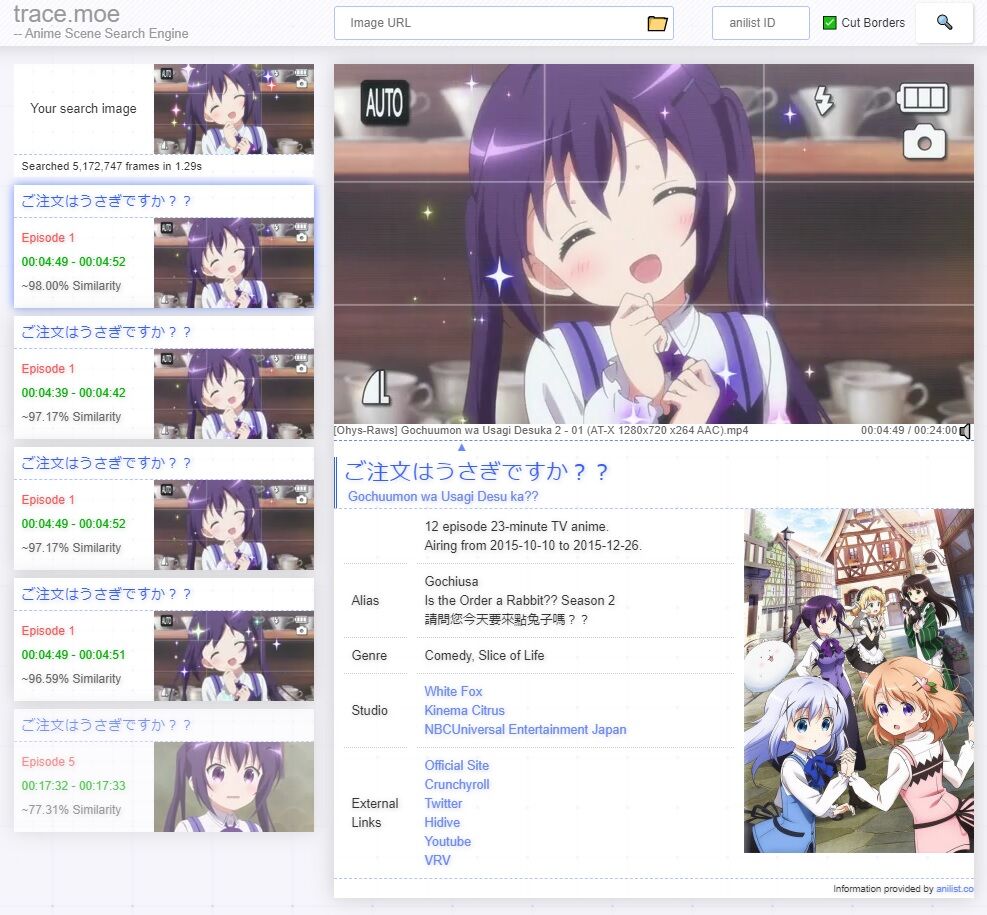
Try this image yourself.

Web Integrations
Link to trace.moe from other websites, you can pass image URL in query string like this:
https://trace.moe/?url=https://images.plurk.com/32B15UXxymfSMwKGTObY5e.jpg
trace.moe API
For Bots/Apps, refer to https://soruly.github.io/trace.moe-api/
System Overview
This repo is just an index page for the whole trace.moe system. It consists of different parts as below:
Client-side:
- trace.moe-www - web server serving the webpage trace.moe
- trace.moe-WebExtension - browser add-ons to help copying and pasting images
- trace.moe-telegram-bot - official Telegram Bot
Server-side:
- trace.moe-api - API server for image search and database updates
- ~~trace.moe-media - media server for video storage and scene preview generation.~~ Integrated into trace.moe-api
- ~~trace.moe-worker - includes hasher, loader and watcher.~~ Integrated into trace.moe-api
- ~~LireSolr - image analysis and search plugin for Solr.~~ Integrated into trace.moe-api
Others:
- ~~anilist-crawler - getting anilist info and store in database.~~ Integrated into trace.moe-api
- slides - past presentation slides on the project
Hosting your own trace.moe system
You're going to need these docker images. They are provided in the compose.yml file.
| Parts | Docker CI Build | Docker Image |
| -------------------------------------------------------- | ------------------------------------------------------------------------------------------------------------------------------------------------------------------------------------------- | ------------------------------------------------------------------------------------------------------------------------------------------------------------------------------------ |
| trace.moe-www | 



Prerequisites
You need docker compose for your OS. Windows is supported via WSL2.
Getting started
-
Create directory
/mnt/c/trace.moe/video/ -
Create subdirectory using anilist ID as folder name.
-
Put video files in it. The full path should look like this
/mnt/c/trace.moe/video/{anilist_ID}/foo.mp4 -
Copy
.env.exampleto.envand setVIDEO_PATHto/mnt/c/trace.moe/video/ -
Start the containers
docker compose up -d
It will scan the VIDEO_PATH every minute for new video files (.mp4 .mkv .webm files only, others are ignored).
You can check the indexing process the from logs of api server
- Open http://localhost:3000 and start searching
More configurations
Other configurations like port mapping are defined in compose.yml
You can also increase MAX_WORKER to make hashing faster.
Using pre-hashed data
Loading all 100,000+ files to memory requires about 160GB RAM
-
Download the pre-hashed data here: trace.moe database dump 2025-10
-
Install zstd
sudo apt install zstd   # Ubuntu / Debian
sudo yum install zstd   # CentOS / RHEL
sudo dnf install zstd   # Fedora
sudo pacman -S zstd     # Arch Linux
- Start all containers
docker compose up -d
- Load the database dump to postgres
docker exec -i tracemoe-postgres-1 psql -U postgres postgres < <(zstdcat dump.sql.zst)
This process takes a few minutes. You can ignore all errors like ERROR: relation "xxx" already exists.
- Load all hashes to Milvus
docker exec -i tracemoe-postgres-1 psql -U postgres postgres < <(echo "UPDATE files SET status='HASHED'")
wait a minute for scan to start, or trigger it manually by
curl http://localhost:3001/scan
This process may take 24 hours. You can check the progress by
docker exec -i tracemoe-postgres-1 psql -U postgres postgres < <(echo "SELECT status, COUNT(*) FROM files GROUP BY status")
Once all files are LOADED, it's ready for search. But background optimization in Milvus may take a few days to complete.
How to cleanup everything
To remove all docker containers and delete all database volumes:
docker compose down -v
Finally, manually clean up the VIDEO_PATH directory if you need to.

Security Score
Audited on Mar 28, 2026