
WeBAD
Web Browser Audio Detection/Speech Recording Events API
Install / Use
/learn @solyarisoftware/WeBADREADME
WeBAD
WeBAD stay for Web Browser Audio Detection/Speech Recording Events API.
Pronounce it we-bad or web-ad.
How to detect speech, on the browser?
You want to use the browser as a voice interface "frontend". Specifically you want to detect the user speech messages.
WeBAD supply a solution for two specific scenarios:
-
Hardware-button push-to-talk
The user press a real/hardware button, that mute/un-mute an external mic. You want to record the audio blob from when the user push the button, to when the user release the button!
-
Continuous listening
The speech is detected in real-time, just talking in front of the PC (or the tablet/ mobile phone / handset). Namely: avoiding any wake-word detection algorithm. You want to record the audio blob from when the user start to talk, to when the user finish the spoken utterance!
|
 |
|:--:|
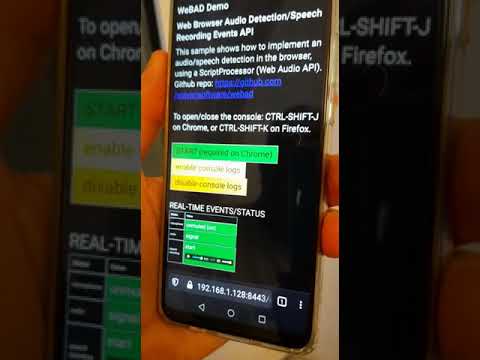
| Instant gratification video demo: continuous listening mode using WeBAD |
|
|:--:|
| Instant gratification video demo: continuous listening mode using WeBAD |
What's a speech message?
Consider user talking with the computer. I define speech an audio message (a binary Blob in some codec format) to be elaborated by some backend voicebot logic.
In terms of syntactical analysis, for speech I mean the pronunciation of
- A letter, a number, a monosyllable (the minimal pronounceable item), by example: 1, 3, I, c, yes, hey
- A single word. Examples: Alexa, isn't, smart, CRSU123456K, ILM-67Z-5643
- An entire utterance. Example: "Hey Google, I'm in love with you", "Please computer, open your heart!"
The pronunciation of an entire spoken sentence could be considered as a sequences of audio signal blocks, I call chunks, interspersed by pauses (silence).
Consider the sentence:
I'm in love with you
It contains a sequence of:
-
Signal chunks
In fact the sentence is composed by 5 words (sentences)
I'm in love with you ___ __ ____ ____ ___ ^ ^ ^ ^ ^ signal chunks -
Inter-speech silences
There are 5 silence segments: 4 inter-word pauses.
I'm     in    love     with    you
   _____  ____    _____    ____
   ^      ^       ^        ^
   silence chunks
So a speech could be considered as a sequence of one or more signal chunks separated by silence chunks. Please note that the complete speech includes also:
-
An initial silence (I call prespeech-lag). That's because we need to preserve the envelope curve starting from silence, to let a speech-to-text engine to transcript successfully the sentence.
-
a final silence (I call postspeech-lag). That's a tricky configuration tuning we'll see. The question is: after how many millisecond of pause after a sequence of words, we consider terminated the spoken sentence?
We will see that a speech message (made by WeBAD) always includes prespeech-lag and postspeech-lag.
     I'm     in    love     with    you
_____   _____  ____    _____    ____   _____
^                                      ^
prespeech-lag                          postspeech-lag
Some different speech detection VUI approaches
Assuming that we want to use a web browser, let's see some possible scenarios:
-
(1) Wake word detection
Currently this is considered the common way to push speech messages on a voice interfaced system. Wake word detection, especially if you want to have your own custom word sequences, need a specialized training of a neural net and a CPU-intensive run-time engine that has to run on the browser.
WeBAD just escapes from wake word approach. Some solutions in references
-
(2) Push-to-talk
That's the traditional reliable way to generate audio messages (see radio mobile/walkie-talkie). The user push a button, start to talk, release the button when finished to talk. Note that push to talk could be implemented on the browser in two way:
-
(2.1) Software-button (web page hotkey)
That's the simplest approach on GUI interface. Consider a web browser, on a mobile device you have a touch interface, on a personal computer you have a keyboard/mouse. So you can have an HTML button (hotkey) that, when pressed, triggers a recording. Through a keyboard or a touch screen, the user press a key or touch a (button on the) screen to talk. But that is not a touch-less / keyboard-less solution.
-
(2.2) Hardware push-button
The user press a real/hardware push-button, that mute/un-mute an external mic. Here a simplified schematics about how the mic setup:
-
Normally-closed push-button
PTT push-button short-circuited to ground (default): exit signal is ~0
.-----------+-----------. (+) | | | .--+--. + .------> | mic | | jack out male mono (mini jack 3.5mm) .--+--. | .------> | + | .-----------+-----------. ground ^ | normally-closed PTT push-button -
Open (pressed) push-button
When the user want to talk, he push the PTT push-button. The exit signal become >> 0
   .-----------+-----------. (+)
   |           |           |
.--+--.        +           .------>
| mic |          /                  jack out male mono (mini jack 3.5mm)
.--+--.         /          .------>
   |           +           |
   .-----------+-----------. ground
               ^
               |
               Open PTT push-button
-
-
(2.3) Hardware USB/Bluetooth foot-switch
That's a smart "hands-free" solution, maybe useful in industrial operations.
One ore more foot-switches act as HW hotkeys. An USBi (or Bluetooth) temporary foot-switch (e.g. I successfully experimented this), when pressed generates a
keydown/touchstartHTML DOM event. When released the pedal generates akeyup/touchendHTML DOM event.This push-to-talk solution is very interesting also because the low CPU/power consumption. This case falls into the previous 2.1. BTW the pedal could be substituted by and hand-keyboard too.
-
-
(3) Continuous listening (without wake-word detection)
A better voice-interface user experience is maybe through a continuous listening mode, where audio is detected in real-time, just talking in front of the PC (or the tablet/ mobile phone / handset). Namely: avoiding any wake-word detection algorithm.
WeBAD focuses on the two last scenarios (2.2) and (3).
Which are the possible applications?
-
Mobile device voice-interface client for operators that can't use the touch-screen
The target scenario is a situation where the user can't easily touch the screen of a mobile device. The voice interface is through an external micro equipped with a push-to talk button.
-
Browser-based voice-interface client for a personal assistant
Continuous listening is, in my opinion, probably the more natural voice-based interface for a conversational personal assistant. Just because it mimic a human-to-human turn-taking.
It's applicable when the user is in front of a personal computer (or a mobile phone) in a pretty quiet environment, by example in a room apartment or a quite office, or inside a vehicle.
WeBAD Event-bus API solution
The technical solution here proposed is a javascript program running on the browser to get the audio volume of the microphone in real-time, using a Web Audio API script processor that calculate RMS volume.
A cyclic task, running every N msecs, does some logic above the current volume RMS sample and generates these javascript events:
-
AUDIO VOLUME EVENTS
Low-level events for track the volume of the current audio sample:
| event | description | | :---: | ----------- | |
mute| audio volume is almost zero, the mic is off | |silence| audio volume is pretty low, the mic is on but there is not speech | |signal| audio volume is high, so probably user is speaking | |clipping| audio volume is too high, clipping. TODO | -
MICROPHONE STATUS EVENTS
Low-level events to track if micro is enabled (unmuted) or if it's disabled (volume is 0):
| event | description | | :---: | ----------- | |
unmutedmic| microphone is unmuted (passing from OFF to ON)| |mutedmic| microphone is muted (passing from ON to OFF)| -
RECORDING EVENTS
Events for recording audio/speech:
| event | description | | :---: | ----------- | |
prespeechstart| speech START| |speechstart| speech of first signal chunk START| |speechstop| speech STOP (success, speech seems a valid speech)| |speechabort| speech ABORTED (because level is too low or audio duration length too short)|
Signal level state tracking
The microphone volume is detected by WeBAD, that trigger events and maintains a current state, with this discrete values:
| signal level | description |
| :----------: | ----------- |
| mute | The microphone is closed, or muted (volume is ~= 0). Via software, by an operating system driver setting. Via software, because the application set the mute state by example with a button on the GUI. Via hardware, with an external mic input grounded by a push-to-talk button |
| unmute | The micro is open, or unmuted |
| silence | The microphone is
Related Skills
docs-writer
99.3k`docs-writer` skill instructions As an expert technical writer and editor for the Gemini CLI project, you produce accurate, clear, and consistent documentation. When asked to write, edit, or revie
model-usage
339.3kUse CodexBar CLI local cost usage to summarize per-model usage for Codex or Claude, including the current (most recent) model or a full model breakdown. Trigger when asked for model-level usage/cost data from codexbar, or when you need a scriptable per-model summary from codexbar cost JSON.
string-reviewer
99.3k>
sag
339.3kElevenLabs text-to-speech with mac-style say UX.
