
Leaflet.TimeDimension
Add time dimension capabilities on a Leaflet map.
Install / Use
/learn @socib/Leaflet.TimeDimensionREADME
Leaflet TimeDimension
Add time dimension capabilities on a Leaflet map.
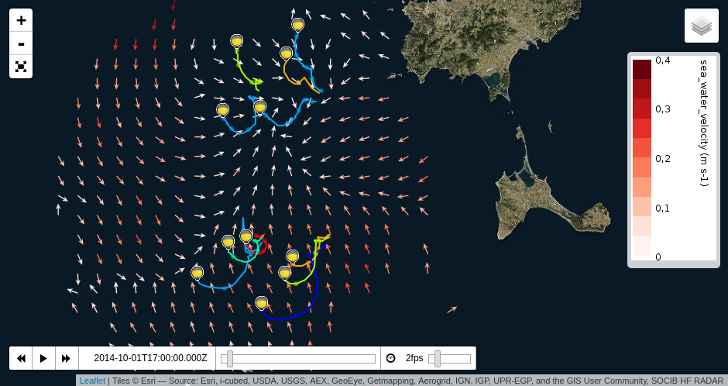
Examples and basic usage
Checkout the Leaflet TimeDimension Demos.
Basic usage:
<html>
    <head>
        <title>Leaflet TimeDimension Demo</title>
        <link rel="stylesheet" href="https://cdn.jsdelivr.net/npm/leaflet@1.5.1/dist/leaflet.css" />
        <link rel="stylesheet" href="https://cdn.jsdelivr.net/npm/leaflet-timedimension@1.1.1/dist/leaflet.timedimension.control.min.css" />
    </head>
    <body>
        <div id="map" style="height: 100%; width: 100%"></div>
        <script type="text/javascript" src="https://cdn.jsdelivr.net/npm/leaflet@1.5.1/dist/leaflet.js"></script>
        <script type="text/javascript" src="https://cdn.jsdelivr.net/npm/iso8601-js-period@0.2.1/iso8601.min.js"></script>
        <script type="text/javascript" src="https://cdn.jsdelivr.net/npm/leaflet-timedimension@1.1.1/dist/leaflet.timedimension.min.js"></script>
        <script type="text/javascript" src="example.js"></script>
    </body>
</html>
// example.js
var map = L.map('map', {
    zoom: 10,
    center: [38.705, 1.15],
    timeDimension: true,
    timeDimensionOptions: {
        timeInterval: "2014-09-30/2014-10-30",
        period: "PT1H"
    },
    timeDimensionControl: true,
});

var wmsUrl = "https://thredds.socib.es/thredds/wms/observational/hf_radar/hf_radar_ibiza-scb_codarssproc001_aggregation/dep0001_hf-radar-ibiza_scb-codarssproc001_L1_agg.nc"
var wmsLayer = L.tileLayer.wms(wmsUrl, {
    layers: 'sea_water_velocity',
    format: 'image/png',
    transparent: true,
    attribution: 'SOCIB HF RADAR | sea_water_velocity'
});

// Create and add a TimeDimension Layer to the map
var tdWmsLayer = L.timeDimension.layer.wms(wmsLayer);
tdWmsLayer.addTo(map);
For more control over each object creation, you can create timeDimension objects manually, see Example 9
API
L.Map
This plugin will attach to a Map a TimeDimension object and a related TimeDimension Control if timeDimension and timeDimensionControl options are included.
Option | Type | Default | Description
------------------------------|-----------|---------|------------
timeDimension | Boolean | false | Automatically creates a new TimeDimension object linked to the map if set to true.
timeDimensionOptions | Object | {} | Options for the TimeDimension object.
timeDimensionControl | Boolean | false | Automatically adds a TimeDimension Control to the map if set to true.
timeDimensionControlOptions | Object | {} | Options for the TimeDimension Control object.
L.TimeDimension
TimeDimension object manages the time component of a layer. It can be shared among different layers and it can be added to a map, and become the default timedimension component for any layer added to the map.
In order to include a TimeDimension in the map, add timeDimension: true as an option when creating the map.
Usage example
L.timeDimension().addTo(map);
Creation
Factory | Description
-------------------------------------|------------
L.timeDimension(<Object> options?) |
<a name="timeDimensionOptions"></a>Options
This options can be set up when creating the map with the option timeDimensionOptions.
Option | Type | Default | Description
-----------------|----------|------------------------|------------
times | Number | null | It can be: a) An array of times (in milliseconds). b) String of dates separated by commas. c) String formed by start date/end date/period. If null, it will be constructed according to timeInterval and period
timeInterval | String | "P1M/" + today | String to construct the first available time and the last available time. Format: ISO8601 Time inverval
period | String | "P1D" | Used to construct the array of available times starting from the first available time. Format: ISO8601 Duration
validTimeRange | String | undefined | Filter the array of available times by start hour and end hour (for any date). Format "HH:MM/HH:MM".
currentTime | Number | Closest available time | Current time to be loaded. Time in ms.
loadingTimeout | Number | 3000 | Maximum time in milliseconds that the component will wait to apply a new time if synced layers are not ready
lowerLimitTime | Number | undefined |
upperLimitTime | Number | undefined |
Events
Event | Data | Description
------------------------|-------------------------------|------------
timeloading | time | Fired when a new time is required to load
timeload | time | Fired when a all synced layers have been loaded/prepared for a new time (or timeout)
availabletimeschanged | availableTimes, currentTime | Fired when the list of available times have been updated
limitschanged | lowerLimit, upperLimit | Fired when range limits changed. Limits are expressed in index value
Methods
Method | Returns | Description
------------------------------------------------------------------------|------------------|------------
getAvailableTimes() | Array of times | Array of all the available times of the TimeDimension
getCurrentTime() | time | Current time of the Time Dimension
setCurrentTime(<Number> time) | - | Modify the current time. If the time argument is not among the available times, the previous closest time will be selected
nextTime(<Number> numSteps, <Boolean> loop) | - | Move the current time n steps forward in the available times array
previousTime(<Number> numSteps, <Boolean> loop) | - | Move the current time n steps backward in the available times array
prepareNextTimes(<Number> numSteps, <Number> howmany, <Boolean> loop) | - | Fire 'timeloading' for severals times (in order to pre-load layers)
registerSyncedLayer(<L.TimeDimension.Layer> layer) | - | TimeDimension will check if all layers are ready before firing timeload. It will listen to "timeload" event of these layers.
unregisterSyncedLayer(<L.TimeDimension.Layer> layer) | - |
setAvailableTimes(<Array> times, <String> mode) | - | Update available times of the TimeDimension with a new array of times (in ms). Mode : Update modes
L.TimeDimension.Layer
TimeDimension.Layer is an abstract Layer that can be managed/synchronized with a TimeDimension. The constructor recieves a layer (of any kind) and options.
Any children class should implement _onNewTimeLoading, isReady and _update functions to react to time changes.
<a name="timeDimensionLayerOptions"></a>Options
Option | Type | Default | Description
----------------|---------------------|---------|------------
timeDimension | <L.TimeDimension> | null | TimeDimension object which will manage this layer. If it is not defined, the map TimeDimension will be attached when adding this layer to the map.
opacity | Number | 1 |
zIndex | Number | 1 |
Events
Event | Data | Description
-----------|--------|------------
timeload | time | Fires when a the layer has been loaded/prepared for a new time
L.TimeDimension.Layer.WMS
Implements a TimeDimension Layer for a given WMS layer, which can be a L.TileLayer.WMS or a L.NonTiledLayer.WMS.
This component synchronizes the WMS with a TimeDimension, modifying the time parameter in the WMS requests.
Usage example
L.timeDimension.layer.wms(layer).addTo(map);
Creation
Factory | Description
----------------------------------------------------------------|------------
L.timeDimension.layer.wms(<L.Layer> layer, <Object> options?) |
<a name="timeDimensionLayerWMSOptions"></a>Options
Option | Type | Default | Description
------------------------------|-----------|--------------------------------------|------------
cache | Number | 0
Related Skills
node-connect
340.2kDiagnose OpenClaw node connection and pairing failures for Android, iOS, and macOS companion apps
frontend-design
84.1kCreate distinctive, production-grade frontend interfaces with high design quality. Use this skill when the user asks to build web components, pages, or applications. Generates creative, polished code that avoids generic AI aesthetics.
openai-whisper-api
340.2kTranscribe audio via OpenAI Audio Transcriptions API (Whisper).
commit-push-pr
84.1kCommit, push, and open a PR
