
PTree
Design power tree and estimate consumptions
Install / Use
/learn @smariel/PTreeREADME
Check smariel.github.io/PTree to download PTree for Windows, Linux, macOS and find more informations.
PTree aims to help building power supplies on electronics design. A first window is dedicated to build the tree itself by connecting sources and loads. The second window lists all components with their consumption on each power supplies. The third window is a graphical summary of all consumption on the design.
Contents
Install
PTree is based on Electron. It is a web app packaged with Chromium and Node.js.
You will first need to install nodejs, which includes npm.
Test the installation:
$ npm --version
$ 6.2.0
Then, using git and npm, install the PTree project and all its dependencies locally:
$ git clone https://github.com/smariel/PTree
$ cd PTree
$ npm install
The project is ready. Launch PTree:
$ npm start
Compile SASS to CSS
The stylesheets are not directly wrotten in CSS but compiled with Sass. You can install it globally with npm.
$ npm install -g npm-sass
You will find a script in the Sass folder to automatically compile sheets each time you save them.
Open a dedicated terminal and let the following command running while you are developping:
$ ./sass/watch.sh
Build and deploy
electron-builder is used to create binaries for all platforms. Install it as a dev dependency:
$ npm install electron-builder --save-dev
package.json contains multiple scripts to easily build PTree. Just run:
$ npm run xxx
Where xxx must be replaced by:
| xxx | Platform | | --------- | --------------------------------------------------- | | build:mac | folder with macOS .app | | build:win | folder with windows .exe + windows stuff | | build:lin | folder with linux binary + linux stuff | | dist:mac | macOS .app in .dmg disk image + extras files | | dist:win | windows portable .exe in a .zip file + extras files | | dist:lin | linux AppImage in a .zip file + extras files | | build:all | = build:mac + build:win + build:lin | | dist:all | = dist:mac + dist:win + dist:lin |
Debugging
To debug the main process, launch the with npm start or by adding a --inspect argument. Then attach a debugger to port 9229.
To debug any renderer, use the DevTools. If you want to use an external debugger, launch PTree with npm start or by adding a --remote-debugging-port=9228 argument. Then close the DevTools (to detach the embedded debugger) and attach an other debugger to port 9228.
Example of external debugger for Atom: atom-ide-ui + atom-ide-debugger-node.
Verifications
You can verify multiple items before deploying.
Local dependencies
Maintain the dependencies up to date:
$ npm outdated
$ Package            Current  Wanted  Latest  Location
$ bootstrap            3.4.1   3.4.1   4.4.1  PTree
$ electron             6.1.7  6.1.10   8.2.3  PTree
$ electron-builder    22.2.0  22.5.1  22.5.1  PTree
Bootstrap is deliberately keeped bellow a certain version.
To update a package:
$ npm update <package name>@<version>
Global dependencies
Maintain other programs, not listed in package.json, up to date :
- node.js
- npm
- sass
- electron-packager
- ...
npm can check those global packages:
$ npm outdated -g
To update a global package:
$ npm update -g <package name>@<version>
Other programs
n can manage node.js versions
 $ npm install -g n
 $ sudo n lts
NPM audit
Use npm to search for security problems in all dependencies:
$ npm audit
Chromium tips
Have a look to the Chromium console. Chromium and Electron may give good advices there.
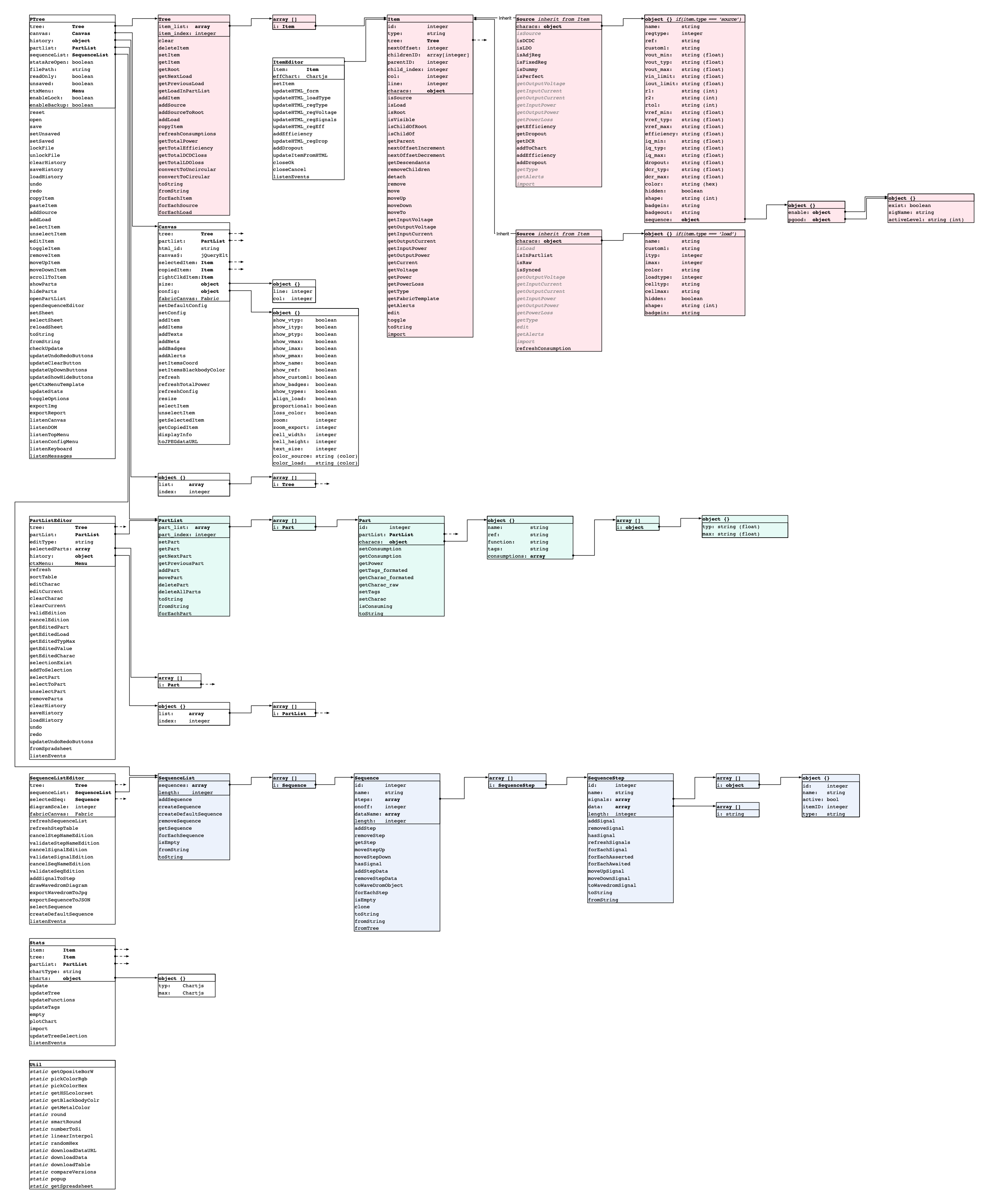
PTree diagram
Finally, a complete view of the objects imbrication can be found in /docs/synop.jpg
Related Skills
diffs
344.1kUse the diffs tool to produce real, shareable diffs (viewer URL, file artifact, or both) instead of manual edit summaries.
clearshot
Structured screenshot analysis for UI implementation and critique. Analyzes every UI screenshot with a 5×5 spatial grid, full element inventory, and design system extraction — facts and taste together, every time. Escalates to full implementation blueprint when building. Trigger on any digital interface image file (png, jpg, gif, webp — websites, apps, dashboards, mockups, wireframes) or commands like 'analyse this screenshot,' 'rebuild this,' 'match this design,' 'clone this.' Skip for non-UI images (photos, memes, charts) unless the user explicitly wants to build a UI from them. Does NOT trigger on HTML source code, CSS, SVGs, or any code pasted as text.
openpencil
2.0kThe world's first open-source AI-native vector design tool and the first to feature concurrent Agent Teams. Design-as-Code. Turn prompts into UI directly on the live canvas. A modern alternative to Pencil.
HappyColorBlend
HappyColorBlendVibe Project Guidelines Project Overview HappyColorBlendVibe is a Figma plugin for color palette generation with advanced tint/shade blending capabilities. It allows designers to
