
Korelate
The open-source, AI-powered Unified Namespace (UNS) Operations Center. Visualize MQTT topic trees, build dynamic SVG HMIs, transform data via ETL, and leverage an embedded Autonomous AI Agent for alerting and historical time-series analysis.
Install / Use
/learn @slalaure/KorelateREADME
Korelate
<div align="center">



The Open-Source Unified Namespace Explorer for the AI Era
Live Demo • Architecture • Installation • User Manual / Wiki • Developer Guide • API
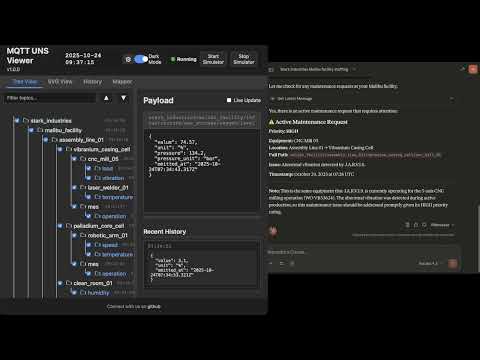
</div>📺 Watch the Demo
📖 The Vision: Why UNS? Why Now?
The Unified Namespace (UNS) Concept
The Unified Namespace is the single source of truth for your industrial data. It creates a semantic hierarchy (e.g., Enterprise/Site/Area/Line/Cell) where every smart device, software, and sensor publishes its state in real-time.
- Single Source of Truth: No more point-to-point spaghetti integrations.
- Event-Driven: Real-time data flows instead of batch processing.
- Open Architecture: Based on lightweight, open standards (MQTT, Sparkplug B).
📚 Learn More:
The AI Revolution & Gradual Adoption
In the age of Generative AI and Large Language Models (LLMs), context is king. An AI cannot optimize a factory if the data is locked in silos with obscure names like PLC_1_Tag_404.
Korelate facilitates Gradual Adoption:
- Connect to your existing messy brokers.
- Visualize the chaos.
- Structure it using the built-in Mapper (ETL) to normalize data into a clean UNS structure without changing the PLC code.
- Analyze with the Autonomous AI Agent which monitors alerts, investigates root causes using available tools, and generates reports automatically.
🏗 Architecture & Design
This application is designed for Edge Deployment (on-premise servers, industrial PCs). It prioritizes low latency, low footprint, high versatility, and extreme resilience against data storms.
Component Diagram
graph TD
    subgraph FactoryFloor ["Factory Floor"]
        PLC["PLCs / Sensors"] -->|MQTT/Sparkplug| Broker1["Local Broker"]
        Cloud["AWS IoT / Azure"] -->|MQTTS| Broker2["Cloud Broker"]
        CSV["Legacy Systems"] -->|CSV Streams| FileParser["Data Parsers"]
    end

    subgraph UNSViewer ["Korelate (Docker)"]
        Backend["Node.js Server"]
        DuckDB[("DuckDB Hot Storage")]
        Mapper["ETL Engine V8"]
        Alerts["Alert Manager & AI Agent"]
        MCP["MCP Server (External AI Gateway)"]

        Backend <-->|Subscribe| Broker1
        Backend <-->|Subscribe| Broker2
        Backend <-->|Loopback Stream| FileParser
        Backend -->|Write| DuckDB
        Backend <-->|Execute| Mapper
        Backend <-->|Orchestrate| Alerts
        MCP <-->|Context Query| Backend
    end

    subgraph PerennialStorage ["Perennial Storage"]
        Timescale[("TimescaleDB / PostgreSQL")]
    end

    subgraph Users ["Users"]
        Browser["Web Browser"] <-->|WebSocket/HTTP| Backend
        Claude["Claude / ChatGPT"] <-->|HTTP/SSE| MCP
    end

    Backend -.-+>|Async Write| Timescale
Storage & Resilience Strategy
To handle environments ranging from a few updates a minute to thousands of messages per second, the architecture uses a multi-tiered and highly resilient approach:
- Extreme Resilience Layer (Anti-Spam & Backpressure):
- Smart Namespace Rate Limiting: Drops high-frequency spam (>50 msgs/s per namespace) early at the MQTT handler level, protecting CPU/RAM while preserving low-frequency critical events.
- Queue Compaction: Deduplicates topic states in memory before DuckDB insertion to prevent Out-Of-Memory (OOM) errors during packet storms.
- Frontend Backpressure: Uses
requestAnimationFrameto batch DOM updates, ensuring the browser UI never freezes, even under extreme load.
- Tier 1: In-Memory (Real-Time): Instant WebSocket broadcasting for live dashboards.
- Tier 2: Embedded OLAP (DuckDB): * Stores "Hot Data" locally.
- Time-series aggregations via native
time_bucketfunctions. - Auto-pruning prevents disk overflow (
DUCKDB_MAX_SIZE_MB).
- Time-series aggregations via native
- Tier 3: Perennial (TimescaleDB):
- Optional connector.
- "Fire-and-forget" batched ingestion for long-term archival and compliance.
🐳 Installation & Deployment
Prerequisites
- Docker & Docker Compose
- Access to MQTT Broker(s), OPC UA server(s), or local CSV files
1. Quick Start
# Clone the repository
git clone https://github.com/slalaure/korelate.git
cd korelate

# Setup configuration
cp .env.example .env

# Start the stack (Multi-Arch image available on Docker Hub)
docker-compose up -d
- Dashboard:
http://localhost:8080 - MCP Endpoint:
http://localhost:3000/mcp
2. Configuration (.env)
The application supports extensive configuration via environment variables.
Connectivity & Permissions
Define multiple providers and explicitly set their Read/Write permissions using arrays. Supported types are mqtt, opcua, and file.
# Define multiple providers (Minified JSON)
DATA_PROVIDERS='[{"id":"local_mqtt", "type":"mqtt", "host":"localhost", "port":1883, "subscribe":["#"], "publish":["uns/commands/#"]}, {"id":"factory_opc", "type":"opcua", "endpointUrl":"opc.tcp://localhost:4840", "subscribe":[{"nodeId":"ns=1;s=Temperature", "topic":"uns/factory/temperature"}]}]'
Storage Tuning
DUCKDB_MAX_SIZE_MB=500       # Limit local DB size. Oldest data is pruned automatically.
DUCKDB_PRUNE_CHUNK_SIZE=5000 # Number of rows to delete per prune cycle.
DB_INSERT_BATCH_SIZE=5000    # Messages buffered in RAM before DB write (Higher = Better Perf).
DB_BATCH_INTERVAL_MS=2000    # Flush interval for DB writes.

# Perennial Storage (Optional)
PERENNIAL_DRIVER=timescale   # Enable long-term storage (Options: 'none', 'timescale')
PG_HOST=192.168.1.50         # Postgres connection details
PG_DATABASE=korelate
PG_TABLE_NAME=mqtt_events
Authentication & Security
# Web Interface & API Authentication
HTTP_USER=admin              # Basic Auth User (Legacy/API fallback)
HTTP_PASSWORD=secure         # Basic Auth Password
SESSION_SECRET=change_me     # Signing key for session cookies

# Google OAuth (Optional)
GOOGLE_CLIENT_ID=...
GOOGLE_CLIENT_SECRET=...
PUBLIC_URL=http://localhost:8080 # Required for OAuth redirects

# Auto-Provisioning
ADMIN_USERNAME=admin         # Creates/Updates a Super Admin on startup
ADMIN_PASSWORD=admin
AI & MCP Capabilities
Control what the AI Agent is allowed to do.
MCP_API_KEY=sk-my-secret-key    # Secure the MCP endpoint
LLM_API_URL=...                 # OpenAI-compatible endpoint (Gemini, ChatGPT, Local)
LLM_API_KEY=...                 # Key for the internal Chat Assistant

# Granular Tool Permissions (true/false)
LLM_TOOL_ENABLE_READ=true       # Inspect DB, topics list, history, and search
LLM_TOOL_ENABLE_SEMANTIC=true   # Infer Schema, Model Definitions
LLM_TOOL_ENABLE_PUBLISH=true    # Publish MQTT messages
LLM_TOOL_ENABLE_FILES=true      # Read/Write files (SVGs, 3D Models, Simulators)
LLM_TOOL_ENABLE_SIMULATOR=true  # Start/Stop built-in sims
LLM_TOOL_ENABLE_MAPPER=true     # Modify ETL rules
LLM_TOOL_ENABLE_ADMIN=true      # Prune History, Restart Server
Analytics
ANALYTICS_ENABLED=false # Enable Microsoft Clarity tracking
📘 User Manual / Power User Wiki
1. Authentication, Roles & Multi-Tenancy
The viewer supports Local (Username/Password) and Google OAuth authentication, enabling secure multi-tenant usage.
- Air-Gapped Ready: Local accounts use dynamically generated embedded SVG avatars, requiring zero internet access to external APIs, perfect for isolated OT networks.
- Role-Based Access Control (RBAC):
- Standard User: Can view data, and create Private Charts, Mappers, and HMI views (stored in their own session workspace:
/data/sessions/<id>). - Administrator: Has full control. Can edit Global configurations (
/data), access the Admin Dashboard (/admin), manage users, execute history imports/pruning, upload 3D models and deploy live ETL logic.
- Standard User: Can view data, and create Private Charts, Mappers, and HMI views (stored in their own session workspace:
2. Dynamic Topic Tree
The left panel displays the discovered UNS hierarchy.
- Sparkplug B Support: Topics starting with
spBv1.0/are automatically decoded from Protobuf to JSON. - Protocol Agnostic: The root nodes represent your different broker connections (MQTT, OPC UA, or local CSV data parsers).
- Filtering & Animations: You can filter topics on the fly, disable traversal animations for high-frequency branches, and toggle live updates to freeze the payload viewer for copy-pasting.
3. HMI Dashboards & 3D Digital Twins
Create professional HMIs using HTML, standard vector graphics, and 3D scenes.
- Composite Dashboards: Load
.htmlfiles that act as grid layouts combining multiple embedded SVGs (.embedded-svg), live charts (.embedded-chart), and data bindings into a single, cohesive view. - 3D Integration (A-Frame): Automatically detects and loads A-Frame to render live 3D Digital Twins directly in the browser using
.glb/.gltfassets. - Dynamic Loading: Upload
.html,.svg, or 3D models directly via the UI or ask the AI to generate one. - Instant Refresh: Views instantly fetch their latest known state from DuckDB using the "AS OF" SQL logic upon activation.
- Layered Storage: Users can see globa
