
StudyNotion
StudyNotion is a fully functional ed-tech platform that enables users to create, consume, and rate educational content. The platform is built using the MERN stack, which includes ReactJS, NodeJS, MongoDB, and ExpressJS.
Install / Use
/learn @skyeyeye/StudyNotionREADME
StudyNotion Online Education Platform (MERN App) Website Link
Building StudyNotion: An EdTech Platform Powered by the MERN Stack Medium Link
StudyNotion is a comprehensive educational platform aimed at providing a seamless experience for students and educators alike. It offers a range of features that facilitate learning, collaboration, and resource sharing.

DESCRIPTION
The StudyNotion project is designed to streamline the educational process. It allows users to access a variety of educational materials, collaborate on projects, and interact with educators, enhancing the learning experience. StudyNotion employs a monolithic architecture and leverages a tech stack involving React.js, Node.js, Express.js, MongoDB, Cloudinary, and Tailwind CSS.
TECHNOLOGY STACK
StudyNotion is built using the following technologies:
Frontend
<a F="frontend"></a>
<p> <a href="https://www.w3schools.com/html/"> <img src="https://img.icons8.com/color/70/000000/html-5--v1.png" alt="HTML" /></a> <a href="https://www.w3schools.com/css/"> <img src="https://img.icons8.com/color/70/000000/css3.png" alt="CSS" /></a> <a href="https://www.w3schools.com/js/"><img src="https://img.icons8.com/color/70/000000/javascript--v1.png" alt="JS" /></a> <a href="https://www.w3schools.com/REACT/DEFAULT.ASP"><img src="https://upload.wikimedia.org/wikipedia/commons/thumb/a/a7/React-icon.svg/2300px-React-icon.svg.png" alt="React.js" width="50" height="50" /></a> </p>- HTML:HTML (HyperText Markup Language) is a skeleton of a website, structuring content with tags and elements.
- CSS:CSS is a style sheet language used to style web pages.It enables the application of different styles based on media types and user preferences, enhancing user accessibility and readability
- JavaScript:JavaScript is a programming language used to add interactivity to websites.
- React.js:A JavaScript library for building user interfaces. It allows developers to create large web applications that can update and render efficiently in response to data changes.
Backend
<a m="backend"></a>
<p> <a href="https://www.w3schools.com/nodejs/"><img src="https://e7.pngegg.com/pngimages/247/558/png-clipart-node-js-javascript-express-js-npm-react-github-angle-text.png" alt="Node.js" width="50" height="50" /></a> <a href="https://www.javatpoint.com/expressjs-tutorial"><img src="https://cdn.icon-icons.com/icons2/2699/PNG/512/expressjs_logo_icon_169185.png" alt="expressjs" width="50" height="50" /></a> <a href="https://www.mongodb.com/docs/"><img src="https://w7.pngwing.com/pngs/956/695/png-transparent-mongodb-original-wordmark-logo-icon-thumbnail.png" alt="MongoDB" width="50" height="50" /></a> </p>- MongoDB: A NoSQL database that provides high performance, high availability, and easy scalability. It stores data in flexible, JSON-like documents.
- Express.js: A minimal and flexible Node.js web application framework that provides a robust set of features for web and mobile applications.
- Node.js: A JavaScript runtime built on Chrome's V8 JavaScript engine, enabling server-side scripting and running scripts server-side to produce dynamic web page content.
ARCHITECTURE DIAGRAM

API ROUTE
AUTHENTICATION
| ENDPOINT | API PATH |
|-----------------------|------------------------------------|
| SENDOTP | api/v1/auth/sendotp |
| SIGNUP | api/v1/auth/signup |
| LOGIN | api/v1/auth/login |
| RESETPASSTOKEN | api/v1/auth/reset-password-token |
| RESETPASSWORD | api/v1/auth/reset-password |
PROFILE
| ENDPOINT | API PATH |
|--------------------------|----------------------------------------|
| GET_USER_DETAILS | api/v1/profile/getUserDetails |
| GET_USER_ENROLLED_COURSES| api/v1/profile/getEnrolledCourses |
| GET_INSTRUCTOR_DATA | api/v1/profile/instructorDashboard |
STUDENT
| ENDPOINT | API PATH |
|--------------------------|----------------------------------------|
| COURSE_PAYMENT | api/v1/payment/capturePayment |
| COURSE_VERIFY | api/v1/payment/verifyPayment |
| SEND_PAYMENT_SUCCESS_EMAIL| api/v1/payment/sendPaymentSuccessEmail|
COURSE
| ENDPOINT | API PATH |
|------------------------------|---------------------------------------------|
| GET_ALL_COURSE | api/v1/course/getAllCourses |
| COURSE_DETAILS | api/v1/course/getCourseDetails |
| EDIT_COURSE | api/v1/course/editCourse |
| COURSE_CATEGORIES | api/v1/course/showAllCategories |
| CREATE_COURSE | api/v1/course/createCourse |
| CREATE_SECTION | api/v1/course/addSection |
| CREATE_SUBSECTION | api/v1/course/addSubSection |
| UPDATE_SECTION | api/v1/course/updateSection |
| UPDATE_SUBSECTION | api/v1/course/updateSubSection |
| GET_ALL_INSTRUCTOR_COURSES | api/v1/course/getInstructorCourses |
| DELETE_SECTION | api/v1/course/deleteSection |
| DELETE_SUBSECTION | api/v1/course/deleteSubSection |
| DELETE_COURSE | api/v1/course/deleteCourse |
| GET_FULL_COURSE_DETAILS_AUTHENTICATED | api/v1/course/getFullCourseDetails|
| LECTURE_COMPLETION | api/v1/course/updateCourseProgress |
| CREATE_RATING | api/v1/course/createRating |
RATINGS & REVIEWS
| ENDPOINT | API PATH |
|---------------------------|-----------------------------------|
| REVIEWS_DETAILS | api/v1/course/getReviews |
CATEGORIES
| ENDPOINT | API PATH |
|-----------------------|---------------------------------------|
| CATEGORIES | api/v1/course/showAllCategories |
CATALOG
| ENDPOINT | API PATH |
|-----------------------|---------------------------------------|
| CATALOG_PAGE_DATA | api/v1/course/getCategoryPageDetails|
CONTACT US
| ENDPOINT | API PATH |
|-----------------------|------------------------------------|
| CONTACT_US | api/v1/reach/contact |
SETTING
| ENDPOINT | API PATH |
|---------------------------|---------------------------------------|
| UPDATE_DISPLAY_PICTURE | api/v1/profile/updateDisplayPicture |
| UPDATE_PROFILE | api/v1/profile/updateProfile |
| CHANGE_PASSWORD | api/v1/auth/changepassword |
| DELETE_PROFILE | api/v1/profile/deleteProfile |
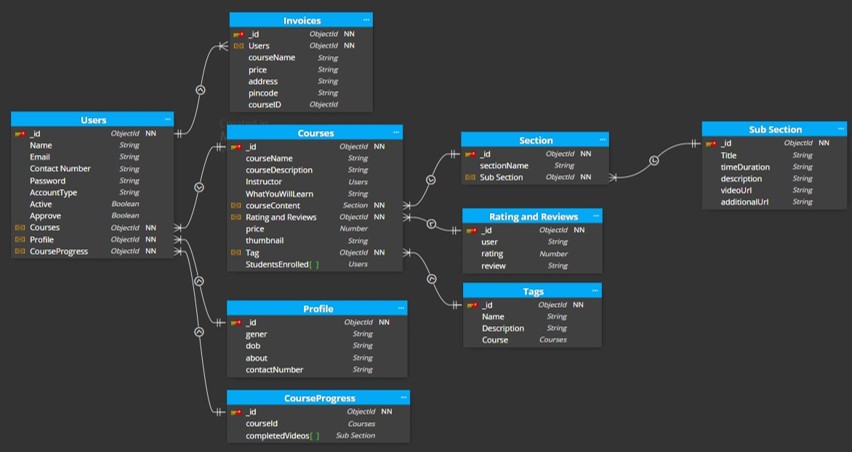
SCHEMA DESIGN
FUNCTIONALITIES
The back end of StudyNotion provides a range of features and functionalities, including:
- USER AUTHENTICATION & AUTHORIZATION: Students and instructors can sign up and log in using email addresses and passwords. The platform supports OTP (One-Time Password) verification and forgot password functionality for enhanced security.
- COURSE MANAGEMENT: Instructors can create, read, update, and delete courses, manage course content, and media. Students can view and rate courses.
- PAYMENT INTEGRATION: Students can purchase and enroll in courses by completing the checkout flow that includes Razorpay integration for payment handling.
- CLOUD-BASED MEDIA MANAGEMENT: StudyNotion utilizes Cloudinary, a cloud-based media management service, to store and manage all media content, including images, videos, and documents.
- MARKDOWN FORMATTING: Course content is stored in Markdown format, allowing easier display and rendering on the front end.
FRONTEND
The front end of StudyNotion is designed using Figma, a popular design tool that allows for the creation of clean and minimal user interfaces. It comprises various pages for Students, Instructors, and potential Admin functionalities:
STUDENT
- HOMEPAGE: Brief introduction to the platform with links to the course list and user details.
- COURSE LIST: Displays all available courses with descriptions and ratings.
- WISHLIST: Shows courses added to the student's wishlist.
- CART CHECKOUT: Allows users to complete the course purchase.
- COOURSE CONTENT: Displays course material, including videos and related content.
- USER DETAILS: Contains information about the student's account.
- USER EDIT DETAILS: Enables students to edit their account details.
INSTRUCTOR
- DASHBOARD: Overview of the instructor's courses, including ratings and feedback.
- INSIGHTS: Detailed metrics of the instructor's courses.
- COURSE MANAGEMENT PAGES: Creation, update, and deletion of courses, as well as managing content and pricing.
- VIEW & EDIT PROFILE DETAILS: View and edit account details.
ADMIN (Future Scope)
- DASHBOARD: Overview of the platform's courses, instructors,
