
Sipsorcery
A WebRTC, SIP and VoIP library for C# and .NET. Designed for real-time communications apps.
Install / Use
/learn @sipsorcery-org/SipsorceryREADME




License


BSD 3-Clause License with an explicit prohibition on use by entities contributing to Israeli occupation or genocide.
For full license see LICENSE.
The SIPSorceryMediaFFmpeg library is licensed separately under GNU LGPL v2.1 see License
SIPSorcery Repository Overview
This repository is the home of the SIPSorcery project - a comprehensive real-time communications library for .NET that enables developers to add VoIP and WebRTC capabilities to their applications. The project consists of multiple packages and extensive examples to help you get started quickly.
Core Packages
| Package | Version | Downloads | Description | README |
|---------|---------|-----------|-------------|---------|
| SIPSorcery |  |
|  | Core library with SIP, WebRTC, RTP, ICE, STUN, and SDP support | README |
| SIPSorceryMedia.Abstractions |
| Core library with SIP, WebRTC, RTP, ICE, STUN, and SDP support | README |
| SIPSorceryMedia.Abstractions |  |
|  | Interfaces for audio/video encoders and device access | README |
| SIPSorceryMedia.Windows |
| Interfaces for audio/video encoders and device access | README |
| SIPSorceryMedia.Windows |  |
|  | Windows-specific audio capture and playback and video capture | README |
| SIPSorceryMedia.FFmpeg |
| Windows-specific audio capture and playback and video capture | README |
| SIPSorceryMedia.FFmpeg |  |
|  | Cross-platform media support using FFmpeg | README |
| SIPSorcery.OpenAI.Realtime |
| Cross-platform media support using FFmpeg | README |
| SIPSorcery.OpenAI.Realtime |  |
|  | Support for OpenAI's Realtime WebRTC and SIP end points | README |
| VP8.Net | | | Experimental pure C# VP8 codec implementation | README |
| Support for OpenAI's Realtime WebRTC and SIP end points | README |
| VP8.Net | | | Experimental pure C# VP8 codec implementation | README |
Related Repositories
The SIPSorcery ecosystem includes several companion projects hosted in separate repositories:
- SIPSorceryMedia.Encoders - Windows-specific wrappers for VP8 and other video codecs

- SIPSorceryMedia.SDL2 - Cross-platform audio/video using SDL2
- signalrtc - Real-time signaling server for WebRTC
Examples
This repository includes 70+ example projects demonstrating various SIP and WebRTC scenarios:
- SIP Examples - Basic calling, transfers, DTMF, registration, and more (README)
- WebRTC Examples - Video streaming, data channels, signaling patterns (README)
- SIP Scenarios - Call transfers, load testing, complex call flows (README)
- WebRTC Scenarios - Advanced WebRTC use cases (README)
- Softphone - Full-featured Windows Forms softphone application (README)
- OpenAI - Example applications for interacting with OpenAI's Realtime WebRTC and SIP end poiints (README)
What Is It?
This fully C# library can be used to add Real-time Communications, typically audio and video calls, to .NET applications.
The diagram below is a high level overview of a Real-time audio and video call between Alice and Bob. It illustrates where the SIPSorcery and associated libraries can help.
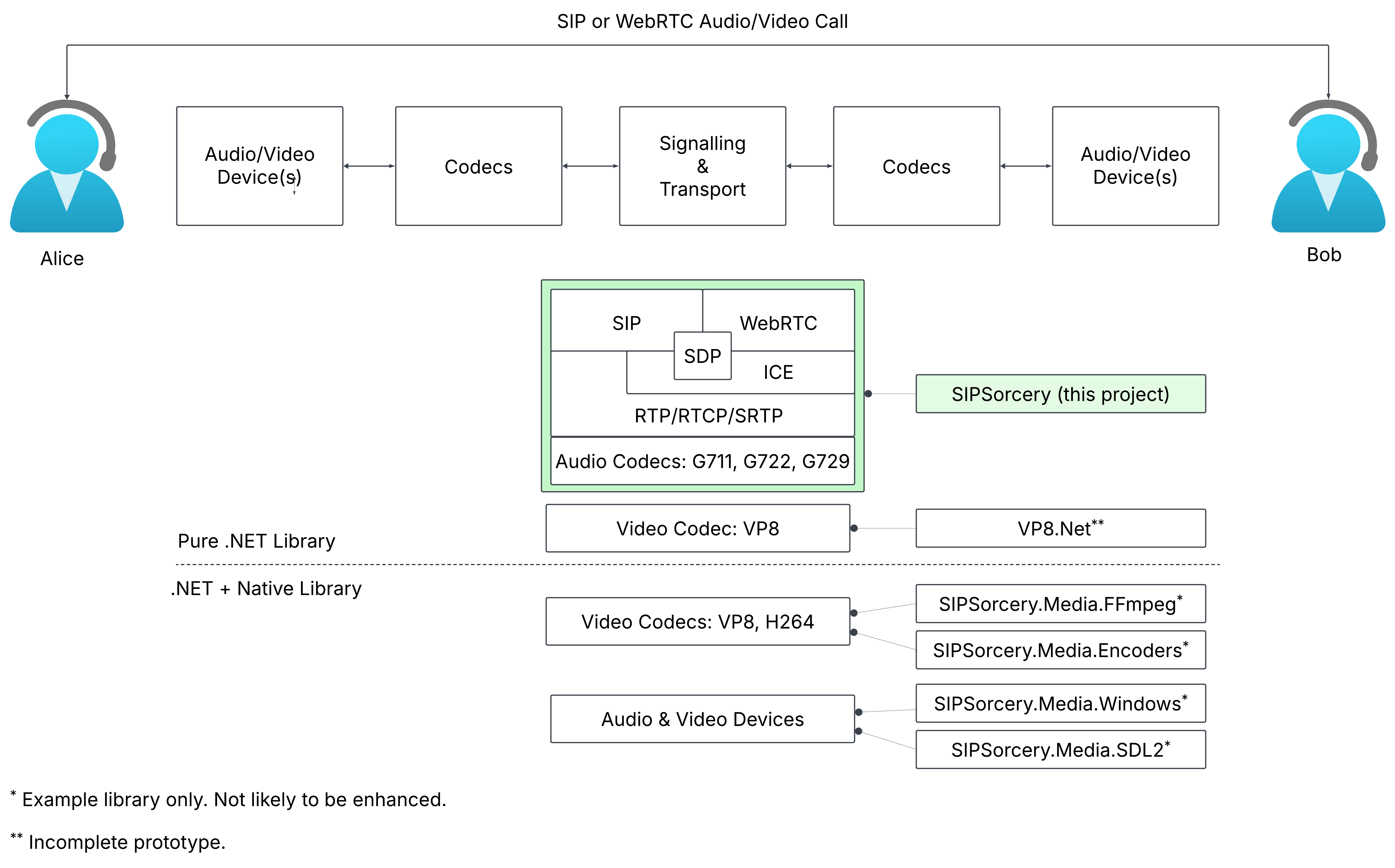
Supports both VoIP (get started) and WebRTC (get started).
Some of the protocols supported:
- Session Initiation Protocol (SIP),
- Real-time Transport Protocol (RTP),
- Web Real-time Communications (WebRTC), as of 26 Jan 2021 now an official IETF and W3C specification,
- Interactive Connectivity Establishment (ICE),
- SCTP, SDP, STUN and more.
Media End Points - Audio/Video Sinks and Sources:
-
The main
SIPSorcerylibrary does not provide access to audio and video devices or native codecs. Providing cross platform access to to these features on top of .NET is a large undertaking. A number of separate demonstration libraries show some different approaches to accessing audio/video devices and wrapping codecs with .NET.- SIPSorceryMedia.Windows: An example of a Windows specific library that provides audio capture and playback.
- SIPSorceryMedia.Encoders: An example of a Windows specific wrapper for the VP8 video codec.
- SIPSorceryMedia.FFmpeg: An example of a cross platform library that features audio and video codecs using PInvoke and FFmpeg.
- SIPSorceryMedia.SDL2: An example of integrating the cross-platform SDL2 Simple Direct Media Layer library.
-
This library provides only a small number of audio and video codecs (G711, G722 and G729). OPUS is available via Concentus. Additional codecs, particularly video ones, require C or C++ libraries. An effort is underway to port the VP8 video codec to C# see the VP8.Net directory.
Installation
The library should work with .NET Framework >= 4.6.1 and all .NET Core and .NET versions. The demo applications initially targetted .NET Core 3.1 and are updated to later .NET versions as time and interest permit. The library is available via NuGet.
dotnet add package SIPSorcery
With Visual Studio Package Manager Console (or search for SIPSorcery on NuGet):
Install-Package SIPSorcery
Documentation
Class reference documentation and articles explaining common usage are available at https://sipsorcery-org.github.io/sipsorcery/.
Getting Started VoIP
The simplest possible example to place an audio-only SIP call is shown below. This example relies on the Windows specific SIPSorceryMedia.Windows library to play the received audio and only works on Windows (due to lack of .NET audio device support on non-Windows platforms).
dotnet new console --name SIPGetStarted --framework net10.0 --target-framework-override net10.0-windows10.0.17763.0
cd SIPGetStarted
dotnet add package SIPSorcery
dotnet add package SIPSorceryMedia.Windows
# Paste the code below into Program.cs.
dotnet run
# If successful you will hear a "Hello World" announcement.
string DESTINATION = "music@iptel.org";

Console.WriteLine("SIP Get Started");

var userAgent = new SIPSorcery.SIP.App.SIPUserAgent();
var winAudio = new SIPSorceryMedia.Windows.WindowsAudioEndPoint(new SIPSorcery.Media.AudioEncoder());
var voipMediaSession = new SIPSorcery.Media.VoIPMediaSession(winAudio.ToMediaEndPoints());

// Place the call and wait for the result.
bool callResult = await userAgent.Call(DESTINATION, null, null, voipMediaSession);
Console.WriteLine($"Call result {(callResult ? "success" : "failure")}.");

Console.WriteLine("Press any key to hangup and exit.");
Console.ReadLine();
The GetStarted example contains the full source and project file for the example above.
The three key classes in the abo
Related Skills
diffs
335.8kUse the diffs tool to produce real, shareable diffs (viewer URL, file artifact, or both) instead of manual edit summaries.
openpencil
1.7kThe world's first open-source AI-native vector design tool and the first to feature concurrent Agent Teams. Design-as-Code. Turn prompts into UI directly on the live canvas. A modern alternative to Pencil.
HappyColorBlend
HappyColorBlendVibe Project Guidelines Project Overview HappyColorBlendVibe is a Figma plugin for color palette generation with advanced tint/shade blending capabilities. It allows designers to
ui-ux-pro-max-skill
50.7kAn AI SKILL that provide design intelligence for building professional UI/UX multiple platforms
