
Sharpliner
Use C# instead of YAML to define your Azure DevOps pipelines
Install / Use
/learn @sharpliner/SharplinerREADME

Sharpliner is a .NET library that lets you use C# for Azure DevOps pipeline definitions instead of YAML. Exchange YAML indentation problems for the type-safe environment of C# and let IntelliSense speed up your work!
Getting started
All you have to do is reference our NuGet package in your project, override a class with your definition and dotnet build the project! Dead simple!
For more detailed steps, check our documentation.
Quick Start with Project Template
If you prefer using .NET project templates, you can get started quickly with the following commands:
# Install the Sharpliner.Templates NuGet package
dotnet new install Sharpliner.Templates

# Create a new pipeline project with your preferred .NET version (6.0-10.0, default is 10.0)
dotnet new sharpliner-pipeline -n MyProject.Pipelines -F net10.0

# Navigate to your new project
cd MyProject.Pipelines

# Build the project to generate your first pipeline YAML
dotnet build
[!NOTE] The samples produced by the template expect to be built within a git repository when generating the YAMLs. This is configured by the
TargetPathType.RelativeToGitRootsetting which tells Sharpliner where to produce the YAMLs.
This creates a new project with a sample pipeline definition in pipelines/SamplePipeline.cs.
The generated sample-pipeline.yml file will be ready to use in your repository!
Example
// Just override prepared abstract classes and `dotnet build` the project, nothing else is needed!
// For a full list of classes you can override
//    see https://github.com/sharpliner/sharpliner/blob/main/src/Sharpliner/AzureDevOps/PublicDefinitions.cs
// You can also generate collections of definitions dynamically
//    see https://github.com/sharpliner/sharpliner/blob/main/docs/AzureDevOps/DefinitionCollections.md
class PullRequestPipeline : SingleStagePipelineDefinition
{
    // Say where to publish the YAML to
    public override string TargetFile => "eng/pr.yml";
    public override TargetPathType TargetPathType => TargetPathType.RelativeToGitRoot;

    private static readonly Variable DotnetVersion = new("DotnetVersion", string.Empty);

    public override SingleStagePipeline Pipeline => new()
    {
        Pr = new PrTrigger("main"),

        Variables =
        [
            // YAML ${{ if }} conditions are available with handy macros that expand into the
            // expressions such as comparing branch names. We also have "else"
            If.IsBranch("net-6.0")
                .Variable(DotnetVersion with { Value = "6.0.100" })
                .Group("net6-keyvault")
            .Else
                .Variable(DotnetVersion with { Value = "5.0.202" }),
        ],

        Jobs =
        [
            new Job("Build")
            {
                Pool = new HostedPool("Azure Pipelines", "windows-latest"),
                Steps =
                [
                    // Many tasks have helper methods for shorter notation
                    DotNet.Install.Sdk(DotnetVersion),

                    NuGet.Authenticate(["myServiceConnection"]),

                    // You can also specify any pipeline task in full too
                    Task("DotNetCoreCLI@2", "Build and test") with
                    {
                        Inputs = new()
                        {
                            { "command", "test" },
                            { "projects", "src/MyProject.sln" },
                        }
                    },

                    // Frequently used ${{ if }} statements have readable macros
                    If.IsPullRequest
                        // You can load script contents from a .ps1 file and inline them into YAML
                        // This way you can write scripts with syntax highlighting separately
                        .Step(Powershell.FromResourceFile("New-Report.ps1", "Create build report")),
                ]
            }
        ],
    };
}
Sharpliner features
Apart from the obvious benefits of using a static type language with IDE support, not having to have to deal with indentation problems ever again, being able to split the code easily or the ability to generate YAML programmatically, there are several other benefits of using Sharpliner.
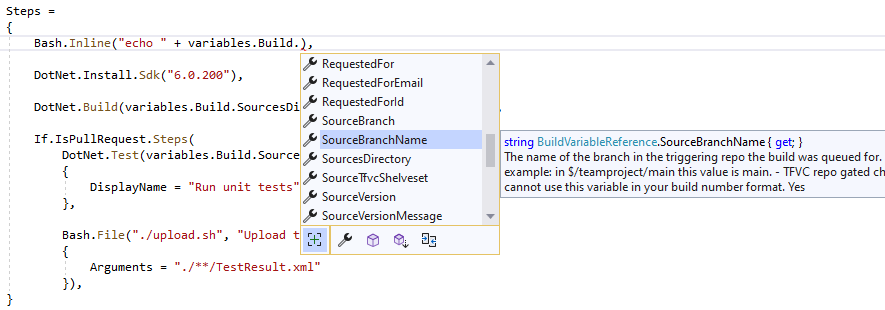
Intellisense
One of the best things when using Sharpliner is that you won't have to go to the YAML reference every time you're adding a new piece of your pipeline. Having everything strongly typed will allow your IDE to give you hints all the way!
Nice APIs
Imagine you want to install the .NET SDK. For that, Azure Pipelines have the DotNetCoreCLI@2 task.
However, this task's specification is quite long since the task does many things:
# .NET Core
# Build, test, package, or publish a dotnet application, or run a custom dotnet command
# https://docs.microsoft.com/en-us/azure/devops/pipelines/tasks/build/dotnet-core-cli?view=azure-devops
- task: DotNetCoreCLI@2
  inputs:
    command: 'build' # Options: build, push, pack, publish, restore, run, test, custom
    publishWebProjects: true # Required when command == Publish
    projects: # Optional
    custom: # Required when command == Custom
    arguments: # Optional
    publishTestResults: true # Optional
    testRunTitle: # Optional
    zipAfterPublish: true # Optional
    modifyOutputPath: true # Optional
    feedsToUse: 'select' # Options: select, config
    vstsFeed: # Required when feedsToUse == Select
    feedRestore: # Required when command == restore. projectName/feedName for project-scoped feed. FeedName only for organization-scoped feed.
    includeNuGetOrg: true # Required when feedsToUse == Select
    nugetConfigPath: # Required when feedsToUse == Config
    externalFeedCredentials: # Optional
    noCache: false
    restoreDirectory:
    restoreArguments: # Optional
    verbosityRestore: 'Detailed' # Options: -, quiet, minimal, normal, detailed, diagnostic
    packagesToPush: '$(Build.ArtifactStagingDirectory)/*.nupkg' # Required when command == Push
    nuGetFeedType: 'internal' # Required when command == Push# Options: internal, external
    publishVstsFeed: # Required when command == Push && NuGetFeedType == Internal
    publishPackageMetadata: true # Optional
    publishFeedCredentials: # Required when command == Push && NuGetFeedType == External
    packagesToPack: '**/*.csproj' # Required when command == Pack
    packDirectory: '$(Build.ArtifactStagingDirectory)' # Optional
    nobuild: false # Optional
    includesymbols: false # Optional
    includesource: false # Optional
    versioningScheme: 'off' # Options: off, byPrereleaseNumber, byEnvVar, byBuildNumber
    versionEnvVar: # Required when versioningScheme == byEnvVar
    majorVersion: '1' # Required when versioningScheme == ByPrereleaseNumber
    minorVersion: '0' # Required when versioningScheme == ByPrereleaseNumber
    patchVersion: '0' # Required when versioningScheme == ByPrereleaseNumber
    buildProperties: # Optional
    verbosityPack: 'Detailed' # Options: -, quiet, minimal, normal, detailed, diagnostic
    workingDirectory:
Notice how some of the properties are only valid in a specific combination with another. With Sharpliner, we remove some of this complexity using nice fluent APIs:
DotNet.Install.Sdk(parameters["version"]),

DotNet.Restore.FromFeed("dotnet-7-preview-feed", includeNuGetOrg: false) with
{
    ExternalFeedCredentials = "feeds/dotnet-7",
    NoCache = true,
    RestoreDirectory = ".packages",
},

DotNet.Build("src/MyProject.csproj") with
{
    Timeout = TimeSpan.FromMinutes(20)
},
Useful macros
Some very common pipeline patterns such as comparing the current branch name or detecting pull requests are very cumbersome to do in YAML (long conditions full of complicated ${{ if }} syntax).
For many of these, we have handy macros so that you get more readable and shorter code.
For example this YAML
- ${{ if eq(variables['Build.SourceBranch'], 'refs/heads/production') }}:
  - name: rg-suffix
    value: -pr

- ${{ else }}:
  - name: rg-suffix
    value: -prod
can become this C#
If.IsBranch("production")
    .Variable("rg-suffix", "-pr")
.Else
    .Variable("rg-suffix", "-prod")
Re-usable pipeline blocks
Sharpliner lets you reuse code more easily than YAML templates do. Apart from obvious C# code reuse, you can also define sets of C# building blocks and reuse them in your pipelines:
class ProjectBuildSteps : StepLibrary
{
    public override List<AdoExpression<Step>> Steps =>
    [
        DotNet.Install.Sdk("6.0.100"),

        If.IsBranch("main")
