
Pyss3
A Python library for Interpretable Machine Learning in Text Classification using the SS3 model, with easy-to-use visualization tools for Explainable AI :octocat:
Install / Use
/learn @sergioburdisso/Pyss3Quality Score
Category
Education & ResearchSupported Platforms
Tags
README





PySS3: Interpretable Machine Learning for Text Classification (Try our Live Demo! :cake:)
<br>PySS3 implements SS3, a simple supervised machine learning model for interpretable text classification. SS3 can self-explain its rationale, making it a reliable choice for tasks where understanding model decisions is critical.
It was originally introduced in Section 3 of "A text classification framework for simple and effective early depression detection over social media streams" (arXiv preprint) and obtained the best and second-best results, consecutively, in the three CLEF eRisk editions from 2019 to 2021 [Burdisso et al. 2019; Loyola et al. 2021].
PySS3 also includes variants of SS3, such as t-SS3, which dynamically recognizes variable-length word n-grams "on the fly" for early risk detection (paper, arXiv).
What is PySS3?
PySS3 is a Python library for working with SS3 in a visual, interactive, and straightforward way.
It provides tools to:
- Analyze, monitor, and understand what your model has learned.
- Visualize classification decisions and model insights.
- Evaluate and optimize hyperparameters efficiently.
The library is organized into three main components:
:point_right: SS3 class
The core classifier with a clean API similar to sklearn:
from pyss3 import SS3

clf = SS3()
clf.fit(x_train, y_train)
y_pred = clf.predict(x_test)
Other useful methods include:
extract_insight()– Returns a list of text fragments involved in the classification decision, allowing you to understand the rationale behind the model’s predictions.classify_multilabel()– Multi-label classification support:
doc = "Liverpool CEO Peter Moore on Building a Global Fanbase"

label = clf.classify_label(doc)          # 'business'
labels = clf.classify_multilabel(doc)    # ['business', 'sports']
See all tutorials for step-by-step guidance.
:point_right: Live_Test class
Interactively test models in your browser, with one line of code:
from pyss3.server import Live_Test

Live_Test.run(clf, x_test, y_test)
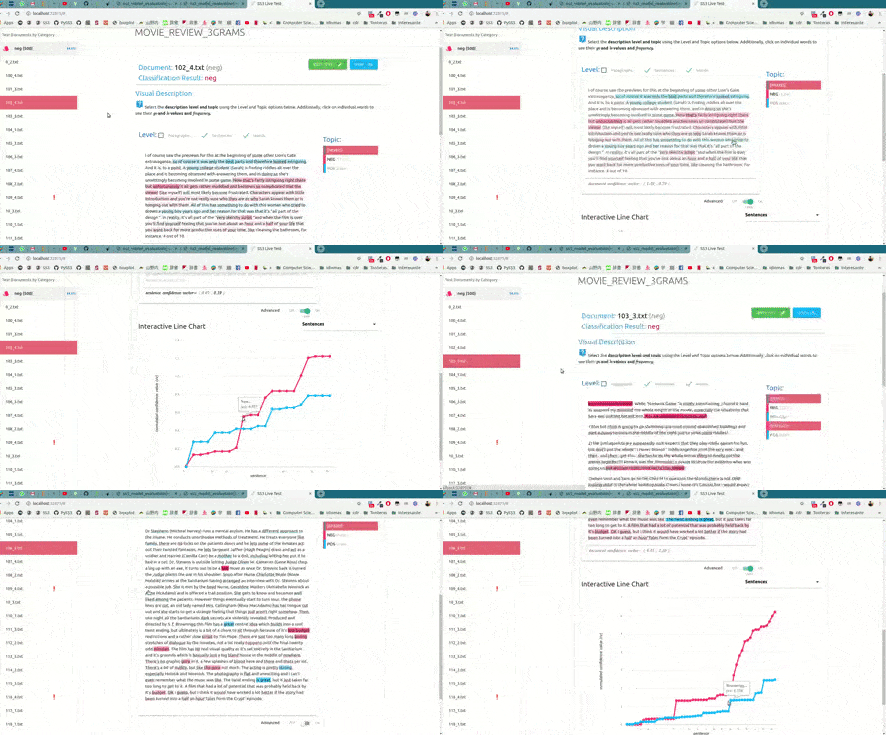
Try our online live demos:
:point_right: Evaluation class
Evaluate and optimize your model easily:
from pyss3.util import Evaluation

best_s, best_l, best_p, _ = Evaluation.grid_search(
    clf, x_train, y_train,
    s=[0.2, 0.32, 0.44, 0.56, 0.68, 0.8],
    l=[0.1, 0.48, 0.86, 1.24, 1.62, 2],
    p=[0.5, 0.8, 1.1, 1.4, 1.7, 2],
    k_fold=4
)
Evaluation.plot()
- Interactive 3D plots for hyperparameter evaluation
- Automatic history tracking of experiments
- Exportable HTML plots for sharing and reporting
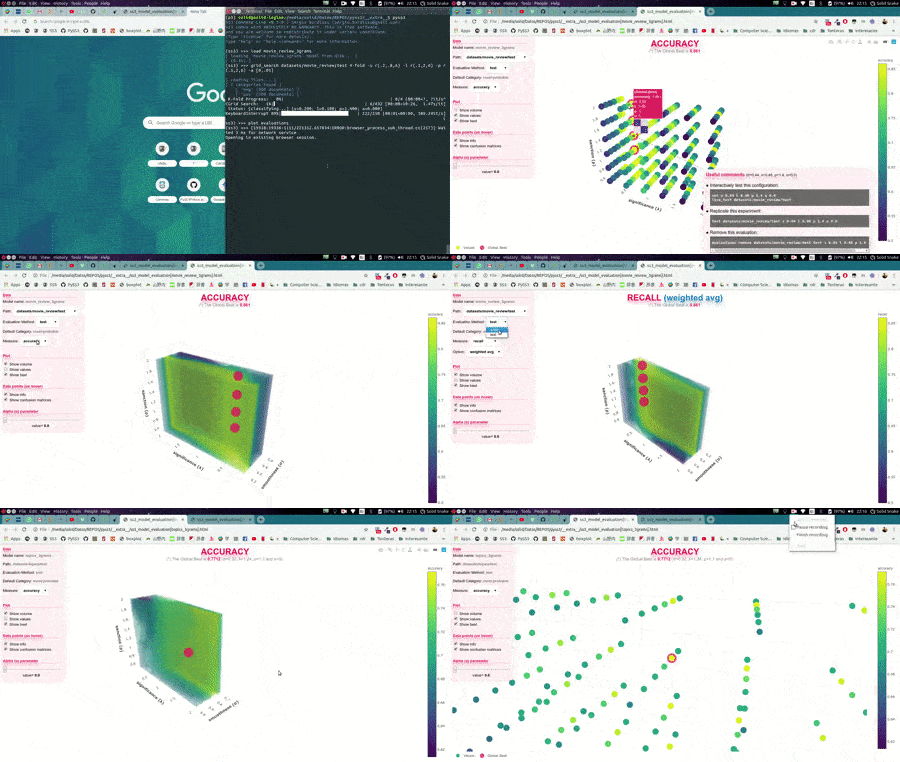
Explore example evaluation plots:
Getting Started :eyeglasses: :coffee:
Installation
pip install pyss3
Full tutorial and documentation
Contributing :sparkles::octocat::sparkles:
Any contributions are welcome! Code, bug reports, documentation, examples, or ideas – everything helps.
Use the "Edit" button on GitHub to propose changes directly, and follow these guidelines for commit messages.
Contributors :muscle::sunglasses::+1:
Thanks goes to these awesome people (emoji key):
<!-- ALL-CONTRIBUTORS-LIST:START - Do not remove or modify this section --> <!-- prettier-ignore-start --> <!-- markdownlint-disable --> <table> <tr> <td align="center"><a href="http://angermeir.me/"><img src="https://avatars3.githubusercontent.com/u/16398152?v=4?s=100" width="100px;" alt=""/><br /><sub><b>Florian Angermeir</b></sub></a><br /><a href="https://github.com/sergioburdisso/pyss3/commits?author=angrymeir" title="Code">💻</a> <a href="#ideas-angrymeir" title="Ideas, Planning, & Feedback">🤔</a> <a href="#data-angrymeir" title="Data">🔣</a></td> <td align="center"><a href="https://www.linkedin.com/in/muneebvaiyani/"><img src="https://avatars3.githubusercontent.com/u/36028992?v=4?s=100" width="100px;" alt=""/><br /><sub><b>Muneeb Vaiyani</b></sub></a><br /><a href="#ideas-Vaiyani" title="Ideas, Planning, & Feedback">🤔</a> <a href="#data-Vaiyani" title="Data">🔣</a></td> <td align="center"><a href="https://www.saurabhbora.com"><img src="https://avatars2.githubusercontent.com/u/29205181?v=4?s=100" width="100px;" alt=""/><br /><sub><b>Saurabh Bora</b></sub></a><br /><a href="#ideas-enthussb" title="Ideas, Planning, & Feedback">🤔</a></td> <td align="center"><a href="https://hbaniecki.com"><img src="https://avatars.githubusercontent.com/u/32574004?v=4?s=100" width="100px;" alt=""/><br /><sub><b>Hubert Baniecki</b></sub></a><br /><a href="#ideas-hbaniecki" title="Ideas, Planning, & Feedback">🤔</a> <a href="https://github.com/sergioburdisso/pyss3/commits?author=hbaniecki" title="Documentation">📖</a></td> </tr> </table> <!-- markdownlint-restore --> <!-- prettier-ignore-end --> <!-- ALL-CONTRIBUTORS-LIST:END -->This project follows the all-contributors specification. Contributions of any kind welcome!
Further Readings :scroll:
Related Skills
proje
Interactive vocabulary learning platform with smart flashcards and spaced repetition for effective language acquisition.
groundhog
398Groundhog's primary purpose is to teach people how Cursor and all these other coding agents work under the hood. If you understand how these coding assistants work from first principles, then you can drive these tools harder (or perhaps make your own!).
last30days-skill
17.5kAI agent skill that researches any topic across Reddit, X, YouTube, HN, Polymarket, and the web - then synthesizes a grounded summary
sec-edgar-agentkit
10AI agent toolkit for accessing and analyzing SEC EDGAR filing data. Build intelligent agents with LangChain, MCP-use, Gradio, Dify, and smolagents to analyze financial statements, insider trading, and company filings.
