
Slogert
A Semantic LOG ExtRaction Templating (SLOGERT) Approach
Install / Use
/learn @sepses/SlogertREADME
SLOGERT v1.0.0-SNAPSHOT
-- Semantic LOG ExtRaction Templating (SLOGERT) --
General Introduction
SLOGERT aims to automatically extract and enrich low-level log data into an RDF Knowledge Graph that conforms to our LOG Ontology. It integrates
- LogPai for event pattern detection and parameter extractions from log lines
- Stanford NLP for parameter type detection and keyword extraction, and
- OTTR Engine for RDF generation.
- Apache Jena for RDF data manipulation.
We have tested our approach on text-based logs produced by Unix OSs, in particular:
- Apache,
- Kernel,
- Syslog,
- Auth, and
- FTP logs.
In our latest evaluation, we are testing our approach with the AIT log dataset, which contains additional logs from non-standard application, such as suricata and exim4. In this repository, we include a small excerpt of the AIT log dataset in the input folder as example log sources.
Workflow
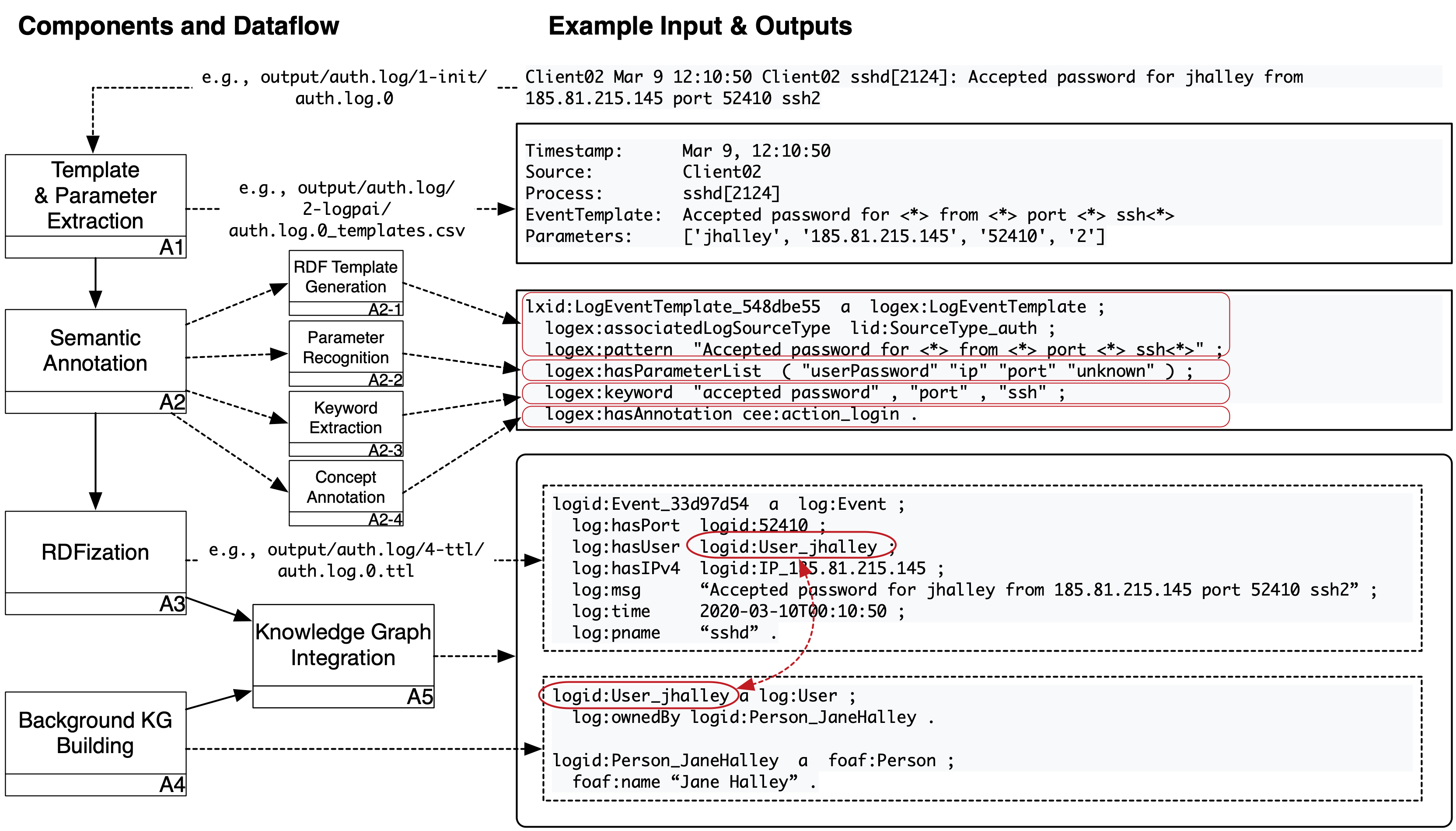
SLOGERT pipeline can be described in several steps, which main parts are shown in Figure 1 above and will be described as the following:
Initialization
- Load
config-ioandconfig.yaml - Collect target
log filesfrom theinput folderas defined inconfig-io. We assume that each top-level folder within input folder represent a single log source - Aggregate collected log files into single file.
- Add log-source information to each log lines,
- If log lines exceed the configuration limit (e.g., 100k), split the aggregated log file into a set of
log-files.
Example results of this step is available in output/auth.log/1-init/ folder
A1 - Extraction Template Generation
- Initialize
extraction_template_generatorwithconfig-ioto register extraction patterns - For each
log-filefromlog-files- Generate a list of
<extraction-template, raw-result>pairs usingextraction_template_generator
- Generate a list of
NOTE: We use LogPAI as extraction_template_generator
Example results of this step is available in output/auth.log/2-logpai/ folder
A2 - Template Enrichment
- Load existing
RDF_templateslist - Load
regex_patternsfromconfiglist for parameter recognition - Initialize
NLP_engineengine - For each
extraction-templatefrom the list of<extraction-template, raw-result>pairs- Transform
extraction-templateinto anRDF_template_candidate - if
RDF_templatesdoes not containRDF_template_candidate- [A2.1 - RDF template generation]
- For each
parameterfromRDF_template_candidate- If
parameterisunknown- [A2.2 - Template parameter recognition]
- Load
sample-raw-resultsfromraw-results - Recognize
parameterfromsample-raw-resultsusingNLP_engineandregex_patternsasparameter_type - Save
parameter_typeinRDF_template_candidate
- Load
- [A2.2 - end]
- [A2.2 - Template parameter recognition]
- If
- [A2.3 - Keyword extraction]
- Extract
template_patternfromRDF_template_candidate - Execute
NLP_engineengine on thetemplate_patternto retrievetemplate_keywords - Add
template_keywordsas keywords inRDF_template_candidate
- Extract
- [A2.3 - end]
- [A2.4 - Concept annotation]
- Load
concept_modelcontaining relevant concept in the domain - For each
keywordfromtemplate_keywords- for each
conceptinconcept_model- if
keywordcontainsconcept- Add
conceptas concept annotation inRDF_template_candidate
- Add
- if
- for each
- Load
- [A2.4 - end]
- add
RDF_template_candidatetoRDF_templateslist
- For each
- [A2.1 - end]
- [A2.1 - RDF template generation]
- Transform
NOTE: We use Stanford NLP as our NLP_engine
Example results (i.e., RDF_templates) of this step is available as output/auth.log/auth.log-template.ttl
A3 - RDFization
- Initialize
RDFizer_engine - Generate
RDF_generation_templatefromRDF_templateslist - for each
raw_resultfromraw_resultslist- Generate
RDF_generation_instancesfromRDF_generation_templateandraw_result - Generate
RDF_graphfromRDF_generation_instancesandRDF_generation_templateusingRDFizer_engine
- Generate
NOTE: We use LUTRA as our RDFizer_engine
Example RDF_generation_template and RDF_generation_instances are available in the output/auth.log/3-ottr/ folder.
Example results of this step is available in the output/auth.log/4-ttl/ folder
KG Generation Algorithm
<p align="center"> <img width="460" src="https://raw.githubusercontent.com/sepses/slogert/master/figures/algorithm.png"> </p> <p align="center"><b>Figure 2</b>. SLOGERT KG generation algorithms.</p>For those that are interested, we also provided an explanation of the KG generation in a form of Algorithm as shown in the Figure 2 above.
How to run
Prerequisites for running SLOGERT
Java 11(for Lutra)Apache MavenPython 2withpandasandpython-scipyinstalled (for LogPai)- the default setting is to use
pythoncommand to invoke Python 2 - if this is not the case, modification on the
LogIntializer.javais needed.
- the default setting is to use
We have tried and and tested SLOGERT on Mac OSX and Ubuntu with the following steps:
- Compile this project (
mvn clean installormvn clean install -DskipTestsif you want to skip the tests) - You can set properties for extraction in the config file (e.g., number of loglines produced per file). Examples of config and template files are available on the
src/test/resourcesfolder (e.g.,auth-config.yamlfor auth log data). - Transform the CSVs into OTTR format using the config file. By default, the following script should work on the example file. (
java -jar target/slogert-<SLOGERT-VERSION>-jar-with-dependencies.jar -c src/test/resources/auth-config.yaml) - The result would be produced in the
output/folder
SLOGERT configurations
Slogert configuration is divided into two parts: main configuration config.yaml and the input parameter config-io.yaml
Main Configuration
There are several configuration that can be adapted in the main configuration file src/main/resources/config.yaml. We will briefly described the most important configuration options here.
- logFormats to describe information that you want to extract from a log source. This is important due to the various existing logline formats and variants. Each logFormat contain references to the ottrTemplate to build the
RDF_generation_templatefor RDFization step. - nerParameters to register patterns that will used by StanfordNLP for recognizing log template parameter types.
- nonNerParameters to register standard regex patterns for template parameter types that can't be easily detected using StanfordNLP. Both nerParameters and nonNerParameters are contains reference for ottr template generation.
- ottrTemplates to register
RDF_generation_templatebuilding block necessary for the RDFization process.
I/O Configuration
The I/O configuration aim to describe log-source specific information that are not suitable to be added into config.yaml. An example of this IO configuration is src/test/resources/auth-config.yaml for auth log. We will describe the most important configuration options in the following:
- source: the name of source file to be searched for in the input folder.
- format: the basic format of the log file, which will be used by
extraction_template_generatorin process A1. - logFormat: types of the logfile. this value of this property should be registered in the
logFormatswithinconfig.yamlfor SLOGERT to work. - isOverrideExisting: whether SLOGERT should use load
RDF_templatesor to override them. - paramExtractAttempt: how many log lines should be processed to determine the
parameter_typeof aRDF_template_candidate. - logEventsPerExtraction: how many log lines should be processed in a single batch of execution.
