
R3DNETWORK
Android Mod Menu Template based on LGL Mod Menu with auto update offsets
Install / Use
/learn @seedhollow/R3DNETWORKREADME
IL2CPP Android Template
This project is based on LGL Mod Menu. Since the original project is no longer actively maintained, We have made several modifications, including:
- UI Changes: Updated the menu interface.
- New Modules: Added additional modules to extend functionality.
- Obfuscation:
- Integrated BlackObfuscator for enhanced code obfuscation.
- Added LSParanoid to provide string encryption for securing sensitive text data.
[!NOTE]
Starting from version 1.3,Il2cppResolverhas been replaced withUnityResolveto offer more extensive API support and improved functionality.New feature suggestions or bugs can be commit as issues.
Layout Style
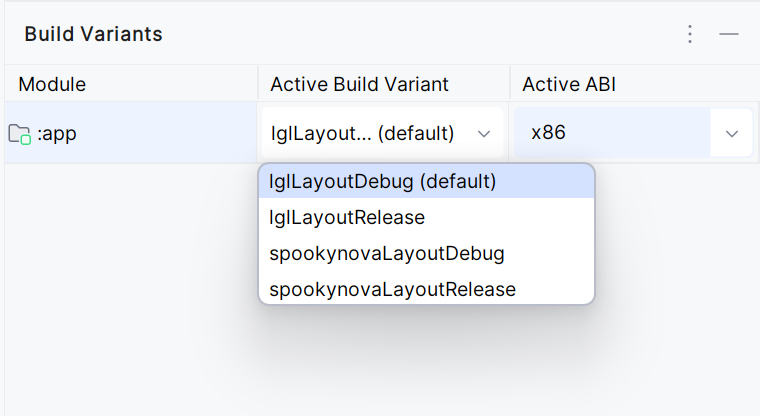
Starting from version 1.4, R3DNETWORK now supports two mod menu layouts: the new default layout and the LGL layout. You can switch between them using build flavors: seedhollow for the new design and lglLayout for the classic LGL style.
Special thanks to nik2143 for bringing back the LGL mod menu layout!
How to use
To enable and display a floating menu in your target app, follow these steps:
1. Request Permission for Floating Menu
To allow your target app to draw a floating menu overlay on top of other apps, add the following permission to your AndroidManifest.xml file:
<uses-permission android:name="android.permission.SYSTEM_ALERT_WINDOW" />
This permission is required for overlaying UI elements, such as a floating menu, across other applications.
2. Register the Service to Show the Menu
To activate the floating menu, declare a service in AndroidManifest.xml to your targer app. This service will handle the display and lifecycle of the floating menu:
<service android:name="com.android.support.Launcher" android:enabled="true" android:exported="true" android:stopWithTask="true" />
3. Call the Loader class
To integrate and initialize the floating menu loader, add the following code in the onCreate method within UnityPlayerActivity.smali. If your target app uses a custom launcher activity, locate it in AndroidManifest.xml and insert the code in that activity’s onCreate method instead.
invoke-static {p0}, Lcom/android/support/Loader;->Start(Landroid/content/Context;)V
If you prefer not to use Remap , simply call this method:
invoke-static {p0}, Lcom/android/support/Main;->Start(Landroid/content/Context;)V
Customizing Fonts
You can integrate custom fonts into your project using a C array. To generate the required font data, you can use a hexadecimal editor such as ImHex.
1. Exporting the Font
To export a font, follow these steps:
- Load the
.ttffont file into ImHex. - Navigate to the File tab and select Export.
- Choose Text Formatted Bytes -> C Array.
- Save the exported data as a
.hfile.
2. Importing the Font into Your Project
- Copy the exported
.hfont file to theIncludes/Fonts/directory. - Open
Utils.hlocated in theIncludesfolder. - Locate the
LoadFontDatamethod and modify it to use the newly exported font.
Example: Modifying LoadFontData
jbyteArray LoadFontData(JNIEnv *env, jclass thiz, jobject ctx) {
    // Create a byte array in Java to hold the font data
    jbyteArray fontData = env->NewByteArray(std::size(font));

    // Populate the byte array with the embedded font data
    env->SetByteArrayRegion(fontData, 0, std::size(font), (jbyte*)font);

    return fontData;  // Return the font data as a byte array
}
3. Updating the Font Variable
Replace the font variable in the code above with the array from your exported font file. This ensures that the custom font is correctly loaded and utilized in the project.
Project
- Arknights DLC Simple Game Helper for better experience.
Credits
Disclaimer
This project is for Educational Use only. We do not condone this project being used to gain an advantage against other people. This project was made for fun.
We strongly refrain you from buying any source codes on Telegram even if the author can be trusted, there is always a risk getting scammed. We will not be responsible for that. This project is always FREE to use
Related Skills
node-connect
349.0kDiagnose OpenClaw node connection and pairing failures for Android, iOS, and macOS companion apps
frontend-design
109.4kCreate distinctive, production-grade frontend interfaces with high design quality. Use this skill when the user asks to build web components, pages, or applications. Generates creative, polished code that avoids generic AI aesthetics.
openai-whisper-api
349.0kTranscribe audio via OpenAI Audio Transcriptions API (Whisper).
qqbot-media
349.0kQQBot 富媒体收发能力。使用 <qqmedia> 标签,系统根据文件扩展名自动识别类型(图片/语音/视频/文件)。
