
Scapegoat
Scala compiler plugin for static code analysis
Install / Use
/learn @scapegoat-scala/ScapegoatREADME
Scapegoat


Scapegoat is a Scala static code analyzer, which is more colloquially known as a code lint tool or linter. Scapegoat works in a similar vein to Java's FindBugs or checkstyle, or Scala's Scalastyle.
A static code analyzer is a tool that flags suspicious language usage in code. This can include behavior likely to lead to bugs, non-idiomatic usage of a language, or just code that doesn't conform to specified style guidelines.
What's the difference between this project and Scalastyle (or others)?
Scalastyle is a similar linting tool which focuses mostly on enforcing style/code standards. There are no problems in running multiple analysis tools on the same codebase. In fact, it could be beneficial as the total set of possible warnings is the union of the inspections of all the enabled tools. The worst case is that the same warnings might get generated by multiple tools.
Usage
Scapegoat is developed as a scala compiler plugin, which can then be used inside your build tool.
SBT
See: sbt-scapegoat for SBT integration.
Maven
Firstly you need to add scapegoat plugin as a dependency:
<dependency>
    <groupId>com.sksamuel.scapegoat</groupId>
    <artifactId>scalac-scapegoat-plugin_${scala.version}</artifactId>
    <version>1.3.12</version>
</dependency>
Then configure scala-maven-plugin by adding compilerPlugin
<plugin>
    <groupId>net.alchim31.maven</groupId>
    <artifactId>scala-maven-plugin</artifactId>
    <configuration>
        <args>
            <arg>-P:scapegoat:dataDir:./target/scapegoat</arg>
        </args>
        <compilerPlugins>
            <compilerPlugin>
                <groupId>com.sksamuel.scapegoat</groupId>
                <artifactId>scalac-scapegoat-plugin_${scala.binary.version}</artifactId>
                <version>1.4.6</version>
            </compilerPlugin>
        </compilerPlugins>
    </configuration>
</plugin>
The only required parameter is dataDir (where report will be generated):
<arg>-P:scapegoat:dataDir:./target/scapegoat</arg>
You can pass other configuration flags same way, e.g.
<arg>-P:scapegoat:disabledInspections:FinalModifierOnCaseClass</arg>
Note: You may use a separate maven profile, so that the dependency doesn't go to you runtime classpath.
Gradle with a plugin
Use gradle-scapegoat-plugin by @eugene-sy
Gradle - manually
Firstly you need to add scapegoat plugin as a dependency:
dependencies {
  compile 'com.sksamuel.scapegoat:scalac-scapegoat-plugin_2.12.21:1.4.6'
  scalaCompilerPlugin "com.sksamuel.scapegoat:scalac-scapegoat-plugin_2.12.21:1.4.6"
}
Then configure scala-compiler-plugin
configurations {
  scalaCompilerPlugin
}

tasks.withType(ScalaCompile) {
  scalaCompileOptions.additionalParameters = [
    "-Xplugin:" + configurations.scalaCompilerPlugin.asPath,
    "-P:scapegoat:dataDir:" + buildDir + "/scapegoat"
  ]
}
The only required parameter is dataDir (where report will be generated):
"-P:scapegoat:dataDir:" + buildDir + "/scapegoat",
You can pass other configuration flags adding it to the additionalParameters list, e.g.
"-P:scapegoat:disabledInspections:FinalModifierOnCaseClass"
Full list of compiler flags
| Flag | Parameters | Required |
|-------------------------------------|--------------------------------------------------------------------------------------------------------------------------------------------------|----------|
| -P:scapegoat:dataDir: | Path to reports directory for the plugin. | true |
| -P:scapegoat:disabledInspections: | Colon separated list of disabled inspections (defaults to none). | false |
| -P:scapegoat:enabledInspections: | Colon separated list of enabled inspections (defaults to all). | false |
| -P:scapegoat:customInspectors: | Colon separated list of custom inspections. | false |
| -P:scapegoat:ignoredFiles: | Colon separated list of regexes to match files to ignore. | false |
| -P:scapegoat:verbose: | Boolean flag that enables/disables verbose console messages. | false |
| -P:scapegoat:consoleOutput: | Boolean flag that enables/disables console report output. | false |
| -P:scapegoat:reports: | Colon separated list of reports to generate. Valid options are none, xml, html, scalastyle, markdown, ,gitlab-codequality, or all. | false |
| -P:scapegoat:overrideLevels: | Overrides the built in warning levels. Should be a colon separated list of name=level expressions. | false |
| -P:scapegoat:sourcePrefix: | Overrides source prefix if it differs from src/main/scala, for ex. app/ for Play applications. | false |
| -P:scapegoat:minimalLevel: | Provides minimal level of inspection displayed in reports and in the console. | false |
Reports
Here is sample output from the console during the build for a project with warnings/errors:
[warning] [scapegoat] Unused method parameter - org.ensime.util.ClassIterator.scala:46
[warning] [scapegoat] Unused method parameter - org.ensime.util.ClassIterator.scala:137
[warning] [scapegoat] Use of var - org.ensime.util.ClassIterator.scala:22
[warning] [scapegoat] Use of var - org.ensime.util.ClassIterator.scala:157
[   info] [scapegoat]: Inspecting compilation unit [FileUtil.scala]
[warning] [scapegoat] Empty if statement - org.ensime.util.FileUtil.scala:157
[warning] [scapegoat] Expression as statement - org.ensime.util.FileUtil.scala:180
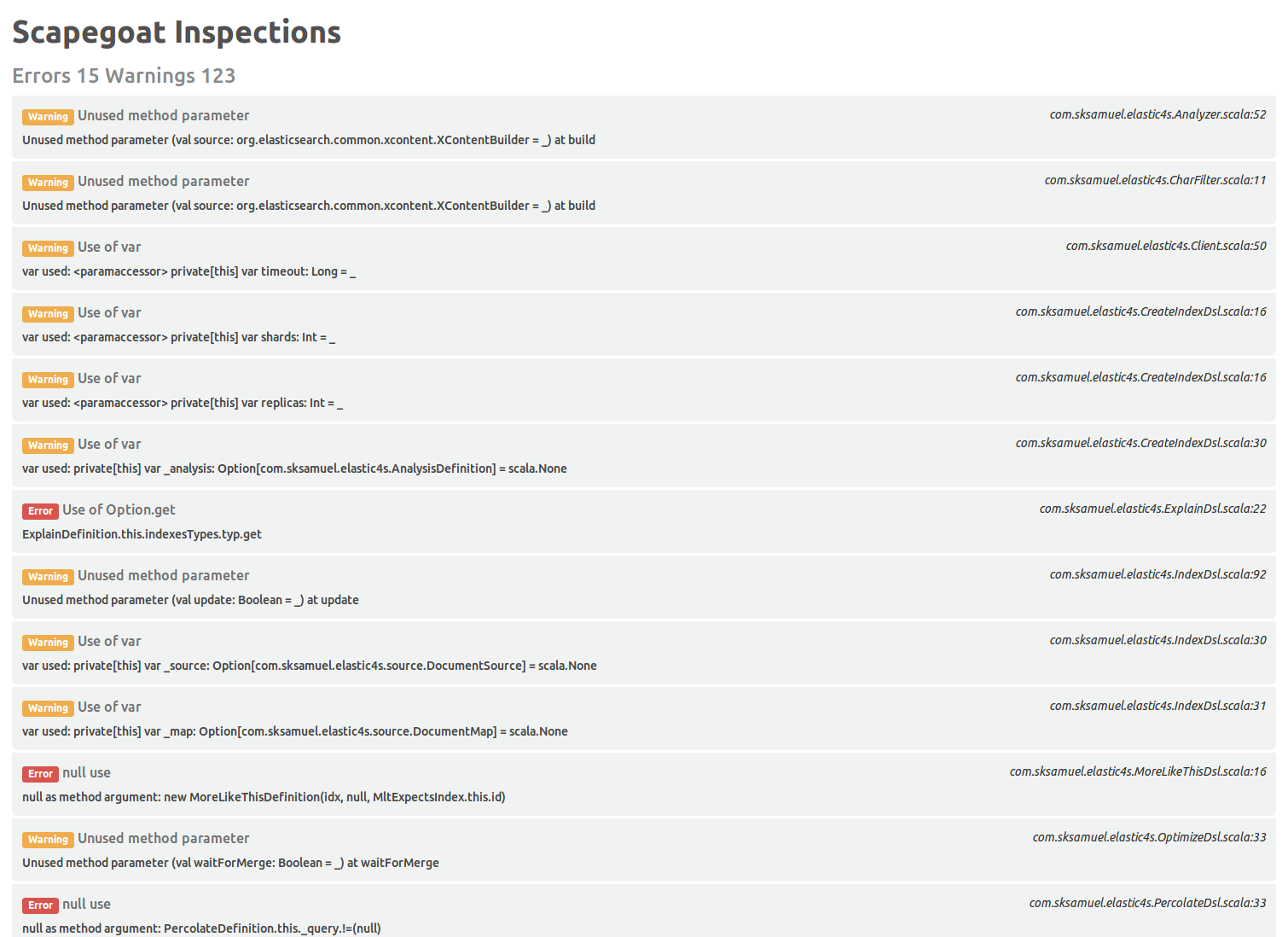
And if you prefer a prettier report, here is a screen shot of the type of HTML report scapegoat generates:
Configuration
For instructions on suppressing warnings by file, by inspection or by line see the sbt-scapegoat README.
To suppress warnings globally for the project, use disabledInspections or overrideLevels flags:
-P:scapegoat:disabledInspections:FinalModifierOnCaseClass
-P:scapegoat:overrideLevels:PreferSeqEmpty=ignore:AsInstanceOf=ignore
Inspections
There are currently 123 inspections for Scala 2, and 5 for Scala 3. An overview list is given, followed by a more detailed description of each inspection after the list (todo: finish rest of detailed descriptions)
| Name | Brief Description | Default Level | Scala 2 | Scala 3 |
|---------------------------------------|--------------------------------------------------------------------------------------------------------------------------------------------------------------|---------------|---------|---------|
| AbstractTrait | Check if trait is abstract | Info | Yes | Yes |
| ArrayEquals | Checks for comparison of arrays using == which will always return false
