
mcp-server-excel
Automate real Microsoft Excel with AI via MCP Server or CLI — Power Query, DAX, VBA, PivotTables, and charts.
Install / Use
claude mcp add sbroenne -- npx -y github:sbroenne/mcp-server-excelIf the server publishes to npm under a different name, use that package instead — check the repo README.
MCP Server
Model Context Protocol server
Quality Score
Category
AutomationSupported Platforms
Our assessment of mcp-server-excel
mcp-server-excel scores 84/100 on our quality scale, 2055th of 2,877 Automation skills we index.
Its MCP Server is 6.0 KB long, well organised into 8 sections with 1 code example: a thorough specification that gives an agent plenty to work with.
It has 854 GitHub stars, a meaningful sign that others use it.
Maintenance, license and trust
- The repository was last updated today, so mcp-server-excel is actively maintained.
- Our last check on 2026-10-18 found the source still online.
- It is released under the MIT license, a permissive license that allows use, modification and commercial use with attribution.
- Its trust signals score 100/100, with no cautions. These come from repository metadata, not a code audit — read the skill file before letting an agent act on it.
Safety scan
No issues foundOur scan of the whole file found no instruction hijacking, hidden characters, credential access, data exfiltration or destructive commands. An AI review of the same text found nothing harmful.
AI review by kimi-k2.7-code on 2026-09-24. Automated pattern scan on 2026-09-24. It catches known dangerous patterns, not every risk — read a skill before letting an agent act on it.
mcp-server-excel compared with similar skills
All 4 of these similar skills score higher than mcp-server-excel; compare them before choosing.
| Skill | Score | Stars | Updated | Format |
|---|---|---|---|---|
| mcp-server-excel (this skill)by sbroenne | 84 | 854 | today | MCP Server |
| Agent-Reachby Panniantong | 100 | 109.5k | 1d ago | CLAUDE.md |
| headroomby headroomlabs-ai | 100 | 79.0k | today | CLAUDE.md |
| CowAgentby zhayujie | 100 | 47.8k | today | CLAUDE.md |
| Scraplingby D4Vinci | 100 | 98.7k | today | MCP Server |
Frequently asked questions
- How do I install mcp-server-excel?
- Run
claude mcp add sbroenne -- npx -y github:sbroenne/mcp-server-excel. The install tabs above show the steps for each supported agent. - Which AI agents does mcp-server-excel work with?
- It is written for Claude Code, Claude Desktop and GitHub Copilot, as a MCP Server file. Other agents that read the same format can often use it too.
- Is mcp-server-excel safe to use?
- Our scan of the whole file found no instruction hijacking, hidden characters, credential access, data exfiltration or destructive commands. An AI review of the same text found nothing harmful. It is MIT-licensed and scores 100/100 on trust signals. Skills are instructions an agent will follow, so read the file before installing it and do not approve commands you do not understand.
- Is mcp-server-excel still maintained?
- The repository was last updated today, so mcp-server-excel is actively maintained.
Skill content
View source on GitHubExcelMcp - MCP Server for Microsoft Excel








Website · Installation · Features · Troubleshooting · 2-minute demo
Automate real Microsoft Excel with AI. Excel MCP Server lets GitHub Copilot, Claude, ChatGPT, and other agents control Excel through natural-language requests—using either MCP or a token-efficient CLI.
Unlike file-parser tools, ExcelMcp drives the actual Excel application through
its official COM API. It can refresh Power Query, recalculate formulas, evaluate
DAX, run VBA and Python =PY(), and preserve PivotTables, charts, macros, the
Data Model, and workbook formatting.
31 tools with 326 operations cover end-to-end Excel automation.
[!IMPORTANT] Requires Windows, Microsoft Excel 2016 or later, and an interactive desktop. It is not intended for Linux, macOS, or server-side batch processing.
🚀 Get Started
| Use case | Recommended path | |---|---| | VS Code | Install the extension | | Claude Desktop or another MCP client | Install the MCP Server | | Coding agents and scripts | Install the CLI | | Not sure which to choose? | Read the installation overview |
Close open Excel workbooks before starting; ExcelMcp requires exclusive access while automating them.
What You Can Automate
- Data & analytics: Power Query, DAX, Power Pivot, Excel Tables, PivotTables, and data connections.
- Cells & workbooks: ranges, formulas, formatting, worksheets, files, calculation, and named ranges.
- Charts & visuals: charts, slicers, conditional formatting, screenshots, drawings, and sparklines.
- Automation & advanced: VBA, Python in Excel, Goal Seek, scenarios, data tables, windows, and XML Maps.
Explore the complete reference for all 326 operations.
See It in Action
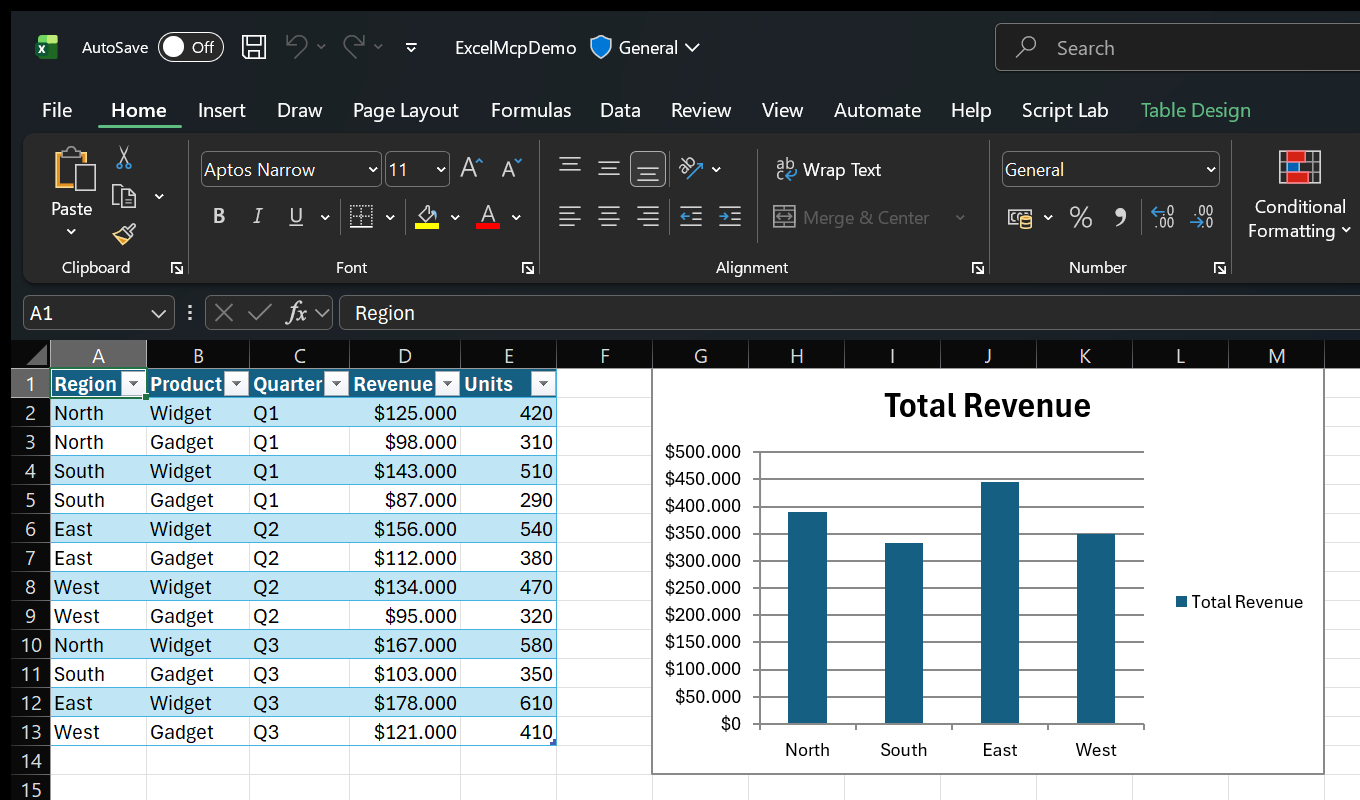
Ask in plain language:
- "Import products.csv with Power Query and load it to the Data Model."
- "Create a PivotTable showing revenue by region, then add a column chart."
- "Use Goal Seek to find the price that produces $100,000 profit."
- "Show me Excel while you work."
Because Excel performs the work, you can inspect results live and continue editing the workbook normally.
See more examples and use cases.
MCP Server or CLI?
Both entry points expose the same Core commands and behavior.
| Interface | Best for | Why |
|---|---|---|
| MCP Server | Conversational assistants and exploratory work | Rich schemas, tool discovery, and persistent sessions |
| CLI (excelcli) | Coding agents, automation, and scripts | One compact tool surface and substantially lower token usage |
The MCP Server calls the ExcelMcp service in-process. The CLI uses a background daemon so workbook sessions persist across commands.
AI assistant or script
        │
   MCP Server / CLI
        │
 ExcelMcp Core commands
        │
 Real Excel COM API
Read the architecture or browse the MCP Server and CLI guides.
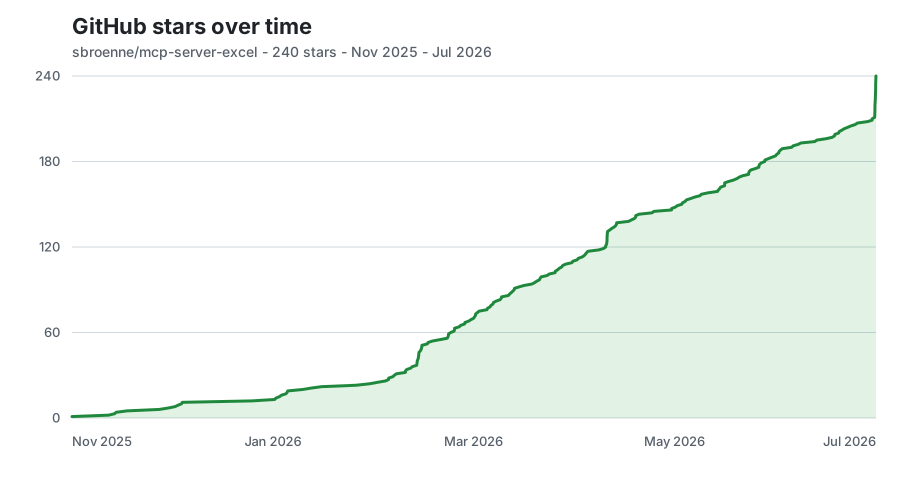
⭐ GitHub Star History
📋 Additional Information
Documentation · Changelog · Contributing · Security · Privacy
License: MIT License - see LICENSE file
Related Projects
Other projects by the author:
- PowerPoint MCP Server — AI-powered PowerPoint automation via MCP, the sister project to this one
- pytest-skill-engineering — LLM-powered testing framework for AI agents
- Windows MCP Server — AI-powered Windows automation via MCP
- OBS Studio MCP Server — AI-powered OBS Studio automation
Related Skills
Agent-Reach
109.5kGive your AI agent eyes to see the entire internet. Read & search Twitter, Reddit, YouTube, GitHub, Bilibili, XiaoHongShu — one CLI, zero API fees.
headroom
79.0kCompress tool outputs, logs, files, and RAG chunks before they reach the LLM. 20% fewer tokens for coding agents, 60-95% fewer tokens for JSON, same answers. Library, proxy, MCP server.
CowAgent
47.8kOpen-source personal AI assistant & Agent Harness. Plans tasks, runs tools and skills, self-evolves with memory and knowledge. Multi-agent, multi-model, multi-channel. Lightweight, extensible, one-line install.
Scrapling
98.7k🕷️ The BEST Web Scraping framework that handles everything from a single request to a full-scale crawl! Don't be shy, join here: https://discord.gg/EMgGbDceNQ and follow here for daily tips and tricks: https://x.com/Scrapling_dev

Languages
Trust signals
From repository metadata: license, adoption, age and documentation. Not a code audit — see the Safety scan above for what the skill file itself contains.