
Poisontap
Exploits locked/password protected computers over USB, drops persistent WebSocket-based backdoor, exposes internal router, and siphons cookies using Raspberry Pi Zero & Node.js.
Install / Use
/learn @samyk/PoisontapREADME
PoisonTap - siphons cookies, exposes internal router & installs web backdoor on locked computers
Created by <a href="https://twitter.com/samykamkar" target=_blank>@SamyKamkar</a> || <a href="https://samy.pl" target=_blank>https://samy.pl</a>
When PoisonTap (<a href="http://amzn.to/2eMr2WY" target="_blank">Raspberry Pi Zero</a> & Node.js) is plugged into a locked/password protected computer, it:
- emulates an Ethernet device over USB (or Thunderbolt)
- hijacks all Internet traffic from the machine (despite being a low priority/unknown network interface)
- siphons and stores HTTP cookies and sessions from the web browser for the Alexa top 1,000,000 websites
- exposes the internal router to the attacker, making it accessible remotely via outbound WebSocket and DNS rebinding (thanks <a href="https://maustin.net" target=_blank>Matt Austin</a> for rebinding idea!)
- installs a persistent web-based backdoor in HTTP cache for hundreds of thousands of domains and common Javascript CDN URLs, all with access to the user's cookies via cache poisoning
- allows attacker to remotely force the user to make HTTP requests and proxy back responses (GET & POSTs) with the user's cookies on any backdoored domain
- does not require the machine to be unlocked
- backdoors and remote access persist even after device is removed and attacker sashays away

(incredible HTML5 canvas animation by <a href="https://codepen.io/ara_node/" target="_blank">Ara</a>)
PoisonTap evades the following security mechanisms:
- <a href="https://www.wikiwand.com/en/Lock_screen" target=_blank>Password Protected Lock Screens</a>
- <a href="https://www.wikiwand.com/en/Routing_table" target=_blank>Routing Table</a> priority and network interface Service Order
- <a href="https://www.wikiwand.com/en/Same-origin_policy" target=_blank>Same-Origin Policy</a>
- <a href="https://developer.mozilla.org/en-US/docs/Web/HTTP/Headers/X-Frame-Options" target=_blank>X-Frame-Options</a>
- <a href="https://www.owasp.org/index.php/HttpOnly" target=_blank>HttpOnly</a> Cookies
- <a href="https://www.chromestatus.com/feature/4672634709082112" target=_blank>SameSite</a> cookie attribute
- <a href="https://www.wikiwand.com/en/Multi-factor_authentication" target=_blank>Two-Factor/Multi-Factor Authentication</a> (2FA/MFA)
- <a href="https://www.wikiwand.com/en/DNS_rebinding" target=_blank>DNS Pinning</a>
- <a href="https://www.wikiwand.com/en/Cross-origin_resource_sharing" target=_blank>Cross-Origin Resource Sharing (CORS)</a>
- <a href="https://www.wikiwand.com/en/HTTPS" target=_blank>HTTPS cookie protection</a> when <a href="https://www.owasp.org/index.php/SecureFlag" target=_blank>Secure</a> cookie flag & <a href="https://www.wikiwand.com/en/HTTP_Strict_Transport_Security" target=_blank>HSTS</a> not enabled
Demo
PoisonTap is built for the $5 <a href="http://amzn.to/2eMr2WY" target="_blank">Raspberry Pi Zero</a> without any additional components other than a <a href="https://amzn.to/2fUMdah" target="_blank">micro-USB cable</a> & <a href="https://amzn.to/2fWgKsd" target="_blank">microSD card</a>, or can work on any Raspberry Pi (1/2/3) with an Ethernet-to-USB/Thunderbolt dongle, or can work on other devices that can emulate USB gadgets such as <a href="https://inversepath.com/usbarmory" target="_blank">USB Armory</a> and <a href="https://lanturtle.com/" target=_blank>LAN Turtle</a>.
Live demonstration and more details available in the video: <a href="https://www.youtube.com/watch?v=Aatp5gCskvk" target="_blank"><img src= "https://samy.pl/poisontap/ptap-thumbnail-small.png" alt="MagSpoof" border="1" /></a>
Point of Contact: <a href="https://twitter.com/samykamkar" target=_blank>@SamyKamkar</a> // <a href="https://samy.pl" target=_blank>https://samy.pl</a>
Released: November 16, 2016
Source code and download: <a href="https://github.com/samyk/poisontap" target=_blank>https://github.com/samyk/poisontap</a>
How PoisonTap Works
PoisonTap produces a cascading effect by exploiting the existing trust in various mechanisms of a machine and network, including USB/Thunderbolt, DHCP, DNS, and HTTP, to produce a snowball effect of information exfiltration, network access and installation of semi-permanent backdoors.
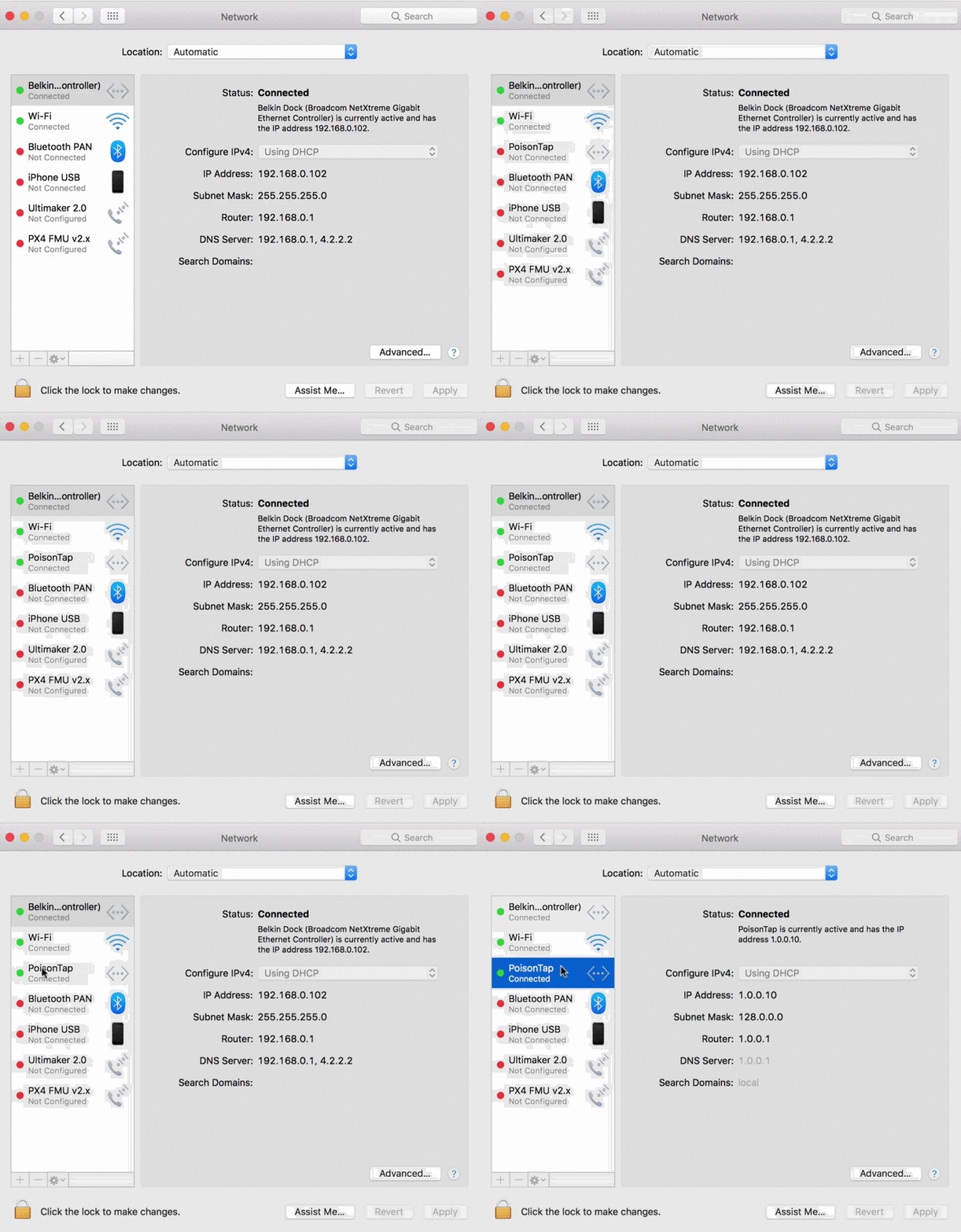
In a nutshell, PoisonTap performs the following:
Network Hijacking
- Attacker plugs PoisonTap (such as weaponized <a href="http://amzn.to/2eMr2WY" target="_blank">Raspberry Pi Zero</a>) into a locked computer (even if computer is password protected)
- PoisonTap emulates an Ethernet device (eg, Ethernet over USB/Thunderbolt) -- by default, Windows, OS X and Linux recognize an ethernet device, automatically loading it as a low-priority network device and performing a DHCP request across it, even when the machine is locked or password protected
- PoisonTap responds to the DHCP request and provides the machine with an IP address, however the DHCP response is crafted to tell the machine that the entire IPv4 space (0.0.0.0 - 255.255.255.255) is part of the PoisonTap's local network, rather than a small subnet (eg 192.168.0.0 - 192.168.0.255)
- Normally it would be irrelevant if a secondary network device connects to a machine as it will be given lower priority than the existing (trusted) network device and won't supersede the gateway for Internet traffic, but...
- Any routing table / gateway priority / network interface service order security is bypassed due to the priority of "LAN traffic" over "Internet traffic"
- PoisonTap exploits this network access, even as a low priority network device, because the subnet of a low priority network device is given higher priority than the gateway (default route) of the highest priority network device
- This means if traffic is destined to 1.2.3.4, while normally this traffic would hit the default route/gateway of the primary (non-PoisonTap) network device, PoisonTap actually gets the traffic because the PoisonTap "local" network/subnet supposedly contains 1.2.3.4, and every other IP address in existence ;)
- Because of this, all Internet traffic goes over PoisonTap, even though the machine is connected to another network device with higher priority and proper gateway (the true wifi, ethernet, etc.)
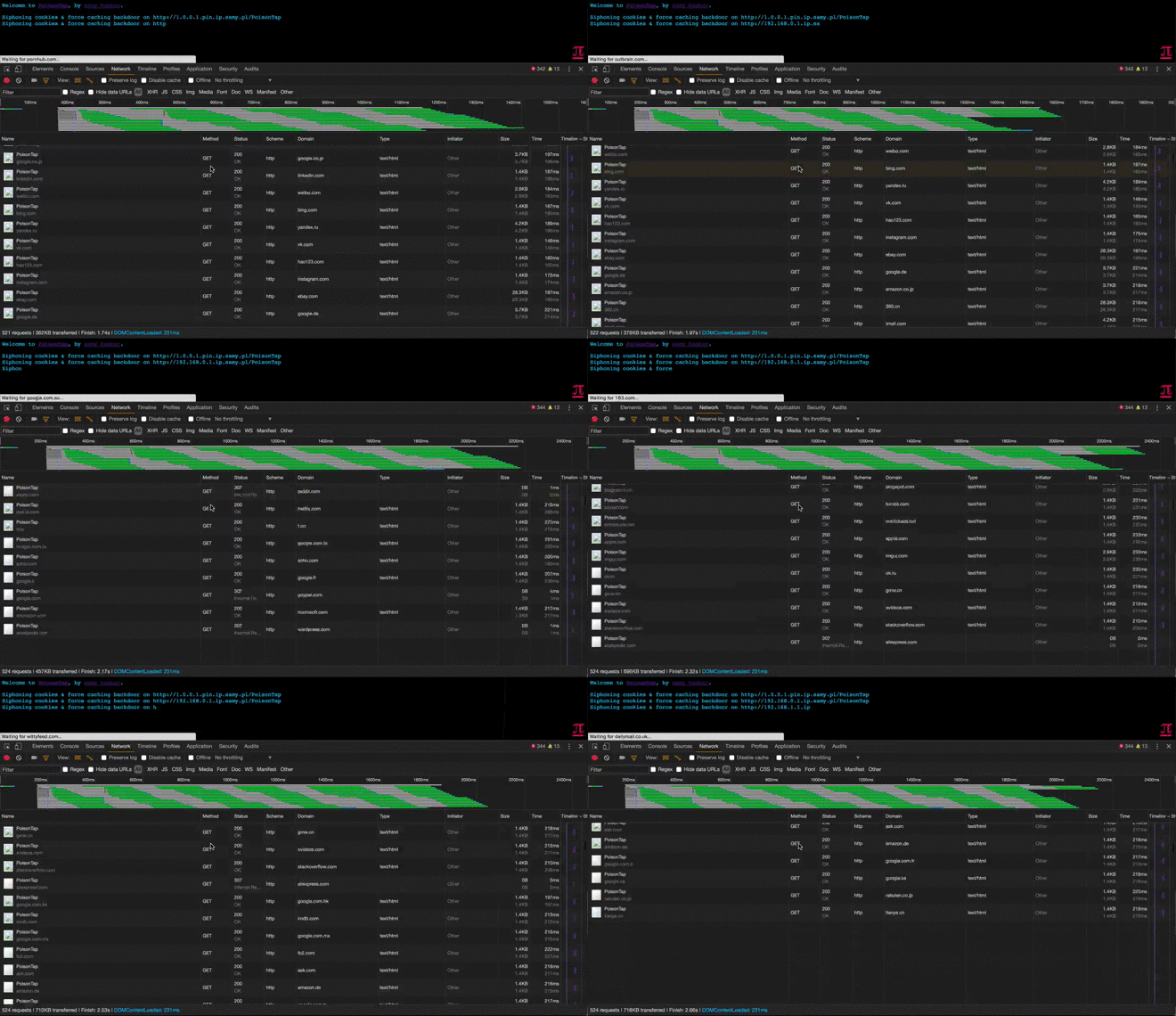
Cookie Siphoning
- As long as a web browser is running the background, it is likely one of the open pages will perform an HTTP request in the background (for example to load a new ad, send data to an analytics platform, or simply continue to track your web movements) via AJAX or dynamic script/iframe tags
- You can see this for yourself, go into your devtools/inspector (typically Cmd+Shift+I or Ctrl+Shift+I), go to a heavily visited website, click on the Network tab, and watch as remote resources continue to be accessed even as you take no action on the page
- Upon this HTTP request, because all traffic exits onto the PoisonTap device, PoisonTap DNS spoofs on the fly to return its own address, causing the HTTP request to hit the PoisonTap web server (<a href="https://nodejs.org/" target="_blank">Node.js</a>)
- If the DNS server is pointing to an internal IP (LAN) that PoisonTap cannot get privilege for, the attack continues to function as the internal DNS server will produce public IP addresses for the various domains attacked, and it is the public IP addresses that PoisonTap has already hijacked
- Once the internal DNS server responds, the web browser hits the public IP, ultimately hitting the PoisonTap web server (Node.js) in either scenario
- When the Node web server receives the request, PoisonTap responds with a response that can be interpreted as HTML or as Javascript, both of which execute properly (many websites will load HTML or JS in background requests)
- The HTML/JS-agnostic page then produces many hidden iframes, each iframe across a different Alexa-top-1-million domain
- Any "X-Frame-Options" security on the domain is bypassed as PoisonTap is now the HTTP server and chooses which headers to send to the client
- As every iframe HTTP request to a site is made (eg, http://nfl.com/PoisonTap), the HTTP cookies are sent from the browser to the "public IP" hijacked by PoisonTap, which swiftly logs the cookies/authentication information, logging tens of thousands of the user's cookies into PoisonTap
- Any "HttpOnly" cookie security is bypassed and those cookies are captured as no Javascript is executed on the domain itself, but rather only used to load the iframe in the first place
- Any Cross-Origin Resource Sharing or Same-Origin Policy security is bypassed as the domain being accessed appears legitimate to the browser
- Because we're capturing cookies rather than credentials, any 2FA/MFA implemented on the site is bypassed when the attacker uses the cookie to login. This is because we're not actually performing the login function but rather continuing an already logged-in session which does not trigger two-factor authentication
- If a server is using HTTPS, but the cookies do not explicitly set the <a href="https://www.owasp.org/index.php/SecureFlag" target="_blank">Secure</a> cookie flag, the HTTPS protection is bypassed and the cookie is sent to PoisonTap
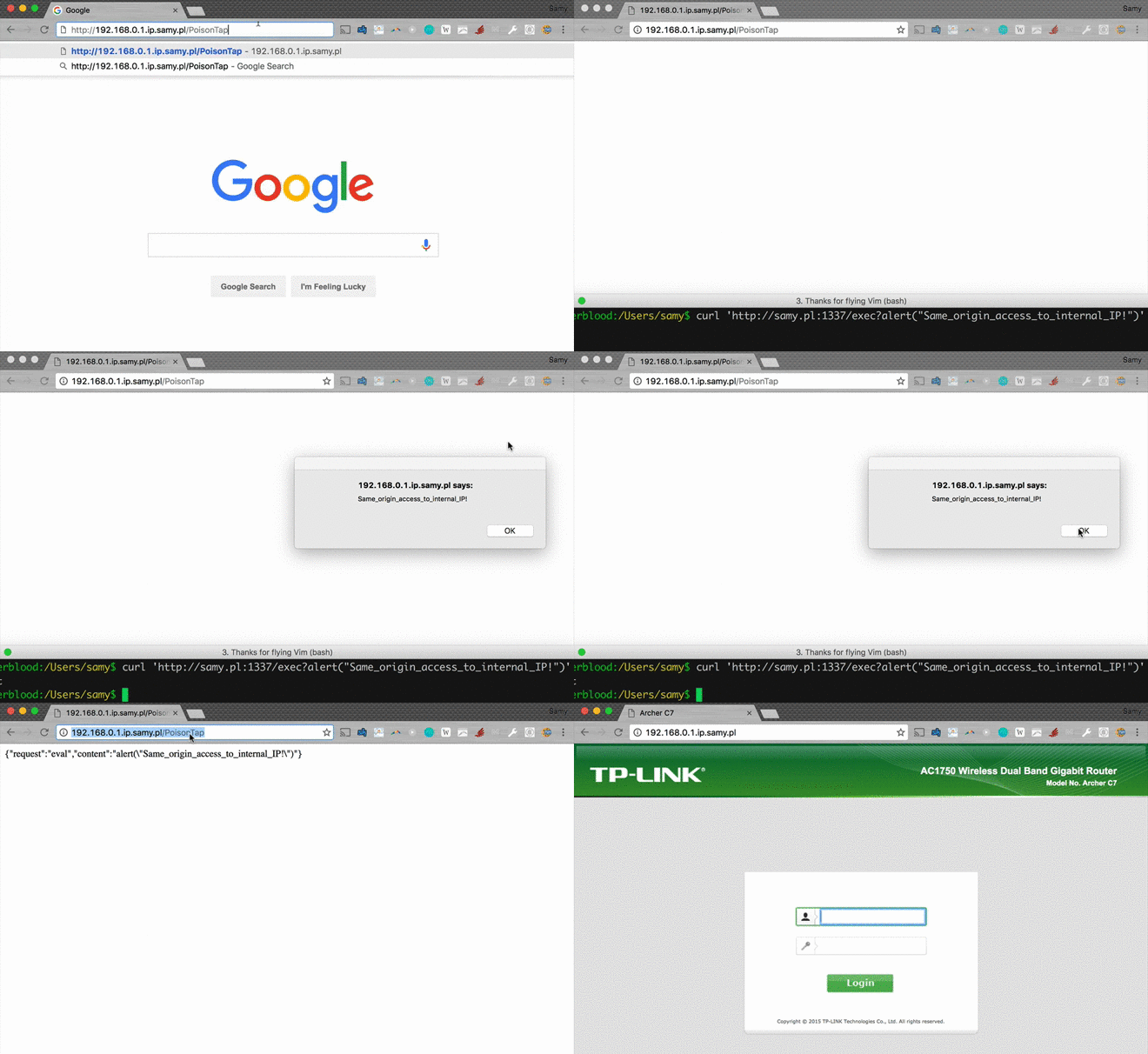
Remotely Accessible Web-Based Backdoors
- While PoisonTap was producing thousands of iframes, forcing the browser to load each one, these iframes are not just blank pages at all, but rather HTML+Javascript backdoors that are cached indefinitely
- Because PoisonTap force-caches these backdoors on each domain, the backdoor is tied to that domain, enabling the attack
