
Dingdong
Digital Ding Dong Ditch -- RTL-SDR + Arduino + GSM/SMS/FONA + RF + GQRX to hack a wireless doorbell from a text message
Install / Use
/learn @samyk/DingdongREADME
Digital Ding Dong Ditch
Digital Ding Dong Ditch is a device to hack into and ring my best friend's wireless doorbell whenever I send a text message to the device. The best part of the device is that it causes my friend, without fail, to come outside, find no one, and go back in.
In this project, we'll learn not only how to create this device, but how to reverse engineer radio frequencies we know nothing about using RTL-SDR (a ~$14 software defined radio), as well as creating hardware and software using Arduino, the Adafruit FONA (GSM/SMS/2G board), an RF (radio frequency) transmitter to transmit custom signals, and even how to reverse engineer a proprietary radio signal we know nothing about!
by @SamyKamkar // code@samy.pl // http://samy.pl // Dec 11, 2014
<a href="http://www.youtube.com/watch?feature=player_embedded&v=BnwBdeQB7vQ" target="_blank"> Watch the detailed video (and demo;) <img src="http://img.youtube.com/vi/BnwBdeQB7vQ/0.jpg" alt="Digital Ding Dong Ditch" width="640" height="480" border="10" /></a>Overview
My best friend Matt (we call him "donr") mentioned to me the other day that his doorbell was wireless. Incredible!
While he was away from his house, I decided to drive to his house and:
- ring his doorbell a bunch of times, while discovering the radio frequency and modulation used by it
- reverse engineer the signal in order to interpret it
- build a device capable of replaying the doorbell signal (ringing his doorbell), and have it work from long distances by allowing it to receive a special text message to trigger the doorbell
Amazing. Hopefully we'll still be friends after this. I can now ring his doorbell no matter how far away I am from his house, and he will never see my device as it's hidden across the street wirelessly manipulating his home.
Through this project, I'm going to explain from start to finish how I determined, hacked, reverse engineered, and built each piece and joined them together into this fun project, as well as provide schematics, source code, and explanation from start to finish.
Software
Digital Dong Ding Ditch
You can acquire the Digital Ding Dong Ditch source code from my github: https://github.com/samyk/dingdong
This is an Arduino sketch which uses the hardware mentioned below.
Samy's Adafruit FONA library
You should use my version of the Adafruit FONA library as I include an additional option that allows the FONA to let us know when there's a new text message. In the original library, you must constantly poll to see if there are more text messages than you expect, however with my version you can enable an option fona.setSMSInterrupt(1) which causes the RI (Ring Interrupt) pin to pull low for a moment upon new SMS messages.
GQRX / SDRSharp
For Linux or Mac, you can use GQRX, or for Windows, SDRSharp. These allow you to have GUI interfaces to visualize and listen to signals through your RTL-SDR device. Any program that interfaces with RTL-SDR to see an FFT or waterfall view of the spectrum will suffice.
RTL-SDR
We use the RTL-SDR codebase to listen and save the signal (via rtl_fm), however you can simply use GQRX or SDRSharp mentioned above to save the signal if you prefer.
Audacity
Audacity is a free application for audio file modification. We use it to look at and interpret the radio signal.
Hardware
RTL-SDR
$14: RTL-SDR is an extremely inexpensive software defined radio (SDR) using a chip from Realtek (RTL). If you have any idea why all Realtek devices are labeled RTL, rather than RLT, please email me as it really bothers me.
Anyway, you can get these dongles new around $14-20. These great chips allow you to receive full I/Q samples of radio frequencies down to potentially 22MHz up to around 2.2GHz, which includes all sorts of interesting radio frequencies! Cars! Garages! Doorbells! Glucometers! Medical devices! Pagers! Cell phones! Wireless phones! Broadcast TV! Airplanes! Power meters! Two way radios! Did I mentiong pagers? Don't page me, bro. Any RTL-SDR device with decent reviews on Amazon should suffice.
Arduino
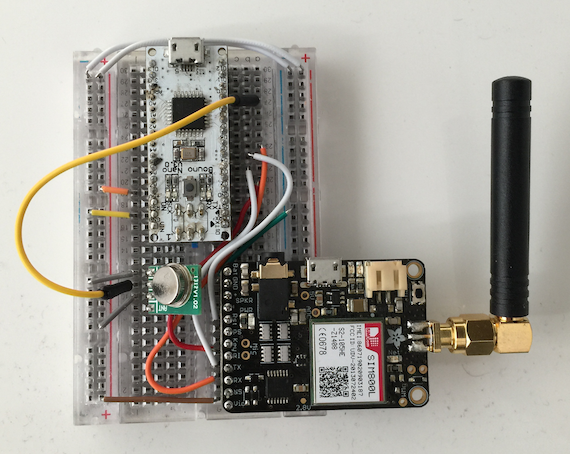
$6: Arduino is an awesome platform for software and hardware development and allows rapid creation of hardware. We'll be using an Arduino Nano clone specifically, however almost any Arduino microcontroller should work. Other microcontrollers or other devices capable of serial communication such as the Raspberry Pi, BeagleBone Black, raw Atmel chip or any other reasonable microcontroller should be able to do what we're doing here.
434MHz ASK RF Transmitter
$4: I use an inexpensive ($4) 434MHz ASK RF transmitter from SparkFun for this project. Note that this device entirely depends on the frequency and modulation of the device you're attempting to transmit to. I knew to get this transmitter only after I determined Matt's doorbell was using the radio frequency of ~434MHz (see how we determine this below or watch the video) and that the digital modulation was ASK, which is a type of digital amplitude modulation (AM). You can see the datasheet here.
Adafruit FONA
OPTIONAL ($45): Adafruit created an awesome board called the FONA which allows you to drop in a 2G SIM card and send/receive SMS's, phone calls, and even use the Internet directly from this little device and a microcontroller. Look ma', I'm on the information super highway!
If you obtain this, you'll be able to send a text message to your Arduino to send the signal, however if you're not looking to to have this sort of setup, no problem, I include a version without any GSM board where the Arduino simply annoyingly rings the doorbell every 30 seconds without any text message or FONA board required!
SIM Card
OPTIONAL ($3, only if using FONA): The FONA requires a mini-SIM card (NOT micro-SIM). I use a T-Mobile prepaid SIM card which is $3 and I believe only costs on outbound messages/calls which we won't be doing. I specifically use T-Moile because they support 2G, where most other carriers have or are deprecating their 2G network, and the FONA only supports 2G for Internet. Make sure you get the right size of SIM card -- more details on FONA SIM requirements here.
3.7V Lithium-Ion (LiOn or LiPo) Battery
OPTIONAL ($5 and up, only if using FONA): This is annoying, but as cool as the FONA is, it requires three power sources, and only one can be directly from the Arduino board. You can't spell cool without loco. One should be a rechargable battery such as this 3.v 1200mAh LiOn battery.
Locating the Signal
At first, I had no idea what frequency the signal was on, so while normally I would use a spectrum analyzer, I wanted to use only RTL-SDR (to keep the project very low cost) and some educated guessing based off of common frequencies.
Typically if you're dealing with a device that transmits and are in the US or Canada, you can look on the back and find an FCC ID or IC ID (for Canada). You can then look that FCC ID up to find the frequencies associated with it. Since the doorbell I was ringing itself didn't have an FCC ID and I wasn't inside the house to inspect the rest of it, I had no information on what frequency, FCC id, or even brand or model it was.
However, there happen to be a number of common ISM radio bands (industrial, scientific and medical radio bands) that are used for many, many devices. In the US, we'll typically see simple devices transmitting around 315MHz, 433MHz or 900MHz, especially if there's low throughput and not much data to send. We also have some other bands such as 2.4GHz (used by wifi, bluetooth, and more) and a few others.
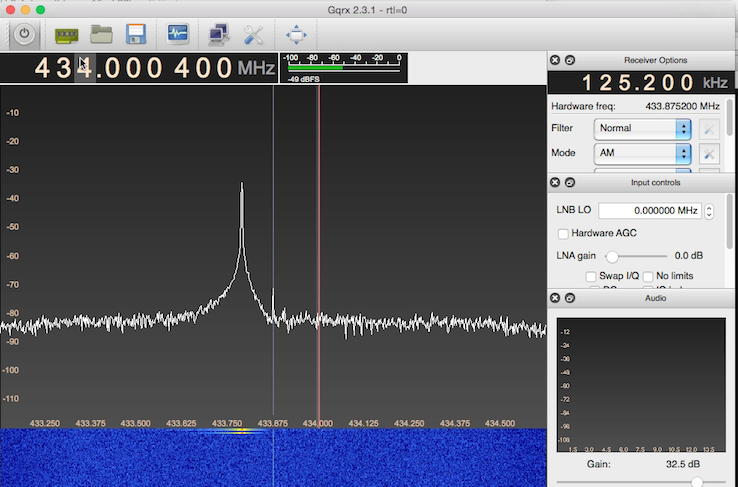
Using GQRX with the RTL-SDR plugged in, I simply started at 300MHz, and it would show me 3MHz at a time. I'd repeatedly hit the doorbell, and if I see no signal, I simply move up. You can skip around from 320 to about 430 usually as if it's not 300-320, it will more likely be in the 400+ or 900 range.
Once I saw a correlation between pressing the button and a signal in GQRX, I knew I had the right frequency, which was around 433.8MHz.
Capturing and Demodulating the Signal
Now that we know the frequency, we must determine the type of modulation used. Modulation is what allows data to be transmitted via radio frequency. I knew based off watching the waterfall view in GQRX that this was Amplitude Modulation (AM), and will explain how below.
We can determine whether the signal is amplitude modulation easily here because it happens to be using something called On-Off Keying, or OOK, which is a type of Amplitude Shift Keying (ASK).
Okay, we're getting into a lot of acronyms, so let's break down the types of modulation we'
