
Matfusion
SVBRDF estimation from photographs for three different lighting conditions (directional, natural, and flash/no-flash illumination) is shown by refining a novel SVBRDF diffusion backbone model.
Install / Use
/learn @samsartor/MatfusionREADME
MatFusion [Paper] [Website]
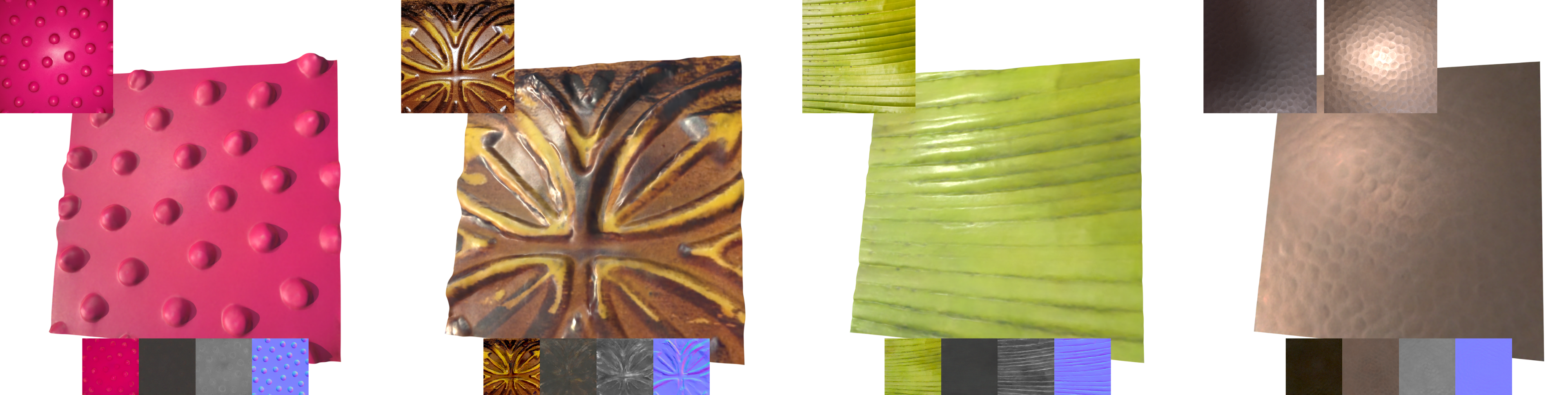
SVBRDF estimation from photographs for three different lighting conditions (directional, natural, and flash/no-flash illumination) is shown by refining a novel SVBRDF diffusion backbone model, named MatFusion.
Citation
@conference{Sartor:2023:MFA,
    author    = {Sartor, Sam and Peers, Pieter},
    title     = {MatFusion: a Generative Diffusion Model for SVBRDF Capture},
    month     = {December},
    year      = {2023},
    booktitle = {ACM SIGGRAPH Asia Conference Proceedings},
    url       = {https://doi.org/10.1145/3610548.3618194},
}
Installation
You will need Git, Python, and Conda on a system with at least CUDA 11 and CUDNN 8.2. This code is only tested on Linux, but Windows and MacOS may be usable with some tweaks.
git clone 'https://github.com/samsartor/matfusion' && cd matfusion
git submodule update --init --recursive
conda env create -f environment.yml
conda activate matfusion
pip install -e matfusion_diffusers
ipython kernel install --user --name=matfusion
Before running a notebook in Jupyter, make sure to set your kernel to "matfusion".
Optional Dependencies
When running more complicated evaluation and training jobs you may need additional dependencies.
To render SVBRDFs under environment lighting or with global illumination, you should install Blender version 3.6 or higher.
To compile the matfusion_jax.data module, install Rust version 1.65 or higher and compile the dataloader_rs package.
cargo build --manifest-path dataloader_rs/Cargo.toml --release
In order to finetune the flash/no-flash model you will also need to pass --features ndarray-linalg to cargo, which will download and compile openblas so that the dataloader can simulate imperfect camera alignment between pairs of rendered images.
You may also need a Julia environment compatible with language version 1.7. Also install the required julia packages by running the julia command and entering:
import Pkg
Pkg.add(name="Images", version="0.23.3")
Pkg.add(name="FFTW", version="1.6.0")
Pkg.add(name="ProgressMeter", version="1.7.2")
These dependencies are NOT needed if you only use the demo notebooks or otherwise the write code to assemble batches yourself. They are only needed when using our dataset processing code through scripts like train.py and eval.py.
Pretrained Models
The following pretrained models are avalible.
| Model Finetuning | Framework | Version | Download | | ---------------- | --------- | ------------- | --------- | | Backbone | Jax | 1 (corrected) | unconditional_v1_corrected_jax.tar.lz4 | | Flash | Jax | 1 | flash_v1_jax.tar.lz4 | | Environment | Jax | 1 | env_v1_jax.tar.lz4 | | Flash/No-flash | Jax | 1 | fnf_v1_jax.tar.lz4 | | Backbone | Diffusers | 1 (corrected) | unconditional_v1_corrected_diffusers.tar.lz4 | | Flash | Diffusers | 1 | flash_v1_diffusers.tar.lz4 | | Environment | Diffusers | 1 | env_v1_diffusers.tar.lz4 | | Flash/No-flash | Diffusers | 1 | fnf_v1_diffusers.tar.lz4 |
To use any of the pretrained models above, untar the downloaded archive into the checkpoints folder. For example, before running the flash finetuning for Jax,
your directory should look like
checkpoints
├── flash_v1_jax.tar.lz4
└── flash_v1_jax
    ├── checkpoint.msgpack
    ├── LICENSE.txt
    └── mode.json
Inference
The easiest way to run MatFusion on your own photographs is with the matfusion_jax_demo.ipynb and matfusion_diffusers_demo.ipynb Jupyter notebooks.
Alternatively you can create an !Images dataset for your photographs. For example, the Lookahead SVBRDF paper by Zhou and Kalantari provides a selection of real flash-lit photographs which you can download from https://drive.google.com/file/d/1kzJicyd9Dn-cGNWJCDqJ4fuh5b_NDajW/view. Unzip into the datasets directory and rename the OurReal directory to datasets/lookahead_real_inputs. Then you can batch-process the test images with eval.py as below. That zip file also contains the MaterialGAN eval dataset in the MGReal directory, which should be renamed to datasets/materialgan_real_inputs.
python eval.py \
    --dataset datasets/real_test_materialgan.yml \
    --checkpoint checkpoints/flash_v1_jax \
    --output results/flash_v1_on_materialgan`
Datasets
MatFusion was trained on three different datasets of SVBRDFs which each have a slightly different download process. Some fine tunings also require path-traced images of those SVBRDFs.
INRIA
The inria dataset can be downloaded from https://team.inria.fr/graphdeco/projects/deep-materials/. Unzip it into the datasets directory of this repo so that datasets/DeepMaterialsData is populated by lots of png files and then run python scripts/convert_inria.py. You should see the script create a datasets/inria_svbrdfs folder.
These SVBRDFs are distributed under a CC BY-NC-ND 2.0 licence.
CC0
Download and untar cc0_svbrdfs.tar.lz4 into the datasets directory so that it contains a datasets/cc0_svbrdfs folder.
These SVBRDFs are collected from PolyHaven and AmbientCG, and are distributed under the CC0 licence.
Mixed
Download and untar mixed_svbrdfs.tar.lz4 into the datasets directory so that it contains a datasets/mixed_svbrdfs folder.
These SVBRDFs are derived from the above INRIA and CC0 datasets, and so are distributed under a combination of the two licences. This usage of the INRIA dataset has been permitted by Adobe.
Rendering
Rendering the SVBRDFs is very CPU intensive and also requires about 1TB of free storage (since the renders are stored in OpenEXR format). This data is impossible to distribute online because of its size, but feel free to email us if rendering it yourself proves impossible.
First you should integrate the normal maps to produce displacement maps by running julia scripts/integrate-normals.jl datasets/*_svbrdfs and waiting a few hours.
To open several background Blender workers to render all the maps over a few days, run dataloader_rs/target/release/renderall datasets/train_rendered_env.yml. You may need to adjust worker and thread counts for optimal performance, since the defaults are for a machine with 128 cores.
Test Data
Our paper also presents a new test set, made up of diverse SVBRDFs from a variety of sources. Download and untar test_svbrdf.tar.lz4 into the datasets directory so that it contains a test_svbrdfs folder.
Compute Error Statistics
You can use the eval.py and score.py scripts to run rigorous evaluations of MatFusion. For example, to evaluate the
flash model on our test set (once downloaded), use:
python eval.py \
    --dataset ./datasets/test_rasterized.yml \
    --checkpoint ./checkpoints/flash_v1_jax \
    --output ./results/flash_v1_on_test
python score.py --output  ./results/flash_v1_on_test
The error numbers can be viewed with the view_eval.ipynb Jupyter notebook.
Training & Finetuning
All of the various training routines can be accomplished with the train.py script. For our training we generally used 4x NVIDIA A40 GPUs each with 45GB of memory. If you are using more or less compute you should probably adjust the batch size and learning rate by passing -O batch_size={BATCH_SIZE} and -O lr={LEARNING_RATE} or by passing a custom --mode_json {PATH_TO_JSON_FILE}. Alternatively, we provide gradient accumulation with the --accumulation option, but it is not very well tested.
Unconditional Backbone Model
python train.py \
    --mode CONVNEXT_V1_UNCONDITIONAL_MODE \
    --epocs 50 \
    --dataset ./datasets/train_rasterized.yml
Flash Finetuning
python train.py \
    --finetune_checkpoint checkpoints/unconditional_v1_jax \
    --mode CONVNEXT_V1_DIRECT_RAST_IMAGES_MODE \
    --epocs 19 \
    --dataset ./datasets/train_rasterized.yml
Environment-Lit Finetuning
python train.py \
    --finetune_checkpoint checkpoints/unconditional_v1_jax \
    --mode CONVNEXT_V1_DIRECT_RENDERED_IMAGES_MODE \
    --epocs 19 \
    --dataset ./datasets/train_rendered_env.yml
Flash/No-Flash Finetuning
python train.py \
    --finetune_checkpoint checkpoints/unconditional_v1_jax \
    --mode CONVNEXT_V1_DIRECT_RENDERED_OTHER_IMAGES_MODE \
    --epocs 19 \
    --dataset ./datasets/train_rendered_fnf.yml
Project Structure
train.pyis our training scripteval.pyis our evaluation scriptscore.pydoes error number computation for evaluationsmatfusion_jax/is our from-scratch diffusion implementation in Jax/Flaxmodel.pycontains logic for saving/loading/initing/training models- `net/res
Related Skills
node-connect
344.1kDiagnose OpenClaw node connection and pairing failures for Android, iOS, and macOS companion apps
frontend-design
96.8kCreate distinctive, production-grade frontend interfaces with high design quality. Use this skill when the user asks to build web components, pages, or applications. Generates creative, polished code that avoids generic AI aesthetics.
openai-whisper-api
344.1kTranscribe audio via OpenAI Audio Transcriptions API (Whisper).
qqbot-media
344.1kQQBot 富媒体收发能力。使用 <qqmedia> 标签,系统根据文件扩展名自动识别类型(图片/语音/视频/文件)。
