
RotoAI
An open-source studio for prompt-driven video segmentation. Powered by SAM2 & Grounding DINO with a hybrid Cloud-Local architecture.
Install / Use
/learn @sPappalard/RotoAIREADME
🟣 RotoAI - Intelligent Video Rotoscoping
<a name="readme-top"></a>
<div align="center">





Automated zero-shot video segmentation powered by SAM2 & Grounding DINO
🌟 Overview •
🎨 Visual Effects Showcase •
✨ Key Features •
📸 UI Screenshots •
🔄 Pipeline & Architecture •
🛠 Tech Stack & Repository Structure •
💾 Memory Management •
🚀 Getting Started •
🐛 Troubleshooting •
📜 Credits •
👨💻 Author
<br><br>
If you find RotoAI useful, please consider supporting the development!
<a href="https://www.buymeacoffee.com/sPappalard"> <img src="https://cdn.buymeacoffee.com/buttons/v2/default-yellow.png" alt="Buy Me A Coffee" width="180" /> </a> </div>🌟 Overview
RotoAI is an advanced open-source studio for prompt-driven video segmentation. It leverages a Hybrid Cloud-Local Architecture: a responsive React frontend runs locally, while the heavy inference is offloaded to Google Colab GPUs (T4) via a secure Ngrok tunnel. Powered by state-of-the-art foundation models (SAM2 & Grounding DINO), RotoAI introduces intelligent VRAM management and chunked processing, enabling high-resolution rotoscoping on free cloud tier hardware without memory bottlenecks.
What Makes RotoAI Special?
- Semantic Understanding: Select objects using natural language prompts (e.g., "person in red shirt") via Grounding DINO.
- Hybrid Architecture: Combines the responsiveness of a local UI with the raw power of Cloud GPUs (Google Colab).
- Production Resilience: Handles long videos via Smart Chunking (5s segments) and Auto-Resolution Scaling to prevent OOM errors.
- Dual Detection Modes: Supports both generic Zero-Shot detection and Custom YOLO Models for specialized tasks.
- 6 Professional Effects: From cinematic B&W pop to neon glow overlays
🎬 Demo
<div align="center">Watch RotoAI in Action
Click to watch the full demonstration on YouTube
</div>🎨 Visual Effects Showcase
Discover the cinematic effects you can create in seconds.
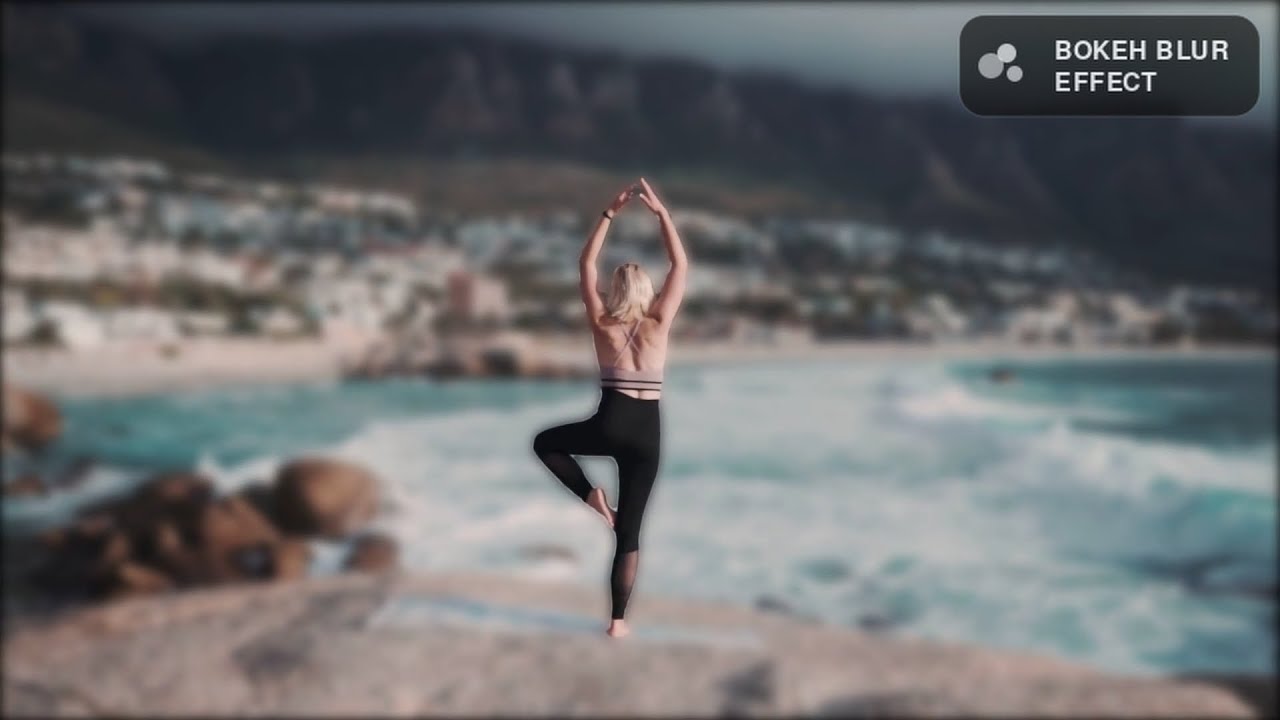
Bokeh Blur
Simulates a high-end camera lens by applying a realistic Gaussian blur to the background, creating a shallow depth-of-field effect.
<div align="center"> <img src="public/boke.gif" alt="Bokeh Blur Effect" width="800"> <p>Prompt used: <em>"Running man"</em></p> </div>Chroma Key (Green Screen)
Replaces the background with a solid green (or custom hex) color, perfect for compositing in post-production tools like After Effects or Premiere.
<div align="center"> <img src="public/greenk.gif" alt="Chroma Key Effect" width="800"> <p>Prompt used: <em>"Boys dressed in red"</em></p> </div>B&W Color Pop
Isolates the subject by keeping them in full color while instantly desaturating the background to grayscale.
<div align="center"> <img src="public/bew.gif" alt="B&W Effect" width="800"> <p>Prompt used: <em>"Boy with orange backpack"</em></p> </div>Neon Glow
Adds a futuristic glowing outline around the detected subject. You can choose between a sharp border or a diffuse glow.
<div align="center"> <img src="public/neonEffect.gif" alt="Neon Effect" width="800"> <p>Prompt used: <em>"Dancing man"</em></p> </div>Configuration Options:
- ✅ With Border: Colored neon outline with edge detection
- ❌ No Border: Soft glow with adjustable blur radius (1-15)
Color Pop
Applies a cinematic desaturation filter to the background, creating a moody, vintage aesthetic while keeping the subject vivid.
<div align="center"> <img src="public/colorPop.gif" alt="Color Pop Effect" width="800"> <p>Prompt used: <em>"Man with glasses"</em></p> </div>Luminous Edge
Highlights the contours of the subject with a radiant light effect, creating a sketched light-painting look.
<div align="center"> <img src="public/doctors.gif" alt="Edge Light Effect" width="800"> <p>Prompt used: <em>"Doctors"</em></p> </div>✨ Key Features
🤖 AI-Powered Detection
- Open-Vocabulary Detection: Zero-shot capabilities via Grounding DINO allows finding any object using natural language prompts.
- BYO Model (Bring Your Own): Support for custom trained YOLO (.pt) weights for specialized industrial or specific object detection.
- Interactive Calibration: Built-in Test Mode to validate detection accuracy on individual frames before committing to full GPU rendering.
🎨 Professional Visual Effects
<table> <tr> <td width="50%">Cinematic Effects
- 🔳 B&W Color Pop: Isolate subjects in vibrant color against grayscale backgrounds
- 🟩 Chroma Key: Green screen-style background replacement with custom colors
- 🧪 Neon Glow: Cyberpunk-inspired luminous edge effects with configurable colors
Advanced Filters
- 💧 Bokeh Blur: Professional depth-of-field simulation
- 🎞️ Color Pop: Cinematic desaturation for mood creation
- 💡 Luminous Edge: Highlight subject contours with glowing borders
✨Effect Previews
<div align="center"> <video src="https://github.com/user-attachments/assets/53be5717-2a86-4521-a576-b98eee2e7100" controls="controls" style="max-width: 100%; border-radius: 10px;" muted="muted" autoplay="autoplay" loop="loop"> </video> <p><i>▶️ Click play to watch the Effect Previews</i></p> </div>⚙️ Advanced Configuration
- Dual Output Modes: Side-by-side comparison or processed-only
- Smart Scanning: Configurable detection window (1-10 seconds)
- Precision Tuning: Adjustable confidence thresholds (0.01-0.80)
- Memory Management: Automatic resolution scaling for optimal VRAM usage
🚀 Performance & Optimization
- Chunked Processing: Handles videos of any length without OOM errors
- GPU Acceleration: FP16 precision for 2x speed on modern GPUs
- Real-Time Progress: Frame-by-frame statistics with ETA
- Smart Caching: Efficient frame storage and cleanup
📸 UI Screenshots
A glance at the RotoAI interface and its capabilities.
Main interface
<div align="center"> <img src="public/main.jpg" alt="Main Interface" width="100%"> </div>Hybrid Cloud Connection
The entry point connecting the local React UI with the Colab GPU backend via Ngrok.
<div align="center"> <img src="public/connect.jpg" alt="Connection Screen" width="100%"> </div>Interactive test detection
Test Detection Module: Validate prompts and confidence thresholds frame-by-frame before processing.
<div align="center"> <img src="public/test.jpg" alt="Test Detection UI" width="100%"> </div> <div align="center"> <img src="public/test2.jpg" alt="Test Detection result" width="100%"> </div>Visual Effects Engine
Select from cinematic effects like Neon Glow, Chroma Key, Bokeh Blur, and B&W Pop.
<div align="center"> <img src="public/effects.jpg" alt="Effects Selection" width="100%"> </div>Advanced Configuration
Fine-tune scan duration, confidence thresholds, and output formats (Comparison vs. Processed Only).
<div align="center"> <img src="public/advanced.jpg" alt="Advanced Settings" width="100%"> </div>Results & Player
Built-in video player with loop functionality and instant download for the final rendered MP4.
<div align="center"> <img src="public/res.jpg" alt="Results" width="100%"> </div>🔄 How It Works
AI Processing Pipeline
<div align="center">
End-to-End Flow: Visual step-by-step of the rendering process
</div>Hybrid Architecture
<div align="center">
Hybrid Infrastructure: Local Frontend connected to Remote Backend via Ngrok
</div>🛠 Tech Stack
Core AI Models
🔍 Detection (The "Eyes")
Grounding DINO (SwinB) The prompt-master. Allows you to select objects using natural language queries (e.g., "black cat").
- Size: ~600MB
- Type: Zero-shot Object Detection
YOLO v8/v11 The specialist. Supports user-uploaded
.ptweights for fine-tuned tasks.
- Size: <100MB (Typical)
- Type: Custom Object Detection
✂️ Segmentation (The "Hands")
SAM 2 (Segment Anything 2) The tracker. Handles the heavy lifting of propagating masks across video frames.
- Architecture: Hiera Small
- Size: ~180MB
- Performance: Real-time propagation
Backend Stack
# Core Dependencies
PyTorch 2.0+          # Deep learning framework
FastAPI 0.104+        # Async web framework
Uvicorn               # ASGI server
OpenCV (cv2)          # Video processing
NumPy                 # Matrix operations
Pillow (PIL)          # Image manipulation
FFmpeg                # Video encoding
Infrastructure:
- 🌐 Google Colab: Cloud GPU environment (T4/P100/V100)
- 🔗 Ngrok: Secure tunnel for public API access
- 🔧 Nest AsyncIO: Event loop management for Co
