
Chrootvpn
Checkpoint R80+ VPN client chroot wrapper
Install / Use
/learn @ruyrybeyro/ChrootvpnREADME
chrootVPN
Checkpoint R80+ VPN client chroot wrapper
VPN client chroot'ed Debian setup/wrapper
for Debian/Ubuntu/RedHat/CentOS/Fedora/Arch/SUSE/Gentoo/Slackware/Void/Deepin/KaOS/Pisi/Kwort/Clear/NuTyx/Mariner Linux based hosts
Checkpoint R80.10 and up
https://github.com/ruyrybeyro/chrootvpn
Rui Ribeiro 2022-2024
Tiago Teles @ttmx - Contributions for Arch Linux
Robson Rodrigues @robsonrod - Contribution for NixOS
💥Nominated for best tool of the year 2022 at Checkpoint user forums💥
 / Recent activity
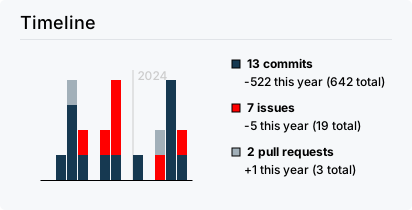
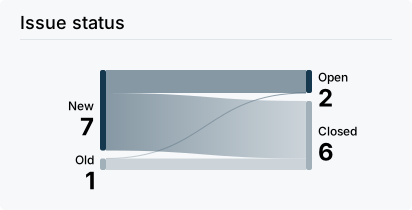
Description
The official Mobile Access Portal Agent (CShell) and the SSL Network Extender (SNX) CheckPoint scripts are severely outdated, not working with recent Linux distributions. This script downloads them from the firewall/VPN we intend to connect to, and installs them in a chrooted environment. (*)
Being SNX still a 32-bits binary together with the multiples issues of satisfying cshell_install.sh requirements, a chroot is used in order to not to corrupt (so much) the Linux user desktop, and yet still tricking snx / cshell_install.sh into "believing" all the requirements are satisfied; e.g. both SNX and CShell behave on odd ways ; furthermore, Fedora and others already deprecated 32-bit packages necessary for SNX ; the chroot setup is built to counter some of those behaviours and provide a more secure setup.
Whilst the script supports most of the Linux distributions around as the host OS, it still uses Debian i386 for the chroot "light container".
CShell CheckPoint Java agent needs Java (already in the chroot) and X11 desktop rights. The binary SNX VPN client needs a 32-bits environment. The SNX binary, the CShell agent/daemon (and Java) install and run under chrooted Debian. The Linux host runs Firefox (or another browser).
resolv.conf, VPN IP address, routes and X11 "rights" "bleed" from the chroot directories and kernel shared with the host to the host Linux OS.
The Mobile Access Portal Agent, unlike the ordinary cshell_install.sh official setup, runs with its own non-privileged user which is different than the logged in user. In addition, instead of adding the localhost self-signed Agent certificate to a user personal profile as the official setup does, this script install a server-wide global Firefox policy file instead when possible. Notably when Firefox is a snap, or the distribution already has a default Firefox policy file, a new policy won't be installed.
As long the version of the Debian/RedHat/SUSE/Arch distribution is not at the EOL stage, chances are very high the script will run successfully. Void, Gentoo, Slackware, Deepin,NuTyx,Pisi/Kwort and KaOS variants are not so thoroughly tested. Have a look near the end of this document, for the more than 110 recent versions/distributions successfully tested.
(*) It is of no use opening issues with the CShell/SNX scripts failing to installs in your normal OS shell/outside the chroot environment. The whole point of this script is automagically installing and providing an alternative environment able to run them and getting in sync with the host OS.
Moreover, the author acknowledges that Linux has the capability to establish a connection to a FW/1 VPN through IPSEC. However, it's important to note that this configuration is not commonly implemented in the majority of corporate or educational setups. It typically requires a more technically proficient end user to navigate and set up.
INSTRUCTIONS
For the stable release, download rpm or deb file from the last release.
-
First time installing, run it as:
vpn.sh -i --vpn=FQDN_DNS_name_of_VPN -
accept localhost certificate in brower if not Firefox or if Firefox is a snap
https://localhost:14186/id
-
visit web VPN page aka Mobile Access Portal for logging in
-
To launch it any time after installation or a reboot
vpn.sh start -
the script tries to launch itself upon user xorg login via XDG. To have an automatic launch, if vpn.sh was installed via rpm or deb, add to /etc/sudoers
your_user ALL=(ALL:ALL) NOPASSWD: /usr/bin/vpn.sh -
Whilst it is recommended having Firefox already installed, for deploying via this script a Firefox policy for automagically accepting the self-signed Mobile Access Portal Agent X.509 certificate, if it is not present a already a policy, you can install a Firefox policy any time doing:
vpn.sh policy -
If /opt/etc/vpn.conf is present the above script settings will be ignored. vpn.conf is created upon first installation. Thus, for reinstalling, you can run:
vpn.sh -i -
For delivering the script to other users, you can fill up VPN and VPNIP variables at the beginning of the script. They can then install it as:
vpn.sh -i -
For opening issues, please provide de output debug information, adding -d to your command line:
vpn.sh -d -
Depending on how much of the chroot is installed, also seeing logs can be useful, as in:
vpn.sh logs
USAGE
vpn.sh [-l][-f FILE][-c DIR|--chroot=DIR][--proxy=proxy_string][--vpn=FQDN] -i|--install
vpn.sh [-f FILE][-o FILE|--output=FILE][-c|--chroot=DIR] start|stop|restart|status
vpn.sh [-f FILE][-c DIR|--chroot=DIR] [uninstall|rmchroot]
vpn.sh [-f FILE][-o FILE|--output=FILE] disconnect|split|selfupdate|fixdns
vpn.sh -h|--help
vpn.sh -v|--version
|Option | |Function | |-----------|--|---------------------------------------------------------| |--install |-i|install mode - creates chroot | |--chroot |-c|changes default chroot /opt/chroot directory | |--help |-h|shows this help | |--version |-v|script version | |--file |-f|alternate conf file. Default /opt/etc/vpn.conf | |--vpn | |selects VPN DNS full name at install time | |--proxy | |proxy to use in apt inside chroot 'http://user:pass@IP' | |--output |-o|redirects ALL output for FILE | |--silent |-s|special case of output, no arguments | | |-l|gets snx/cshell_install.sh from cwd directory, if present| | | |the files wont be loaded from the remote CheckPoint | |--portalurl| |custom prefix path other than / and sslvpn |
|Command |Function | |-------------|-------------------------------------------------------| |start |starts CShell daemon | |stop |stops CShell daemon | |restart |restarts CShell daemon | |status |checks if CShell daemon is running | |disconnect |disconnects VPN/SNX session from the command line | |split |splits tunnel VPN - use only after session is up | |uninstall |deletes chroot and host file(s) | |rmchroot |deletes chroot | |selfupdate |self-updates this script if new version available | |fixdns |tries to fix resolv.conf | |policy |tries to install a Firefox policy |
For debugging/maintenance:
vpn.sh -d|--debug vpn.sh sudoers vpn.sh [-c DIR|--chroot=DIR] shell|upgrade
vpn.sh shell
|Options| |Function | |-------|--|-----------------------------------------------------| |--debug|-d|bash debug mode on | |shell | |bash shell inside chroot | |upgrade| |OS upgrade inside chroot | |sudoers| |installs in /etc/sudoers sudo permission for the user| |log | |shows CShell Jetty logs | |taillog| |follows/tail CShell Jetty logs |
This script can be downloaded running:
- git clone https://github.com/ruyrybeyro/chrootvpn/blob/main/vpn.sh
- wget https://raw.githubusercontent.com/ruyrybeyro/chrootvpn/main/vpn.sh
- curl https://raw.githubusercontent.com/ruyrybeyro/chrootvpn/main/vpn.sh -O
KNOWN FEATURES
-
The Web page of Mobile access portal has to open in a browser and allow login with or without this script/SNX/CShell installed;
-
The user installing/running the script has to got sudo rights (for root);
-
For the CShell daemon to start automatically upon the user XDG login, the user must be able to sudo /usr/bin/vpn.sh or /usr/local/bin/vpn.sh without a password;
-
The CShell daemon writes over X11; if VPN is not working when called/installed from a ssh session, or after logging in, start/restart the script using a X11 graphical terminal;
-
The script/chroot is not designed to allow automatic remote deploying of new versions of both CShell (or SNX?)-apparently this functionality is not supported for Linux clients. If the status command of this script shows CShell or SNX new versions remotely, uninstall, and install the chroot setup again;
-
For (re)installing newer versions of SNX/CShell delete t
