
Presenter
A Multi-Agent AI Tool that creates beautiful presentations with voice-overs 🎦🔥
Install / Use
/learn @rsrohan99/PresenterREADME
Presenter 🎦
Introducing Presenter: A Multi-Agent AI Tool that can:
- [x] Create beautiful presentations for any given topic 🔥
- [x] Render intuitive & visually appealing diagrams 🖼️ for slides when needed (using Mermaid)
- [x] Write scripts for every slide 📜
- [x] Render & View interactive presentations in HTML 💻 (using markdown-slides & reveal.js)
- [x] Intuitive speaker view with scripts (reveal.js)
- [x] Export presentations to PDF 🖨️ (using DeckTape)
- [x] Generate audio narrations from scripts 🎙️ (using ElevenLabs)
- [x] Render full video presentations 🎥 with all the slides and voiceover (using FFmpeg)
Video Demo with overview of the multi-agent setup
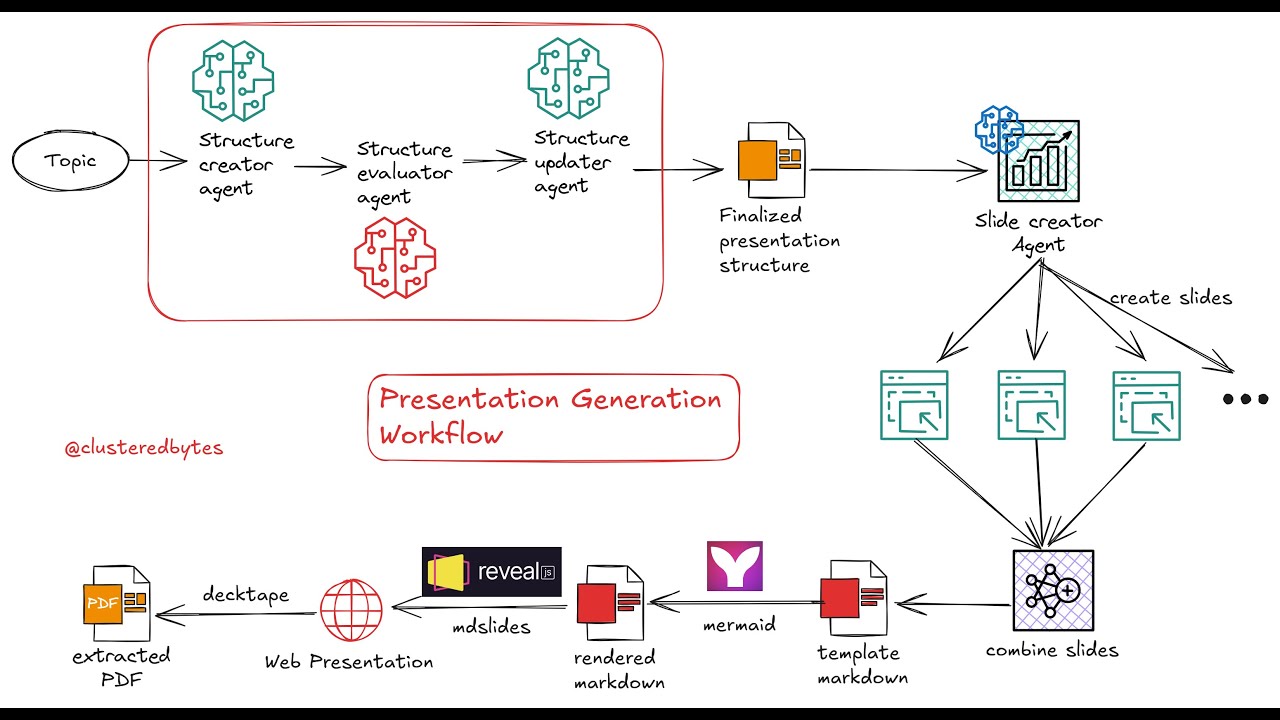
Tools Used
- LlamaIndex Workflows to orchestrate the entire multi-agent setup
- markdown-slides and reveal.js for rendering & viewing the presentation
- Mermaid to render the diagrams
- DeckTape to export the presentation to PDF
- ElevenLabs API to create audio narration for the slides
- FFmpeg to render the full presentation with voiceover
How to use
- First install the necessary tools
python -m pip install git+https://gitlab.com/da_doomer/markdown-slides.git
npm install -g @mermaid-js/mermaid-cli
npm install -g decktape
npm install -g puppeteer
puppeteer browsers install chrome
-
Install FFmpeg for your operating system from here
-
Clone the repo
git clone https://github.com/rsrohan99/presenter.git
cd presenter
- Install dependencies
pip install -r requirements.txt
- Create
.envfile and addOPENAI_API_KEYandELEVENLABS_API_KEY
cp .env.example .env
- Run the workflow with the topic to create the presentation on
python run.py "observer design pattern"
- Add
--export-videoargument to generate a full video of the presentation with voiceover.
python run.py "observer design pattern" --export-video
- After running the workflow, it'll put all the files (slides, video, pdf etc.) inside the
presentationsfolder - There be a folder for each presentation generated
- The interactive HTML for the presentation will be at
presentations/<presentation_folder>/output/index.html - The extracted PDF of the presentation will be at
presentations/<presentation_folder>/presentation.pdf - The rendered video with voiceover of the presentation will be at
presentations/<presentation_folder>/presentation.mp4
Related Skills
node-connect
345.9kDiagnose OpenClaw node connection and pairing failures for Android, iOS, and macOS companion apps
frontend-design
106.4kCreate distinctive, production-grade frontend interfaces with high design quality. Use this skill when the user asks to build web components, pages, or applications. Generates creative, polished code that avoids generic AI aesthetics.
openai-whisper-api
345.9kTranscribe audio via OpenAI Audio Transcriptions API (Whisper).
qqbot-media
345.9kQQBot 富媒体收发能力。使用 <qqmedia> 标签,系统根据文件扩展名自动识别类型(图片/语音/视频/文件)。
