
Clearly
Clearly see and debug your celery cluster in real time!
Install / Use
/learn @rsalmei/ClearlyREADME
Clearly see and debug your celery cluster in real time!








Do you use celery, and monitor your tasks with flower? You'll probably like Clearly! 👍
Clearly is a real time monitor for your celery tasks and workers!
While I do like flower, to me it's not been totally up to the task (pun intended :). <br>Why is that? flower needs page refreshes, filters only one task type at a time, displays results as plain strings without any formatting or syntax highlighting, and on top of that also truncates them!
And clearly is actually real time, has multiple simultaneous filters, a beautiful syntax highlighting system, an advanced formating system that shows parameters, results and tracebacks just as an ipython would, has complete un-truncated results and is very easy to use! 😃
<br>Also you can install it very easily with a docker image!
It's great to actually see in a totally real time way what's going on in your celery workers! So it's very nice for inspecting, debugging, and even demonstrating your company async-superpowers (put clearly on a big screen TV showing all tasks of your production environment 😜)!
Clearly is composed of a server, which collects real time events from the celery cluster, generates missing states, and streams filtered data to connected clients; and a client, which you use to send filter commands and display both real time and stored data. They communicate with each other via gRPC and ProtocolBuffers.
See what clearly looks like:
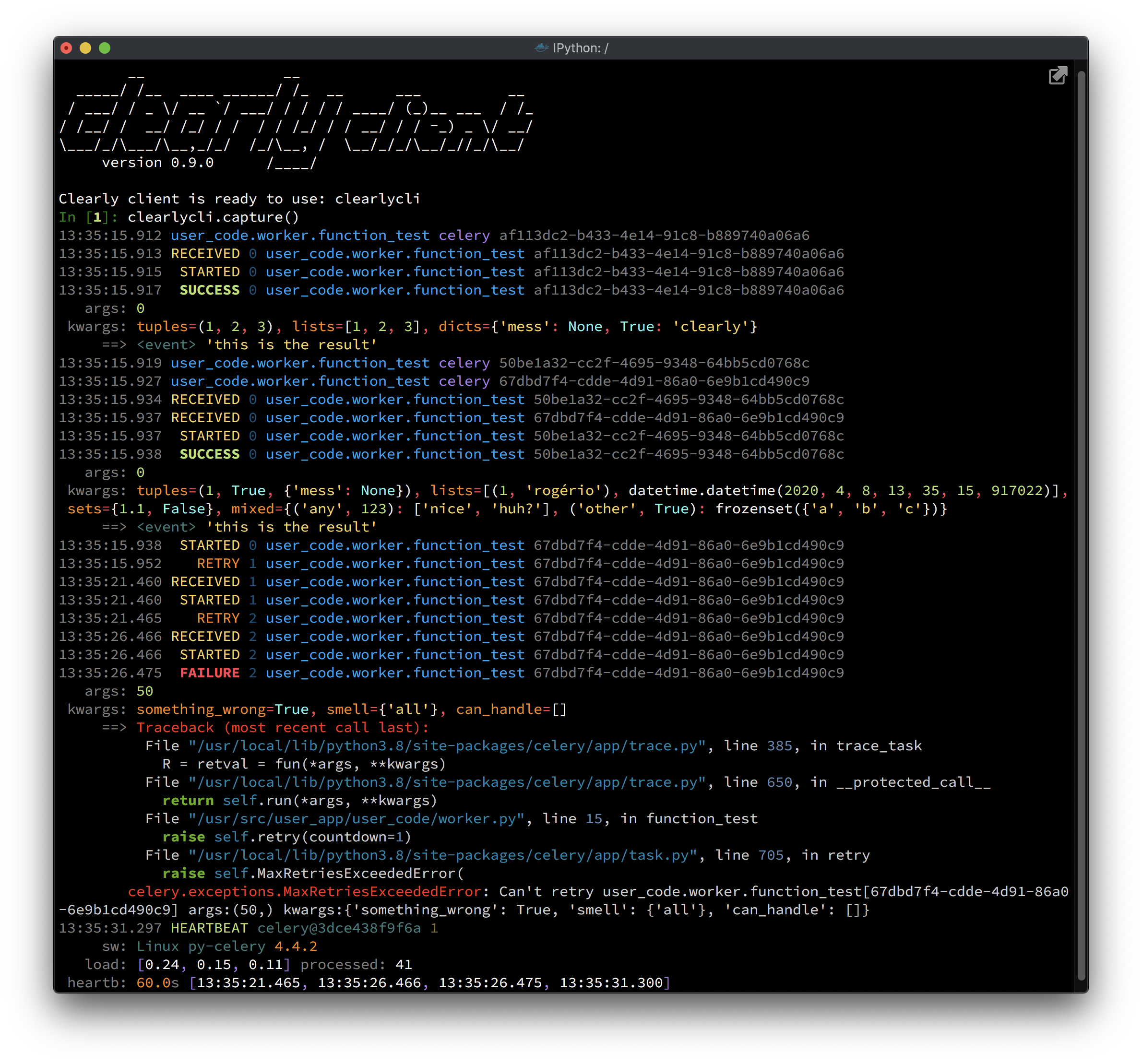
📌 New version!
Clearly has received a major revamp in version 0.9, since its very near 1.0! \o/
All code has been revisited and several new features were implemented, which took ~170 commits, ~70 files changed and ~2700 additions!
Clearlyis now more mature, more reliable and way more polished in general, with beautiful colors and complete error handling, making this newClearlyway more pleasant to use!And there's also the unit tests, which were greatly streamlined. The suite has gone from ~2600 tests down to less than 700, while keeping 100% code coverage (branch-coverage)! The PR is in https://github.com/rsalmei/clearly/pull/52 if you'd like to see it.
This endeavor has taken five weeks of full-time work, and demanded a great effort. If you appreciate my work, you could buy me a coffee 😊, I would really appreciate that! (the button is on the top-right corner)
Also please help
Clearlygain more momentum! Tweet about it, write a blog post about it or just recommend it!Enjoy!
Features
Clearly enables you to:
- Be informed of any and all tasks running, failing or just being enqueued, both in real time and stored;
- if you enable
task_send_sent_eventin your code, you can track tasks even before they get into a worker!
- if you enable
- Be informed of workers availability, knowing immediately if any goes down or up;
- Filter tasks any way you want by several fields, both in real time and stored;
- Debug the actual parameters the tasks were called with, and analyze their outcome, such as success results or failure tracebacks and retries;
- All types and representations of those parameters and outcomes can be clearly seen with the advanced formatting system and syntax highlighting;
- Analyze metrics of your system.
Clearly is
- compatible with any version of celery, from 3.1 to 4.4+;
- aware of your result backend, using it if available to retrieve tasks' results;
- running inside docker, so anyone with any version of python can use it! 👏
Clearly is not
- an administration tool for celery clusters, it is specialized in monitoring.
Get clearly the docker way
Requirements
To use clearly, you just have to:
- enable Events in your celery workers (
celery worker -E)
and you're good to go!
Start the server
$ docker run --rm --name clearly-server -p <clearly_port>:12223 \
      rsalmei/clearly server <broker_url> [--backend backend_url]
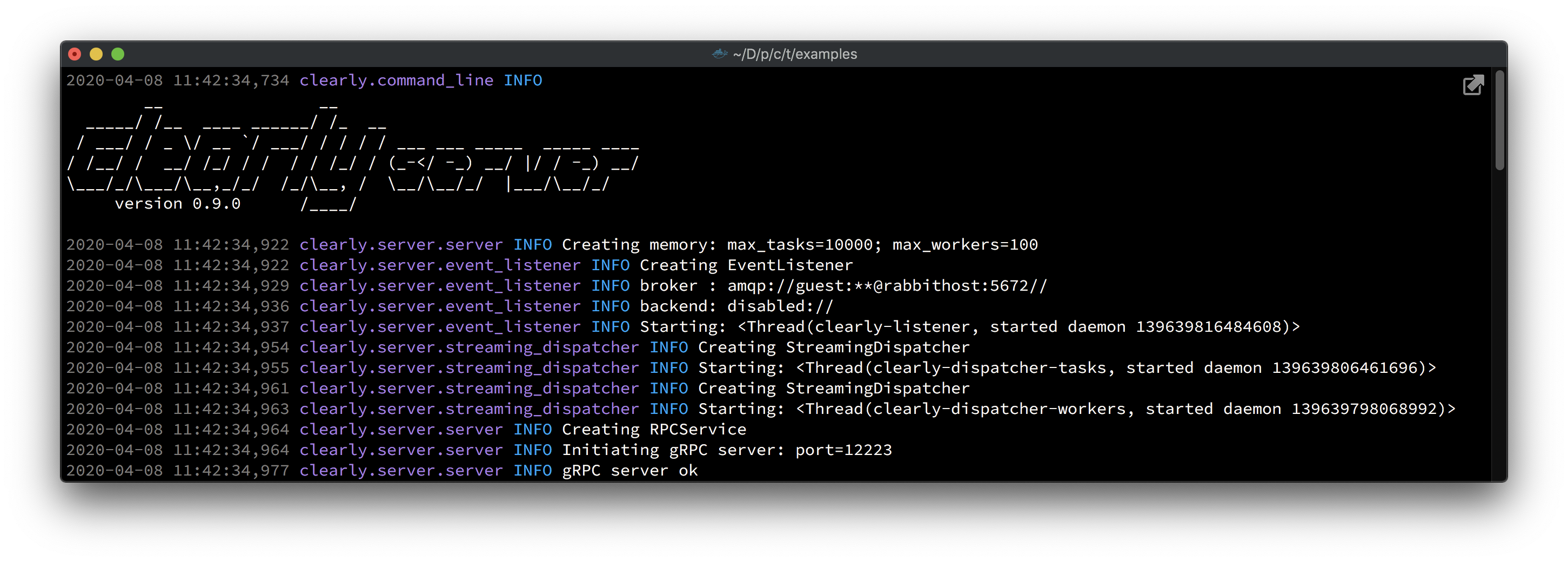
You should see something like:
Start the client
$ docker run --rm -ti --name clearly-client -v ipythonhist:/root/.ipython/profile_default/ \
      rsalmei/clearly client [clearly_server [clearly_port]]
Note: The above volume (
-v) is not really necessary, but it's very nice to not lose yourclearlyclihistory every time you leave it. I recommend it 👍.
That's it, you're good to go! \o/
<details> <summary>What, you really need to use it inside your own REPL?</summary></details>Ok, you can use
clearlythe pip way, but this is not recommended anymore. The docker way is much more portable, and avoids coupling between yours andclearlycode. Also enables me to use internally any python version I see fit, without fear of breaking user's code. See in the changelog the currently supported python version.$ pip install clearlyStart the server
<details> <summary>Just a quickie debug?</summary>$ clearly server <broker_url> [--backend backend_url] [--port 12223]</details>Clearly Client used to not need any server, which was convenient but had several shortcomings, like losing all history when closed, and receiving every single event from the celery cluster for each new client, which stressed the broker way more. But if you'd like to use it quickly like that, be it to just assert something or to trial
clearlybefore committing, you still can. Just start the server in-process:from clearly.server import ClearlyServer clearly_server = ClearlyServer('<broker_url>', '<backend>') clearly_server.start_server(<port>)Then you can simply start the client without arguments:
clearlycli = ClearlyClient()Start the client
Enter any REPL like python or IPython:
from clearly.client import ClearlyClient
clearlycli = ClearlyClient('<clearly_server>', <12223>)
That's it, you're good to go!
<details> <summary>Constrained to Python 2.7?</summary></details>Use the docker way! :) <br>If you still really want this, maybe to embed in your legacy projects' shell, please use version 0.4.2 as in:
$ pip install clearly==0.4.2This version is prior to the server split, so it connects directly to the broker, but should still work.
You could also use 0.6.4, which is newer and already has a server, but please do mind that gRPC and Python 2.7 have a very annoying bug in this case: you can't CTRL+C out of
clearlyclient'scapturemethod (or any streaming methods), so you have to kill the process itself when needed with CTRL+\. For more details on this nasty bug:
- https://github.com/grpc/grpc/issues/3820
- https://github.com/grpc/grpc/issues/6999
- https://bugs.python.org/issue8844
How to use it
So, you are ready to see tasks popping up in your screen faster than you can see? (Remember to filter them!)
Grab them
In real time ⚡️
clearlycli.capture()
clearlycli.capture_tasks()
clearlycli.capture_workers()
Past, stored events 🗄
clearlycli.tasks()
clearlycli.workers()
Example using the capture() method, which will show all real time activity in the celery cluster, including both tasks and workers.
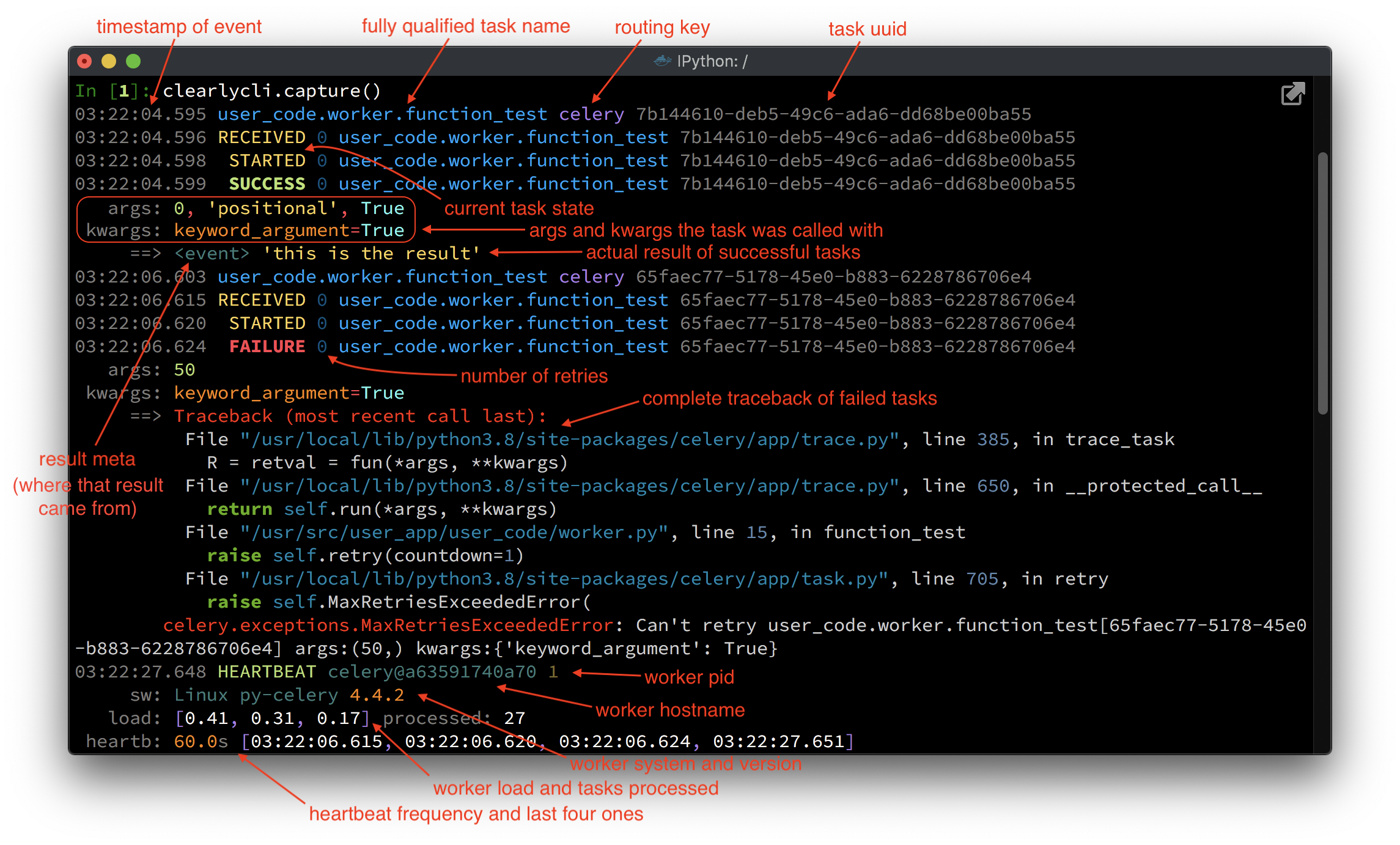
The real time method variants block to receive streaming events from the server.
<br>At any moment, you can CTRL+C out them, and rest assured the server will continue to gather all events seamlessly, it's just this client that will stop receiving them. The capture_tasks() and capture_workers() methods receive only its respective real time events.
<br>The tasks() and workers() methods operates similarly, but retrieving only stored events without blocking.
The client will display those events in a format configured by the corresponding Display Mode.
Display modes
clearlycli.display_modes()
Display modes specify the level of details you want to see. Things like to show or not arguments being sent, to show exceptions, with or without arguments, to show tasks' results, etc.
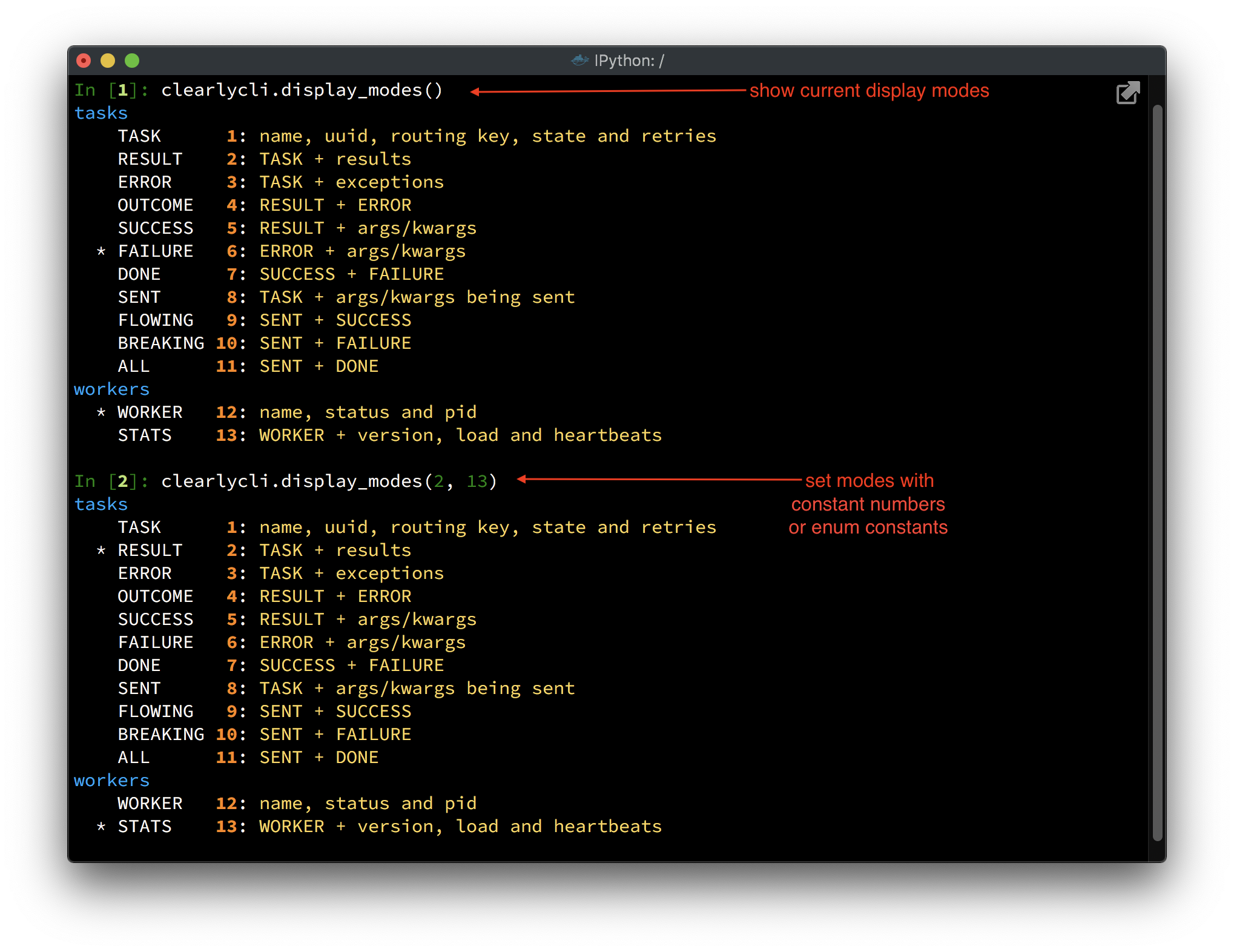
To change a display mode, just call the same method with the constant number beside it or the enum constant.
clearlycli.display_modes(ModeTask.RESULT, ModeWorker.STATS)  # the enums are automatically imported
cle
Related Skills
tmux
343.1kRemote-control tmux sessions for interactive CLIs by sending keystrokes and scraping pane output.
claude-opus-4-5-migration
90.0kMigrate prompts and code from Claude Sonnet 4.0, Sonnet 4.5, or Opus 4.1 to Opus 4.5
model-usage
343.1kUse CodexBar CLI local cost usage to summarize per-model usage for Codex or Claude, including the current (most recent) model or a full model breakdown. Trigger when asked for model-level usage/cost data from codexbar, or when you need a scriptable per-model summary from codexbar cost JSON.
terraform-provider-genesyscloud
Terraform Provider Genesyscloud
