
Inouets
Simple WhatsApp Bot using TypeScript (ESM) with case command handler
Install / Use
/learn @rrykarlsefni/InouetsREADME
inouets (base)
[!NOTE]
Simple WhatsApp Bot using TypeScript (ESM) with case command handler. Built on the latest Baileys @whiskeysockets/baileys 7.0.0-rc.2 – see Migration Guide (v7.x.x).
[!TIP]
This is a base WhatsApp bot, it comes with no features by default.
- Example command:
command/case.ts- Configuration file:
config/config.ts
[!IMPORTANT]
🌟 This is the initial base bot source code.
Give this repo a star ⭐ to support development.
Updates will be released when there’s time and opportunity.
[!WARNING]
⚠️ Not supporting custom pairing and buttons, since this project uses the official Baileys.
💡 You can still modify it yourself using a Baileys mod if needed.
Disclaimer
[!CAUTION]
If you obtained this source code from anywhere other than the official repository
👉 https://github.com/rrykarlsefni/inouets
it is most likely modified by a third party.
I am not responsible for any bugs, errors, data loss, or issues that may occur from using a modified version.
Please use only the official repository to get proper updates and support. and in my case the script can run well, don't know if it works for you
[!WARNING]
- Found a bug? Report it on Issues
- Need a panel? Visit inouehost.my.id
- Testimonials: WhatsApp Channel
- Free source/code bot: WhatsApp Channel
Features
- Case command handler (simple and extendable)
- Includes eval & exec utilities
- Pairing code login support
- Auto-restart with nodemon & PM2
- Fixed LID (m.key.participantAlt)
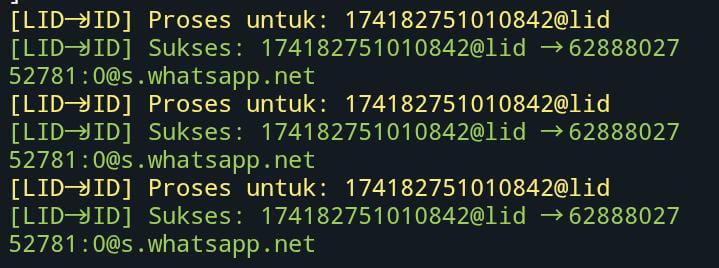
- Fixed convert LID ( sept 2025)
Covert Lid To Jid
Example case
m.reply("text") //untuk mengirim pesan simple
m.react() //react random dari config, gunakan m.react("😥") untuk react custom
m.chat //jid pesan di mana bot di command(m.key.remoteJid)
m.sender //jid user yang meng command (m.key.participant)
m.pushName //untuk mendapatkan nama pengirim
m.download() / m.quoted.download() //mendownload media
Example send message
// Send a regular message
await rrykarl.sendMessage(m.chat, {
  text: "hi"
});
// Send message with quoted
await rrykarl.sendMessage(m.chat, {
  text: "hi"
}, {quoted: m});
// Quick way to reply to messages
m.reply("hi");
Installation-
Install via termux
Install package
$ pkg update && pkg upgrade
$ pkg install git
$ pkg install nodejs
$ pkg install ffmpeg
Opsi 1: Manual
$ pkg update && pkg upgrade
$ pkg install git -y
$ pkg install nodejs -y
$ pkg install ffmpeg -y
$ cp -r /sdcard/inouets ~/inouets
$ cd ~/inouets
$ npm install
$ npm start
Opsi 2: One-liner
$ pkg update && pkg upgrade
$ pkg install git && pkg install ffmpeg && pkg install nodejs -y
$ cp -r /sdcard/inouets ~/inouets && cd ~/inouets
$ npm install && npm start
Opsi 3: Dengan install.sh
$ pkg update && pkg upgrade
$ bash install.sh
$ cp -r /sdcard/inouets ~/inouets
$ cd ~/inouets
$ npm install && npm start
Opsi 4: Dengan Github
$ pkg update && pkg upgrade
$ pkg install git -y
$ pkg install nodejs -y
$ pkg install ffmpeg -y
$ git clone https://github.com/rrykarlsefni/inouets
$ cd ~/inouets
$ npm install
$ npm start
start option
Normal
$ npm install
$ npm start
with ts-node
$ npm install
$ npm run ts-node
Mode Developer
$ npm install
$ npm run dev
Mode Process Manager 2
$ npm install
$ npm run pm2
Debug
$ DEBUG=* npx ts-node --esm start/index.ts
License
This project is licensed under the MIT License.
Versi license custom, terjemahan dalam bahasa Indonesia beserta tambahan klausul dapat dilihat di LICENSE-ID.
Open Source
The inouets project is fully open source and not encrypted (no enc).
You are free to study, modify, and use this source code under the MIT license.
There are no encoded or encrypted files, everything is fully readable and open for development.
Thanks
Related Skills
node-connect
353.1kDiagnose OpenClaw node connection and pairing failures for Android, iOS, and macOS companion apps
frontend-design
111.6kCreate distinctive, production-grade frontend interfaces with high design quality. Use this skill when the user asks to build web components, pages, or applications. Generates creative, polished code that avoids generic AI aesthetics.
Writing Hookify Rules
111.6kThis skill should be used when the user asks to "create a hookify rule", "write a hook rule", "configure hookify", "add a hookify rule", or needs guidance on hookify rule syntax and patterns.
review-duplication
100.7kUse this skill during code reviews to proactively investigate the codebase for duplicated functionality, reinvented wheels, or failure to reuse existing project best practices and shared utilities.
