
Gitstatus
Git status for Bash and Zsh prompt
Install / Use
/learn @romkatv/GitstatusREADME
gitstatus
- THE PROJECT HAS VERY LIMITED SUPPORT
- NO NEW FEATURES ARE IN THE WORKS
- MOST BUGS WILL GO UNFIXED
gitstatus is a 10x faster alternative to git status and git describe. Its primary use
case is to enable fast git prompt in interactive shells.
Heavy lifting is done by gitstatusd -- a custom binary written in C++. It comes with Zsh and Bash bindings for integration with shell.
Table of Contents
- Using from Zsh
- Using from Bash
- Using from other shells
- How it works
- Benchmarks
- Why fast
- Requirements
- Compiling
- License
Using from Zsh
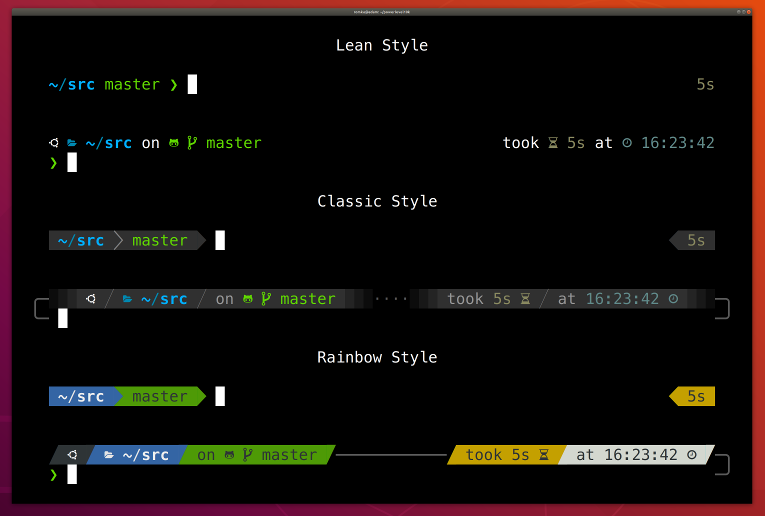
The easiest way to take advantage of gitstatus from Zsh is to use a theme that's already integrated with it. For example, Powerlevel10k is a flexible and fast theme with first-class gitstatus integration. If you install Powerlevel10k, you don't need to install gitstatus.
For those who wish to use gitstatus without a theme, there is gitstatus.prompt.zsh. Install it as follows:
git clone --depth=1 https://github.com/romkatv/gitstatus.git ~/gitstatus
echo 'source ~/gitstatus/gitstatus.prompt.zsh' >>! ~/.zshrc
Users in China can use the official mirror on gitee.com for faster download.<br> 中国大陆用户可以使用 gitee.com 上的官方镜像加速下载.
git clone --depth=1 https://gitee.com/romkatv/gitstatus.git ~/gitstatus
echo 'source ~/gitstatus/gitstatus.prompt.zsh' >>! ~/.zshrc
Alternatively, if you have Homebrew installed:
brew install romkatv/gitstatus/gitstatus
echo "source $(brew --prefix)/opt/gitstatus/gitstatus.prompt.zsh" >>! ~/.zshrc
(If you choose this option, replace ~/gitstatus with $(brew --prefix)/opt/gitstatus/gitstatus
in all code snippets below.)
Make sure to disable your current theme if you have one.
This will give you a basic yet functional prompt with git status in it. It's
over 10x faster than any alternative that can give you comparable prompt. In order
to customize it, set PROMPT and/or RPROMPT at the end of ~/.zshrc after sourcing
gitstatus.prompt.zsh. Insert ${GITSTATUS_PROMPT} where you want git status to go. For example:
source ~/gitstatus/gitstatus.prompt.zsh

PROMPT='%~%# '               # left prompt: directory followed by %/# (normal/root)
RPROMPT='$GITSTATUS_PROMPT'  # right prompt: git status
The expansion of ${GITSTATUS_PROMPT} can contain the following bits:
| segment | meaning |
|-------------|-------------------------------------------------------|
| master | current branch |
| #v1 | HEAD is tagged with v1; not shown when on a branch |
| @5fc6fca4 | current commit; not shown when on a branch or tag |
| ⇣1 | local branch is behind the remote by 1 commit |
| ⇡2 | local branch is ahead of the remote by 2 commits |
| ⇠3 | local branch is behind the push remote by 3 commits |
| ⇢4 | local branch is ahead of the push remote by 4 commits |
| *5 | there are 5 stashes |
| merge | merge is in progress (could be some other action) |
| ~6 | there are 6 merge conflicts |
| +7 | there are 7 staged changes |
| !8 | there are 8 unstaged changes |
| ?9 | there are 9 untracked files |
$GITSTATUS_PROMPT_LEN tells you how long $GITSTATUS_PROMPT is when printed to the console.
gitstatus.prompt.zsh has an example of using it to truncate the current
directory.
If you'd like to change the format of git status, or want to have greater control over the
process of assembling PROMPT, you can copy and modify parts of
gitstatus.prompt.zsh instead of sourcing the script. Your ~/.zshrc
might look something like this:
source ~/gitstatus/gitstatus.plugin.zsh

function my_set_prompt() {
  PROMPT='%~%# '
  RPROMPT=''

  if gitstatus_query MY && [[ $VCS_STATUS_RESULT == ok-sync ]]; then
    RPROMPT=${${VCS_STATUS_LOCAL_BRANCH:-@${VCS_STATUS_COMMIT}}//\%/%%}  # escape %
    (( VCS_STATUS_NUM_STAGED    )) && RPROMPT+='+'
    (( VCS_STATUS_NUM_UNSTAGED  )) && RPROMPT+='!'
    (( VCS_STATUS_NUM_UNTRACKED )) && RPROMPT+='?'
  fi

  setopt no_prompt_{bang,subst} prompt_percent  # enable/disable correct prompt expansions
}

gitstatus_stop 'MY' && gitstatus_start -s -1 -u -1 -c -1 -d -1 'MY'
autoload -Uz add-zsh-hook
add-zsh-hook precmd my_set_prompt
This snippet is sourcing gitstatus.plugin.zsh rather than gitstatus.prompt.zsh. The former
defines low-level bindings that communicate with gitstatusd over pipes. The latter is a simple
script that uses these bindings to assemble git prompt.
Unlike Powerlevel10k, code based on
gitstatus.prompt.zsh is communicating with gitstatusd synchronously. This
can make your prompt slow when working in a large git repository or on a slow machine. To avoid
this problem, call gitstatus_query asynchronously as documented in
gitstatus.plugin.zsh. This can be quite challenging.
Using from Bash
The easiest way to take advantage of gitstatus from Bash is via gitstatus.prompt.sh. Install it as follows:
git clone --depth=1 https://github.com/romkatv/gitstatus.git ~/gitstatus
echo 'source ~/gitstatus/gitstatus.prompt.sh' >> ~/.bashrc
Users in China can use the official mirror on gitee.com for faster download.<br> 中国大陆用户可以使用 gitee.com 上的官方镜像加速下载.
git clone --depth=1 https://gitee.com/romkatv/gitstatus.git ~/gitstatus
echo 'source ~/gitstatus/gitstatus.prompt.sh' >> ~/.bashrc
Alternatively, if you have Homebrew installed:
brew install romkatv/gitstatus/gitstatus
echo "source $(brew --prefix)/opt/gitstatus/gitstatus.prompt.sh" >> ~/.bashrc
(If you choose this option, replace ~/gitstatus with $(brew --prefix)/opt/gitstatus/gitstatus
in all code snippets below.)
This will give you a basic yet functional prompt with git status in it. It's over 10x faster than any alternative that can give you comparable prompt.
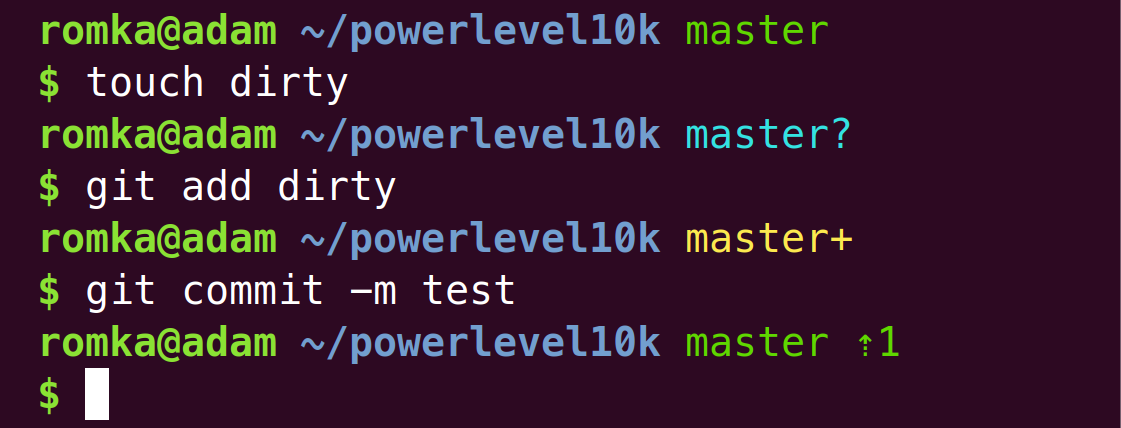
In order to customize your prompt, set PS1 at the end of ~/.bashrc after sourcing
gitstatus.prompt.sh. Insert ${GITSTATUS_PROMPT} where you want git status to go. For example:
source ~/gitstatus/gitstatus.prompt.sh

PS1='\w ${GITSTATUS_PROMPT}\n\$ ' # directory followed by git status and $/# (normal/root)
The expansion of ${GITSTATUS_PROMPT} can contain the following bits:
| segment | meaning |
|-------------|-------------------------------------------------------|
| master | current branch |
| #v1 | HEAD is tagged with v1; not shown when on a branch |
| @5fc6fca4 | current commit; not shown when on a branch or tag |
| ⇣1 | local branch is behind the remote by 1 commit |
| ⇡2 | local branch is ahead of the remote by 2 commits |
| ⇠3 | local branch is behind the push remote by 3 commits |
| ⇢4 | local branch is ahead of the push remote by 4 commits |
| *5 | there are 5 stashes |
| merge | merge is in progress (could be some other action) |
| ~6 | there are 6 merge conflicts |
| +7 | there are 7 staged changes |
| !8 | there are 8 unstaged changes |
| ?9 | there are 9 untracked files |
If you'd like to change the format of git status, or want to have greater control over the
process of assembling PS1, you can copy and modify parts of
gitstatus.prompt.sh instead of sourcing the script. Your ~/.bashrc might
look something like this:
source ~/gitstatus/gitstatus.plugin.sh

function my_set_prompt() {
  PS1='\w'

  if gitstatus_query && [[ "$VCS_STATUS_RESULT" == ok-sync ]]; then
    if [[ -n "$VCS_STATUS_LOCAL_BRANCH" ]]; then
      PS1+=" ${VCS_STATUS_LOCAL_BRANCH//\\/\\\\}"  # escape backslash
    else
      PS1+=" @${VCS_STATUS_COMMIT//\\/\\\\}"       # escape backslash
    fi
    (( VCS_STATUS_HAS_STAGED"    )) && PS1+='+'
    (( VCS_STATUS_HAS_UNSTAGED"  )) && PS1+='!'
    (( VCS_STATUS_HAS_UNTRACKED" )) && PS1+='?'
  fi

  PS1+='\n\$ '

  shopt -u promptvars  # disable expansion of '$(...)' and the like
}

gitstatus_stop && gitstatus_start
PROMPT_COMMAND=my_set_prompt
This snippet is sourcing gitstatus.plugin.sh rather than gitstatus.prompt.sh. The former
defines low-level bindings that communicate with gitstatusd over pipes. The latter is a simple
script that uses these bindings to assemble git prompt.
Note: Bash bindings, unlike Zsh bindings, don't support asynchronous calls.
Using from other shells
If there are no gitstatusd bindings for your shell, you'll need to get your hands dirty.
Use the existing bindings for inspiration; run gitstatusd --help or read the same thing in
options.cc.
How it works
gitstatusd reads requests from stdin and prints responses to stdout. Requests contain an ID and a directory. Responses contain the same ID and machine-readable git status for the directory. gitstatu
