VoIpUSSD
:octocat: 📞 IMEI (USSD) Library in Android Devices by @romellfudi
Install / Use
/learn @romellfudi/VoIpUSSDREADME
by Romell Dominguez
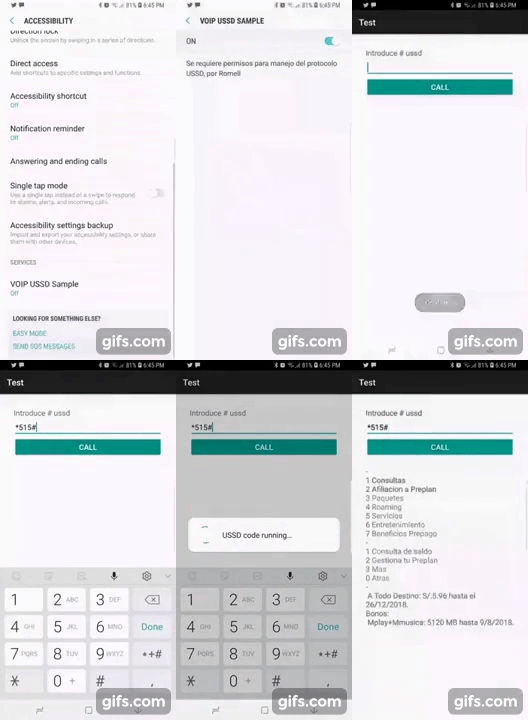
Target Development High Quality:
<p align="center"> <a href="https://raw.githubusercontent.com/romellfudi/VoIpUSSD/Rev04/snapshot/device_recored.gif"><img src="https://raw.githubusercontent.com/romellfudi/VoIpUSSD/Rev04/snapshot/device_recored.gif" alt="Jitpack"></a> </p>Interactive with ussd windows, remember the USSD interfaces depends on the System Operative and the manufacturer of Android devices.
Community Chat

Downloads Dashboard

USSD LIBRARY
Implementations
Add the following dependency in your app's build.gradle configuration file:
| Repository | implementation | Status |
| :------: | ------ | :------: |
| jcenter() | 'com.romellfudi.ussdlibrary:ussd-library:1.1.i' | DEPRECATED |
| jcenter() | 'com.romellfudi.ussdlibrary:kotlin-ussd-library:1.1.k' | DEPRECATED |
| maven { url https://jitpack.io } | 'com.github.romellfudi.VoIpUSSD:ussd-library:1.4.a' | READY |
| maven { url https://jitpack.io } | 'com.github.romellfudi.VoIpUSSD:kotlin-ussd-library:1.4.a' | READY |
- Writing a config xml file from here
to res/xmlfolder (if necessary), this config file allow to link between Application and System Oerative:
<?xml version="1.0" encoding="utf-8"?>
<accessibility-service xmlns:android="http://schemas.android.com/apk/res/android"
    .../>
Application Permissions
To use the application, add the following permissions to your AndroidManifest.xml:
<uses-permission android:name="android.permission.CALL_PHONE" />
<uses-permission android:name="android.permission.READ_PHONE_STATE" />
<uses-permission android:name="android.permission.SYSTEM_ALERT_WINDOW" />
Service Configuration
Include the service in your AndroidManifest.xml for Java:
<service
    android:name="com.romellfudi.ussdlibrary.USSDService"
    android:permission="android.permission.BIND_ACCESSIBILITY_SERVICE">
    <intent-filter>
        <action android:name="android.accessibilityservice.AccessibilityService" />
    </intent-filter>
    <meta-data
        android:name="android.accessibilityservice"
        android:resource="@xml/ussd_service" />
</service>
Or for Kotlin:
<service
    android:name="com.romellfudi.ussdlibrary.USSDServiceKT"
    android:permission="android.permission.BIND_ACCESSIBILITY_SERVICE">
    <intent-filter>
        <action android:name="android.accessibilityservice.AccessibilityService" />
    </intent-filter>
    <meta-data
        android:name="android.accessibilityservice"
        android:resource="@xml/ussd_service" />
</service>
NOTE: You may want to override android:notificationTimeout="0"to a corresponding value of 200 or avobe by copying the contents of @xml/ussd_service to the xml dir.
Otherwise it is possible that the library will miss accessibility events during operation, resulting is unintended behaivours (e.g not reading up to date prompts #115 )
Usage Instructions
- Create a HashMap to identify USSD response messages for login and error scenarios:
| KEY MESSAGE | String Messages | | ------ | ------ | | KEY_LOGIN | "espere", "waiting", "loading", "esperando", ... | | KEY_ERROR | "problema", "problem", "error", "null", ... |
For Java:
Map<String, HashSet<String>> map = new HashMap<>();
map.put("KEY_LOGIN", new HashSet<>(Arrays.asList("espere", "waiting", "loading", "esperando")));
map.put("KEY_ERROR", new HashSet<>(Arrays.asList("problema", "problem", "error", "null")));
For Kotlin:
val map = HashMap<String, HashSet<String>>()
map["KEY_LOGIN"] = hashSetOf("espere", "waiting", "loading", "esperando")
map["KEY_ERROR"] = hashSetOf("problema", "problem", "error", "null")
- Instantiate a USSDController object and invoke a USSD code:
For Java:
USSDApi ussdApi = USSDController.getInstance(context);
ussdApi.callUSSDInvoke(phoneNumber, map, new USSDController.CallbackInvoke() {
    @Override
    public void responseInvoke(String message) {
        // Handle the USSD response
        String dataToSend = "data"; // Data to send to USSD
        ussdApi.send(dataToSend, new USSDController.CallbackMessage() {
            @Override
            public void responseMessage(String message) {
                // Handle the message from USSD
            }
        });
    }

    @Override
    public void over(String message) {
        // Handle the final message from USSD or error
    }
});
For Kotlin:
val ussdApi = USSDController.getInstance(context)
ussdApi.callUSSDOverlayInvoke(phoneNumber, map, object : USSDController.CallbackInvoke {
    override fun responseInvoke(message: String) {
        // Handle the USSD response
        val dataToSend = "data" // Data to send to USSD
        ussdApi.send(dataToSend) { responseMessage ->
            // Handle the message from USSD
        }
    }

    override fun over(message: String) {
        // Handle the final message from USSD or error
    }
})
- For custom message handling, structure your code as follows:
For Java:
// Example of selecting options from USSD menu
ussdApi.callUSSDInvoke(phoneNumber, map, new USSDController.CallbackInvoke() {
    ...
    // Select the first option
    ussdApi.send("1", new USSDController.CallbackMessage() {
        ...
        // Select the next option
        ussdApi.send("1", new USSDController.CallbackMessage() {
            ...
        });
    });
    ...
});
For Kotlin:
// Example of selecting options from USSD menu
ussdApi.callUSSDOverlayInvoke(phoneNumber, map,