
Smalltalk
Parser, code model, interpreter and navigable browser for the original Xerox Smalltalk-80 v2 sources and virtual image file
Install / Use
/learn @rochus-keller/SmalltalkREADME
About this project
Some time ago I came accross Mario Wolczko's site (http://www.wolczko.com/st80) when searching for an original Smalltalk-80 implementation corresponding to the famous Smalltalk "Bluebook" (see http://stephane.ducasse.free.fr/FreeBooks/BlueBook/Bluebook.pdf). I used Smalltalk in the nineties and also played around with Squeak and Pharo. But I was surprised that there was no VM around capable of running the original Xerox images, which Mario provides on this link: http://www.wolczko.com/st80/image.tar.gz. I wasn't able to load this image with the aforementioned VMs; and even after numerous modifications, I still haven't managed to get the VM of Mario to work (it now compiles but crashes before the image is fully loaded).
Since I recently completed an Oberon implementation based on LuaJIT (see https://github.com/rochus-keller/Oberon) I got interested in the question whether it would be feasible to use LuaJIT as a backend for Smalltalk-80, and what performance it would achieve compared to Cog (see https://github.com/OpenSmalltalk/opensmalltalk-vm). There are many similarities between Lua and Smalltalk, even though the syntax is very different. I see two implementation variants: run everything from the Smalltalk source code, or run it from the Smalltalk image (i.e. Bluebook bytecode). To further analyze the Xerox implementation and make a decision I needed a good tool, so here we are.
AND NOT TO FORGET: Smalltalk-80 turns 40 this year (2020), and Alan Kay turns 80 (on May 17), and Xerox PARC turns 50 (on July 1)!
Interim conclusion July 2020: I have implemented and optimized a few tools and two Bluebook bytecode interpreters - one in C++ and the other in Lua running on LuaJIT. The Lua version of the interpreter is very fast (i.e. almost as fast as the C++ version) and once again demonstrates the incredible performance of LuaJIT, but not faster than one would expect from an interpreter. I have looked at several ways to get rid of the interpreter and translate the Bluebook bytecode directly to Lua; but none so far seems feasible without changing the Smalltalk virtual image (which I don't want). The main problem is that a significant part of the VM (e.g. the scheduler, execution contexts and stacks) is implemented directly in Smalltalk and part of the virtual image, and that the virtual image makes many concrete assumptions about the interpreter and the memory model, so these cannot be replaced easily. At the moment I'm following two approaches and also want to extend the Lua version so that you can load benchmarks that also run on current Smalltalk VMs.
Update September 2020: Meanwhile I implemented a Smalltalk to Lua and LuaJIT bytecode translator for the SOM dialect and was able to do comparative measurements based on the https://github.com/smarr/are-we-fast-yet benchmark suite; from these experiments I could draw the conclusion that a LuaJIT-based speed-up is currently not possible, because Smalltalk blocks have to be implemented as closures, but the tracing JIT compiler does currently not support their instantiation; the code therefore runs mostly in the interpreter; see https://github.com/rochus-keller/Som for the details.
Final conclusion December 2020: With the https://github.com/rochus-keller/Som project I was able to demonstrate that even if the tracing JIT compiler of LuaJIT would support closures, a Smalltalk/SOM implementation based on LuaJIT would still be at least factor 7 slower than a plain Lua on LuaJIT implementation or a Smalltalk implementation based on Cog/Spur (such as e.g. Pharo 7). To achieve the performance of Pharo 7 therefore aggressive optimizations on bytecode and VM level would be required, as it was done in https://github.com/OpenSmalltalk/opensmalltalk-vm over a period of 20 years.
Update December 2024: I added yet another implementation of the VM, written in the new Luon programming language, which is a statically typed alternative to Lua, also running on LuaJIT.
With this project I could show that a Smalltalk-80 implementation on LuaJIT is feasible and achieves a respectable performance with reasonable effort, but by no means the performance of an implementation like Cog/Spur, which has been optimized over decades.
A Smalltalk-80 parser and code model written in C++
Of course I could have implemented everything in Smalltalk as they did with the original Squeak and Cog VMs. But over the years I got used to strictly/statically typed programming and C++ is my main programming language since more than twenty years. And there is Qt (see https://www.qt.io/) which is a fabulous framework for (nearly) everything. And LuaJIT is written in C and Assembler. I therefore consider C++ a good fit.
Usually I start with an EBNF syntax and transform it to LL(1) using my own tools (see https://github.com/rochus-keller/EbnfStudio). Smalltalk is different. There are syntax specifications available (even an ANSI standard), but there is a plethora of variations. So I just sat down and wrote a lexer and then a parser and modified it until it could parse the Smalltalk-80.sources file included with http://www.wolczko.com/st80/image.tar.gz. The parser feeds a code model which does some additional validations and builds the cross-reference lists. On my old 32 bit HP EliteBook 2530p the whole Smalltalk-80.sources file is parsed and cross-referenced in less than half a second.
There is also an AST and a visitor which I will use for future code generator implementations.
A Smalltalk-80 Class Browser written in C++
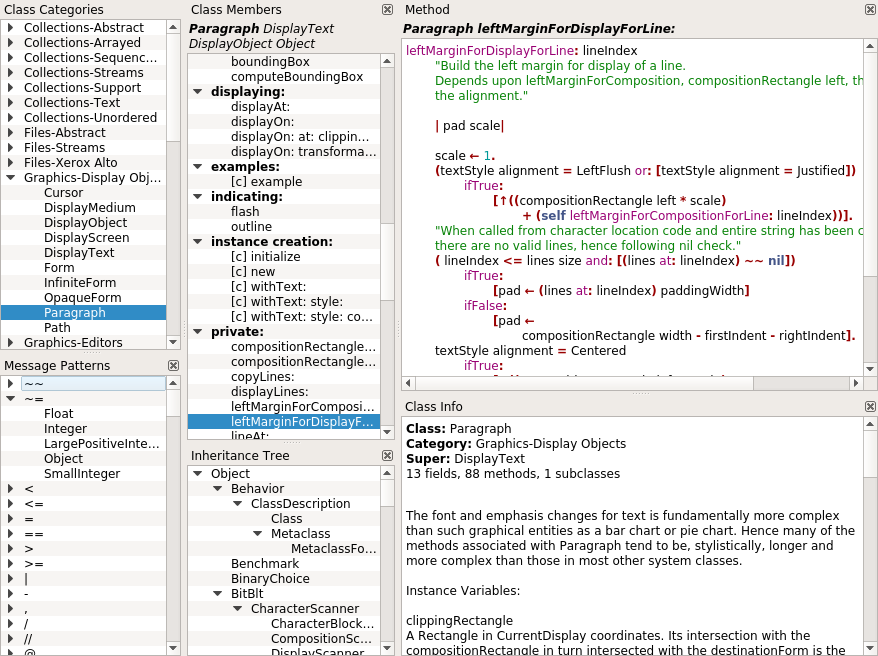
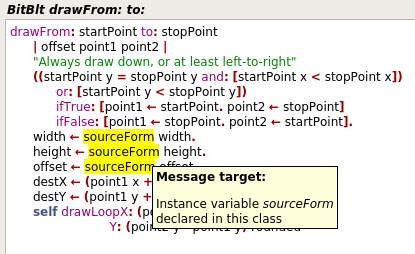
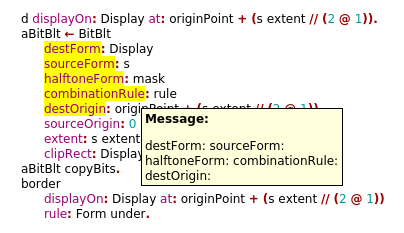
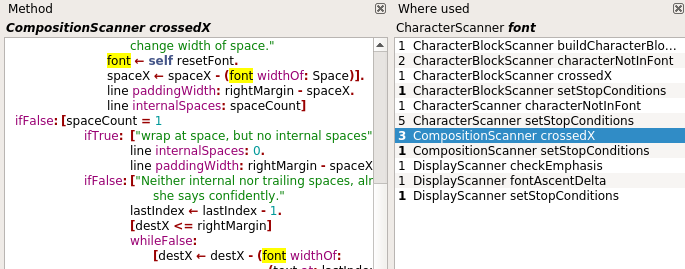
The Class Browser has a few special features that I need for my analysis. There is syntax highlighting of course but it also marks all keywords of the same message and all uses of a declaration. If you click on the identifier there is a tooltip with information whether it's a temporary, instance or class variable, etc. If you CTRL+click on a class identifier or on a message sent to an explicit class then it navigates to this class and method. There is also a list with all methods of all classes where a variable is used or assigned to; other lists show all message patterns or primaries used in the system and in which classes/methods they are implemented. There is also a browsing history; you can go back or forward using the ALT+Left and ALT+Right keys.
Here are some screenshots:
A Smalltalk-80 Image Viewer
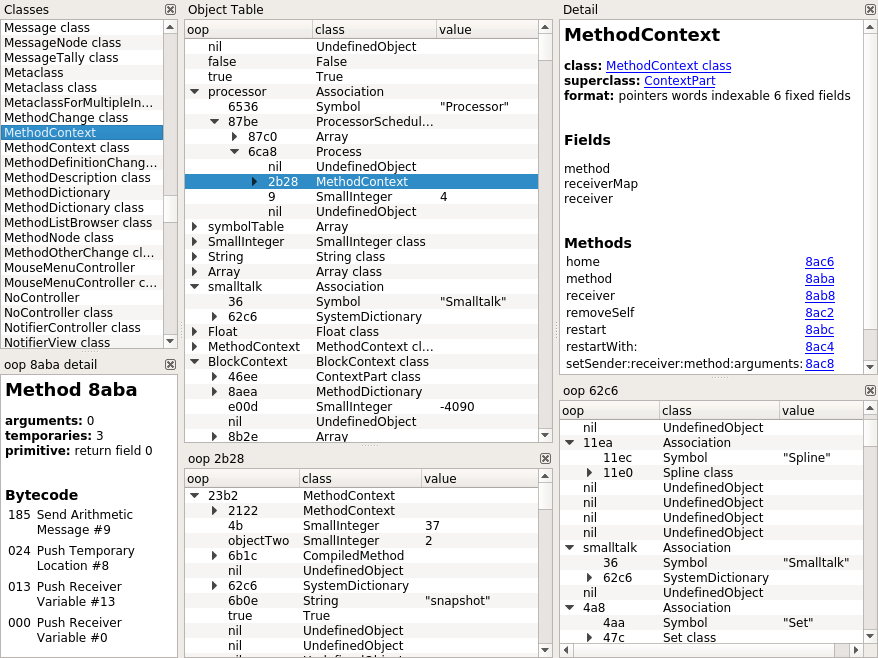
With the Image Viewer one can inspect the contents of the original Smalltalk-80 Virtual Image in the interchange format provided at http://www.wolczko.com/st80/image.tar.gz. The viewer presents the object table in a tree; known objects (as defined in the Bluebook part 4) and classes are printed by name; an object at a given oop can be expanded, so that object pointers can be followed; when clicking on an object or its class the details are presented in html format with navigable links; by CTRL- clicking on a list item or link a list or detail view opens with the given object as root. There is a dedicated list with all classes and metaclasses found in the image, as well as a cross-reference list from where a given oop is referenced. Detail views of methods also show bytecode with descriptions. There is also a browsing history; you can go back or forward using the ALT+Left and ALT+Right keys. Use CTRL+G to navigate to a given OOP, and CTRL+F to find text in the detail view (F3 to find again).
Here is a screenshot:
A Smalltalk-80 Interpreted Virtual Machine in C++
This is a bare bone Bluebook implementation to understand and run the original Smalltalk-80 Virtual Image in the interchange format provided at http://www.wolczko.com/st80/image.tar.gz. The focus is on functionality and compliance with the Bluebook, not on performance (it performs decently though) or productive work. Saving snapshots is not implemented. My goal is to gradualy migrate the virtual machine to a LuaJIT backend, if feasible. The interpreter reproduces the original Xerox trace2 and trace3 files included with http://www.wolczko.com/st80/image.tar.gz. The initial screen after startup corresponds to the screenshot shown on page 3 of the "Smalltalk 80 Virtual Image Version 2" manual. This is still work in progress though; there are some view update issues and don't be surprised by sporadic crashes.
Note that you can press CTRL+left mouse button to simulate a right mouse button click, and CTRL+SHIFT+left mouse button to simulate a middle mouse button click. If you have a two button mouse, then you can also use SHIFT+right mouse button to simulate a middle mouse button click.
All keys on the Alto keyboard (see e.g. https://www.extremetech.com/wp-content/uploads/2011/10/Alto_Mouse_c.jpg) besides LF are supported; just type the key combination for the expected symbol on your local keyboard. Use the left and up arrow keys to enter a left and up arrow character.
The VM supports some debugging features. If you press ALT+B the interpreter breaks and the Image Viewer is shown with the current state of the object memory and the interpreter registers. The currently active process is automatically selected and the current call chain is shown. When the Image Viewer is open you can press F5 (or close the viewer) to continue, or press F10 to execute the next bytecode and show the Image Viewer again. There are also some other shortcuts for logging (ALT+L) and screen update recording (ALT+R), but these only work if the corresponding functions are enabled when compiling the source code (see ST_DO_TRACING an
Related Skills
node-connect
337.3kDiagnose OpenClaw node connection and pairing failures for Android, iOS, and macOS companion apps
frontend-design
83.2kCreate distinctive, production-grade frontend interfaces with high design quality. Use this skill when the user asks to build web components, pages, or applications. Generates creative, polished code that avoids generic AI aesthetics.
openai-whisper-api
337.3kTranscribe audio via OpenAI Audio Transcriptions API (Whisper).
commit-push-pr
83.2kCommit, push, and open a PR
